Amplify-js: Confirm sign up empty code
Describe the bug
When using email and password with amplify the auth.ConfirmSignUp part doesn't work as part of the workflow.
To Reproduce
Steps to reproduce the behavior:
My logs.
email [email protected]
authCode_passcodescreen 716541
Authcode before signin 716541
Error when entering confirmation code: Code cannot be empty
authCode 716541
email [email protected]
authCode_passcodescreen 111111
Authcode before signin 111111
Error when entering confirmation code: Code cannot be empty
authCode 111111
Here is the authentication piece of code.
export const confirmSignUp = (email, authCode, navigation) => async () => {
  console.log("Authcode before signin", authCode);
  await Auth.confirmSignUp({ username: email, authCode: parseInt(authCode) })
    .then(data => {
      console.log("data", data);
      navigation.navigate("SignIn");
      console.log("Confirm sign up successful");
    })
    .catch(err => {
      if (!err.message) {
        console.log("Error when entering confirmation code: ", err);
        console.log("authCode", authCode);
        Alert.alert("Error when entering confirmation code: ", err);
      } else {
        console.log("Error when entering confirmation code: ", err.message);
        Alert.alert("Error when entering confirmation code: ", err.message);
      }
    });
};
And the pertinent code from the Passcode part of the screen.
``` async confirmSignUp() {
if (
this.state.passCode1 == -1 ||
this.state.passCode2 == -1 ||
this.state.passCode3 == -1 ||
this.state.passCode4 == -1 ||
this.state.passCode5 == -1 ||
this.state.passCode6 == -1
) {
Alert.alert("Please enter 6 digit passcode.");
} else {
//let { state } = this.props.navigation;
// console.error();
//const {username, authCode} = this.state
//const { username } = this.state;
let email = this.state.email;
console.log("email", email);
let authCode =
this.state.passCode1 +
"" +
this.state.passCode2 +
"" +
this.state.passCode3 +
"" +
this.state.passCode4 +
"" +
this.state.passCode5 +
"" +
this.state.passCode6;
//let authCode2 = parseInt(authCode);
console.log("authCode_passcodescreen", authCode);
this.props.confirmSignUp({ username: email }, authCode, this.props.navigation);
}
}
**Expected behavior**
Previously when I was using username, this code worked. I'm confused why the authCode is printed to the logs but isn't being passed around.

https://github.com/aws-amplify/amplify-js/issues/1924 seems to be a similar issue.
**Screenshots**
<img width="391" alt="Screenshot 2019-07-30 15 32 19" src="https://user-images.githubusercontent.com/983944/62209075-7587b000-b390-11e9-9e45-9681be629116.png">

Using the IPhone simulator with Iphone 7. On my Mac OSX.
   ``` "Demographic": Object {
      "AppVersion": "ios/12.2",
      "Make": "iPhone",
      "Model": "iPhone 6/7/8 plus",
      "ModelVersion": "12.2",
      "Platform": "ios",
    }
You can turn on the debug mode to provide more info for us by setting window.LOG_LEVEL = 'DEBUG'; in your app.
 springcoil
All 11 comments
Not sure if I'm reading this wrong, but I think that Auth.confirmSignup needs to have just the values passed directly in as args, i.e. instead of:
Auth.confirmSignUp({ username: email, authCode: parseInt(authCode) })
Try
Auth.confirmSignUp(email, parseInt(authCode))
 dabit3
on 31 Jul 2019
dabit3
on 31 Jul 2019
Ok thanks.
springcoil
on 31 Jul 2019
@springcoil Does @dabit3 answer solve your issue? Just want to confirm prior to closing this issue out. Let us know
 sammartinez
on 31 Jul 2019
sammartinez
on 31 Jul 2019
So it's a bit strange I don't think his code solution fixed my issue, however I do think just time fixed the issue. Is that possible? Was there some sort of Cognito update?
springcoil
on 1 Aug 2019
Hey @springcoil, re: __just time fixed the issue__, can you elaborate? Thanks,
dabit3
on 1 Aug 2019
Well the bug seemed to disappear. Maybe a caching issue or something?
On Thu, 1 Aug 2019, 2:58 pm Nader Dabit, notifications@github.com wrote:
Hey @springcoil https://github.com/springcoil, re: just time fixed the
issue, can you elaborate? Thanks,—
You are receiving this because you were mentioned.
Reply to this email directly, view it on GitHub
https://github.com/aws-amplify/amplify-js/issues/3771?email_source=notifications&email_token=AAHQHCDJ2UYTOZAJE7VB2KTQCLTW7A5CNFSM4IIFX3G2YY3PNVWWK3TUL52HS4DFVREXG43VMVBW63LNMVXHJKTDN5WW2ZLOORPWSZGOD3KV2RY#issuecomment-517299527,
or mute the thread
https://github.com/notifications/unsubscribe-auth/AAHQHCDJYPJZU6XVBRWX7ILQCLTW7ANCNFSM4IIFX3GQ
.
springcoil
on 1 Aug 2019
Ah ok got it. No, I'm not sure why it would start working now when it did not before.
For anyone here with similar issues in the future, check out the API for confirmSignUp here.
dabit3
on 1 Aug 2019
According to the documentation of Auth class, second param code is a string.
 ninjasun
on 10 Jun 2020
ninjasun
on 10 Jun 2020
Hey @springcoil, I am also getting the same error, I converted the verification code in to int before call, still no luck ?
Guys anyone still getting the same error ?
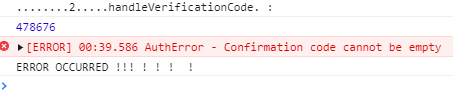
        try {
          console.log("........2.....handleVerificationCode. : ");
          console.log(parseInt(this.state.verificationCode));

          let codeInt = parseInt(this.state.verificationCode);
          const confirmSignUpResponse = await Auth.confirmSignUp(
                    {
                        username:this.state.email,
                        code:codeInt
                    }
               );
                console.log(confirmSignUpResponse);
        } catch (error ) {
            console.log("ERROR OCCURRED !!! ! ! !  ! ");
            this.setState({
              errors: { ...this.state.errors,cognito:error }
            });
        }
 rajinonnet
on 31 Aug 2020
rajinonnet
on 31 Aug 2020
@rajinonnet I have also come across this issue, I have not parsed to int for verification codes when a user originally signs up, however custom auth flows that need to access to forgot password functionality giving the same error.
 s-g-r
on 11 Sep 2020
s-g-r
on 11 Sep 2020
@s-g-r
You should not convert into INT. If the verification code entered by user is "000891" it will be converted into 891 and authentication will fail ultimately.
Just take the input from UI as it is and send it exactly as follows. It works like a charm.
const confirmSignUpResponse = await Auth.confirmSignUp(this.state.email,this.state.verificationCode) ;
rajinonnet
on 12 Sep 2020
Related issues
 epicfaace
·
3Comments
epicfaace
·
3Comments
 karlmosenbacher
·
3Comments
karlmosenbacher
·
3Comments
 benevolentprof
·
3Comments
benevolentprof
·
3Comments
 josoroma
·
3Comments
josoroma
·
3Comments
 cgarvis
·
3Comments
cgarvis
·
3Comments
Most helpful comment
Not sure if I'm reading this wrong, but I think that Auth.confirmSignup needs to have just the values passed directly in as args, i.e. instead of:
Try