Amplify-js: Authenticator flow now asking for account recovery on every login
Describe the bug
On every login attempt from Chrome Incognito, I am asked to verify my email or phone number for account recovery purposes.
To Reproduce
Steps to reproduce the behavior:
- Follow the flow to get the code to your email
- Insert into authenticator flow
- Logout / exit Incognito and log back in
- Observe you're once again expected to enter the code for recovery purposes
Expected behavior
This should be a one-time behavior or should happen whenever security threats are detected, not on every login.
Screenshots

 jkeys-ecg-nmsu
All 16 comments
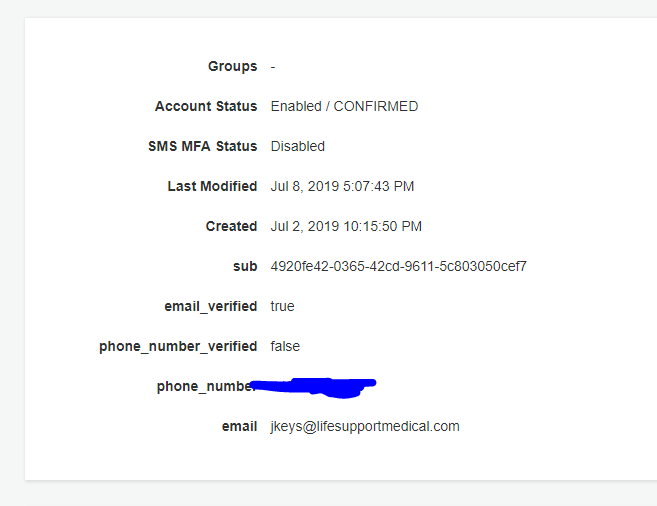
@jkeys-ecg-nmsu this component will show up if neither the email or the phone number is verified in the account. Can you check if the email/phone_number attribute of that account is verified in the Cognito User Pool console?
 powerful23
on 9 Jul 2019
powerful23
on 9 Jul 2019
I can confirm this behaviour — it seems to be a bug?
 tknuth
on 22 Jul 2019
tknuth
on 22 Jul 2019
@powerful23 email is verified in my case.
tknuth
on 22 Jul 2019
same issue here, any finding? @tknuth
 giulioambrogi
on 25 Jul 2019
giulioambrogi
on 25 Jul 2019
@powerful23 @tknuth @giulioambrogi it's not been a priority but if this isn't resolved soon I'll need to dive into the source and see what happened (or revert to an older amplify version but I'd rather not have to do that for a production environment). Any updates from the Amplify team?
jkeys-ecg-nmsu
on 25 Jul 2019
Quick update:
After tracing through the call stack, it looks like Auth.getUserAttributes() is not returning the "email_verified" and "phone_verified" claims to the client even when they exist in the Cognito user. The code in the stack trace doesn't look like it's changed in the Github history thought. So did Cognito change something?

jkeys-ecg-nmsu
on 26 Jul 2019
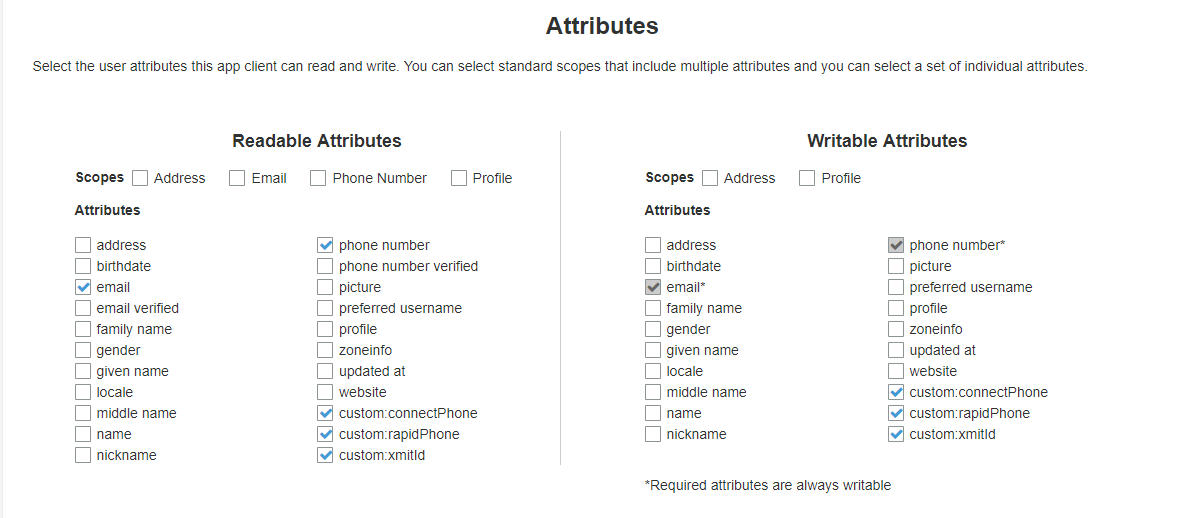
@tknuth @giulioambrogi Okay, I did a little more digging and found these (seemingly new?!) Phone Number Verified and Email Verified attributes in the App Client settings for readable attributes. They were not selected for my legacy project and as far as I'm aware no changes were made to Cognito, so I believe this is a change that the Cognito team made that affected existing code. (!!) Especially since this seems to be affecting multiple people.
Once I selected the Phone Number Verified and Email Verified attributes and made them readable to my app client, the error went away.
Please update the App Client settings in your Cognito user pool to fix this error.
@powerful23 can we get a postmortem on what happened here? Did these attributes always exist or were they just added by Cognito, the internal logic changed, and we got broken code as a result?
jkeys-ecg-nmsu
on 26 Jul 2019
Looks like those options did exist (I thought they were lumped into phone and email previously) according to screenshots from Google Images of the readable attributes tab xD, so maybe a bug in the CloudFormation template generator? Or someone on my end ran amplify auth update and changed the readable attributes configuration? I found no such change suggested by the commit history. And our older projects just have this line in amplify/backend/auth/
    "userpoolClientReadAttributes": [
        "email"
    ],
But they don't appear to be affected.
Urgh. Anyway, it's fixed now.
jkeys-ecg-nmsu
on 26 Jul 2019
@jkeys-ecg-nmsu - Did you add those custom attributes as readable recently? Also, could you see if the 'userpoolClientSetAttributes' value in your parameters.json file ever changed? It would be much appreciated!
 haverchuck
on 27 Jul 2019
haverchuck
on 27 Jul 2019
@haverchuck No, I did it when we bootstrapped our latest Amplify project a few weeks ago. Those custom attributes are present in older versions of our project in different user pools so it was one of the first things I took care of. I did it by hand in the console (is there a way to add custom attributes through the Amplify CLI?).
I just checked my active project, and the only commit involving /backend/auth/

jkeys-ecg-nmsu
on 27 Jul 2019
@jkeys-ecg-nmsu Thanks for your quick response. Were you seeing this behavior ever since you marked the custom attributes as readable in the user pool? In other words - did the bug manifest from the beginning or did it crop up in flight?
PS - We don't support custom attributes in the CLI yet, but IMO it's a great feature request.
haverchuck
on 27 Jul 2019
It did manifest at the beginning, I waited a while before posting this issue.
Agreed that custom attributes via CLI would be fantastic, we use them a lot in our business logic.
jkeys-ecg-nmsu
on 27 Jul 2019
Ok - so I believe the issue is that Cognito treats all attributes as readable by default, unless you select specific attributes as readable, in which case it excludes all non-selected attributes. The Amplify CLI mirrors this, in that it only includes a list of readable attributes in the configuration if you say 'I want to select reabable attributes'. It allows you to select email_verified and phone_number_verified in this list, BUT there is no good indication that this attribute is necessary for the UI components. We are working on a solution to this.
haverchuck
on 27 Jul 2019
Perfect, thanks!
jkeys-ecg-nmsu
on 27 Jul 2019
This issue has been automatically marked as stale because it has not had recent activity. It will be closed if no further activity occurs. Thank you for your contributions.
![stale[bot] picture](https://avatars.githubusercontent.com/in/1724?v=4&s=40) stale[bot]
on 26 Aug 2019
stale[bot]
on 26 Aug 2019
End of 2020 and the issue persist, classic Amplify code quality... ehh..
 davidgatti
on 16 Nov 2020
davidgatti
on 16 Nov 2020
Related issues
 ddemoll
·
3Comments
ddemoll
·
3Comments
 DougWoodCDS
·
3Comments
DougWoodCDS
·
3Comments
 lucasmike
·
3Comments
lucasmike
·
3Comments
 cosmosof
·
3Comments
cosmosof
·
3Comments
 cgarvis
·
3Comments
cgarvis
·
3Comments
Most helpful comment
Ok - so I believe the issue is that Cognito treats all attributes as readable by default, unless you select specific attributes as readable, in which case it excludes all non-selected attributes. The Amplify CLI mirrors this, in that it only includes a list of readable attributes in the configuration if you say 'I want to select reabable attributes'. It allows you to select
email_verifiedandphone_number_verifiedin this list, BUT there is no good indication that this attribute is necessary for the UI components. We are working on a solution to this.