Amplify-js: Getting "no current user" after successful login to Cognito UserPool
When I call Auth.currentSession() I always get "no current user" even though I'm logged in successfully.
I'm using AWS Amplify and AWS Gateway API in a React Native app.
We already have a Cognito UserPool and API set up and working with an existing web-based UI. I'm now trying to create a mobile app using React Native and Amplify. So first off, I created a config that pointed at our User Pool and created a custom login page that called Auth.signIn like this:
const data = await Auth.signIn(username, password);
console.log(`onSignIn::Response#1: ${JSON.stringify(data, null, 2)}`);
This works in that the call succeeds and returns a load of data including a JWT token.
In fact I've found that if I store away this token and then later add it to my headers, I can call my API. I do it like this:
await AsyncStorage.setItem(
  'userToken',
   data.signInUserSession.idToken.jwtToken
);
But if I try and get the current session as per the documentation, like this:
Auth.currentAuthenticatedUser()
  .then(user => console.log('>>>>Authenticated user:', user))
  .catch(err => console.log('>>>>Auth user error', err));
Then it always gets caught with "no current user". Switching on the AWS logging shows that there's no federated info and I get log messages like the following:
[11:50:17] [DEBUG] 50:17.48 AuthClass - Getting current user credentials
[11:50:17] [DEBUG] 50:17.50 AuthClass - failed to get or parse item aws-amplify-federatedInfo [SyntaxError: JSON Parse error: Unexpected identifier "undefined"]
[11:50:17] [DEBUG] 50:17.51 AuthClass - Getting current session
We didn't have a Cognito Identity Pool, just a User Pool. I thought this might be the problem, so I created an Identity Pool and updated the config. No difference.
I thought maybe the way I've set them up was wrong, so next I tried creating a new app and using the amplify cli, I called amplify add auth. That created a new user pool and identity pool and created a file locally with all the IDs. So next I changed my app to use the ids for this new user and identity pool. No difference, still no current user.
Not giving up just yet, I then decided that maybe I wasn't quite logging in correctly, so I switched to using the withAuthenticator helper that comes with aws-amplify-react-native. This seemed to work! When I launched the app I got the AWS-provided log-in screen and when I typed in the right credentials, I got in to my app. However, if I try and get the currentSession, it still fails with the same error.
I've read through https://github.com/aws-amplify/amplify-js/issues/500 and it seems that IdentityPools shouldn't be required, but as far as I can tell, the aws code still fails if there isn't an identity pool.
My workaround at the moment is to store the token away using AsyncStorage and then get it out again to add it to the header, here's my config:
{
  Auth: {
    userPoolId: 'eu-west-2xxxx',
    userPoolWebClientId: 'yyyy',
    region: 'eu-west-2',
    cookieStorage: {
      domain: '.example.com'
    }
  },
  API: {
    endpoints: [
      {
        name: 'ExampleAPI',
        endpoint: 'https://example.com',
        region: 'eu-west-2',
        custom_header: async () => {
          const token = await AsyncStorage.getItem('userToken');
          return {
            Authorization: `Bearer ${token}`
          };
        }
      }
    ]
  }
}
This works fine until the token has expired. I don't know how to fix that, I was hoping that the Auth functionality would sort that for me.
Where am I going wrong?
 isocra
All 29 comments
Hi @isocra
I've seen this message before when for some reason you end up with multiple versions of the same dependency.
Can you paste the output of this command?
yarn list --pattern "aws-"
or
npm list | grep "aws-"
 manueliglesias
on 13 Feb 2019
manueliglesias
on 13 Feb 2019
Hi @manueliglesias
Here you go:
yarn list v1.13.0
├─ @aws-amplify/[email protected]
├─ @aws-amplify/[email protected]
├─ @aws-amplify/[email protected]
├─ @aws-amplify/[email protected]
├─ @aws-amplify/[email protected]
│  └─ [email protected]
├─ @aws-amplify/[email protected]
├─ @aws-amplify/[email protected]
├─ @aws-amplify/[email protected]
├─ @aws-amplify/[email protected]
├─ @aws-amplify/[email protected]
├─ [email protected]
├─ [email protected]
├─ [email protected]
├─ [email protected]
│  └─ [email protected]
└─ [email protected]
In fact I had also wondered if I maybe had old versions of some modules, so earlier I deleted yarn.lock and the whole node_modules directory and removed all the modules from package.json and then re-added them all with yarn. Above is the new list. Unfortunately it still doesn't work. Here's the trace
About to try signing in with Auth AuthClass {userPool: CognitoUserPool, _cognitoAuthClient: null, user: null, _gettingCredPromise: null, currentUserCredentials: ƒ, …}
20:58:15.792 [DEBUG] 58:15.793 AuthClass CognitoUserSession {idToken: CognitoIdToken, refreshToken: CognitoRefreshToken, accessToken: CognitoAccessToken, clockDrift: 0}
20:58:15.793 [DEBUG] 58:15.794 AsyncStorageCache - Remove item: key is federatedInfo
20:58:15.804 [DEBUG] 58:15.805 Credentials - set credentials from session
20:58:15.805 [DEBUG] 58:15.805 Credentials - No Cognito Federated Identity pool provided
20:58:15.806 [DEBUG] 58:15.807 AuthClass - cannot get cognito credentials No Cognito Federated Identity pool provided
20:58:15.807 [DEBUG] 58:15.808 Analytics - on hub capsule auth {event: "signIn", data: CognitoUser}
20:58:15.809 [DEBUG] 58:15.809 Credentials - getting credentials
20:58:15.810 [DEBUG] 58:15.810 Credentials - picking up credentials
20:58:15.811 [DEBUG] 58:15.811 Credentials - getting new cred promise
20:58:15.812 [DEBUG] 58:15.812 Credentials - checking if credentials exists and not expired
20:58:15.812 [DEBUG] 58:15.813 Credentials - need to get a new credential or refresh the existing one
20:58:15.813 [DEBUG] 58:15.814 AuthClass - Getting current user credentials
20:58:15.818 [DEBUG] 58:15.819 AuthClass - failed to get or parse item aws-amplify-federatedInfo SyntaxError: Unexpected token u in JSON at position 0
20:58:15.819 [DEBUG] 58:15.820 AuthClass - Getting current session
20:58:15.820 onSignIn::Response#1: {
  "username": "69e55dbe-8ba1-4ee1-b643-81ec99fb0296",
  "pool": {
    "userPoolId": "[SNIP]",
    "clientId": "[SNIP]",
    "client": {
      "endpoint": "https://cognito-idp.eu-west-2.amazonaws.com/",
      "userAgent": "aws-amplify/0.1.x react-native"
    },
    "advancedSecurityDataCollectionFlag": true,
    "storage": {
      "domain": ".example.com",
      "path": "/",
      "expires": 365,
      "secure": true
    }
  },
  "Session": null,
  "client": {
    "endpoint": "https://cognito-idp.eu-west-2.amazonaws.com/",
    "userAgent": "aws-amplify/0.1.x react-native"
  },
  "signInUserSession": {
    "idToken": {
      "jwtToken": "[SNIP]",
      "payload": {[SNIP]}
    },
    "refreshToken": {
      "token": "[SNIP]"
    },
    "accessToken": {
      "jwtToken": "[SNIP]",
      "payload": {[SNIP]}
    },
    "clockDrift": 0
  },
  "authenticationFlowType": "USER_SRP_AUTH",
  "storage": {
    "domain": ".example.com",
    "path": "/",
    "expires": 365,
    "secure": true
  },
  "keyPrefix": "[SNIP]",
  "userDataKey": "[SNIP]"
}
20:58:15.824 [DEBUG] 58:15.824 AuthClass - Failed to get user from user pool
20:58:15.832 [DEBUG] 58:15.833 AuthClass - Failed to get the current user No current user
20:58:15.845 [DEBUG] 58:15.845 AuthClass - getting session failed No current user
20:58:15.846 [DEBUG] 58:15.847 Credentials - setting credentials for guest
20:58:15.848 [DEBUG] 58:15.848 Credentials - No Cognito Federated Identity pool provided
Thanks for looking into this for me!
isocra
on 13 Feb 2019
I see two different versions of aws-sdk, can you lock your dependency to the same one amplify and aws-appsync use? ([email protected])
manueliglesias
on 13 Feb 2019
I've done that here's the new list
yarn list v1.13.0
├─ @aws-amplify/[email protected]
├─ @aws-amplify/[email protected]
├─ @aws-amplify/[email protected]
├─ @aws-amplify/[email protected]
├─ @aws-amplify/[email protected]
├─ @aws-amplify/[email protected]
├─ @aws-amplify/[email protected]
├─ @aws-amplify/[email protected]
├─ @aws-amplify/[email protected]
├─ @aws-amplify/[email protected]
├─ [email protected]
├─ [email protected]
├─ [email protected]
├─ [email protected]
├─ [email protected]
├─ [email protected]
│  └─ [email protected]
└─ [email protected]
   └─ [email protected]
I think we can ignore the serverless uses of the sdk because they're not used at runtime, only for deployment.
Unfortunately no change.
I've tried single stepping through the code but it's that easy since it's data and state driven. However, I think I've found the problem (though not the solution).
Here's the debug log again, you'll see that at 58.265 it says 'No Cognito Federated Identity pool provided'. This comes from node_modules/@aws-amplify/core/lib/Credentials.js line 288.
09:10:43.900 AuthClass CognitoUserSession {idToken: CognitoIdToken, refreshToken: CognitoRefreshToken, accessToken: CognitoAccessToken, clockDrift: 0}
09:11:25.313 AsyncStorageCache - Remove item: key is federatedInfo
09:11:58.263 Credentials - set credentials from session
09:11:58.265 Credentials - No Cognito Federated Identity pool provided
09:13:29.252 AuthClass - cannot get cognito credentials No Cognito Federated Identity pool provided
09:14:27.112 Analytics - on hub capsule auth {event: "signIn", data: CognitoUser}
09:14:27.114 Credentials - getting credentials
09:14:27.116 Credentials - picking up credentials
09:14:27.118 Credentials - getting new cred promise
09:14:27.125 Credentials - checking if credentials exists and not expired
09:14:27.130 Credentials - need to get a new credential or refresh the existing one
09:14:27.133 AuthClass - Getting current user credentials
09:14:40.140 AuthClass - failed to get or parse item aws-amplify-federatedInfo SyntaxError: Unexpected token u in JSON at position 0
09:14:40.141 AuthClass - Getting current session
09:14:40.142 RemoteConsole.js:80 onSignIn::Response#1: {
  "username": "69e55dbe-8ba1-4ee1-b643-81ec99fb0296",
  "pool": {
  // ... all the tokens and successful data
}
So despite having all the information needed after a successful sign in, Credentials._setCredentialsFromSession doesn't set them because there's no identity pool provided. Here's the code:
    Credentials.prototype._setCredentialsFromSession = function (session) {
        logger.debug('set credentials from session');
        var idToken = session.getIdToken().getJwtToken();
        var _a = this._config, region = _a.region, userPoolId = _a.userPoolId, identityPoolId = _a.identityPoolId;
        if (!identityPoolId) {
            logger.debug('No Cognito Federated Identity pool provided');
            return Promise.reject('No Cognito Federated Identity pool provided');
        }
       ...
Now as far as I understand this, it's wrong, I shouldn't need an identity pool? It's really frustrating because I _am_ able to log in successfully. I _do_ get the JWT tokens back that then give me access, so there's no error in that side of it. It's just that Amplify isn't saving away stuff as it should. Just as a test, I created an Identity Pool too and then specified that. It still didn't work. I got a whole load more inexplicable log messages:
09:50:16.243 DEBUG] 50:16.235 AuthClass - Failed to get user from user pool
09:50:16.243 DEBUG] 50:16.244 AuthClass - Failed to get the current user No current user
09:50:16.252 DEBUG] 50:16.252 AuthClass - getting session failed No current user
09:50:16.253 DEBUG] 50:16.253 Credentials - setting credentials for guest
09:50:16.287 DEBUG] 50:16.288 AuthClass - Getting current session
09:50:16.451 DEBUG] 50:16.451 AuthClass - Failed to get user from user pool
09:50:16.504 DEBUG] 50:16.504 AuthClass - Failed to get the current user No current user
09:50:16.529 DEBUG] 50:16.529 Credentials - Failed to load credentials CognitoIdentityCredentials {expired: true, expireTime: null, accessKeyId: undefined, sessionToken: undefined, params: {…}, …}
09:50:16.621 DEBUG] 50:16.622 AWSPinpointProvider - set credentials for analytics Error: IdentityPool 'eu-west-2:xxxxxxxxx' not found.
Why does it say expired: true, why is it still complaining? Why is it complaining it can't find it, when that's definitely the right id?
isocra
on 14 Feb 2019
Hi @isocra,
Did you make any progress on this? I believe I'm seeing the exact same issue.
Thank you.
 jd-bell
on 4 Apr 2019
jd-bell
on 4 Apr 2019
Hi @jd-bell,
Yes I did sort this out eventually. What I found is that I needed a Web Client that connected to an IdentityPool which in turn connected to a UserPool. This allowed me to populate a config as follows:
  const awsConfig = {
    aws_appsync_authenticationType: 'AWS_IAM',
    aws_appsync_graphqlEndpoint: `https://xxx.appsync-api.zzzzzz.amazonaws.com/graphql`,
    aws_appsync_region: 'xxxx',
    aws_cognito_identity_pool_id: 'xxxx',
    aws_cognito_region: 'xxxx',
    aws_project_region: 'xxxx',
    aws_user_pools_id: 'xxxx',
    aws_user_pools_web_client_id: 'xxxx',
    aws_user_files_s3_bucket: 'xxxx',
    aws_user_files_s3_bucket_region: 'xxxx'
  };
Note that the authentication type is AWS_IAM.
I was then able to connect like this:
/**
 * Configure the AWS Amplify sub-system and return an AppSync client
 * so the play nicely together
 */
export function configureApolloClient(config: IMyConfiguration) {
  Amplify.configure(config);
  return new AWSAppSyncClient({
    url: config.aws_appsync_graphqlEndpoint,
    region: config.aws_appsync_region,
    auth: {
      type: AUTH_TYPE.AWS_IAM,
      credentials: () => Auth.currentCredentials()
    },
    // Amplify uses Amazon IAM to authorize calls to Amazon S3. This provides the relevant IAM credentials.
    complexObjectsCredentials: () => Auth.currentCredentials() as any // Just to switch off the typescript error
  });
}
Again notice that the auth type is AWS_IAM and that I needed to set the auth _and_ the complexObjectsCredentials. I needed to do this so that the S3Object uploads worked. There was another 3-4 days working out how to make that work properly. I'm planning to write a blog post about it all, but am rushing against deadlines just at the moment (what's new? 😉).
I hope this helps!
isocra
on 4 Apr 2019
This post helped me solve my similar problem.
I had my worflow working with a POC a month ago - when using aws-sdk v.2.452, but then on deploying the production version recently, which was aws-sdk v.2.466 I had issues with the Cloudwatch SDK simply exiting without an error. Even the amplify Auth.currentCredentials() just would exit without any error. I tried investigating the Cognito user with calls like Auth.currentSession() but would receive errors like: 'Failed to get the session because the user is empty'.
The aws-sdk changelog mentions that v.2.453 includes a change to AWS STS - this must be where an issue has happened. So I have fixed my production aws-sdk to v.2.452 for now.
My workflow:
- AWS Amplify hosting and auth site
- Provide the Identify Pool's authRole with appropriate permissions to make the required aws-sdk calls
- Log into the site
- Make calls to amplify Auth to get the credentials and add them to the AWS.config.credentials
- Then create the cloudwatchlogs instance which will use these credentials and continue on to make required calls:
import Auth from '@aws-amplify/auth';

handleSearchSubmit = async () => {
  AWS.config.credentials = Auth.essentialCredentials(await Auth.currentCredentials());
  const cloudwatchlogs = new AWS.CloudWatchLogs();

  const params = {....}
  return cloudwatchlogs.startQuery(params)
        .promise()
        .then((data) => ....
}
And it does work fine with the two different aws-sdk versions in play:
```
$ npm list | grep "aws-"
├─┬ [email protected]
│ ├─┬ @aws-amplify/[email protected]
│ │ ├── @aws-amplify/[email protected] deduped
│ │ ├── @aws-amplify/[email protected] deduped
│ ├─┬ @aws-amplify/[email protected]
│ │ ├── @aws-amplify/[email protected] deduped
│ │ ├── @aws-amplify/[email protected] deduped
│ │ ├── @aws-amplify/[email protected] deduped
│ ├─┬ @aws-amplify/[email protected]
│ │ ├── @aws-amplify/[email protected] deduped
│ │ ├── @aws-amplify/[email protected] deduped
│ ├─┬ @aws-amplify/[email protected]
│ │ └── @aws-amplify/[email protected] deduped
│ ├─┬ @aws-amplify/[email protected]
│ │ ├─┬ [email protected]
│ ├─┬ @aws-amplify/[email protected]
│ │ └── @aws-amplify/[email protected] deduped
│ ├─┬ @aws-amplify/[email protected]
│ │ ├── @aws-amplify/[email protected] deduped
│ ├─┬ @aws-amplify/[email protected]
│ │ └── @aws-amplify/[email protected] deduped
│ ├── @aws-amplify/[email protected]
│ └─┬ @aws-amplify/[email protected]
│ └── @aws-amplify/[email protected] deduped
├─┬ [email protected]
├─┬ [email protected] // Fixed to this version before the STS update.
│ │ ├── [email protected]
 kgodsmark
on 3 Jun 2019
kgodsmark
on 3 Jun 2019
@isocra when you say
What I found is that I needed a Web Client that connected to an IdentityPool which in turn connected to a UserPool
What does that mean exactly? What does the config look like in terms of access roles and that kind of stuff?
I tried setting up an identity pool and including it in the config, but currentSession() still failed
 ricky-sb
on 23 Jun 2019
ricky-sb
on 23 Jun 2019
@ricky-sb I changed over the authenticationType to AWS_IAM. I used serverless and some custom javascript to generate the configs, but the resulting cloudFormation template was like this (Atom was the name of the AppSync API):
   "DemoUserPool": {
      "Type": "AWS::Cognito::UserPool",
      "Properties": {
        "UserPoolName": "demo-dev",
/* all the other properties you need */
      }
    },
    "DemoUserPoolClient": {
      "Type": "AWS::Cognito::UserPoolClient",
      "Properties": {
        "ClientName": "demo-dev-client",
        "UserPoolId": {
          "Ref": "DemoUserPool"
        }
      }
    },
    "DemoAtomUserPoolClient": {
      "Type": "AWS::Cognito::UserPoolClient",
      "Properties": {
        "ClientName": "demo-dev-atom-client",
        "UserPoolId": {
          "Ref": "DemoUserPool"
        }
      }
    },
    "DemoAtomAuthRole": {
      "Type": "AWS::IAM::Role",
      "Properties": {
        "RoleName": "demo-dev-atom-auth",
        "AssumeRolePolicyDocument": {
          "Version": "2012-10-17",
          "Statement": [
            {
              "Effect": "Allow",
              "Principal": {
                "Federated": "cognito-identity.amazonaws.com"
              },
              "Action": "sts:AssumeRoleWithWebIdentity",
              "Condition": {
                "ForAnyValue:StringLike": {
                  "cognito-identity.amazonaws.com:amr": "authenticated"
                }
              }
            }
          ]
        },
        "Policies": [
          {
            "PolicyName": "AllowAuthenticatedAppSyncAccess",
            "PolicyDocument": {
              "Version": "2012-10-17",
              "Statement": [
                {
                  "Action": [
                    "appsync:GraphQL"
                  ],
                  "Effect": "Allow",
                  "Resource": "*"
                }
              ]
            }
          }
        ]
      }
    },
    "DemoAtomIdentityPool": {
      "Type": "AWS::Cognito::IdentityPool",
      "Properties": {
        "IdentityPoolName": "DemoAtomIdentityPool_dev",
        "AllowUnauthenticatedIdentities": false,
        "CognitoIdentityProviders": [
          {
            "ClientId": {
              "Ref": "DemoAtomUserPoolClient"
            },
            "ProviderName": {
              "Fn::Join": [
                "/",
                [
                  "cognito-idp.eu-west-2.amazonaws.com",
                  {
                    "Ref": "DemoUserPool"
                  }
                ]
              ]
            }
          }
        ]
      }
    },
    "DemoAtomIdentityPoolRoleMap": {
      "Type": "AWS::Cognito::IdentityPoolRoleAttachment",
      "Properties": {
        "IdentityPoolId": {
          "Ref": "DemoAtomIdentityPool"
        },
        "Roles": {
          "authenticated": {
            "Fn::GetAtt": [
              "DemoAtomAuthRole",
              "Arn"
            ]
          }
        }
      }
    },
I had the same problem, but for me, removing the cookie storage configuration in aws-exports.js solved it. Maybe this helps someone.
 pieterjandesmedt
on 4 Jul 2019
pieterjandesmedt
on 4 Jul 2019
I ended up solving this problem over here: https://stackoverflow.com/questions/46879876/aws-cognito-invalid-refresh-token
I disabled device tracking, and everything worked. It seems like the JS SDK doesn't natively handle that?
ricky-sb
on 8 Jul 2019
I had the same problem, but for me, removing the cookie storage configuration in
aws-exports.jssolved it. Maybe this helps someone.
Thanks for the solution and it works. Besides, I would like to note
1) That the "no current user" message is meaningless. To identify the problem, set the log level to debug:
window.LOG_LEVEL = 'DEBUG'
You will see which specific issue leads to "no current user"
2) To resolve the error message "AuthClass - Failed to get user from user pool"
Beside Cognito User Pools, double-check the settings of federated identities. In the Federated Identities -> Edit Identity Pool -> Authentication Providers -> Cognito, make sure the user pool id and App Client ID match. This could resolve the error message.
 pttse
on 14 Aug 2019
pttse
on 14 Aug 2019
My solution is to remove the node_modules and reinstall again.
 junejie
on 25 Aug 2019
junejie
on 25 Aug 2019
I had this very same error
What I realised, is that I needed to run node v8 and that I use nvm to set that version. I think what happened was I ran a node install on the wrong version? Whatever the real cause was, removing node_module, and doing a
npm use 8; npm install for me fixed it
Your commands might be different, but essentially, removing node_modules, and reinstalling my dependencies is what fixed it
UPDATE: What can also cause this, is your react app calling storage, before the user has been authenticated
 WinstonN
on 22 Sep 2019
WinstonN
on 22 Sep 2019
I had the same problem, but for me, removing the cookie storage configuration in
aws-exports.jssolved it. Maybe this helps someone.
I have the same error message but I do not have any storage in my aws-export.js.
// WARNING: DO NOT EDIT. This file is automatically generated by AWS Amplify. It will be overwritten.

const awsmobile = {
    "aws_project_region": "eu-central-1",
    "aws_cognito_identity_pool_id": "eu-central-1:hash",
    "aws_cognito_region": "eu-central-1",
    "aws_user_pools_id": "eu-central-1_hash",
    "aws_user_pools_web_client_id": "hash",
    "oauth": {
        "domain": "projectname.auth.eu-central-1.amazoncognito.com",
        "scope": [
            "phone",
            "email",
            "openid",
            "profile"
        ],
        "redirectSignIn": "http://localhost:3000/",
        "redirectSignOut": "http://localhost:3000/",
        "responseType": "code"
    },
    "federationTarget": "COGNITO_USER_POOLS",
    "aws_appsync_graphqlEndpoint": "https://project/graphql",
    "aws_appsync_region": "eu-central-1",
    "aws_appsync_authenticationType": "AMAZON_COGNITO_USER_POOLS"
};

export default awsmobile;
I am now searching since two weeks at this bug my you could help me.
 akucharczyk
on 29 Sep 2019
akucharczyk
on 29 Sep 2019
I'm having the same problem as akucharczyk. Anyone have a solutions. I'm still searching.
 MCVNick
on 9 Nov 2019
MCVNick
on 9 Nov 2019
@MCVNick: have you tried switching on debug logging? That might help you find out what's going wrong. You can set it using window.LOG_LEVEL = 'DEBUG'; see https://aws-amplify.github.io/docs/js/logger for details.
isocra
on 13 Nov 2019
@isocra I did, and thanks for the reply, I found a solution to my own problem. I am guessing the problem had something to do with async storage now being maintained by react native community. For some reason the default async storage amplify came with wasn't working for me. I ended up configuring it this way to work.
I created a file called AsyncStorage, which would be my custom storage class.
import AsyncStorage from '@react-native-community/async-storage';

const MEMORY_KEY_PREFIX = '@MemoryStorage:';
let dataMemory = {};

export default class AmplifyAuthStorage {
  static syncPromise = null;
  static setItem(key, value) {
    AsyncStorage.setItem(MEMORY_KEY_PREFIX + key, value, () => {});
    dataMemory[key] = value;
    return dataMemory[key];
  }

  static getItem(key) {
    return Object.prototype.hasOwnProperty.call(dataMemory, key)
      ? dataMemory[key]
      : undefined;
  }

  static removeItem(key) {
    AsyncStorage.removeItem(MEMORY_KEY_PREFIX + key);
    return delete dataMemory[key];
  }

  static clear() {
    dataMemory = {};
    return dataMemory;
  }

  static sync() {
    if (!this.syncPromise) {
      this.syncPromise = new Promise((res, rej) => {
        AsyncStorage.getAllKeys((errKeys, keys) => {
          if (errKeys) {
            rej(errKeys);
          }
          const memoryKeys = keys.filter(key =>
            key.startsWith(MEMORY_KEY_PREFIX),
          );
          AsyncStorage.multiGet(memoryKeys, (err, stores) => {
            if (err) {
              rej(err);
            }
            stores.map((result, index, store) => {
              const key = store[index][0];
              const value = store[index][1];
              const memoryKey = key.replace(MEMORY_KEY_PREFIX, '');
              dataMemory[memoryKey] = value;
            });
            res();
          });
        });
      });
    }
    return this.syncPromise;
  }
}
Then I configured my entry point (App.android.js) to have the following above my component
import AmplifyAuthStorage from './utils/AsyncStorage/AsyncStorage';
import config from '../aws-exports';

Amplify.configure(config);
Amplify.configure({storage: AmplifyAuthStorage});
The locations I have would be different than other peoples locations probably though.
MCVNick
on 13 Nov 2019
@akucharczyk It has been a while for you, so maybe you found your solution. I just figured I'd mention to you that I did end up with a solution of my own that may or may not help you.
MCVNick
on 13 Nov 2019
@MCVNick, glad to know you found a fix and thanks for posting the details. We've been having some issues with AsyncStorage, so I might be adopting some of your fixes too :-)
isocra
on 13 Nov 2019
@MCVNick Thanks!!! it works for us!!! ... We had that problem just in iOS (May be because iOS operating system upgrade? because it was working before)
@manueliglesias @elorzafe May be this solution & info is useful for future amplify upgrades ?
we are using:
react-native: "0.60.4"
"aws-amplify": "2.2.5"
"amazon-cognito-identity-js": "3.2.4"
Again, We had to apply the @MCVNick fix.
Thanks everybody!
 matamicen
on 23 Feb 2020
matamicen
on 23 Feb 2020
In case anyone is using next.js framework and has similar issues but Auth configuration looks fine: in my case the issue was running the query in getInitialProps. It was too early or done on server side, I'm not sure which one was it or maybe both.
Anyway after switching to using data fetching with SWR on render time (after user is signed in) fixed the issue.
 pawelphilipczyk
on 3 Apr 2020
pawelphilipczyk
on 3 Apr 2020
I'm also getting this issue.
I am not using any of the HoC
my window.LOG_LEVEL is set to 'DEBUG'
I do not have any federated user pool, just a cognito user pool, but please, let me know if I need one
I do not have asyncStorage in my config, but please, let me know my config looks correct:
awsAmplify.configure({
  Auth: {
    authenticationFlowType: 'CUSTOM_AUTH',

    // REQUIRED only for Federated Authentication - Amazon Cognito Identity Pool ID
    // identityPoolId: 'XX-XXXX-X:XXXXXXXX-XXXX-1234-abcd-1234567890ab',

    // REQUIRED - Amazon Cognito Region
    region: 'us-west-2',

    // OPTIONAL - Amazon Cognito User Pool ID
    userPoolId: 'us-west-2_xcsfpy430',

    // OPTIONAL - Amazon Cognito Web Client ID (26-char alphanumeric string)
    userPoolWebClientId: '39f1k1v0bgirgnomea8negrggj', // serverlessrepo-FG-PWLA-OR

  }
});
Below is my log output:
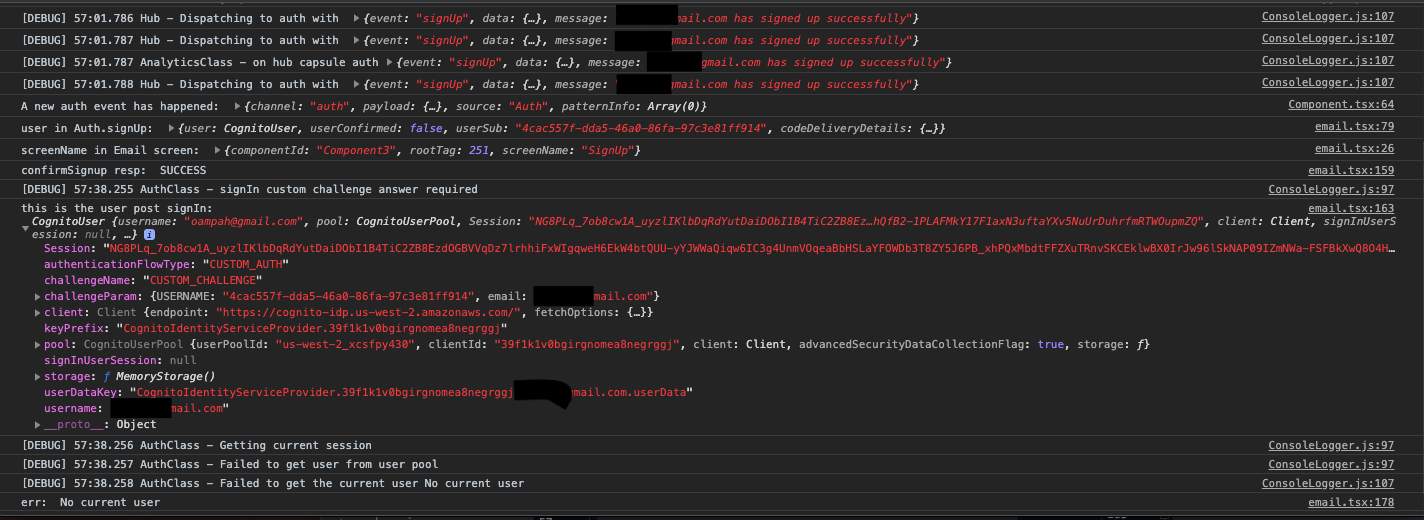
No idea what I might be doing wrong -- it worked once and then stopped working. I am almost to my delivery date so help would be greatly appreciated.
 ObedAmpah
on 1 Jun 2020
ObedAmpah
on 1 Jun 2020
 nihp
on 10 Jun 2020
nihp
on 10 Jun 2020
I think the recommended solution is to give up on Cognito/Amplify and use something that works.
 cwells
on 9 Aug 2020
cwells
on 9 Aug 2020
Late to the party but I encountered this issue and the problem for some reason that happened with aws-cli/2.0.17 or so was that cognito became the default and even though API was an alternative method it did not fall back to API key. Hence look into that if you have issues
 ludwigward
on 13 Dec 2020
ludwigward
on 13 Dec 2020
I am still facing this issue in my production app too. Any updates what is the reason for this issue
nihp
on 17 Dec 2020
For me, the cause of this error was that the Cognito account status of the user I was logging in with was FORCE_CHANGE_PASSWORD. I had to implement the change-password flow before treating the user as being logged-in.
 SijmenHuizenga
on 17 Dec 2020
SijmenHuizenga
on 17 Dec 2020
@SijmenHuizenga This is what was blocking me. Glad it was something simple!
 mannieschumpert
on 27 Dec 2020
mannieschumpert
on 27 Dec 2020
Related issues
 callmekatootie
·
3Comments
callmekatootie
·
3Comments
 oste
·
3Comments
oste
·
3Comments
 guanzo
·
3Comments
guanzo
·
3Comments
 TheRealRed7
·
3Comments
TheRealRed7
·
3Comments
 rayhaanq
·
3Comments
rayhaanq
·
3Comments
Most helpful comment
I had the same problem, but for me, removing the cookie storage configuration in
aws-exports.jssolved it. Maybe this helps someone.