Amplify-js: [React] Amplify Custom Component override option hides default SignUp link
Describe the bug
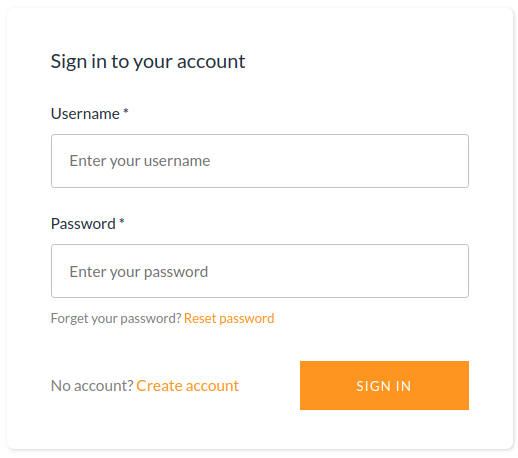
When trying to override React Component as stated in https://aws-amplify.github.io/docs/js/authentication#customize-ui link to Sign Up is missing, which requires to add custom text.
To Reproduce
Steps to reproduce the behavior:
- Create Authenticator Component like so:
import { Authenticator, SignUp, SignIn } from 'aws-amplify-react';

<Authenticator hideDefault={true}>
  <SignIn />
  <MyCustomSignUp override={SignUp}/> {/* to tell the Authenticator the SignUp component is not hidden but overridden */}
</Authenticator>
- Open page with auth form
Expected behavior
Default SignIn form should appear with "No Account ? Create One" link.
Screenshots
If applicable, add screenshots to help explain your problem.

Desktop (please complete the following information):
- OS: Linux Solus
- Browser Chrome
- Version 67
 pippo111
All 3 comments
Hi @pippo111,
It looks like the documentation may be incorrect here. Can you try changing override={SignUp} to use a string instead like: <MyCustomSignUp override={'SignUp'} />
Let me know if that works. Based on your response we can either improve the documentation or improve the actual code driving this.
 jordanranz
on 7 Feb 2019
jordanranz
on 7 Feb 2019
Hi @jordanranz
Yes, changing override to use a string fixed the issue, so it seems that documentation is in fact incorrect here. Thank you.
pippo111
on 8 Feb 2019
No problem, I'll go ahead and fix the documentation. Going to close this now. Please reopen this if you run into any related issues.
jordanranz
on 8 Feb 2019
Related issues
 josoroma
·
3Comments
josoroma
·
3Comments
 callmekatootie
·
3Comments
callmekatootie
·
3Comments
 romainquellec
·
3Comments
romainquellec
·
3Comments
 shinnapatthesix
·
3Comments
shinnapatthesix
·
3Comments
 TheRealRed7
·
3Comments
TheRealRed7
·
3Comments
Most helpful comment
Hi @pippo111,
It looks like the documentation may be incorrect here. Can you try changing
override={SignUp}to use a string instead like:<MyCustomSignUp override={'SignUp'} />Let me know if that works. Based on your response we can either improve the documentation or improve the actual code driving this.