Amplify-js: No matter what, I get an incorrect username or password
Do you want to request a feature or report a bug?
Bug
What is the current behavior?
Here is the error I am getting trying to log in

And here is my Cognito configuration

I have reset my password many times thinking it has been user error and no matter what I can't seem to log in.
If the current behavior is a bug, please provide the steps to reproduce and if possible a minimal demo of the problem. Your bug will get fixed much faster if we can run your code and it doesn't have dependencies other than AWS Amplify.
What is the expected behavior?
I think I should be able to log in.
Which versions of Amplify, and which browser / OS are affected by this issue? Did this work in previous versions?
1.04
Firefox on Mac OS
No
You can turn on the debug mode to provide more info for us by setting
window.LOG_LEVEL = 'DEBUG';in your app.
AWS Pinpoint said it did not have a region configured, but I don't think that's the issue as the other Auth methods work and this looks like something from cognito.
 shicholas
All 13 comments
How are you configuring Amplify? (please hide sensitive information)
 elorzafe
on 31 Jul 2018
elorzafe
on 31 Jul 2018
 Amplify.configure({
      Auth: {
        identityPoolId: process.env.COGNITO_IDENTITY_POOL_ID,
        region: 'us-east-1',
        userPoolId: process.env.COGNITO_USER_POOL_ID,
        userPoolWebClientId: process.env.COGNITO_USER_POOL_WEB_CLIENT_ID,
      },
      Storage: {
        bucket: process.env.STORAGE_BUCKET,
        region: 'us-east-1',
      },
    });
Do I need to specify the email alias in this config?
Thank you,
shicholas
on 31 Jul 2018
FWIW, I set up the hosted OAuth2 flow option Cognito has for User Pool Apps (using a URL like https://something.auth.us-east-1.amazoncognito.com), and the username/password combo seemed to work fine there.
shicholas
on 1 Aug 2018
Another update,
I have confirmed I have the username right b/c I disabled the username in the console and I get an error that states "User is disabled," instead of "Incorrect username and password." Also, as part of signing in, the correct UUID is returned from the initial sign-in request sent to Cognito.
I noticed over the wire, the actual password doesn't get sent, instead, a PASSWORD_CLAIM does which is an encrypted message. Perhaps I'm messing something up on this front? I have tripled checked my config to ensure I'm hitting the right Identity Pool/User Pool and User Pool App; could there be anything else I'm missing?
Furthermore, is this something that AWS could help with on a support ticket?
Thank you,
shicholas
on 2 Aug 2018
I have the same issue.
- Existing users are not able to sign in with existing credentials.
- Existing users are not able to sign in after they reset their password.
- New users are not able to sign in with their new credentials.
Error code I keep receiving:
{code: "NotAuthorizedException", name: "NotAuthorizedException", message: "Incorrect username or password."}
I'm using the latest version of amazon-cognito-identity-js which seems to be calling https://cognito-idp.eu-west-1.amazonaws.com/ in the background.
Hope this helps.
 botre
on 3 Aug 2018
botre
on 3 Aug 2018
that would make sense for my error, everything I do is set up in us-east-1. thanks for the help @Botre!
shicholas
on 3 Aug 2018
On second thought, I don't know if that's it as the network tab shows only traffic going to us-east-1 from my auth queries.
Def glad I'm not alone though.
shicholas
on 3 Aug 2018
Update, today's Amplify JS update repeated the same behavior.
Here is my Cloudformation template I used to set up my Cognito User-Pool and AppSync (which has worked fine)
AWSTemplateFormatVersion: '2010-09-09'
Description: >
  This template creates the Authenticated AppSync Schema & Resolvers
Parameters:
  APIName:
    Description: Name of the API for Appsync
    Type: String
  LambdaArn:
    Description: ARN of the Lambda used as a data resolver
    Type: String
  GraphqlDefinition:
    Description: Text of the Graphql Definition
    Type: String
  pUploadBucketName:
    Description: Bucket Name for the upload bucket
    Type: String
  pCognitoLambdaName:
    Description: Lambda name of the Cognito Bucket
    Type: String

Resources:
  SNSRole:
    Type: "AWS::IAM::Role"
    Properties:
      AssumeRolePolicyDocument:
        Version: "2012-10-17"
        Statement:
          - Effect: "Allow"
            Principal:
              Service:
                - "cognito-idp.amazonaws.com"
            Action:
              - "sts:AssumeRole"
      Policies:
        - PolicyName: "CognitoSNSPolicy"
          PolicyDocument:
            Version: "2012-10-17"
            Statement:
              - Effect: "Allow"
                Action: "sns:publish"
                Resource: "*"

  LambdaExecutionRole:
    Type: AWS::IAM::Role
    Properties:
      AssumeRolePolicyDocument:
        Version: '2012-10-17'
        Statement:
          Effect: Allow
          Principal:
            Service: appsync.amazonaws.com
          Action: sts:AssumeRole
      Policies:
        - PolicyName: !Sub ${APIName}-lambda-policy
          PolicyDocument:
            Version: '2012-10-17'
            Statement:
              - Effect: Allow
                Action:
                  - lambda:invoke
                Resource: !Ref LambdaArn

  UserPool:
    Type: "AWS::Cognito::UserPool"
    Description: "A Cognito user pool for authenticating users"
    Properties:
      UserPoolName: !Sub ${APIName}-user-pool
      MfaConfiguration: "OPTIONAL"
      LambdaConfig:
        CreateAuthChallenge: !Ref pCognitoLambdaName
        CustomMessage: !Ref pCognitoLambdaName
        DefineAuthChallenge: !Ref pCognitoLambdaName
        PostAuthentication: !Ref pCognitoLambdaName
        PostConfirmation: !Ref pCognitoLambdaName
        PreAuthentication: !Ref pCognitoLambdaName
        PreSignUp: !Ref pCognitoLambdaName
        VerifyAuthChallengeResponse: !Ref pCognitoLambdaName
      AutoVerifiedAttributes:
        - email
        - phone_number
      UsernameAttributes:
        - email
      SmsConfiguration:
        ExternalId: !Sub ${APIName}-sms
        SnsCallerArn: !GetAtt SNSRole.Arn
      Schema:
        - Name: name
          AttributeDataType: String
          Mutable: true
          Required: true
        - Name: email
          AttributeDataType: String
          Mutable: true
          Required: true
        - Name: phone_number
          AttributeDataType: String
          Mutable: true
          Required: false

  LambdaPermission:
    Type: "AWS::Lambda::Permission"
    Description: "Allows Cognito to invoke the Cognito Lambda Function"
    Properties:
      Action: lambda:InvokeFunction
      FunctionName: !Ref pCognitoLambdaName
      Principal: cognito-idp.amazonaws.com
      SourceArn: !GetAtt UserPool.Arn

  UserPoolClient:
    Type: "AWS::Cognito::UserPoolClient"
    Description: "App Client used by AWS AppSync"
    Properties:
      ClientName: !Sub ${APIName}-appsync-client
      GenerateSecret: false
      UserPoolId: !Ref UserPool

  CognitoIdentityPool:
    Type: AWS::Cognito::IdentityPool
    Properties:
      AllowUnauthenticatedIdentities: true
      CognitoIdentityProviders:
        - ClientId: !Ref UserPoolClient
          ProviderName: !GetAtt UserPool.ProviderName

  AppSyncApi:
      Type: "AWS::AppSync::GraphQLApi"
      Description: "The GraphQL API for the Notes App"
      Properties:
        AuthenticationType: "AMAZON_COGNITO_USER_POOLS"
        Name: !Sub ${APIName}
        UserPoolConfig:
          UserPoolId: !Ref UserPoolClient
          AwsRegion: !Sub ${AWS::Region}
          DefaultAction: "ALLOW"

  AppSyncSchema:
    Type: "AWS::AppSync::GraphQLSchema"
    Properties:
      ApiId: !GetAtt AppSyncApi.ApiId
      Definition: !Ref GraphqlDefinition

  LambdaDataSource:
    DependsOn: "AppSyncSchema"
    Type: "AWS::AppSync::DataSource"
    Properties:
      ApiId: !GetAtt AppSyncApi.ApiId
      Name: lambda
      Description: "The Authenticated Api Lambda Role for Appsinc"
      Type: "AWS_LAMBDA"
      ServiceRoleArn: !GetAtt LambdaExecutionRole.Arn
      LambdaConfig:
        LambdaFunctionArn: !Ref LambdaArn

  UploadBucket:
    Type: AWS::S3::Bucket
    Properties:
      AccessControl: LogDeliveryWrite
      BucketName: !Ref pUploadBucketName
      LifecycleConfiguration:
        Rules:
          - Transitions:
              - StorageClass: GLACIER
                TransitionInDays: 100
            ExpirationInDays: 2558
            Status: Enabled

Outputs:
  CognitoUserPoolId:
    Description: The Pool ID of the Cognito User Pool
    Value: !Ref UserPool
  CognitoUserPoolClientId:
    Description: The Client ID for AWS AppSync Auth
    Value: !Ref UserPoolClient
  GraphQLApiEndpoint:
    Description: The URL to the GraphQL Endpoint
    Value: !GetAtt AppSyncApi.GraphQLUrl
  GraphQLApiId:
    Description: The API ID of the GraphQL API
    Value: !GetAtt AppSyncApi.ApiId
  UploadBucket:
    Description: Bucket Name
    Value: !Ref UploadBucket
    Export:
      Name: !Sub '${AWS::StackName}-UploadBucketName'
  IdentityPool:
    Description: The Cognito Identity Pool Name
    Value: !Ref CognitoIdentityPool
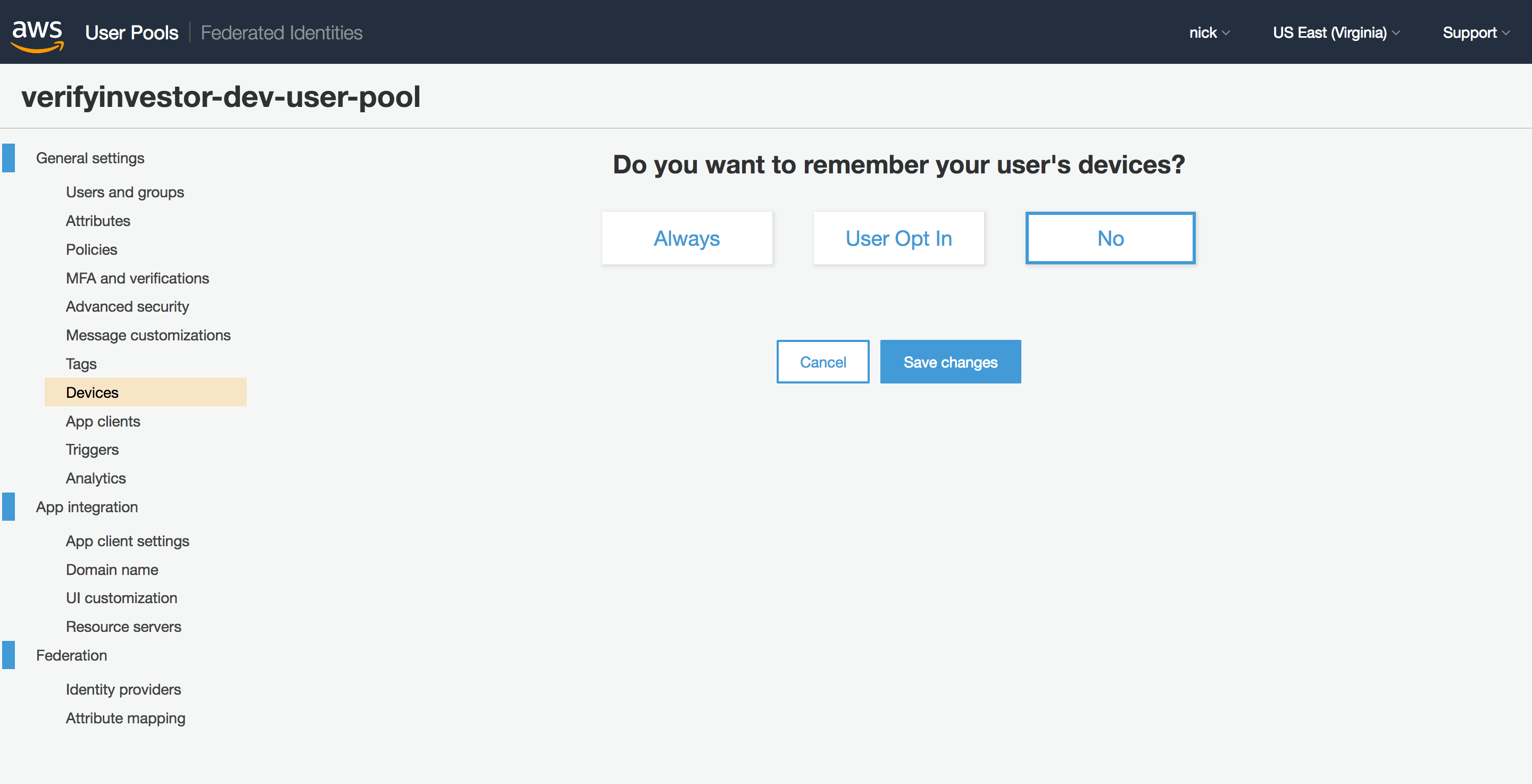
@shicholas Can you go to your User Pool in the AWS Console, select Devices on the right hand side and check that Do you want to remember your user's devices? is set to No?
I remember having trouble logging in with User Pools created via CloudFormation until I set this option to No in the console. Unfortunately I can't find a way to set it to No via CloudFormation. The relevant option in the CloudFormation template only allows it to be set to Always or User Opt In.
 buggy
on 7 Aug 2018
buggy
on 7 Aug 2018
Unfortunately, that doesn't seem to do anything. Here is the setting I've tried. Thanks for the help.
shicholas
on 7 Aug 2018
I nuked everything with cloudformation, re-ran the scripts, and now everything seems to work.
Closing this because I don't think the problem is with the javascript library. Still kinda befuddled, but I'll take it.
Thanks so much for releasing this library and your work!
shicholas
on 10 Aug 2018
I'm getting this now once I enable MFA as optional (something that seemingly cannot be undone). Switching remembering devices off, as buggy as that sounds anyways, doesn't fix the issue.
Edit: for those coming here late to the party, this was fixed over here
 mrowles
on 14 Jan 2019
mrowles
on 14 Jan 2019
Im getting this error but I noticed when i send the current password it request the code for reset password but if i send wrong current password it is showing "incorrect username or password" jajaja this is werid since when you reset your password you dont remember the password xD
 hectomg
on 20 May 2020
hectomg
on 20 May 2020
Related issues
 guanzo
·
3Comments
guanzo
·
3Comments
 cgarvis
·
3Comments
cgarvis
·
3Comments
 ldgarcia
·
3Comments
ldgarcia
·
3Comments
 TheRealRed7
·
3Comments
TheRealRed7
·
3Comments
 karlmosenbacher
·
3Comments
karlmosenbacher
·
3Comments
Most helpful comment
I'm getting this now once I enable MFA as optional (something that seemingly cannot be undone). Switching remembering devices off, as buggy as that sounds anyways, doesn't fix the issue.
Edit: for those coming here late to the party, this was fixed over here