Amplify-js: Is it possible to customize default Sign Up, Sign In screens of aws-amplify-react-native package?
Do you want to request a feature or report a bug?
Issue
What is the current behavior?
Default login/sign up screen
What is the expected behavior?
Customized login/sign up screen
Question
In order to have default auth screen, I can merely do this (https://github.com/aws-samples/aws-mobile-react-native-starter):
    import { withAuthenticator } from 'aws-amplify-react-native';
    export default withAuthenticator(App);
And I get pretty ugly default out-of-the-box login screen:
Then docs say I can't modify default, I have to create my own (https://github.com/aws-samples/aws-mobile-react-native-starter):
You can either use this Higher Order Component, or build your own UI and use the APIs from Amplify too.
But also they thay say, that I can customize default login screens (https://github.com/aws/aws-amplify/blob/master/README.md):
AWS Amplify will provide you customizable UI for common use cases such as user registration and login.
Question is, can we customize default screen or we must create our own screens if we want something fancy?
OS, Amplify
Model Name: Mac mini
Model Identifier: Macmini6,1
Processor Name: Intel Core i5
Processor Speed: 2.5 GHz
System Version: macOS 10.13.4 (17E199)
"aws-amplify": "^0.3.3",
"aws-amplify-react-native": "^0.2.9",
"aws-appsync": "^1.0.0",
"aws-appsync-react": "^1.0.6",
"aws-sdk": "^2.141.0",
"react-native": "0.54.2",
"react-native-aws-cognito-js": "0.0.7",
Question on SO https://stackoverflow.com/questions/50859539/is-it-possible-to-customize-default-sign-up-sign-in-screens-of-aws-amplify-reac
 wzup
wzup
All 30 comments
I think you can either implement your own UI component or pass a theme object. Can you check this doc?
 powerful23
on 15 Jun 2018
powerful23
on 15 Jun 2018
@wzup You can, it's not too hard. As @powerful23 says you need to follow the steps in the doc.
aws-amplify-react-native provides a set of base classes that you can extend. https://github.com/aws/aws-amplify/tree/master/packages/aws-amplify-react-native/src/Auth
So if you want to create a Sign Up component you have it extend SignUp and provide your render() method. The good thing about this is that allows you to just call this.signUp when you're ready to process your user input (make sure your components state matches the expectation of the state in the method you're calling: https://github.com/aws/aws-amplify/blob/master/packages/aws-amplify-react-native/src/Auth/SignUp.js#L70).
One thing to be careful about, and the docs do not say this, is that the Authenticator component will create a list of your screens inside another view; which means you need to style the outside view to match your view: https://github.com/aws/aws-amplify/blob/master/packages/aws-amplify-react-native/src/Auth/Authenticator.js#L150-L155
Additionally, since they just inject all of the children into a long list you need to use the authState prop passed to your children (assuming the extend one of the classes listed above; at the least they need to extend AuthPiece) so you end up with something like:
class Login extends SignIn {
render() {
if (this.props.authState !== 'signIn') {
return null;
}
return (
// your component
)
}
}
While this is not too hard to do, it seems a pretty poor requirement to put on app builders. So at this point you may want to just consider using a great navigation library like react-navigation or the wix react native navigation and just copy and paste the authentication calls from the aws-amplify classes.
 ossareh
on 15 Jun 2018
ossareh
on 15 Jun 2018
@ossareh if you extend SignIn I believe you can override the showComponent and return your component. This is simpler then overriding the render method.
 vvantruong
on 20 Sep 2018
vvantruong
on 20 Sep 2018
@vutronic thanks for catching that, I've not dug in too deeply but that does look as though you can then avoid the prop.authState check.
ossareh
on 20 Sep 2018
@vutronic @ossareh
FYI; I have attempted to override SignIn form by overriding the showComponent() method, and it wasn't pretty straight forward... I had problems importing the different UI-components used in the original SignIn form, as I didn't want to change the look too much. It seems that there is a bug in the aws-amplify-react component which prevents all UI-components from being exported directly. I ended up using the following imports:
import {
FormSection,
SectionHeader,
SectionBody,
FederatedButtons,
Link,
} from 'aws-amplify-react';
// HACK:
// Needed to use different import for these UI-component as they are
// not defined as exports within the global scope of the component.
import {
FormField,
Input,
InputLabel,
Hint,
SectionFooter,
SectionFooterPrimaryContent,
Button,
SectionFooterSecondaryContent
} from 'aws-amplify-react/dist/Amplify-UI/Amplify-UI-Components-React';
 jonasao
on 10 Oct 2018
jonasao
on 10 Oct 2018
@jonasao - yeah that's correct. Not really a bug. You have to import the child components used by the SignIn class in 'showComponent' when you're extending 'SignIn' to tweak 'showComponent'.
vvantruong
on 10 Oct 2018
@vutronic I perfectly understand, but in my opinion the components FormSection, SectionHeader, SectionBody and Link are on the same level as the ones (FormField, Input, InputLabel...) i needed to make a "hack" to import. That is why I am referring to it as a bug.
I am fully aware that I have to import the child-components required by the showComponent()method.
jonasao
on 11 Oct 2018
@jonasao yeah you are right. Those components are not getting exported from 'aws-amplify-react'. Maybe they didn't expect you to go this deep :) You should file a ticket.
Anyway, since I'm using 'aws-amplify-react-native', I can import those sub React elements used in SignIn.showComponent directly from 'aws-amplify-react-native' So kudos to the native team:).
vvantruong
on 11 Oct 2018
I think this section https://aws-amplify.github.io/docs/js/authentication#customize-withauthenticator might be helpful. I personally feel using the withAuthenticator HOC instead of wrapping your app inside the Authenticator component makes it much easier to navigate between different screens, by just changing the authState like it is shown here: https://github.com/aws-amplify/amplify-js/blob/master/packages/aws-amplify-react-native/src/Auth/SignIn.js#L103. We won't need to check authState like
if (this.props.authState !== 'signIn') {
return null;
}
For example, you can extend the SignIn component, so as to use its sign in method like @ossareh says above but change the UI to suit your needs.
This is a blog article I found useful: https://blog.kylegalbraith.com/2018/11/29/how-to-easily-customize-the-aws-amplify-authentication-ui/
Now, I am following this method and ideally everything should work out, but am facing one problem, maybe related to what @ossareh is saying about wrapping our screens inside another view. When I override the showComponent method, my view does not extend to the entire space available, as seen in the picture below. Has anyone experienced this? Or knows how to fix it? I am a beginner in React Native so pardon me if this is something straightforward.
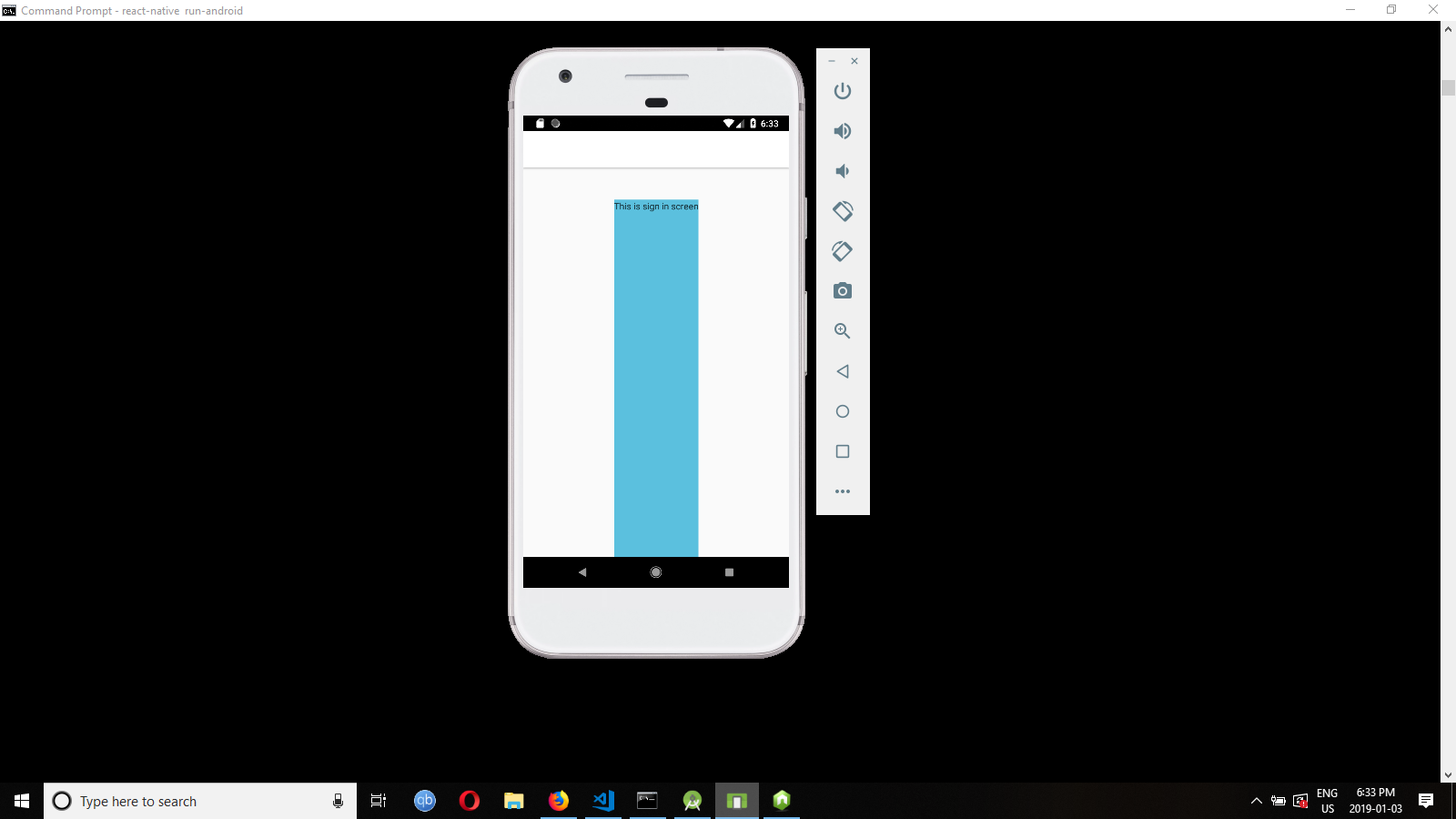
Here is the code associated with it:
import React from 'react';
import { View, Text, Image, KeyboardAvoidingView, StyleSheet } from 'react-native';
import { SignIn} from 'aws-amplify-react-native';
import { THEME_COLOR } from './config'
export default class MySignIn extends SignIn {
constructor(props) {
super(props);
this.state = {
username: null,
password: null,
error: null
}
this.checkContact = this.checkContact.bind(this);
this.signIn = this.signIn.bind(this);
}
showComponent(theme) {
return (
<View style={{flex:1, backgroundColor: '#5BC0DE}} behavior="padding">
<Text>This is sign in screen</Text>
</View>
);
}
}
Also, @vvantruong, could you show how you are importing the components from the project? I have tried to import the Header defined in https://github.com/aws-amplify/amplify-js/blob/master/packages/aws-amplify-react-native/src/AmplifyUI.js but was not successful.
Thank you!
 dhyeysejpal
on 3 Jan 2019
dhyeysejpal
on 3 Jan 2019
@dhyeysejpal , I also use the 'withAuthenticator' to wrap my app inside the Authenticator component :)
In my app I extend the SignUp component and pass it to the withAuthenticator. This is how I import the built in components:
import { SignUp, FormField, LinkCell, Header, ErrorRow, AmplifyButton} from 'aws-amplify-react-native';
I declare my custom SignUp like this:
`export default class MySignUp extends SignUp {
constructor(props) {
super(props);
}
showComponent(theme) {
...
}
}`
Try this to see if it fixes your layout issue:
showComponent(theme) {
return (
<View style={{theme.section}} >
                <Text>This is sign in screen</Text>
            </View>
);
}
vvantruong
on 3 Jan 2019
@vvantruong It worked wonderfully! Thank you very much! :)
dhyeysejpal
on 5 Jan 2019
Using theme.section solves the layout issue but has anyone found out a way to ignore all theme components and design the screen from scratch? I feel in a way that the theme limits our possibilities.
For example, I am trying to use KeyboardAvoidingView, and it works if I don't use theme.section. However, the width gets too small (as seen in the screenshot above). If I style using theme.section to get the full width, then KeyboardAvoidingView stops working. Anyone experience this?
dhyeysejpal
on 7 Jan 2019
@dhyeysejpal - sure you can return a custom view. The theme.section is just a style object:
section: {
flex: 1,
width: '100%',
padding: 20
},
You can apply the same styles to your custom component.
vvantruong
on 9 Jan 2019
@vvantruong Got it! I was not using width:'100%' which was causing it. Thanks again!
dhyeysejpal
on 9 Jan 2019
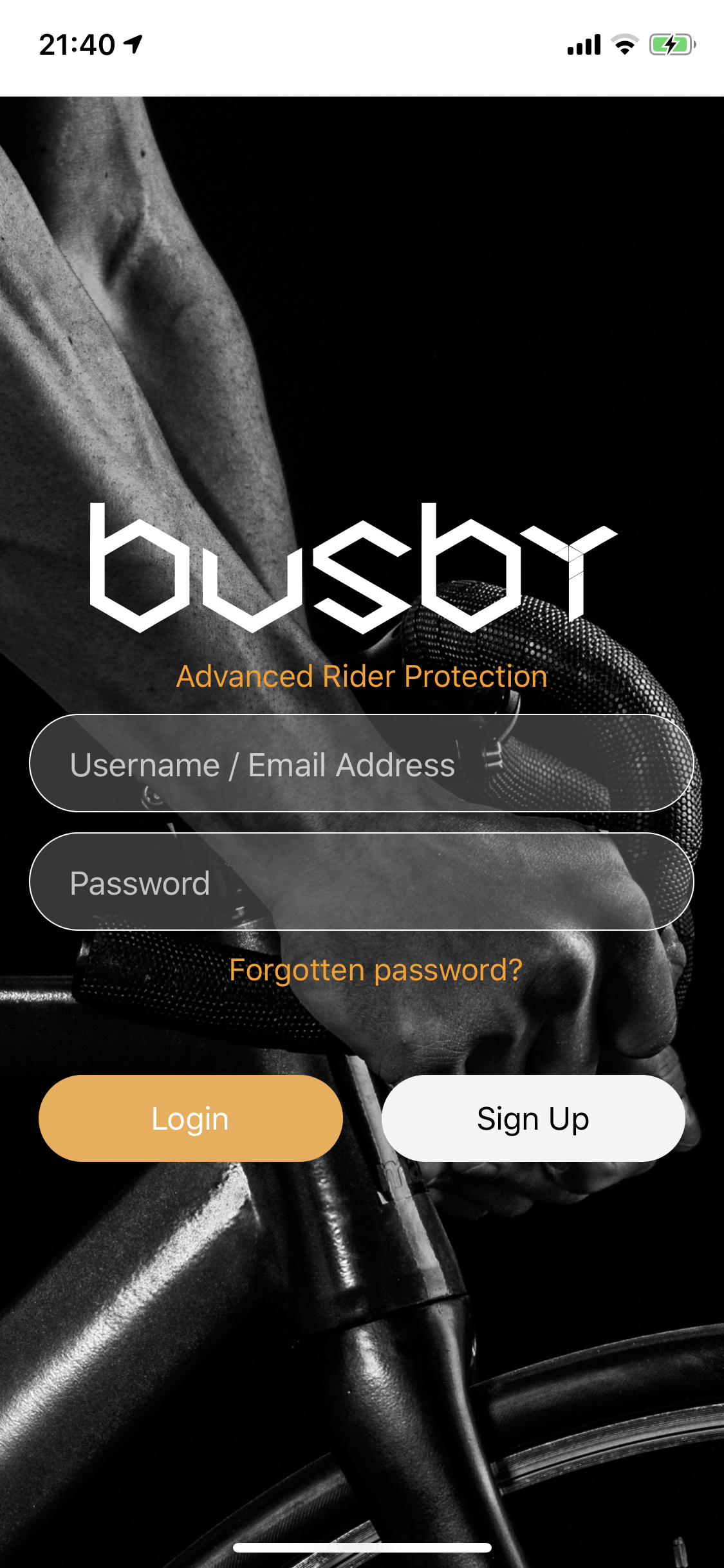
This thread is as close as I can get to my current issue, I simply want to remove the header from my custom component which extends SignIn:
I have set the nativationOptions as such:
static navigationOptions = {
header: null
};
However, a big ugly grey header is still present on my signIn component. Any ideas how to remove it so that the background image runs to the top?
 kirkryan
on 29 Jan 2019
kirkryan
on 29 Jan 2019
@kirkryan are you referring to the white status bar shown in your comp? Maybe this will help?
https://facebook.github.io/react-native/docs/statusbar.html
vvantruong
on 30 Jan 2019
Hi - yes the white bar. I’ve tried with StatusBar hidden (this works
in my own components that reside within my react-navigation hierarchy) but when I use it with my SignIn component it simply hides the StatusBar but the white header is still present? It seems to me that a header is being passed from a parent component?
kirkryan
on 30 Jan 2019
🤔
@kirkryan where is this navigationOptions prop coming from? I did a quick search [1] of this code base and I can't find it?
I looked at the code involved in ShowComponent in SignUp.tsx, and the only thing that seems related to me is this [2]. It is referenced in showComponent(). Are you overriding this? (the general context of this issue, but you're not specific about it).
Are you using the included UI components [3]? If so, it seems the default config will draw a 30px bottomMargin on a HeaderSection [4].
[1] https://github.com/aws-amplify/amplify-js/search?q=navigationOptions&unscoped_q=navigationOptions
ossareh
on 30 Jan 2019
@kirkryan I am also facing the same problem. If you look at the screenshot I posted above, I was able to fix the width but there is some blank space which I can't get rid of, nor the header above it.
You can try passing a custom theme object with styling for navigation bar overridden. I am not too good at React Native so wasn't able to get it to work because maybe I was doing it wrong.
I also saw it somewhere that passing theme object has some problems when using withAuthenticator, so using the Aithenticator component directly can also be tried.
dhyeysejpal
on 31 Jan 2019
Thanks all, I looked into the SignIn and SignUp components within the following directory (node_modules/aws-amplify-react-native/dist/Auth) and removed the header, but it's still showing!
showComponent(theme) {
return React.createElement(
TouchableWithoutFeedback,
{ onPress: Keyboard.dismiss, accessible: false },
React.createElement(
View,
{ style: theme.section },
/* React.createElement(
Header,
{ theme: theme },
I18n.get('Sign in to your account')
), */
React.createElement(
View,
{ style: theme.sectionBody },
React.createElement(FormField, {
theme: theme,
onChangeText: text => this.setState({ username: text }),
label: I18n.get("Username"),
placeholder: I18n.get("Enter your username"),
required: true
}),
kirkryan
on 5 Feb 2019
hmm wonder if this is related to the default CSS styles set in the Auth components. Out of curiosity, I can take a look tonight.
vvantruong
on 6 Feb 2019
@kirkryan looks like the Authenticator that renders your custom SignIn and SignUp components uses the AmplifyTheme where the 'container' style has {paddingTop: 20, marginTop: 30}. I think this is why you're seeing that white blank bar on top when the status bar is hidden.
The only way I know how to fix this is to pass in a custom theme in the app.js where you call 'withAuthenticator'. You can copy the styles found in AmplifyTheme.js in the aws amplify react native package.
const AuthenticatorWrapper = withAuthenticator(...);
// Pass in MyTheme to override the AmplifyTheme. Set paddingTop and marginTop to '0'
const MyAuthenticatorWrapper = () => (
< AuthenticatorWrapper theme={MyTheme} />
)
export default MyAuthenticatorWrapper ;
vvantruong
on 6 Feb 2019
Actually you can pass the theme directly to withAuthenticator now:
https://github.com/aws-amplify/amplify-js/pull/2177
vvantruong
on 7 Feb 2019
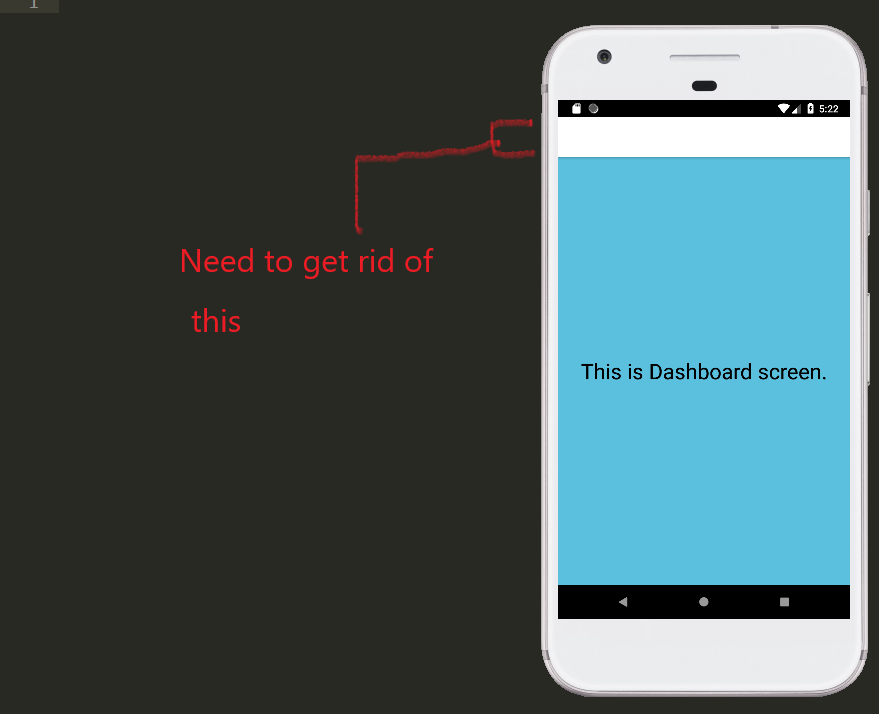
@kirkryan were you able to resolve the issue? I am getting the same problem. Have spent so much time on this but nothing seems to work. I am passing the theme object to the HOC but it doesn't seem to have any effect. I still seem to have a navbar on top of my every screen, the auth screens as well as my app home screen.
Can anyone confirm having faced this issue? Would this happen due to amplify or is this a side-effect of react-native-navigation? Any help is appreciated!
Here is how it looks:
Here is my code:
/**
* Dashboard screen with Authenticator wrapper around the entire app.
*/
import React, { Component } from 'react';
import { StyleSheet, Text, View } from 'react-native';
import { ConfirmSignUp, AmplifyTheme, ForgotPassword, RequireNewPassword, withAuthenticator } from 'aws-amplify-react-native'
import MySignIn from './MySignIn';
import MySignUp from './MySignUp';
import { THEME_COLOR } from './config';
class Dashboard extends Component {
render() {
return (
<View style={styles.container}>
<Text>
<Text style={styles.welcome}>This is Dashboard screen.</Text>
</Text>
</View>
);
}
}
const myNavBar = Object.assign({}, AmplifyTheme.navBar, { width: 0, height: 0});
const MyTheme = Object.assign({}, AmplifyTheme, { navBar: myNavBar });
const styles = StyleSheet.create({
welcome: {
fontSize: 30,
color: 'black'
},
container: {
flex: 1,
justifyContent: 'center',
alignItems: 'center'
}
});
export default withAuthenticator(Dashboard, false, [
<MySignIn/>,
<MySignUp />,
<ConfirmSignUp/>,
// <ForgotPassword/> ,
// <RequireNewPassword/>
], null, MyTheme);
I'm having same issue, I'm passing the custom them to the withAuthenticator and seems not using it, any updates?
 gerardovg520
on 6 May 2019
gerardovg520
on 6 May 2019
I opened another issue for this: #2951. I was able to get rid of the top navbar as it was coming from react-native-navigation, but the sign in component (and other screens part of Amplify) still have a lot of margin on top.
Maybe try using the Authenticator component directly, that will be my next step too.
dhyeysejpal
on 7 May 2019
FYI, we have started an RFC discussion for a proposed Amplify UI Component refactor to increase customizability and flexibility for our components. Please feel free to add any additional comments to the following issue:
 jordanranz
on 22 May 2019
jordanranz
on 22 May 2019
I need to customize all login screens for my app. Here already I have the Authenticator compoent and all other are imported inside this component.
I have two approach. Can anyone suggest the best practice.
- If I add withauthenticator and import all custom screens it will works (My guess)
- Need to add all custom screens under the stacknavigation and make appropriate changes with Auth.SignIn and so on.
@ashika01
 nihp
on 1 Apr 2020
nihp
on 1 Apr 2020
Hi everyone.. When I used
 rawadrifai
on 22 Jun 2020
rawadrifai
on 22 Jun 2020
Here's an example of how you can apply styling to the legacy withAuthenticator-produced component
export default withAuthenticator(App, {
// Render a sign out button once logged in
includeGreetings: true,
// Show only certain components
authenticatorComponents: [MyComponents],
// display federation/social provider buttons
federated: {myFederatedConfig},
// customize the UI/styling
theme: {myCustomTheme}
});
 harrysolovay
on 12 Nov 2020
harrysolovay
on 12 Nov 2020
Related issues
 epicfaace
·
3Comments
epicfaace
·
3Comments
 TheRealRed7
·
3Comments
TheRealRed7
·
3Comments
 karlmosenbacher
·
3Comments
karlmosenbacher
·
3Comments
 ldgarcia
·
3Comments
ldgarcia
·
3Comments
 josoroma
·
3Comments
josoroma
·
3Comments
Most helpful comment
@dhyeysejpal , I also use the 'withAuthenticator' to wrap my app inside the Authenticator component :)
In my app I extend the SignUp component and pass it to the withAuthenticator. This is how I import the built in components:
import { SignUp, FormField, LinkCell, Header, ErrorRow, AmplifyButton} from 'aws-amplify-react-native';I declare my custom SignUp like this:
`export default class MySignUp extends SignUp {
constructor(props) {
super(props);
}
showComponent(theme) {
...
}
}`
Try this to see if it fixes your layout issue:
showComponent(theme) {
return (
<View style={{theme.section}} >
                <Text>This is sign in screen</Text>
            </View>
);
}