Amplify-js: 'cannot get guest credentials' error on clicking Sign Out button in Greetings component
Do you want to request a feature or report a bug?
Bug
What is the current behavior?
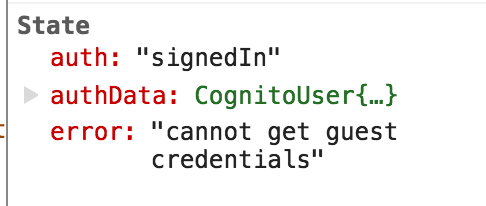
When signed in as a Cognito user, clicking "Sign Out" in the default <Greetings> component throws an error, as shown:

With the corresponding React state (still showing auth: signedIn and my signed-in authData):
After reloading the page, I am successfully shown as signed out (the <SignIn> component renders).
What is the expected behavior?
Clicking Sign Out in the default Greetings component should show the "Sign In" UI, with no errors.
The new error appears to be from the new catching logic here (it was previously always resolved):
https://github.com/aws/aws-amplify/commit/1e8a497d6746b4e0f877738568a36ccfee757691#diff-0dac56aa728020901cdf9a90ec3ee802R844
Which versions of Amplify, and which browser / OS are affected by this issue? Did this work in previous versions?
I'm using [email protected], [email protected].
My component has an <Authenticator hideDefault={true} theme={theme}> (although I tested it with and without hideDefault).
The "sign out" button worked in previous aws-amplify versions (although those had other issues, hence my update).
CC @powerful23
 tyson-kubota
All 20 comments
@tyson-kubota Can you turn on the debug mode to see why the guest credentials can't be loaded?
 powerful23
on 23 Mar 2018
powerful23
on 23 Mar 2018
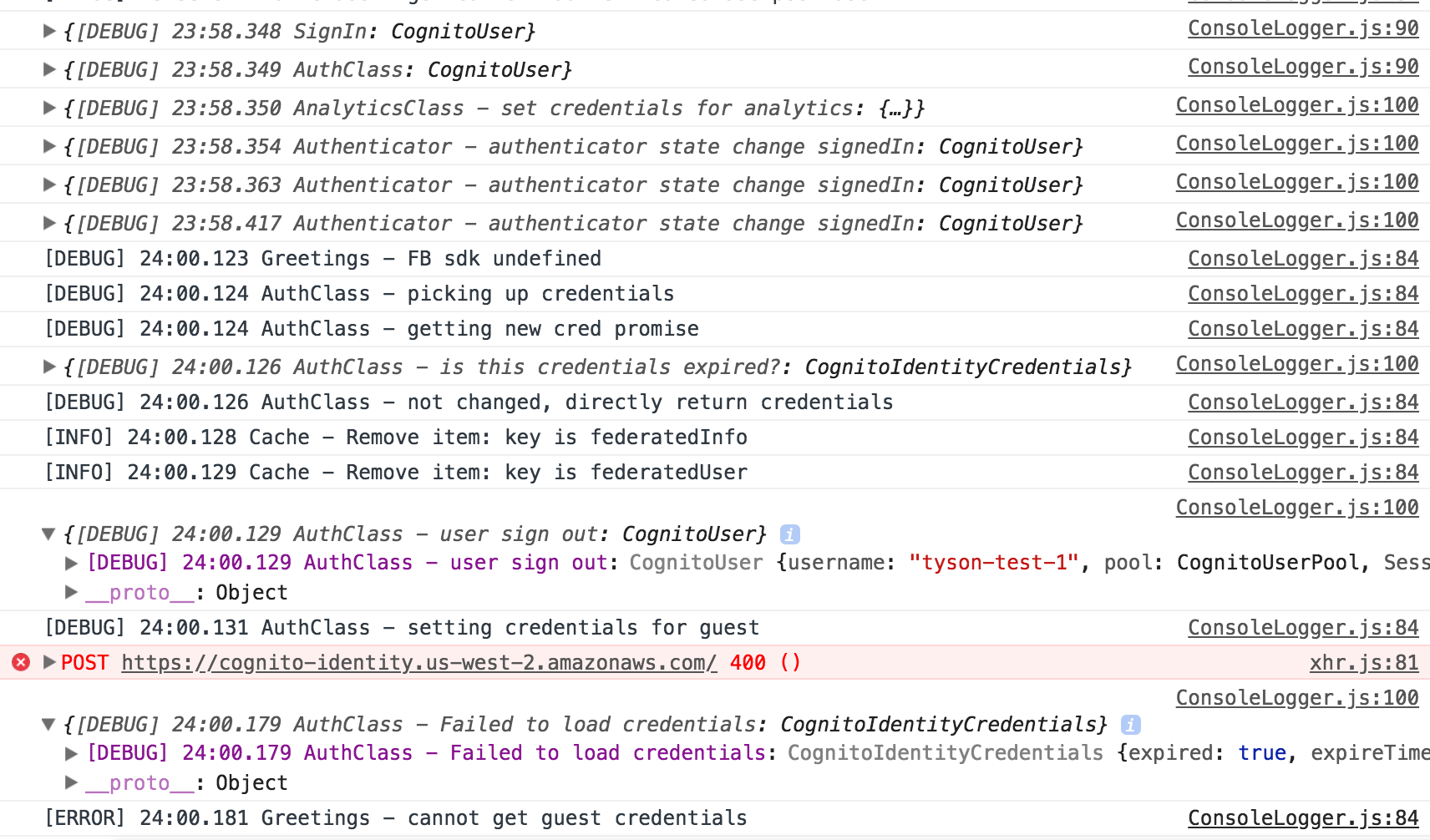
@powerful23 sure, here's the debug output.
tyson-kubota
on 23 Mar 2018
@tyson-kubota Seems like the http call to load the guest credentials failed due to some reason. Can you check that http request?
powerful23
on 23 Mar 2018
Yes, I saw that 400 too, but that request occurs on basically every interaction, including the initial pageload.
The response is:
{"__type":"NotAuthorizedException","message":"Unauthenticated access is not supported for this identity pool."}
tyson-kubota
on 23 Mar 2018
@tyson-kubota Seems like you didn't allow unauthenticated access into your identity pool.

For now you can either turn on that or we can make a patch for that issue
powerful23
on 23 Mar 2018
Right, I didn't enable unauthenticated users for this pool because I don't anticipate needing that setting. Is that setting a requirement for using the prebuilt React components of aws-amplify?
Unless I'm misunderstanding, it seems like the Authenticator component could handle that case and still update its state to signIn, instead of erroring? This is the behavior on initial pageload:
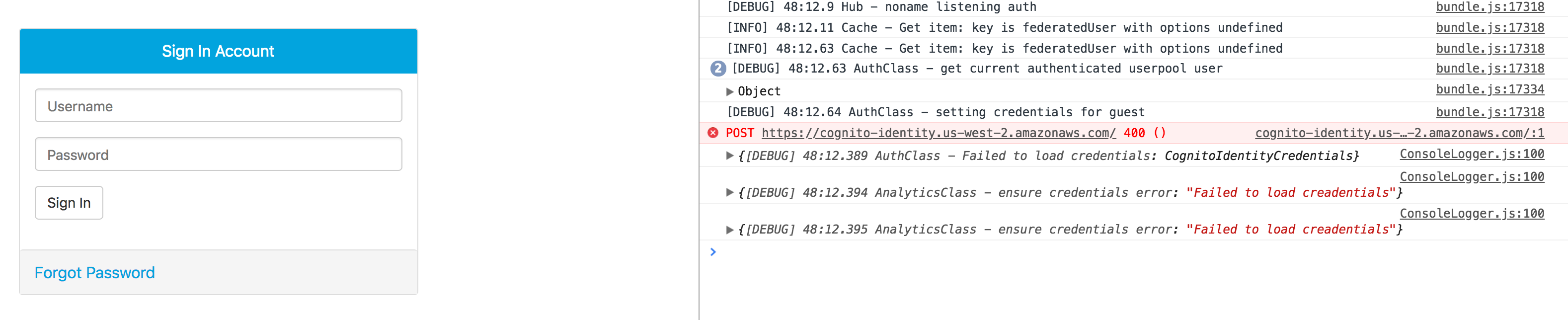
Despite the credential loading failure, the signIn component still renders and no warnings are shown.
tyson-kubota
on 23 Mar 2018
@tyson-kubota It's not a requirement for using those React components. I think the library shouldn't send errors to users if there is no guest credential available. We can log this in the background saying there is no guest credential available. Other categories like Analytics will check AWS credentials so when they find there is no credentials available they will stop working.
powerful23
on 24 Mar 2018
Sounds good. Thanks for the explanation!
tyson-kubota
on 24 Mar 2018
@tyson-kubota Thanks for the finding! That's why we made the beta version. 👍
powerful23
on 24 Mar 2018
Closing this issue as this should have been fixed in the latest version.
powerful23
on 30 Mar 2018
@powerful23 this still occures for me when the pool doesn't allow the unauthenticated access, can you verify this bug is still existing?
 kjellski
on 20 Jul 2018
kjellski
on 20 Jul 2018
@kjellski hi which version of aws-amplify are you using?
powerful23
on 20 Jul 2018
I'm using 1.0.2 @powerful23 and I'm still getting that error
 M1chaelTran
on 21 Jul 2018
M1chaelTran
on 21 Jul 2018
@powerful23 @M1chaelTran same here, we're using 1.0.2 too
kjellski
on 22 Jul 2018
@M1chaelTran @kjellski can you provide your debug log when signing out?
powerful23
on 23 Jul 2018
@powerful23 we've just yesterday removed the identity pool from the equation and that solved the problem for us. But here is our new log, hope it helps:
{[DEBUG] 59:29.449 AuthClass: CognitoUserSession}
ConsoleLogger.js:100 {[DEBUG] 59:29.450 AuthClass - cannot get cognito credentials: "No Cache module registered in Amplify"}
ConsoleLogger.js:84 [DEBUG] 59:29.451 AuthClass - Getting current session
ConsoleLogger.js:84 [DEBUG] 59:29.457 AuthClass - Getting current session
ConsoleLogger.js:100 {[DEBUG] 59:29.458 AuthClass - Getting the session from this user:: CognitoUser}
ConsoleLogger.js:100 {[DEBUG] 59:29.459 AuthClass - Succeed to get the user session: CognitoUserSession}
ConsoleLogger.js:100 {[DEBUG] 59:29.460 AuthClass - Getting the session from this user:: CognitoUser}
ConsoleLogger.js:100 {[DEBUG] 59:29.462 AuthClass - Succeed to get the user session: CognitoUserSession}
ConsoleLogger.js:84 [DEBUG] 59:29.507 AuthClass - getting current authenticted user
ConsoleLogger.js:84 [DEBUG] 59:29.507 AuthClass - cannot load federated user from auth storage
ConsoleLogger.js:84 [DEBUG] 59:29.508 AuthClass - get current authenticated userpool user
ConsoleLogger.js:100 {[DEBUG] 59:29.510 AuthClass - Getting the session from this user:: CognitoUser}
ConsoleLogger.js:100 {[DEBUG] 59:29.511 AuthClass - Succeed to get the user session: CognitoUserSession}
VM248:1 I'm really logged in now
ConsoleLogger.js:84 [DEBUG] 00:05.324 AuthClass - failed to clear cached items
ConsoleLogger.js:100 {[DEBUG] 00:05.324 AuthClass - user sign out: CognitoUser}
ConsoleLogger.js:84 [DEBUG] 00:05.325 Credentials - setting credentials for guest
ConsoleLogger.js:84 [DEBUG] 00:05.325 Credentials - No Cognito Federated Identity pool provided
ConsoleLogger.js:100 {[DEBUG] 00:05.327 AuthClass - cannot load guest credentials for unauthenticated user: "No Cognito Federated Identity pool provided"}
ConsoleLogger.js:84 [DEBUG] 00:05.358 AuthClass - Getting current session
ConsoleLogger.js:84 [DEBUG] 00:05.361 AuthClass - Failed to get user from user pool
ConsoleLogger.js:100 {[DEBUG] 00:05.362 AuthClass - Failed to get the current user: "No current user"}
VM250:1 I'm really logged out now
@powerful23 I've just looked into the codebase and found this place here:
It seems that when no guest user is set for the identity pool, it would still try to set it.
kjellski
on 24 Jul 2018
@kjellski Amplify will try to get the guest credentials no matter you have the identity pool or not but will catch the error when failed to get it: https://github.com/aws-amplify/amplify-js/blob/master/packages/auth/src/Auth.ts#L986 You can try Auth.configure({mandatorySignIn: true}) to tell Amplify that you only allow authenticated users to ask for AWS credentials.
powerful23
on 24 Jul 2018
@powerful23 sorry to get back to you that late... I'll try and test that again, just need a bit of time and recreate the identity pool to do so...
kjellski
on 27 Jul 2018
@powerful23 I'm sorry man, I couldn't get to it. I'll try in the course of the week, but please try for yourself if I can't make it...
kjellski
on 31 Jul 2018
Related issues
 simon998yang
·
3Comments
simon998yang
·
3Comments
 cgarvis
·
3Comments
cgarvis
·
3Comments
 guanzo
·
3Comments
guanzo
·
3Comments
 lucasmike
·
3Comments
lucasmike
·
3Comments
 rayhaanq
·
3Comments
rayhaanq
·
3Comments
Most helpful comment
@tyson-kubota It's not a requirement for using those React components. I think the library shouldn't send errors to users if there is no guest credential available. We can log this in the background saying there is no guest credential available. Other categories like Analytics will check AWS credentials so when they find there is no credentials available they will stop working.