Amplify-js: Authentication hideDefault documentation is either unclear or functionality is not working as expected
Not clear if this is a documentation issue (functionality is unclear documentation) or a bug.
Following the example in the authentication documentation does not work as expected. Expected behavior would be to see the correct component within the <Authenticator hideDefault> component but including hideDefault removes all authentication components.
With the below code, I would expect to see the correct explicitly defined authentication component(s) but the <AlwaysOn /> component is the only one rendered.
import React from 'react';
import Amplify from 'aws-amplify';
import { Authenticator, SignIn, SignUp, ConfirmSignUp, Greetings } from 'aws-amplify-react';

Amplify.configure({
  Auth: {
    identityPoolId: process.env.REACT_APP_COGNITO_IDENTITY_POOL,
    region: process.env.REACT_APP_COGNITO_REGION,
    userPoolId: process.env.REACT_APP_COGNITO_USER_POOL,
    userPoolWebClientId: process.env.REACT_APP_COGNITO_CLIENT_ID,
  },
});

const AlwaysOn = props => (
  <div>
    <div>I am always here to show current auth state: {props.authState}</div>
  </div>
);


class AppWithAuth extends React.Component {
  constructor(props) {
    super(props);
    this.handleAuthStateChange = (state) => {
      if (state === 'signedIn') { /* GO TO Main Page */ }
    };
  }

  render() {
    return (
      <Authenticator hideDefault>
        <SignIn />
        <SignUp />
        <ConfirmSignUp />
        <Greetings />
        <AlwaysOn />
      </Authenticator>
    );
  }
}

export default AppWithAuth;
Tested on OS X Safari with the following packages:
    "amazon-cognito-identity-js": "^2.0.1",
    "aws-amplify": "^0.2.7",
    "aws-amplify-react": "^0.1.33",
    "aws-sdk": "^2.199.0",
 funkfinger
All 9 comments
DISCLAIMER - I'm new to this and not familiar with how it is wired together...
I've been trying to figure out what is going on, and this is what I've observed:
I tried to write a test to recreate what I would expect:
import React from 'react';
import Authenticator from '../../src/Auth/Authenticator';
import Greetings from '../../src/Auth/Greetings';
import SignIn from '../../src/Auth/SignIn';
import AmplifyTheme  from '../../src/AmplifyTheme';
import { Auth, Analytics } from 'aws-amplify';
import { ButtonRow, InputRow } from '../../src/AmplifyUI';

const waitForResolve = Promise.resolve();

window.LOG_LEVEL = 'DEBUG';

describe('Authenticator', () => {
  describe('my case', () => {
    test('my sanity test', () => {
      expect(true).toBe(true);
    });

    test('it renders children', () => {
      const props = { authState: 'signedIn', authData: { user: { name: 'joe', username: 'schmo' } } };
      const wrapper = mount(<Authenticator hideDefault {...props} ><Greetings {...props} /></Authenticator>);
      console.log(wrapper.html());
      expect(wrapper.instance().props.children.type).toBe(Greetings);
      expect(wrapper.text()).toMatch(/Hello joe/);
    });

  });
});
This fails on the text match of Hello joe - I'm having an issue testing the component when the hideDefault property is removed - it appears that authData isn't getting passed to the child component and it throws an undefined error on this line:
const name = user.name || user.username;
I believe that the <Authenticator> component is changing state.
The Greetings-test.js.snap snapshot file looks incorrect to me, perhaps I'm wrong, but I would expect the normal case authState to render differently than the other deniedStates states:
exports[`signUp normal case render correctly with authState signedIn 1`] = `""`;

exports[`signUp render corrently with other authStates 1`] = `""`;

exports[`signUp render corrently with other authStates 2`] = `""`;

exports[`signUp render corrently with other authStates 3`] = `""`;

exports[`signUp render corrently with other authStates 4`] = `""`;

exports[`signUp render corrently with other authStates 5`] = `""`;

exports[`signUp render corrently with other authStates 6`] = `""`;

exports[`signUp render corrently with other authStates 7`] = `""`;

exports[`signUp render corrently with other authStates 8`] = `""`;
The snapshot file that updated the <Greetings /> component happy state was checked in 2017-12-21
funkfinger
on 25 Feb 2018
I believe I'm seeing the same issue with my code
Create-React-App default template added aws-amplify && aws-amplify-react
High Sierra 10.13.3
"aws-amplify": "^0.2.7",
"aws-amplify-react": "^0.1.33",
import React, { Component } from "react"
import logo from "./logo.svg"
import "./App.css"

import Amplify, { Auth } from "aws-amplify"
import {
    ConfirmSignIn,
    ConfirmSignUp,
    ForgotPassword,
    SignIn,
    SignUp,
    VerifyContact,
    withAuthenticator
} from "aws-amplify-react"

import config from "./aws-config"

Amplify.configure({
    Auth: {
        identityPoolId: config.cognito.IDENTITY_POOL_ID,
        region: config.cognito.REGION,
        userPoolId: config.cognito.USER_POOL_ID,
        userPoolWebClientId: config.cognito.APP_CLIENT_ID // 26-char alphanumeric string
    }
})
window.LOG_LEVEL = "DEBUG"
class App extends Component {
    constructor(props) {
        super(props)
        this.state = {}
    }

    signOut() {
        Auth.signOut()
            .then(data => console.log(data))
            .catch(err => console.log(err))
    }

    render() {
        return (
            <div className="App">
                <header className="App-header">
                    <img src={logo} className="App-logo" alt="logo" />
                    <h1 className="App-title">Welcome to React</h1>
                </header>
                <p className="App-intro">
                    To get started, edit <code>src/App.js</code> and save to
                    reload.
                    <button onClick={this.signOut}>SignOut</button>
                </p>
            </div>
        )
    }
}

const AlwaysOn = props => (
    <div>
        <div>
            I am always here to show current auth state: {props.authState}
            <button onClick={() => props.onStateChange("signUp")}>
                Show Sign Up
            </button>
        </div>
    </div>
)

export default withAuthenticator(App, false, [
    <AlwaysOn />,
    <SignIn />,
    <ConfirmSignIn />,
    // <VerifyContact/>,
    <SignUp />,
    <ConfirmSignUp />,
    <ForgotPassword />
])
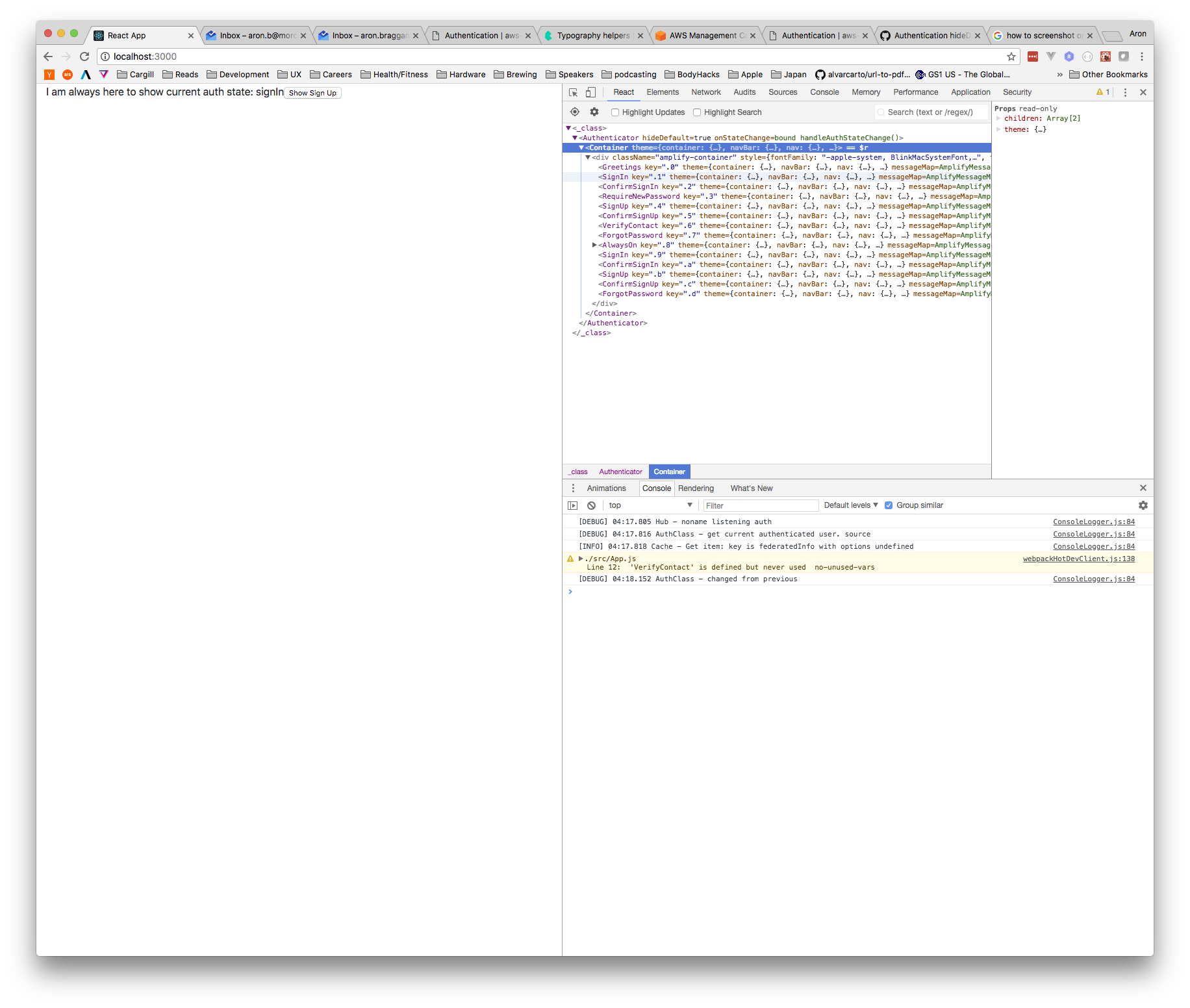
Interesting that you can see that I have double components within the
 8BitAron
on 25 Feb 2018
8BitAron
on 25 Feb 2018
I found the same issue recently.
IMHO the problem lies in the hide check every AuthPiece Component implements inside showComponent:
e.g. SignUp
if (hide && hide.includes(SignUp)) {
  return null;
}
This problem could be avoided with making authenticatorComponents an Object to overwrite certain default screens:
withAuthenticator(
  App,
  false,
  {
    SignIn: <MySignIn />,
  }
)
or by making the hidden check a function that could be overwritten in a custom component with a default like this:
import { SignIn } from 'aws-amplify-react'

export default class MySignIn extends SignIn {
  isHidden() {
    const { hide } = this.props
    return hide && hide.includes(this)
  }
}
 jbreckel
on 27 Feb 2018
jbreckel
on 27 Feb 2018
Is there a temporary workaround I can do to make this work? My example is similar to @8BitAron
 nickchoate
on 4 Mar 2018
nickchoate
on 4 Mar 2018
@nickchoate This issue should have been fixed although it's not published yet. For now you can just pull the master branch down and use it in your local.
 powerful23
on 6 Mar 2018
powerful23
on 6 Mar 2018
Hi,
I am also waiting for this fix... Do you know when it will be published?
 OlivierPT
on 14 Mar 2018
OlivierPT
on 14 Mar 2018
@OlivierPT it's now in the beta version. You can run npm install aws-amplify-react@beta to get it.
powerful23
on 14 Mar 2018
Closing the issue as it has been fixed in the latest release.
powerful23
on 25 Mar 2018
Related issues
 rayhaanq
·
3Comments
rayhaanq
·
3Comments
 benevolentprof
·
3Comments
benevolentprof
·
3Comments
 josoroma
·
3Comments
josoroma
·
3Comments
 leantide
·
3Comments
leantide
·
3Comments
 guanzo
·
3Comments
guanzo
·
3Comments
Most helpful comment
@nickchoate This issue should have been fixed although it's not published yet. For now you can just pull the master branch down and use it in your local.