Amplify-ios: Ios - Sign in With apple gives domain error - "Error Domain=com.amazon.cognito.AWSCognitoAuthErrorDomain Code=-3000 "(null)" "
Describe the bug
I am trying to implement social sign in/ sign up into my app and I have been running into an issue regarding apple sign in. The documentation I have followed is this one: https://docs.amplify.aws/lib/auth/social_signin_web_ui/q/platform/ios#prerequisites.
I have been able to implement social sign in with Facebook and google but when I try to sign in to the app using apple, I get this error:
AuthError: Unexpected error occurred with message: An unknown error occurred
Recovery suggestion: This should not happen. There is a possibility that there is a bug if this error persists. Please take a look at https://github.com/aws-amplify/amplify-ios/issues to see if there are any existing issues that match your scenario, and file an issue with the details of the bug if there isn't. Issue encountered at:
file: /Pods/Amplify/Amplify/Categories/Auth/Error/AuthError.swift
function: recoverySuggestion
line: 79
Caused by:
Error Domain=com.amazon.cognito.AWSCognitoAuthErrorDomain Code=-3000 "(null)" UserInfo={error=invalid_request: SignInWithApple Error - 400 invalid_client}
false
I have gone to that line(79) and it gives me the following return AmplifyErrorMessages.shouldNotHappenReportBugToAWS()
My issue is similar to the one reported here: https://github.com/aws-amplify/amplify-ios/issues/613
but I was unable to find my answer on there. I have configured and reconfigured on the apple dev site, and aws console site multiple times. I believe I am using the correct domain because it is the one listed when I configure it on the amplify CLI and on the aws cognito console.
To Reproduce
Steps to reproduce the behavior:
When I sign in to my app through my phone it asks me if i want to sign in to "null" with face ID. ( I am not sure if the null is an issue that is related
Once I use face ID to sign in, it doesn't sign me into the app. I also tried doing this by typing my credentials. The Web hosted UI also gives me the same issues.
One thing to note is I called the function
_ = Amplify.Auth.signInWithWebUI(for: .facebook, presentationAnchor: self.view.window!) { result in
            switch result {
            case .success(_):
                print("Sign in succeeded")
            case .failure(let error):
                print("Sign in failed \(error)")
            }
        }
Expected behavior
After entering the credentials it should log me in like the other SocialSIgnIn providers. The other ones like google and facebook are working with no problems, so I have no idea why apple isn't working besides not configuring it correctly but I have done it multiple times.
Environment(please complete the following information):
- Amplify Framework Version: [4.18.0]
- Dependency Manager: [CocoaPods]
- Swift Version : [e.g. 5.0]
- xcode Version: [Version 11.6]
Device Information (please complete the following information):
- Device: [iphone X(my phone 13.5.1), Iphone 8,11 simulator ]
- iOS Version: [13.5.1]
- Specific to simulators:
 YanRei
All 6 comments
I'm getting the same error with facebook and google as well.
 AboulEinein
on 22 Jul 2020
AboulEinein
on 22 Jul 2020
@YanRei
When I sign in to my app through my phone it asks me if i want to sign in to "null" with face ID. ( I am not sure if the null is an issue that is related.
This should not be a problem with signing in, the null issue was a OS level problem which was fixed in iOS 13.6 beta, details here.
I tried a new app from scratch - https://github.com/royjit/SIWACognitoUserPoolSample. Followed the steps given here - https://docs.amplify.aws/lib/auth/social_signin_web_ui/q/platform/ios and I was able to sign in and sign out without any issue.
As per the documentation invalid_client error is thrown when the client includes client_id and client_secret in the authorization header, but there's no such client with that client_id and client_secret. Can you make sure that you have the correct configuration in the amplifyconfiguration.json. Here is the structure of my configuration:
{
    "UserAgent": "aws-amplify-cli/2.0",
    "Version": "1.0",
    "auth": {
        "plugins": {
            "awsCognitoAuthPlugin": {
                "UserAgent": "aws-amplify/cli",
                "Version": "0.1.0",
                "IdentityManager": {
                    "Default": {}
                },
                "CredentialsProvider": {
                    "CognitoIdentity": {
                        "Default": {
                            "PoolId": "xx",
                            "Region": "xx"
                        }
                    }
                },
                "CognitoUserPool": {
                    "Default": {
                        "PoolId": "xx",
                        "AppClientId": "xx",
                        "AppClientSecret": "xx",
                        "Region": "xx"
                    }
                },
                "Auth": {
                    "Default": {
                        "OAuth": {
                            "WebDomain": "xx",
                            "AppClientId": "xx",
                            "AppClientSecret": "xx",
                            "SignInRedirectURI": "siwacognito://",
                            "SignOutRedirectURI": "siwacognito://",
                            "Scopes": [
                                "phone",
                                "email",
                                "openid",
                                "profile",
                                "aws.cognito.signin.user.admin"
                            ]
                        },
                        "authenticationFlowType": "USER_SRP_AUTH"
                    }
                }
            }
        }
    }
}
@AboulEinein Are you also getting invalid_client error? Could you please check the configuration is right?
 royjit
on 25 Jul 2020
royjit
on 25 Jul 2020
@royjit I've managed to get it working. But, may I suggest that you add the configuration sample in the docs.
The docs is assuming that we're using the CLI which is not the case for me and it took me a while to get the configuration correct.
AboulEinein
on 25 Jul 2020
@AboulEinein we recently added some docs for Use existing AWS resources. That file can get really complex the more features you add and that's why CLI is the recommended way.
That being said, we're working on improving the support for existing resources on both the documentation and tooling fronts. Appreciate your feedback.
 drochetti
on 27 Jul 2020
drochetti
on 27 Jul 2020
Thank you @royjit for answering my question, however I am still getting issues and I checked my config file, and everything seems correct. Google and Facebook works for me so I dont think its the Config file. I tried reconfiguring on the apple dev page by creating a new appID, Service ID and Im still getting the same issue.
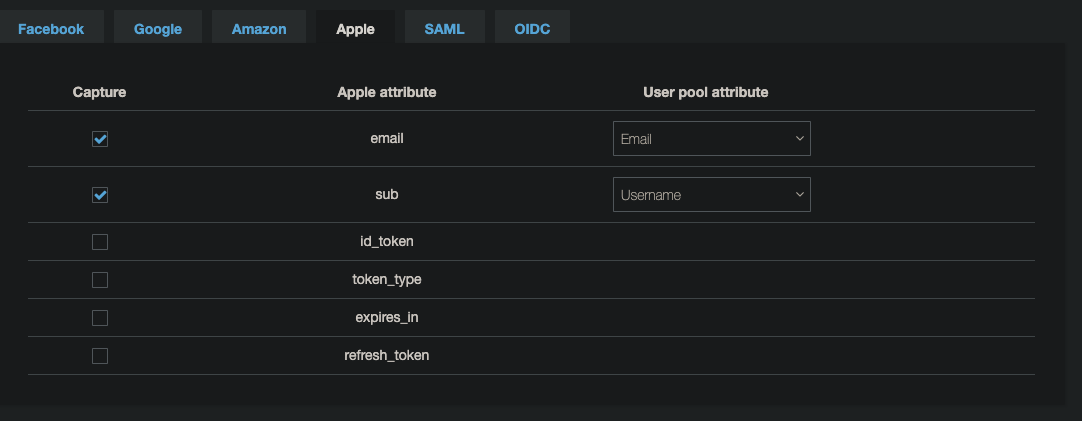
Update: I think I have fixed the Config issue on apple but now I am getting an attribute error?
This is the following error I am getting now.
Error Domain=com.amazon.cognito.AWSCognitoAuthErrorDomain Code=-3000 "(null)" UserInfo={error=invalid_request: Invalid user attributes: email: The attribute is required
I have it mapped on the attributes tab on the attributes tab for apple, so I am not sure why I am getting this error?
YanRei
on 27 Jul 2020
I have fixed my issues @royjit , It was due to the way apple handles user attributes. Apple only sends email attributes once, so if you have an Icloud account associated then it wont send the email attribute back. The way I fixed it was to reset my iCloud account for the app in AppleId->password and security-> apps using your Apple ID. Inside the iPhone settings. Thank you for all the help!
YanRei
on 28 Jul 2020
Related issues
 ovidiuadorian-yonder
·
5Comments
ovidiuadorian-yonder
·
5Comments
 LordZardeck
·
3Comments
LordZardeck
·
3Comments
 shikhilnuwal
·
6Comments
shikhilnuwal
·
6Comments
 snowjujube
·
4Comments
snowjujube
·
4Comments
 sebsto
·
8Comments
sebsto
·
8Comments
Most helpful comment
I'm getting the same error with
facebookandgoogleas well.