Amplify-ios: 1.0.0-rc.1 crashes at runtime when APIPlugin is added but backend does not exist yet
Describe the bug
Amplify 1.0.0-rc.1
When the code adds the APIPlugin but the amplify push has not been made yet (there is no API / backend), the execution crashes.
To Reproduce
Steps to reproduce the behavior:
- Create a new project, create the pod, create the DataStore schema and do a codegen
- Initialize amplify in your code with
        do {
//            Amplify.Logging.logLevel = .info

            try Amplify.add(plugin: AWSAPIPlugin())
            try Amplify.add(plugin: AWSDataStorePlugin(modelRegistration: AmplifyModels()))

            try Amplify.configure()
            print("Amplify initialized")
...
Expected behavior
No crash
Screenshots
If applicable, add screenshots to help explain your problem.
Environment(please complete the following information):
- Amplify Framework Version: 1.0.0-rc.1
- Dependency Manager: cocoapod 1.9.2
- Swift Version : 5.x
Device Information (please complete the following information):
- Device: simulator
- iOS Version: 13.x
- Specific to simulators:
Additional context
Error in my console :
Amplify initialized
==HUB== HubPayload(eventName: "Amplify.configured", context: nil, data: nil)
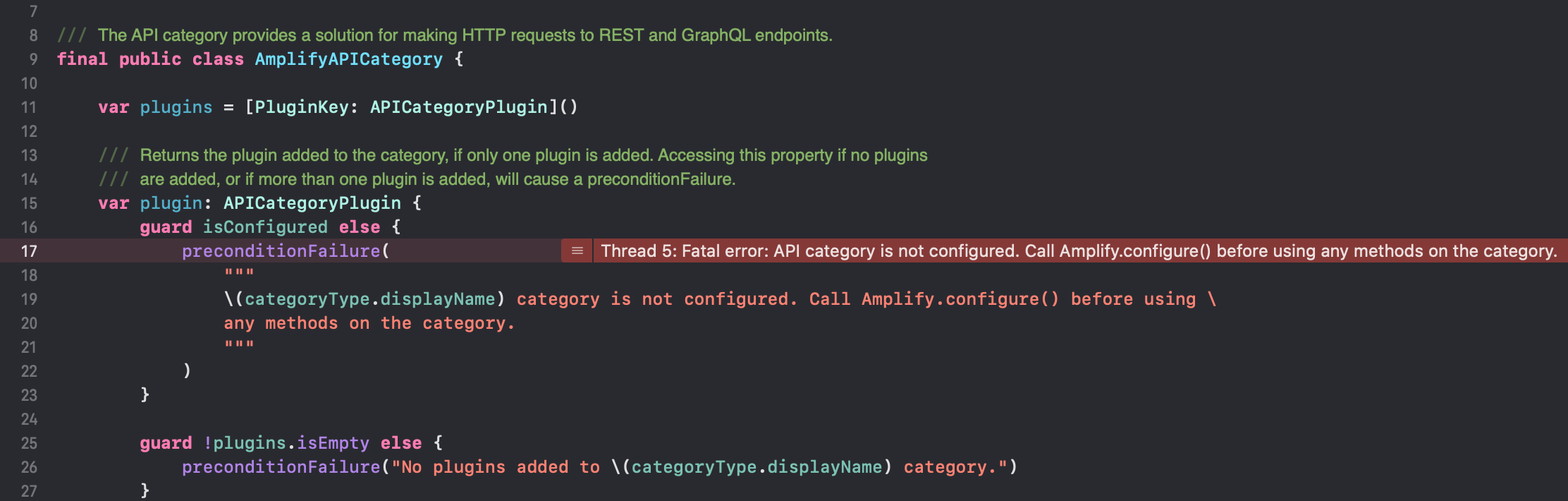
Fatal error: API category is not configured. Call Amplify.configure() before using any methods on the category.: file /Users/stormacq/Documents/amazon/code/amplify/amplify-mobile-news-blog/amplify-lib-ios-demo/Pods/Amplify/Amplify/Categories/API/AmplifyAPICategory.swift, line 17
2020-05-22 21:18:04.867104+0200 amplify-lib-ios-demo[28171:4552336] Fatal error: API category is not configured. Call Amplify.configure() before using any methods on the category.: file /Users/stormacq/Documents/amazon/code/amplify/amplify-mobile-news-blog/amplify-lib-ios-demo/Pods/Amplify/Amplify/Categories/API/AmplifyAPICategory.swift, line 17
Line that causes the crash
#6 0x0000000101a6b2d0 in AmplifyAPICategory.plugin.getter at /Users/stormacq/Documents/amazon/code/amplify/amplify-mobile-news-blog/amplify-lib-ios-demo/Pods/Amplify/Amplify/Categories/API/AmplifyAPICategory.swift:17
Error message in the debugger :
Thread 5: Fatal error: API category is not configured. Call Amplify.configure() before using any methods on the category.
 sebsto
All 17 comments
I see the same error even after the backend is deployed with auth and api.
 amuresia
on 26 May 2020
amuresia
on 26 May 2020
I see the same error even after the backend is deployed with
authandapi.
I assume you have the API Plugin added at initialization time.
try Amplify.add(plugin: AWSAPIPlugin())
Does your awsconfiguration.json has an AppSync property ?
Does your amplifyconfiguration.json has an api property ?
sebsto
on 26 May 2020
Hi @sebsto, yes, I initialise like this in my AppDelegate:
func application(_ application: UIApplication, didFinishLaunchingWithOptions launchOptions: [UIApplication.LaunchOptionsKey: Any]?) -> Bool {
        // Override point for customization after application launch.
        // Initialize AWSMobileClient singleton
        AWSMobileClient.default().initialize { (userState, error) in
            if let userState = userState {
                print("UserState: \(userState.rawValue)")
            } else if let error = error {
                print("error: \(error.localizedDescription)")
            }
        }

        let apiPlugin = AWSAPIPlugin(modelRegistration: AmplifyModels())
        do {
            try Amplify.add(plugin: apiPlugin)
            try Amplify.configure()
            print("Amplify initialized")
        } catch {
            print("Failed to configure Amplify \(error)")
        }

        return true
    }
awsconfiguration.json does include the AppSync property with
"AppSync": {
        "Default": {
            "ApiUrl": "*",
            "Region": "*",
            "AuthMode": "AMAZON_COGNITO_USER_POOLS",
            "ClientDatabasePrefix": "*"
        }
    }
and amplifyconfiguration.json does include the api property.
"api": {
        "plugins": {
            "awsAPIPlugin": {
                "*": {
                    "endpointType": "GraphQL",
                    "endpoint": "*",
                    "region": "*",
                    "authorizationType": "AMAZON_COGNITO_USER_POOLS"
                }
            }
        }
    }
Amplify 1.0.0-rc1 is unreleased yet, this is just a release candidate, the doc is not published yet.
You do not need to use AWSMobileClient anymore
Have a look at my sample project at https://github.com/sebsto/amplify-mobile-news-blog
sebsto
on 26 May 2020
I had a feeling that was the case!
I tried with the contents of your AppDelegate and after I sign in with Cognito and use the API I get the same problem as before
2020-05-26 11:23:41.652330+0200 * Fatal error: Authentication category is not configured. Call Amplify.configure() before using any methods on the category.: file /*/amplify-ios-1.0.0/Amplify/Categories/Auth/AuthCategory.swift, line 18
I messaged the team in Discord and I'll wait for 1.0.0 to be released.
Would you be so kind to add a README to your example repo, the iOS one in particular. It looks great btw!
amuresia
on 26 May 2020
I am writing a blog post for Amplify Mobile 1.0.0 launch, that will be the missing README :-)
It should not be very long anymore.
Can you check your Auth category is correctly configured ? (you have an Auth property in awsconfiguration.json ? and a 'authproperty inamplify configuration.json` ?)
This is my amplifyconfiguration.json (notice the Auth from awsconfiguration.json is duplicated there, this will be added automatically by amplify CLI when 1.0.0 will be released)
{
    "api": {
        "plugins": {
            "awsAPIPlugin": {
                "amplifyDatasource": {
                    "endpointType": "GraphQL",
                    "endpoint": "https://3sq.appsync-api.eu-west-1.amazonaws.com/graphql",
                    "region": "eu-west-1",
                    "authorizationType": "API_KEY",
                    "apiKey": "da2-cli64d4"
                }
            }
        }
    },
    "auth": {
        "plugins": {
            "awsCognitoAuthPlugin": {
                "UserAgent": "aws-amplify/cli",
                "Version": "0.1.0",
                "IdentityManager": {
                    "Default": {}
                },
                "AppSync": {
                    "Default": {
                        "ApiUrl": "https://3nrsq.appsync-api.eu-west-1.amazonaws.com/graphql",
                        "Region": "eu-west-1",
                        "AuthMode": "API_KEY",
                        "ApiKey": "da2-cli6dd4",
                        "ClientDatabasePrefix": "amplifyDatasource_API_KEY"
                    }
                },
                "CredentialsProvider": {
                    "CognitoIdentity": {
                        "Default": {
                            "PoolId": "eu-west-1:8761f7",
                            "Region": "eu-west-1"
                        }
                    }
                },
                "CognitoUserPool": {
                    "Default": {
                        "PoolId": "eu-west-1_gjqXwlSJs",
                        "AppClientId": "6sk0",
                        "AppClientSecret": "1q157",
                        "Region": "eu-west-1"
                    }
                },
                "Auth": {
                    "Default": {
                        "OAuth": {
                            "WebDomain": "amplify-lib-ios-demo-amplify.auth.eu-west-1.amazoncognito.com",
                            "AppClientId": "6sk0",
                            "AppClientSecret": "1q57",
                            "SignInRedirectURI": "myapp://",
                            "SignOutRedirectURI": "myapp://",
                            "Scopes": [
                                "phone",
                                "email",
                                "openid",
                                "profile",
                                "aws.cognito.signin.user.admin"
                            ]
                        },
                        "authenticationFlowType": "USER_SRP_AUTH"
                    }
                }
            }
        }
    },
    "predictions": {
        "plugins": {
            "awsPredictionsPlugin": {
                "defaultRegion": "eu-west-1",
                "convert": {
                    "translateText": {
                        "targetLang": "fr",
                        "sourceLang": "en",
                        "region": "eu-west-1",
                        "defaultNetworkPolicy": "auto"
                    }
                }
            }
        }
    }
}
The awsconfiguration.json's Auth is a bit scarce.
    "CredentialsProvider": {
        "CognitoIdentity": {
            "Default": {
                "PoolId": "*",
                "Region": "*"
            }
        }
    },
    "CognitoUserPool": {
        "Default": {
            "PoolId": "*",
            "AppClientId": "*",
            "AppClientSecret": "*",
            "Region": "*"
        }
    },
    "Auth": {
        "Default": {
            "authenticationFlowType": "USER_SRP_AUTH"
        }
    },
And actually amplifyconfigurtion.json doesn't have auth at all.
amuresia
on 26 May 2020
It means the Auth category is setup with just Cognito Auth, no social providers (like in my example). This explains the difference.
I would try to remove the auth and re-create it.
Maybe amplify update auth ? or amplify remove auth and 'amplify add auth` again ?
sebsto
on 26 May 2020
I removed and redeployed everything but I'm seeing the same error :(
amuresia
on 26 May 2020
I am afraid I can not help anymore. Wait for 1.0.0 to be released and try again with a fresh project and the updated CLI
sebsto
on 26 May 2020
@amuresia and @sebsto 1.0.0 is released and I've verified that it's available in CocoaPods. Can you re-test with the latest version & see if this is still an issue?
 palpatim
on 27 May 2020
palpatim
on 27 May 2020
I will verify this tomorrow. thanks
sebsto
on 27 May 2020
This is not fixed in 1.0.0
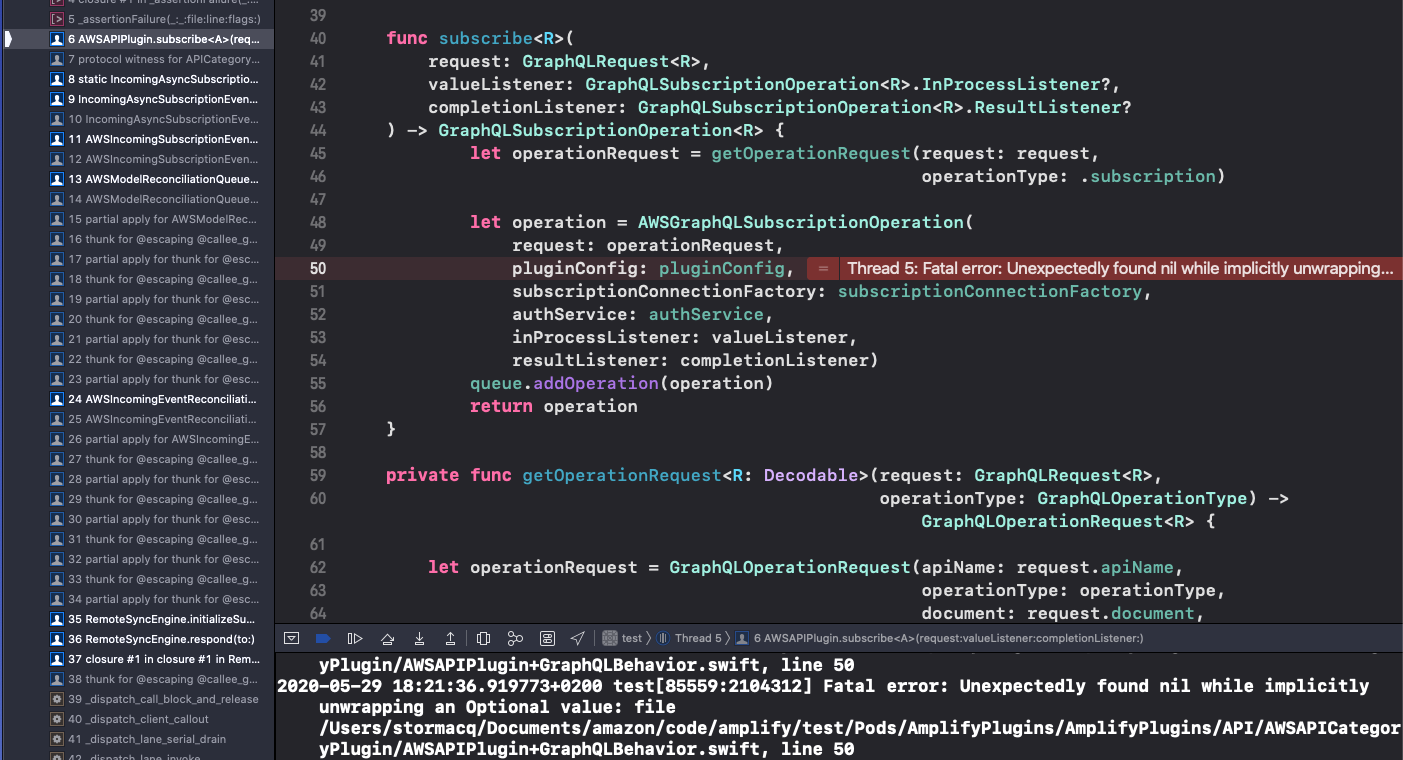
When adding AWSAPIPlugin() at runtime but before an amplify push, the app is crashing with :
Initilaization Code :
    func application(_ application: UIApplication, didFinishLaunchingWithOptions launchOptions: [UIApplication.LaunchOptionsKey: Any]?) -> Bool {

        // Override point for customization after application launch.
        let dataStorePlugin = AWSDataStorePlugin(modelRegistration: AmplifyModels())
        do {
           try Amplify.add(plugin: AWSAPIPlugin())
           try Amplify.add(plugin:dataStorePlugin)
           try Amplify.configure()
           print("Initialized Amplify");
        } catch {
           print("Could not initialize Amplify: \(error)")
        }

        return true
    }
Run the app before an `amplify push`` i.e. THERE IS NO BACKEND CREATED yet.
The app should not crash in this condition but silently ignore the lack of backend,
sebsto
on 29 May 2020
Thanks for confirming @sebsto
We will work on a fix for this.
 drochetti
on 1 Jun 2020
drochetti
on 1 Jun 2020
I was able to reproduce this. Issue happens when AWSAPICategoryPlugin is added to the project but amplify push was not called. Since amplify push is not called, amplifyconfiguration.json does not contain any configuration for API. Due to this, the following code block is not called:
https://github.com/aws-amplify/amplify-ios/blob/da26991b88f5128d8b0f6bc07c17eb038bc5da03/AmplifyPlugins/API/AWSAPICategoryPlugin/AWSAPIPlugin%2BConfigure.swift#L36
As a result the non-nil value pluginConfig was never assigned a value.
 royjit
on 1 Jul 2020
royjit
on 1 Jul 2020
The fix has been released, please try with the latest SDK. Feel free to reach us if you have any concerns.
royjit
on 25 Jul 2020
Hello, thank you for the follow up.
I just tested this using Amplify 1.0.5 and I confirm this is fixed.
sebsto
on 27 Jul 2020
Related issues
 chris-mds
·
3Comments
chris-mds
·
3Comments
 ovidiuadorian-yonder
·
5Comments
ovidiuadorian-yonder
·
5Comments
 rodrigoelp
·
5Comments
rodrigoelp
·
5Comments
 AboulEinein
·
8Comments
AboulEinein
·
8Comments
 dsaliberti
·
6Comments
dsaliberti
·
6Comments