Amplify-console: Environment Variables Through AWS Amplify Console
* Please describe which feature you have a question about? *
I am trying to add environment variables and inject them into my React app (created using create-react-app) through the AWS Amplify console. I followed this guide. However, after I updated my amplify.yml file like the guide suggested, my builds have started failing.
* Provide additional details*
Here is my build log
#Completed phase: preBuild
# Starting phase: build
# Executing command: npm run build:
2020-07-15T17:51:24.795Z [WARNING]: npm
2020-07-15T17:51:24.795Z [WARNING]: ERR! missing script: build:
npm ERR!
npm ERR! Did you mean this?
npm ERR! build
2020-07-15T17:51:24.963Z [WARNING]:
2020-07-15T17:51:24.965Z [WARNING]: npm ERR! A complete log of this run can be found in:
npm ERR! /root/.npm/_logs/2020-07-15T17_51_24_796Z-debug.log
2020-07-15T17:51:24.965Z [HELP]: Outputting the npm debug log
0 info it worked if it ends with ok
1 verbose cli [ '/root/.nvm/versions/node/v10.16.0/bin/node',
1 verbose cli '/root/.nvm/versions/node/v10.16.0/bin/npm',
1 verbose cli 'run',
1 verbose cli 'build:' ]
2 info using [email protected]
3 info using [email protected]
4 verbose stack Error: missing script: build:
4 verbose stack
4 verbose stack Did you mean this?
4 verbose stack build
4 verbose stack at run (/root/.nvm/versions/node/v10.16.0/lib/node_modules/npm/lib/run-script.js:155:19)
4 verbose stack at /root/.nvm/versions/node/v10.16.0/lib/node_modules/npm/lib/run-script.js:63:5
4 verbose stack at /root/.nvm/versions/node/v10.16.0/lib/node_modules/npm/node_modules/read-package-json/read-json.js:115:5
4 verbose stack at /root/.nvm/versions/node/v10.16.0/lib/node_modules/npm/node_modules/read-package-json/read-json.js:418:5
4 verbose stack at checkBinReferences_ (/root/.nvm/versions/node/v10.16.0/lib/node_modules/npm/node_modules/read-package-json/read-json.js:373:45)
4 verbose stack at final (/root/.nvm/versions/node/v10.16.0/lib/node_modules/npm/node_modules/read-package-json/read-json.js:416:3)
4 verbose stack at then (/root/.nvm/versions/node/v10.16.0/lib/node_modules/npm/node_modules/read-package-json/read-json.js:160:5)
4 verbose stack at /root/.nvm/versions/node/v10.16.0/lib/node_modules/npm/node_modules/read-package-json/read-json.js:280:12
4 verbose stack at /root/.nvm/versions/node/v10.16.0/lib/node_modules/npm/node_modules/graceful-fs/graceful-fs.js:90:16
4 verbose stack at FSReqWrap.readFileAfterClose [as oncomplete] (internal/fs/read_file_context.js:53:3)
5 verbose cwd /codebuild/output/src299746030/src/barcode-generator
6 verbose Linux 4.14.181-108.257.amzn1.x86_64
7 verbose argv "/root/.nvm/versions/node/v10.16.0/bin/node" "/root/.nvm/versions/node/v10.16.0/bin/npm" "run" "build:"
8 verbose node v10.16.0
9 verbose npm v6.9.0
10 error missing script: build:
10 error
10 error Did you mean this?
10 error build
11 verbose exit [ 1, true ]
2020-07-15T17:51:24.969Z [ERROR]: !!! Build failed
2020-07-15T17:51:25.069Z [ERROR]: !!! Non-Zero Exit Code detected
2020-07-15T17:51:25.069Z [INFO]: # Starting environment caching...
2020-07-15T17:51:25.070Z [INFO]: # Environment caching completed
Terminating logging...
The guide linked above suggests the following command:
build:
commands:
- npm run build:$BUILD_ENV
This command seems to causing the build error.
How do I resolve this and inject my env variables during build time for use in my React app?
 redixhumayun
All 8 comments
Hi, is there any way to figure this out? I'm assuming that this must be a known bug since I was following the official AWS Amplify docs when I made the changes to the amplify.yml file.
redixhumayun
on 17 Jul 2020
Hello @redixhumayun,
I was able to create an env variable called BUILD_ENV with a value test, and use that in the amplify.yml, as follows:
version: 1
backend:
  phases:
    build:
      commands:
        - '# Execute Amplify CLI with the helper script'
        - amplifyPush --simple
frontend:
  phases:
    preBuild:
      commands:
        - yarn install
    build:
      commands:
        - yarn run build:$BUILD_ENV
  artifacts:
    baseDirectory: build
    files:
      - '**/*'
  cache:
    paths:
      - node_modules/**/*
I could see the env variable substituted with value 'test'. This is the corresponding log:
# Executing command: yarn run build:test
I had a corresponding script in package.json called build:test.
 abhi7cr
on 17 Jul 2020
abhi7cr
on 17 Jul 2020
Okay, this approach is confusing me.
Using this approach I can see how I can run different script commands for different branches of my application.
However, this doesn't answer the question as to how to inject environment variables into the app itself.
The guide states the following:
Environment variables are key-value pairs that are available at build time. These configurations can be anything, including >the following:
Database connection details
Third-party API keys
Different customization parameters
Secrets
If I have a BUILD_ENV variable with a value of prod and can run the build:prod script, I can't set my DB keys or paths in the package.json file right? That would exposing them.
For instance, I can't have build:prod: API_KEY='1234' DB_KEY='ge15jrh8' react-scripts build
My question ultimately boils down to this: If I have a .env.production file and a .env.development file and I want to use the key value pairs from the .env.production file in one branch of my repo in the AWS Amplify console and the key value pairs from .env.development file in the other branch of my repo, how would I accomplish that?
redixhumayun
on 17 Jul 2020
In general, it's not good practice to store api keys and secrets in the client side (be it package.json or .env files), since React injects them at build time into your source code which ends up in the browser. React warns about this too:
WARNING: Do not store any secrets (such as private API keys) in your React app!
Environment variables are embedded into the build, meaning anyone can view them by inspecting your app's files.
(More info)
To your question of having .env.production point to production branch, and .env.development point to develop branch, you can do it in either of the 2 ways:
- Using .env files - Since React has a default behavior to use specific
.envfiles depending onNODE_ENVvariable (which we cannot override), you can define a custom script inpackage.jsonthat loads a specific env file depending upon the branch. It usesenv-cmdpackage as follows:
build:development": "env-cmd -f .env.development react-scripts build". In this case to inject the environment variable with value asdevelopment, you would define it as an Environment variable in Amplify Console, and override the value for each branch. - Not using .env files - You could directly inject different values for the same environment variable per branch as follows:

Let me know if you have any questions.
abhi7cr
on 18 Jul 2020
Hi @abhi7cr, thank you for the prompt replies. I do have some more questions though.
So, I definitely want to avoid using .env files. However, from what I've understood from your previous comment, I can use the keys in the environment variables file to point to specific build scripts correct?
I have the following keys in my environment variables file
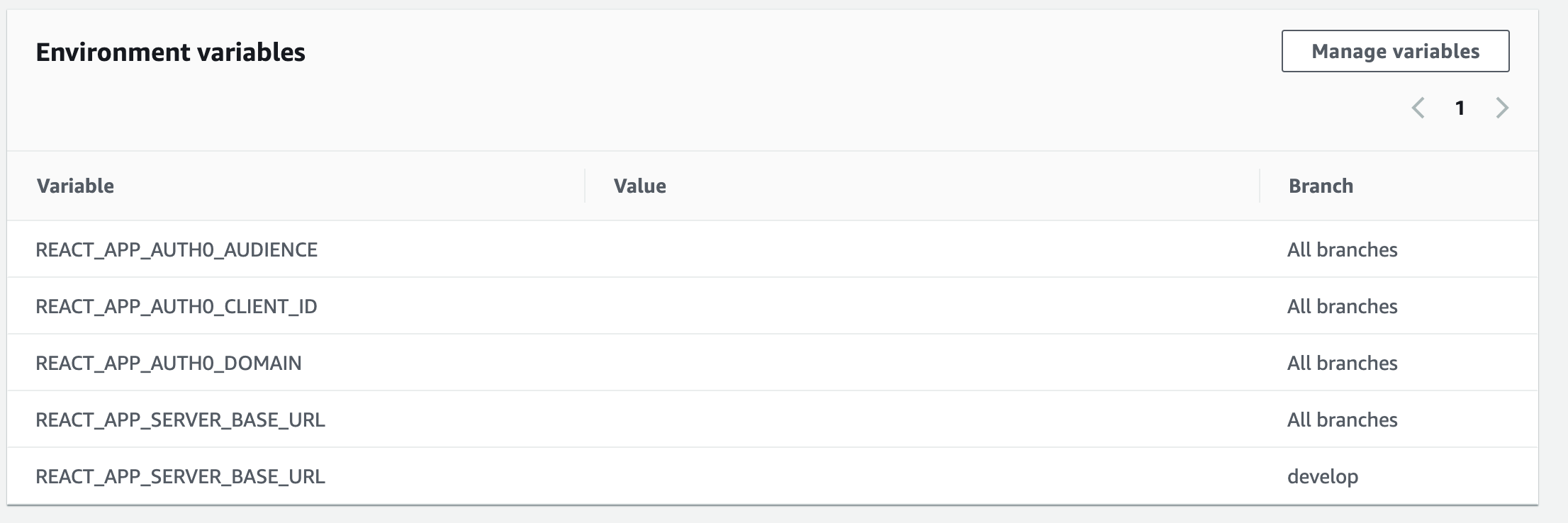
How would I use REACT_APP_AUTH0_CLIENT_ID for instance?
I can't have a build:$REACT_APP_AUTH0_CLIENT_ID in my build scripts can I? Because that would expose my client id. Also, this still doesn't explain how I would have multiple environment variables either.
I'm sorry but I still don't quite understand how I'd inject these env variables into my React app.
redixhumayun
on 18 Jul 2020
I see you have defined REACT_APP_AUTH0_CLIENT_ID as an Environment variable. So you can use it in your react code using process.env.REACT_APP_AUTH0_CLIENT_ID. You don’t need to use build: $REACT_APP_AUTH0_CLIENT_ID. The ‘build:’ script is generally used to run the builds specific to an environment so as to load the corresponding .env files. For example,
build:development, build:production, etc. Since you are not planning to use .env files, you don’t need it.
As i said earlier, if you are injecting Client Id or any sensitive information into your React app, it is going to be exposed regardless of if you use .env files or inject directly using Amplify, since React just replaces process.env.REACT_APP_AUTH0_CLIENT_ID with the actual value during build time, and the source code that would be shipped to the browser will expose the actual value. Ideally, you would have the frontend call your server, which would have access to the client ids/secrets.
For multiple environments, I see you have REACT_APP_SERVER_BASE_URL defined for all branches, with an override for develop. Now, when the develop branch is getting built, this environment variable will have the value you have defined against develop branch, and you can use it directly in your react code using: process.env.REACT_APP_SERVER_BASE_URL. Likewise for all other branches, it will take the default value.
Let me know if you need more clarifications😊
abhi7cr
on 18 Jul 2020
As i said earlier, if you are injecting Client Id or any sensitive information into your React app, it is going to be exposed regardless of if you use .env files or inject directly using Amplify, since React just replaces process.env.REACT_APP_AUTH0_CLIENT_ID with the actual value during build time, and the source code that would be shipped to the browser will expose the actual value. Ideally, you would have the frontend call your server, which would have access to the client ids/secrets
Ah, this explains so much. I was under the impression that there was a way to secretly inject all the env variables I needed through the AWS Amplify Console. However, the only secret I was considering worthwhile protecting was the Auth0 Client ID, which as it turns out shows up in the browser URL anyway.
For future readers, I decided to go with the env-cmd approach where I define two separate builds scripts build:development and build:production. I then load the relevant .env file for each script.
@abhi7cr thank you so much for your patience and help. I really appreciate it :)
redixhumayun
on 18 Jul 2020
@abhi7cr Hello there, i was wondering if i can ask for help. i have a node/react app and im trying to host it on AWS amplify but env variables are not working whatsoever! it clones my code from my github which i didnt push my .env file, so i have tried to add them manually but it didnt work! they say i have to modify this build section to:
build:
commands:
- npm run build:$BUILD_ENV
but its not working for, by the way i have 10 variables how can i add them like this?
 Ashkanrpd
on 26 Sep 2020
Ashkanrpd
on 26 Sep 2020
Related issues
 adamaltman
·
3Comments
adamaltman
·
3Comments
 dongjason1
·
3Comments
dongjason1
·
3Comments
 OzzieOrca
·
3Comments
OzzieOrca
·
3Comments
 gherrera-gesintel
·
4Comments
gherrera-gesintel
·
4Comments
 JIoJIaJIu
·
5Comments
JIoJIaJIu
·
5Comments
Most helpful comment
I see you have defined REACT_APP_AUTH0_CLIENT_ID as an Environment variable. So you can use it in your react code using process.env.REACT_APP_AUTH0_CLIENT_ID. You don’t need to use build: $REACT_APP_AUTH0_CLIENT_ID. The ‘build:’ script is generally used to run the builds specific to an environment so as to load the corresponding .env files. For example,
build:development, build:production, etc. Since you are not planning to use .env files, you don’t need it.
As i said earlier, if you are injecting Client Id or any sensitive information into your React app, it is going to be exposed regardless of if you use .env files or inject directly using Amplify, since React just replaces process.env.REACT_APP_AUTH0_CLIENT_ID with the actual value during build time, and the source code that would be shipped to the browser will expose the actual value. Ideally, you would have the frontend call your server, which would have access to the client ids/secrets.
For multiple environments, I see you have REACT_APP_SERVER_BASE_URL defined for all branches, with an override for develop. Now, when the develop branch is getting built, this environment variable will have the value you have defined against develop branch, and you can use it directly in your react code using: process.env.REACT_APP_SERVER_BASE_URL. Likewise for all other branches, it will take the default value.
Let me know if you need more clarifications😊