Amplify-console: JS YAMLException crashes amplify console
Issue Description
A JS exception related to the amplify.yml file prevents me from seeing the detail view of my amplify console. Modifying the yaml file in my repo doesn't seem to change that behavior.
Detailed Steps To Reproduce
Not sure how to reproduce.
Copy and Paste Logs + Error Messages (remove sensitive data)
main.js:35 uncaught at o YAMLException: duplicated mapping key at line 37, column 1:
    version: 1
    ^
    at m (https://dqryvwaesjl1l.cloudfront.net/5d82503d58eaefe3954b453be1d2d57823dd518e/main.js:102:187427)
    at g (https://dqryvwaesjl1l.cloudfront.net/5d82503d58eaefe3954b453be1d2d57823dd518e/main.js:102:187525)
    at N (https://dqryvwaesjl1l.cloudfront.net/5d82503d58eaefe3954b453be1d2d57823dd518e/main.js:102:188606)
    at D (https://dqryvwaesjl1l.cloudfront.net/5d82503d58eaefe3954b453be1d2d57823dd518e/main.js:102:195585)
    at x (https://dqryvwaesjl1l.cloudfront.net/5d82503d58eaefe3954b453be1d2d57823dd518e/main.js:102:198146)
    at V (https://dqryvwaesjl1l.cloudfront.net/5d82503d58eaefe3954b453be1d2d57823dd518e/main.js:102:200254)
    at j (https://dqryvwaesjl1l.cloudfront.net/5d82503d58eaefe3954b453be1d2d57823dd518e/main.js:102:201001)
    at Z (https://dqryvwaesjl1l.cloudfront.net/5d82503d58eaefe3954b453be1d2d57823dd518e/main.js:102:201206)
    at Object.O [as safeLoad] (https://dqryvwaesjl1l.cloudfront.net/5d82503d58eaefe3954b453be1d2d57823dd518e/main.js:102:201463)
    at t.n.generateTabs (https://dqryvwaesjl1l.cloudfront.net/5d82503d58eaefe3954b453be1d2d57823dd518e/main.js:81:148187)
Expected behavior
Even if the amplify.yml file contains errors I should be able to remove the app or modify its build configuration.
Application Details
I can't get to my app ID because of the exception.
The contents of amplify.yml
version: 1
applications:
  - appRoot: frontend
    frontend:
      phases:
        preBuild:
          commands:
            - yarn install
        build:
          commands:
            - BUILD_MODE=$BUILD_MODE make build-frontend
      artifacts:
        baseDirectory: dist
        files:
          - '**/*'
      cache:
        paths:
          - node_modules/**/*
      customHeaders:
        - pattern: '**/*.js'
          headers:
            - key: 'Cache-Control'
              value: 'public,max-age=31536000,immutable'
        - pattern: '**/*.css'
          headers:
            - key: 'Cache-Control'
              value: 'public,max-age=31536000,immutable'
        - pattern: '**/*.png'
          headers:
            - key: 'Cache-Control'
              value: 'public,max-age=31536000,immutable'
        - pattern: '**/*.jpg'
          headers:
            - key: 'Cache-Control'
              value: 'public,max-age=31536000,immutable'
 davidmatter
All 7 comments
Hi @davidmatter,
Thanks for reporting. Just to understand the steps you followed:
- You created amplify.yml in your Frontend GitHub repo
- You connected your repo in amplify console
- In the build phase, you got an error because of an invalid amplify.yml file?
- When you say you are not able to see app details. Do you mean you see a white screen when you click on the app?
 abhi7cr
on 27 Jun 2020
abhi7cr
on 27 Jun 2020
@abhi7cr i am having the same problem: https://github.com/aws-amplify/amplify-console/issues/865
- You create amplify.yml in your Frontend GitHub repo
- You connected your repo in amplify console
- Go go to the Amplify console and change the yml to something that is not valid yml
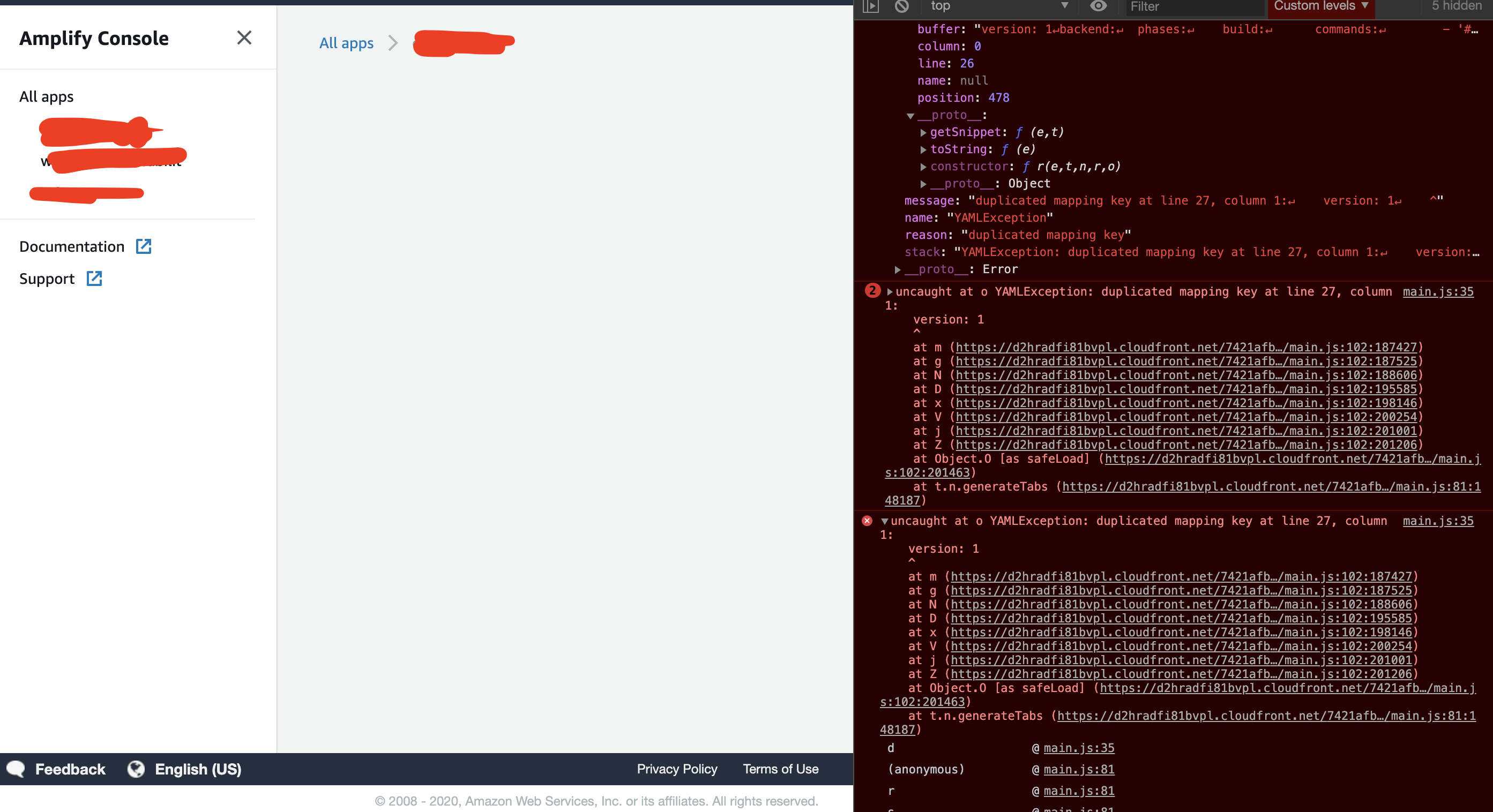
- When clicking on the App in the Console you get a blank page because of yml / js parsing error
- My build works fine tho! I just cannot access the logs because of the console being blank
When you say you are not able to see app details. Do you mean you see a white screen when you click on the app?
You can not even see any details about the app anymore:
 H34D
on 16 Jul 2020
H34D
on 16 Jul 2020
@abhi7cr I'm not exactly sure how to reproduce - Whether it was an invalid yaml file in the repo or in the app console. Same outcome as @H34D though.
Also, I haven't found out which version of the amplify.yaml file is used for the build if I make changes in both the repo's yaml file and the console's. Does the version in the repo override the one from the console or the other way around?
davidmatter
on 16 Jul 2020
i recovered from this error with a sneaky workaround:
- create a new amplify app, and select it from the fold out menu
- reload the console forcefully with (cmd+r on mac)
- this should bring you the interface back and show the newly create app
- in the new app go to build settings
- then switch to the app with the faulty yml via the fold out menu on the left side
- this should give you the editor with the faulty yml
- now click on edit and empty the whole yml (i had to to this because i was unable to write at that time, only delete)
- click on save
- reload everything and switch to the faulty application
- click on edit and past the correct yml back in
- click on save
- delete the new app you created
- done!, easy 🚀
H34D
on 16 Jul 2020
Hello all, thank you for your patience. We have deployed a fix for this, so it should no longer be an issue. Feel free to re-open this ticket if you continue to face this or related issues. Thank you!
 Athena96
on 17 Sep 2020
Athena96
on 17 Sep 2020
@Athena96 thanks! I still have this question that is absolutely unclear from the docs as well as the UI:
Also, I haven't found out which version of the amplify.yaml file is used for the build if I make changes in both the repo's yaml file and the console's. Does the version in the repo override the one from the console or the other way around?
davidmatter
on 18 Sep 2020
@davidmatter for a given branch, if you include amplify.yml in your project root during a build/deploy of that branch, that will override whatever you have provided in the console (regardless of what it shows).
 kahdojay
on 29 Sep 2020
kahdojay
on 29 Sep 2020
Related issues
 lucaluke88
·
4Comments
lucaluke88
·
4Comments
 asyschikov
·
5Comments
asyschikov
·
5Comments
 nballenger
·
5Comments
nballenger
·
5Comments
 helloPiers
·
3Comments
helloPiers
·
3Comments
 BardiaN
·
4Comments
BardiaN
·
4Comments