Amplify-console: Overriding yarn properly?
* Please describe which feature you have a question about? *
I am trying to use a newer version of yarn for the frontend build and I'm not sure if I'm doing it wrong or if this is a bug. I have tried overriding it in the "Edit build image settings"/"Live update packages" area, but it still uses v1.16.0:
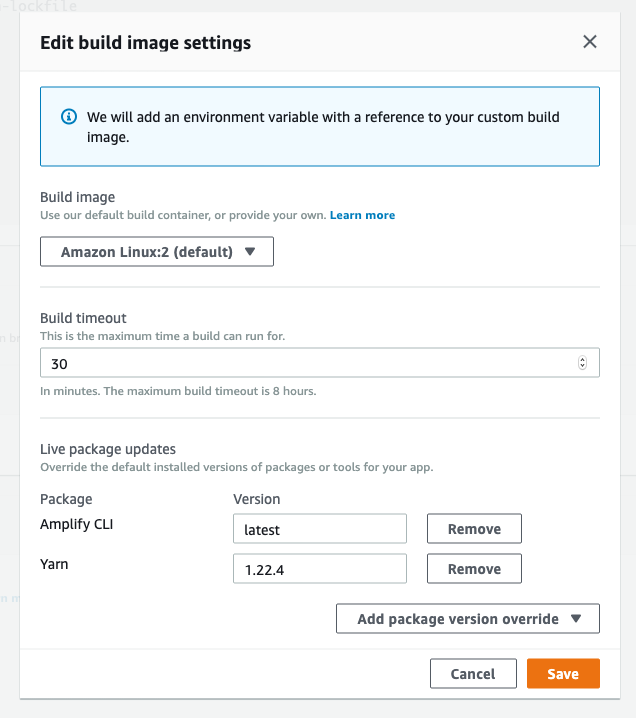
I have also tried setting it in amplify.yaml
frontend:
  phases:
    preBuild:
      commands:
        - nvm use 12
        - node -v
        - yarn global add [email protected]
        - yarn global add @quasar/cli
        - yarn install --frozen-lockfile
Here is the front end log:
                                 # Starting phase: preBuild
2020-05-04T17:10:37.841Z [INFO]: # Executing command: nvm use 12
2020-05-04T17:10:38.150Z [INFO]: Now using node v12.8.1 (npm v6.10.2)
2020-05-04T17:10:38.151Z [INFO]: # Executing command: node -v
2020-05-04T17:10:38.153Z [INFO]: v12.8.1
2020-05-04T17:10:38.153Z [INFO]: # Executing command: npm -g i [email protected]
2020-05-04T17:10:39.142Z [INFO]: /root/.nvm/versions/node/v12.8.1/bin/yarnpkg -> /root/.nvm/versions/node/v12.8.1/lib/node_modules/yarn/bin/yarn.js
2020-05-04T17:10:39.144Z [INFO]: /root/.nvm/versions/node/v12.8.1/bin/yarn -> /root/.nvm/versions/node/v12.8.1/lib/node_modules/yarn/bin/yarn.js
2020-05-04T17:10:39.147Z [INFO]: + [email protected]
                                 added 1 package in 0.231s
2020-05-04T17:10:39.157Z [INFO]: # Executing command: yarn global add @quasar/cli
2020-05-04T17:10:39.372Z [INFO]: yarn global v1.16.0
2020-05-04T17:10:39.410Z [INFO]: [1/4] Resolving packages...
2020-05-04T17:10:40.306Z [WARNING]: warning @quasar/cli > metalsmith > gray-matter > [email protected]: CoffeeScript on NPM has moved to "coffeescript" (no hyphen)
2020-05-04T17:10:40.588Z [INFO]: [2/4] Fetching packages...
2020-05-04T17:10:43.587Z [INFO]: [3/4] Linking dependencies...
2020-05-04T17:10:44.711Z [INFO]: [4/4] Building fresh packages...
2020-05-04T17:10:44.731Z [INFO]: success Installed "@quasar/[email protected]" with binaries:
2020-05-04T17:10:44.732Z [INFO]: - quasar
                                 Done in 5.36s.
2020-05-04T17:10:44.747Z [INFO]: # Executing command: yarn install --frozen-lockfile
2020-05-04T17:10:44.867Z [INFO]: yarn install v1.16.0
2020-05-04T17:10:44.937Z [INFO]: [1/5] Validating package.json...
2020-05-04T17:10:44.939Z [WARNING]: error [email protected]: The engine "yarn" is incompatible with this module. Expected version ">= 1.21.1". Got "1.16.0"
2020-05-04T17:10:44.947Z [WARNING]: error Found incompatible module.
at the end when it tried to validate the yarn version that quasar's default template expects, it still uses v1.16.0
 smakinson
All 12 comments
@smakinson can you update your buildspec to:
frontend:
  phases:
    preBuild:
      commands:
        - nvm use 12
        - node -v
        - yarn global add [email protected]
        - yarn --v
        - yarn global add @quasar/cli
       -  yarn --v
        - yarn install --frozen-lockfile
Suspect there's something going on after the quasar CLI install.
 swaminator
on 14 May 2020
swaminator
on 14 May 2020
@swaminator I'll give it a try and see what happens.
Setting yarn in the Live package updates area is definitely a no go?
smakinson
on 14 May 2020
@swaminator I tried and I still see the issue
frontend:
  phases:
    preBuild:
      commands:
        - nvm use 12
        - node -v
        - yarn global add [email protected]
        - yarn --v
        - yarn global add @quasar/cli
        - yarn --v
        - yarn install --frozen-lockfile
                                 # Starting phase: preBuild
2020-05-14T19:00:23.872Z [INFO]: # Executing command: nvm use 12
2020-05-14T19:00:24.235Z [INFO]: Now using node v12.8.1 (npm v6.10.2)
2020-05-14T19:00:24.235Z [INFO]: # Executing command: node -v
2020-05-14T19:00:24.237Z [INFO]: v12.8.1
2020-05-14T19:00:24.238Z [INFO]: # Executing command: yarn global add [email protected]
2020-05-14T19:00:24.489Z [INFO]: yarn global v1.16.0
2020-05-14T19:00:24.557Z [INFO]: [1/4] Resolving packages...
2020-05-14T19:00:24.656Z [INFO]: [2/4] Fetching packages...
2020-05-14T19:00:24.840Z [INFO]: [3/4] Linking dependencies...
2020-05-14T19:00:24.857Z [INFO]: [4/4] Building fresh packages...
2020-05-14T19:00:24.862Z [INFO]: success Installed "[email protected]" with binaries:
2020-05-14T19:00:24.863Z [INFO]: - yarn
                                 - yarnpkg
2020-05-14T19:00:24.865Z [INFO]: Done in 0.38s.
2020-05-14T19:00:24.874Z [INFO]: # Executing command: yarn --v
2020-05-14T19:00:25.016Z [INFO]: yarn install v1.16.0
2020-05-14T19:00:25.117Z [INFO]: [1/5] Validating package.json...
2020-05-14T19:00:25.119Z [WARNING]: error [email protected]: The engine "yarn" is incompatible with this module. Expected version ">= 1.21.1". Got "1.16.0"
2020-05-14T19:00:25.128Z [WARNING]: error Found incompatible module.
2020-05-14T19:00:25.128Z [INFO]: info Visit https://yarnpkg.com/en/docs/cli/install for documentation about this command.
2020-05-14T19:00:25.135Z [ERROR]: !!! Build failed
2020-05-14T19:00:25.135Z [ERROR]: !!! Non-Zero Exit Code detected
2020-05-14T19:00:25.135Z [INFO]: # Starting environment caching...
2020-05-14T19:00:25.136Z [INFO]: # Environment caching completed
Hi, @smakinson would you mind share your package.json, or your repo? It seems like some setting in your code made the yarn always set to 1.16.0
 Joycehao19
on 6 Jun 2020
Joycehao19
on 6 Jun 2020
@Joycehao19
"dependencies": {
    "@quasar/extras": "^1.8.1",
    "aws-amplify": "^3.0.10",
    "axios": "^0.18.1",
    "dayjs": "^1.8.16",
    "es6-shim": "^0.35.5",
    "gsap": "^2.1.3",
    "howler": "^2.1.3",
    "jsonp": "^0.2.1",
    "jsonwebtoken": "^8.5.1",
    "lodash": "^4.17.15",
    "lscache": "^1.3.0",
    "middy": "^0.36.0",
    "numeral": "^2.0.6",
    "qs": "^6.9.3",
    "quasar": "^1.11.3",
    "sanitize-html": "^1.23.0",
    "v-emoji-picker": "^2.1.8",
    "vue-markdown": "^2.2.4",
    "vue-script2": "=2.0.3",
    "vuelidate": "^0.7.5"
  },
  "devDependencies": {
    "@quasar/app": "^1.8.6",
    "@quasar/quasar-app-extension-dotenv": "^1.0.1",
    "@vue/eslint-config-standard": "^4.0.0",
    "babel-eslint": "^10.0.1",
    "copy-webpack-plugin": "^5.0.3",
    "eslint": "^5.10.0",
    "eslint-loader": "^2.1.1",
    "eslint-plugin-vue": "^5.0.0"
  },
"engines": {
    "node": ">= 8.9.0",
    "npm": ">= 5.6.0",
    "yarn": ">= 1.21.1"
  },
I'm facing the exact same issue.
  phases:
    preBuild:
      commands:
        - npm install --global [email protected]
        - nvm install $(<./.node-version)
        - nvm use $(<./.node-version)
        - yarn install --frozen-lockfile
Results in this failure:
                                 # Starting phase: preBuild
                                 # Executing command: npm install --global [email protected]
2020-07-09T15:33:49.850Z [INFO]: /root/.nvm/versions/node/v10.16.0/bin/yarn -> /root/.nvm/versions/node/v10.16.0/lib/node_modules/yarn/bin/yarn.js
2020-07-09T15:33:49.852Z [INFO]: /root/.nvm/versions/node/v10.16.0/bin/yarnpkg -> /root/.nvm/versions/node/v10.16.0/lib/node_modules/yarn/bin/yarn.js
2020-07-09T15:33:49.853Z [INFO]: + [email protected]
                                 updated 1 package in 0.223s
2020-07-09T15:33:49.860Z [INFO]: # Executing command: nvm install v12.18.2
2020-07-09T15:33:50.350Z [INFO]: Downloading and installing node v12.18.2...
2020-07-09T15:33:50.445Z [WARNING]: Downloading https://nodejs.org/dist/v12.18.2/node-v12.18.2-linux-x64.tar.gz...
2020-07-09T15:33:50.693Z [WARNING]: #################################################### 100.0%
2020-07-09T15:33:50.705Z [WARNING]: Computing checksum with sha256sum
2020-07-09T15:33:50.789Z [WARNING]: Checksums matched!
2020-07-09T15:33:51.629Z [INFO]: Now using node v12.18.2 (npm v6.14.5)
2020-07-09T15:33:51.655Z [INFO]: # Executing command: nvm use v12.18.2
2020-07-09T15:33:51.973Z [INFO]: Now using node v12.18.2 (npm v6.14.5)
2020-07-09T15:33:51.974Z [INFO]: # Executing command: yarn install --frozen-lockfile
2020-07-09T15:33:52.421Z [INFO]: yarn install v1.16.0
2020-07-09T15:33:52.530Z [INFO]: [1/5] Validating package.json...
2020-07-09T15:33:52.533Z [WARNING]: error [redacted]@0.0.0: The engine "yarn" is incompatible with this module. Expected version "^1.22.4". Got "1.16.0"
2020-07-09T15:33:52.540Z [WARNING]: error Found incompatible module.
2020-07-09T15:33:52.540Z [INFO]: info Visit https://yarnpkg.com/en/docs/cli/install for documentation about this command.
2020-07-09T15:33:52.548Z [ERROR]: !!! Build failed
2020-07-09T15:33:52.548Z [ERROR]: !!! Non-Zero Exit Code detected
2020-07-09T15:33:52.548Z [INFO]: # Starting environment caching...
2020-07-09T15:33:52.549Z [INFO]: # Environment caching completed
Has anyone found a workaround for this issue?
 elektronik2k5
on 9 Jul 2020
elektronik2k5
on 9 Jul 2020
I bit the bullet and just created a custom build image, i.e., https://docs.aws.amazon.com/amplify/latest/userguide/custom-build-image.html, based on amazonlinux:2. Mostly, I felt that would side step some of the issues folks have found, and save some build time since the image is already baked with the desired package versions when it is provisioned.
To my surprise, even when basing the image on theirs, you have to install the packages listed in "Custom Build Image Requirements" as well as some others (like tar). Oh well 🤷
 emilio-martinez
on 9 Aug 2020
emilio-martinez
on 9 Aug 2020
@elektronik2k5 not sure what may be causing the issue you're seeing, but I installed via the alternative path using curl instead of using npm. I also had to ensure the expected node and yarn versions were in the PATH.
emilio-martinez
on 9 Aug 2020
As a workaround, for now, I have removed the requirement "yarn": ">= 1.21.1" from package.json and it installed / compiled successfully with yarn version 1.16.0.
I understand this isn't a solution, but allows me to work with Amplify for now.
 sagrawal-idrc
on 18 Aug 2020
sagrawal-idrc
on 18 Aug 2020
HI Guys,
Have another sort of solution that worked for me so far.
Been on same road as few I see here trying to work out failed uploads via github that work perfectly if used drag drop
Using yarn not npm
and this in the build on AWS
Be aware in case you do not know ( I didn't up until not long ago) that the yml file has to have everything line up exactly seemingly Eg dashes above each other etc.
Hope it helps someone.

version: 1
backend:
phases:
build:
commands:
- '# Execute Amplify CLI with the helper script'
- amplifyPush --simple
frontend:
phases:
preBuild:
commands:
- yarn --v
- yarn install
build:
commands:
- yarn run build
artifacts:
baseDirectory: public
files:
- '/'
cache:
paths:
- node_modules//
 marksteven
on 21 Oct 2020
marksteven
on 21 Oct 2020
I have been able to override yarn successfully with the following:
frontend:
  phases:
    preBuild:
      commands:
        - nvm install 14
        # via https://github.com/aws-amplify/amplify-console/blob/master/images/latest/Dockerfile#L77
        - curl -o- -L https://yarnpkg.com/install.sh > yarn-install.sh
        - chmod 755 yarn-install.sh
        - bash yarn-install.sh --version 1.22.4
        - yarn --v
        - yarn install
 kevinold
on 29 Nov 2020
kevinold
on 29 Nov 2020
@kevinold solution worked for me - Thank You!
 cravelight
on 29 Nov 2020
cravelight
on 29 Nov 2020
Related issues
 nballenger
·
5Comments
nballenger
·
5Comments
 ckamps
·
3Comments
ckamps
·
3Comments
 OzzieOrca
·
3Comments
OzzieOrca
·
3Comments
 helloPiers
·
3Comments
helloPiers
·
3Comments
 JIoJIaJIu
·
5Comments
JIoJIaJIu
·
5Comments