Amplify-console: Unable to Add Custom Domain
App Id: d39hhmbxkor2c2
Region: us-west-2
Step: Adding custom domain
Status: Unable to add custom domain
Note: Do not include information that is sensitive in nature such as your domain name, company etc.
Issue/question
Unable to add custom domain in Amplify console.
Error message
No option to add domain:
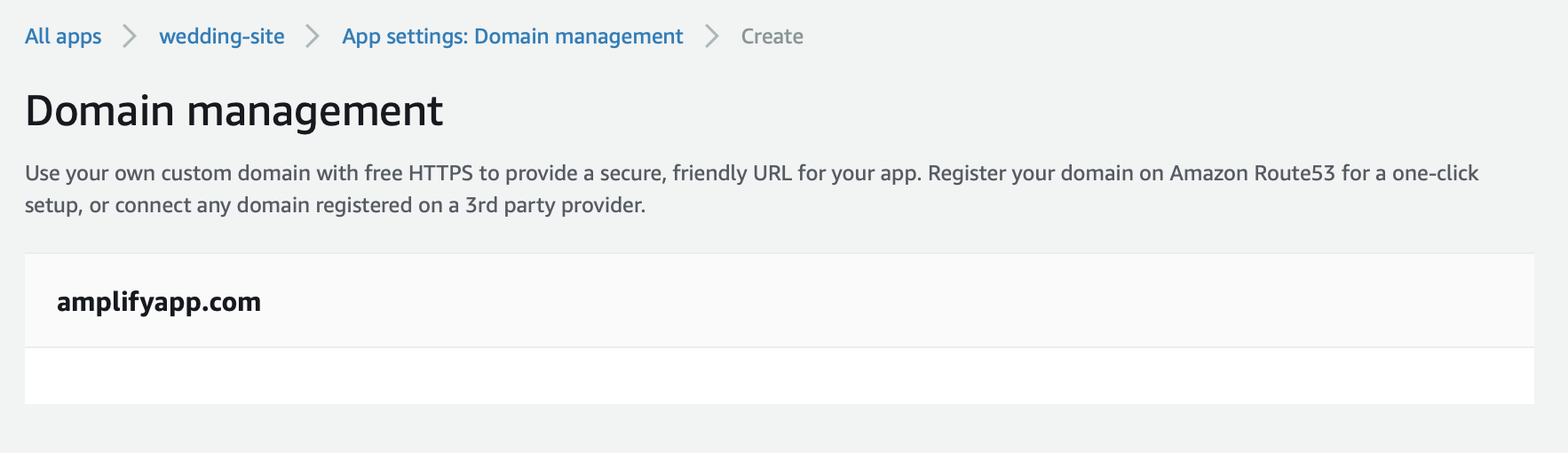
Note: Be sure to check the message for sensitive information.
Additional information
I have created an Amplify app using the CLI, I added S3 with CloudFront hosting and published the app using the CLI. The CloudFront URL provided by the CLI during the publish step works and it created the distribution visible in my CloudFront console. However, the Amplify console does not show a front end for my application and I am unable to add a custom domain which I have as a hosted zone in Route 53.
Running amplify status in the CLI returns the following:
```Current Environment: prod
| Category | Resource name | Operation | Provider plugin |
| -------- | ------------------- | --------- | ----------------- |
| Auth |
| Storage | rsvps | No Change | awscloudformation |
| Function | handleRsvps | No Change | awscloudformation |
| Api | rsvps | No Change | awscloudformation |
| Hosting | S3AndCloudFront | No Change | awscloudformation |
```
 cjuszczak
All 6 comments
@cjuszczak currently Amplify Console and Amplify CLI do not have the same hosting options. Hosting with Amplify CLI will create an S3/Cloudfront distribution. Please enable hosting through the Amplify Console by choosing the 'Frontend environment' tab and either connecting your repository or manually uploading your site. Once you do that the custom domain options will show up.
 swaminator
on 19 Feb 2020
swaminator
on 19 Feb 2020
@swaminator Thanks for following up. That’s disappointing news for sure but I will give that a try. Is there any intent on adding this functionality in the future?
cjuszczak
on 20 Feb 2020
This information should be stated on the "Domain management" section - I also spent time trying to understand why I could not setup my custom domain - when I had an app and available domains in Route53, until I found description given by @swaminator .
 stigalvestad
on 23 Feb 2020
stigalvestad
on 23 Feb 2020
Hi @cjuszczak you can check out our recent release adding the Amplify Console as a hosting option from the Amplify CLI: https://aws.amazon.com/blogs/aws/host-your-apps-with-aws-amplify-console-from-the-aws-amplify-cli/
Let us know if you're still unable to setup a custom domain with you Amplify Console-hosted app, our documentation on the topic can be found here.
@stigalvestad thanks for the feedback, we will take this into consideration and look at clarifying the docs
 kahdojay
on 17 Mar 2020
kahdojay
on 17 Mar 2020
Thanks for linking to the description about the new hosting option @kahdojay . It looks very useful!
stigalvestad
on 20 Mar 2020
I had the same problem and I just spent hours looking for ways to configure Route 53 so that my domain would route to my amplify app. The solution posted by @swaminator should become a big bold warning in the documentation here: https://docs.aws.amazon.com/amplify/latest/userguide/custom-domains.html
 peerhenry
on 6 Apr 2020
peerhenry
on 6 Apr 2020
Related issues
 OzzieOrca
·
3Comments
OzzieOrca
·
3Comments
 kontrol-debug
·
4Comments
kontrol-debug
·
4Comments
 adamaltman
·
3Comments
adamaltman
·
3Comments
 hassankhan
·
4Comments
hassankhan
·
4Comments
 dongjason1
·
3Comments
dongjason1
·
3Comments