Amplify-console: Latest commit not deployed
It was working until yesterday, the 150th build.
but when I have commit and push code, it doesn't start deployment and it shows old commit as last commit.
There is nothing I updated in amplify configuration side and github.
Is there limit of building count?
 whitesnow9291
All 28 comments
I am having exact same problem. It was working fine until yesterday. I had to disconnect - reconnect branch to deploy a new version.
 ozanbulut
on 3 Feb 2020
ozanbulut
on 3 Feb 2020
@whitesnow9291 Can you give the appId and region where this is happening?
App Id: ???
Region: ???
 ganipcanot
on 4 Feb 2020
ganipcanot
on 4 Feb 2020
I have created a new amplify app and connected the same repository. It is working on a new app.
I haven't deleted the old one. It's still broken.
Here is my broken app's id: arn:aws:amplify:eu-central-1:192681667700:apps/d3uz4iijgjkdi
ozanbulut
on 4 Feb 2020
@ganipcanot
This is app id and region.
Region: Ohio
Id: d30hazi5jm4rje
whitesnow9291
on 5 Feb 2020
We're also experiencing issues since last week.
arn:aws:amplify:eu-central-1:981789534438:apps/d3eotlz5taz563
arn:aws:amplify:eu-central-1:981789534438:apps/d3gmfhwjopea0t
Seems to be working when creating a new project, but that's quite a lot of work to transfer both apps without downtime and all the domain configurations.
If nothing has changed in Amplify, in our case there's a small chance that it's related with renaming our repository's group path in the past:
https://gitlab.com/foo → https://gitlab.com/bar
Although, according to Gitlab docs it should still work until old path is acquired by someone else and it has been working for quite some time like this already. Plus, locally I can still successfully use the old urls. But it's rather a questions for @whitesnow9291 and @ozanbulut:
- Is your GIT provider Gitlab?
- Have you ever changed the url of the repository, so that the Amplify still points to old repository url?
 ArturKp
on 5 Feb 2020
ArturKp
on 5 Feb 2020
@ArturKp
- I am using github, not gitlab
- I never changed url of repo, it's just stop auto building without any config update.
Ofcourse, source code has been updated. but not other things such as build yaml, git repo, git username, password, and so on.
whitesnow9291
on 5 Feb 2020
We are also having the same issue. Github is still connected in Amplify, and nothing has changed in our configuration, but Amplify has stopped building on pushes to our connected branches.
Our region is ap-southeast-2
 jehrenheim
on 6 Feb 2020
jehrenheim
on 6 Feb 2020
In case there are others who don't know how to trigger a manual build with latest code... Today I found that it's possible to create a webhook and manually trigger a build. While this issue is being investigated, the webhook can be used as a workaround.
Amplify Console → Build settings → Incoming Webhooks → Create Webhook.
Then it's possible to use the curl command to trigger a new build.
ArturKp
on 6 Feb 2020
@ArturKp @jehrenheim @whitesnow9291 @ozanbulut we are looking into this proactively.
 swaminator
on 6 Feb 2020
swaminator
on 6 Feb 2020
@whitesnow9291 I only see 1 build in us-east-2 for d30hazi5jm4rje and it looks like the build succeeded. Is this the correct info?
ganipcanot
on 6 Feb 2020
@ganipcanot , yes, because I reconnected branch because auto build not working.
Nowadays, I am repeating disconnect/connect to deploy :(
whitesnow9291
on 7 Feb 2020
@ArturKp @jehrenheim @whitesnow9291 @ozanbulut we've identified the issue and are in the process of a deploying an updated reconnect flow that will allow you to get your existing apps building again, will post an update here once the update is available in all regions.
 cslogan-red
on 7 Feb 2020
cslogan-red
on 7 Feb 2020
Update is rolling out and will be available in all regions by 2/18, once available in your region, you'll have a new "Reconnect repository" button in your app under App settings > General:

Clicking this button will allow you to re-authenticate and reconnect your existing repository to get builds working for that app again, after polling completes, select your repository from the dialog that pops up and click Confirm. (Note: If you're a Github user, as noted in the dialog, you must first delete the existing webhook created by Amplify Console under your repo's Settings > Webhooks before clicking Confirm)
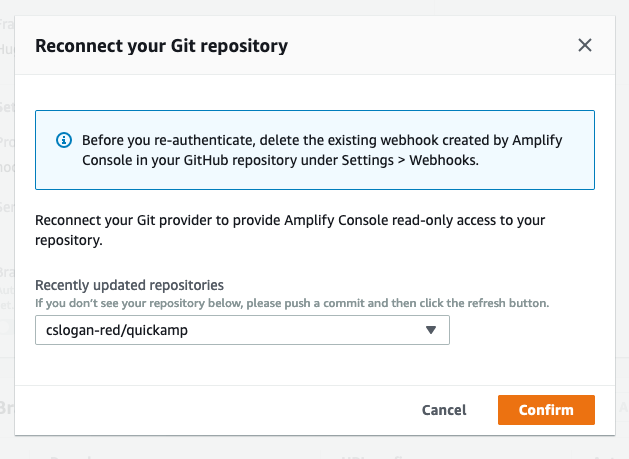
After clicking confirm to finish the reconnection, your pushed commits will begin triggering builds in that app again.
cslogan-red
on 13 Feb 2020
To be clear this will solve the issue where we've renamed our repos and the webhooks are not registering for auto builds right?
 jhoffmcd
on 14 Feb 2020
jhoffmcd
on 14 Feb 2020
@jhoffmcd correct, you'll be able to reselect your updated repo on the dialog.
cslogan-red
on 14 Feb 2020
@jhoffmcd @cslogan-red Doesn't look like I can reconnect my repository if the repo has been renamed. Request returns:
400 Bad Request: Cannot update app with different repository. You can only update repository when it has not been set.
ArturKp
on 19 Feb 2020
@ArturKp same here, tried this morning and got the same errors in the console.
jhoffmcd
on 19 Feb 2020
@ArturKp @jhoffmcd you're good to go now if you refresh the console and give it another try, backend resources were still propagating until just now, update is now available in all regions.
cslogan-red
on 19 Feb 2020
@cslogan-red Works! Thanks for keeping Amplify flexible to our needs 👍 🎉
jhoffmcd
on 19 Feb 2020
Yay! Thanks @cslogan-red 👍
ganipcanot
on 19 Feb 2020
@cslogan-red Hi there, sorry to tag you here. This is currently happening to me now, I tried the reconnect button but it did not solve it, I tried to create a web hook and then I triggered the web hook and it worked, so I tried to push again but nothing happened, I tried the reconnect button again and then pushed to the repo and nothing happened the ARN of my app is arn:aws:amplify:ap-southeast-1:046119459188:apps/d2ky2aabbv93u5
 aprilmintacpineda
on 15 Jul 2020
aprilmintacpineda
on 15 Jul 2020
I'm seeing the same issue, even when hitting the reconnect button.
 dbaigel1
on 15 Jul 2020
dbaigel1
on 15 Jul 2020
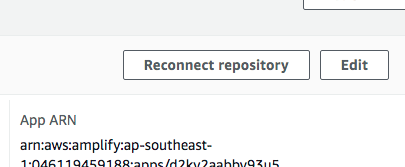
Instead of using that button, I simply completely disconnected the branch. On App settings > general scroll down below, then check the branch that is not working and then disconnect that branch
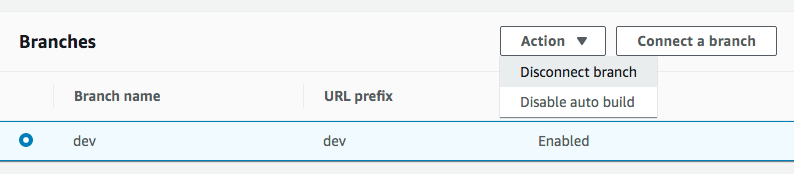
After that, I reconnected the branch but didn't work. Looks like Continuous Deployment is broken...
aprilmintacpineda
on 15 Jul 2020
@aprilmintacpineda our on-call is looking into this now, we'll have an update in this thread once we have more information.
cslogan-red
on 15 Jul 2020
@aprilmintacpineda Looks like Github services (including webhooks) are experiencing degraded performance, that's causing commit pushes to not fire the webhooks.
Relevant links: github-status, twitter
 abhi7cr
on 15 Jul 2020
abhi7cr
on 15 Jul 2020
@abhi7cr looks like it was github, it's working now, thank you very much!
@cslogan-red thank you very much for attending to this!
aprilmintacpineda
on 16 Jul 2020
for me this was triggered after following enviroment variables setup at https://docs.aws.amazon.com/amplify/latest/userguide/environment-variables.html
turns out my bew build script did not like build:$BUILD_ENV (I'm using yarn)
 PeterLAxakon
on 15 Sep 2020
PeterLAxakon
on 15 Sep 2020
same bug here
 MatteoInfi
on 8 Nov 2020
MatteoInfi
on 8 Nov 2020
Related issues
 dongjason1
·
3Comments
dongjason1
·
3Comments
 lucaluke88
·
4Comments
lucaluke88
·
4Comments
 asyschikov
·
5Comments
asyschikov
·
5Comments
 adamaltman
·
3Comments
adamaltman
·
3Comments
 nomiddlename
·
4Comments
nomiddlename
·
4Comments
Most helpful comment
@ArturKp @jehrenheim @whitesnow9291 @ozanbulut we've identified the issue and are in the process of a deploying an updated reconnect flow that will allow you to get your existing apps building again, will post an update here once the update is available in all regions.