Amplify-cli: CLI is stuck and not working later when I add a REST api with a lambda function.
Describe the bug
My project uses AppSync and other services (pinpoint, aurora, cognito....)
Everything works fine.
I added a REST api with a lambda function (I wanted to generate a small website to validate some tokens sent to emails).
"amplify api add"
I add the new (the second one) api. With a lambda function. No API restrictions.
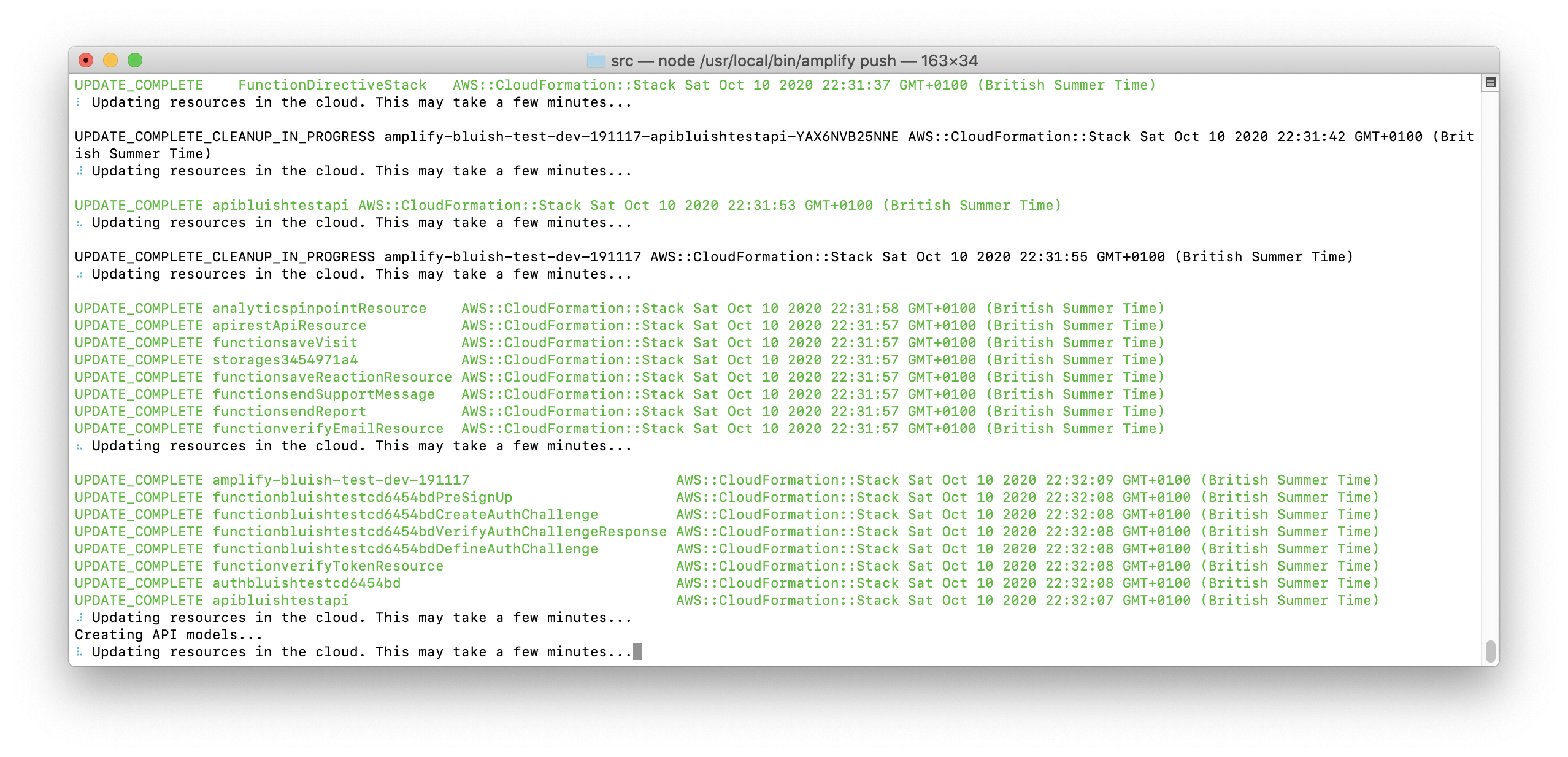
When I execute "amplify push", it seems the process works, but at some point, it is stuck forever:
After 10 or 20 min, if I press COMMAND+C, I see this error:
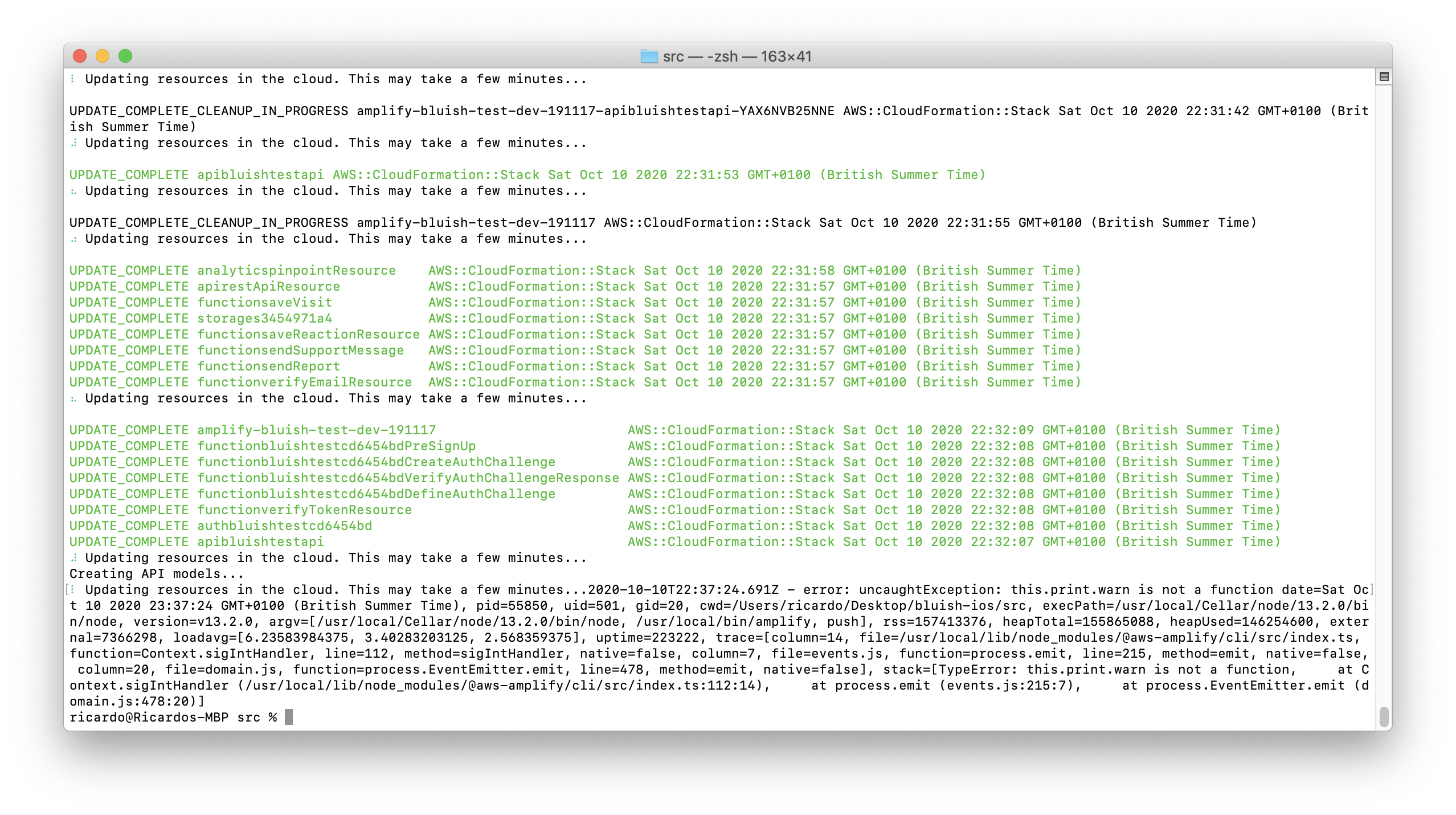
When I check Cloud Formation Stacks using AWS console, the new api and lambda are there, in fact, they are working fine.
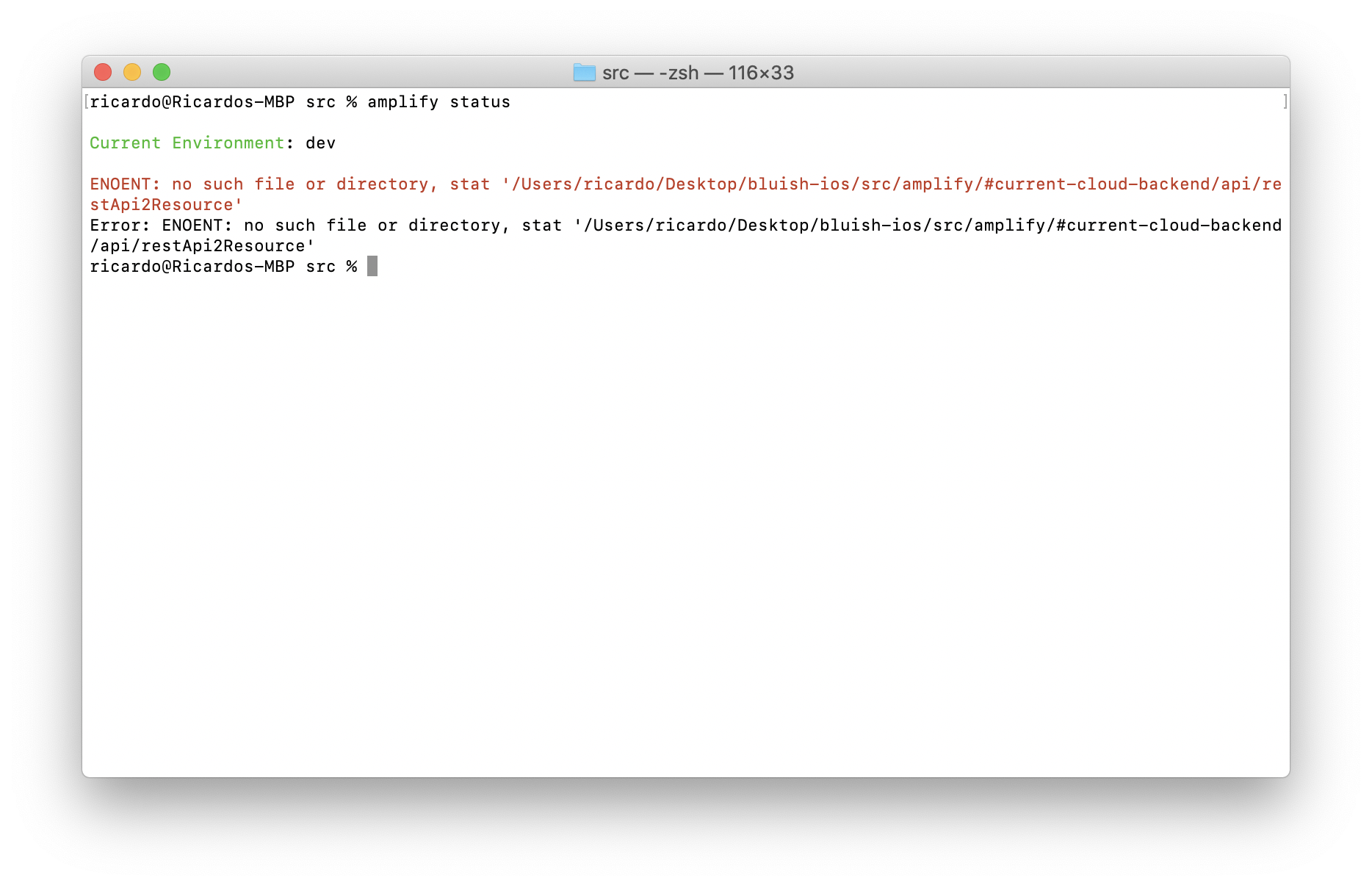
However, when I edit my lambda function and press "amplify push" or "amplify status", then this is what I see:
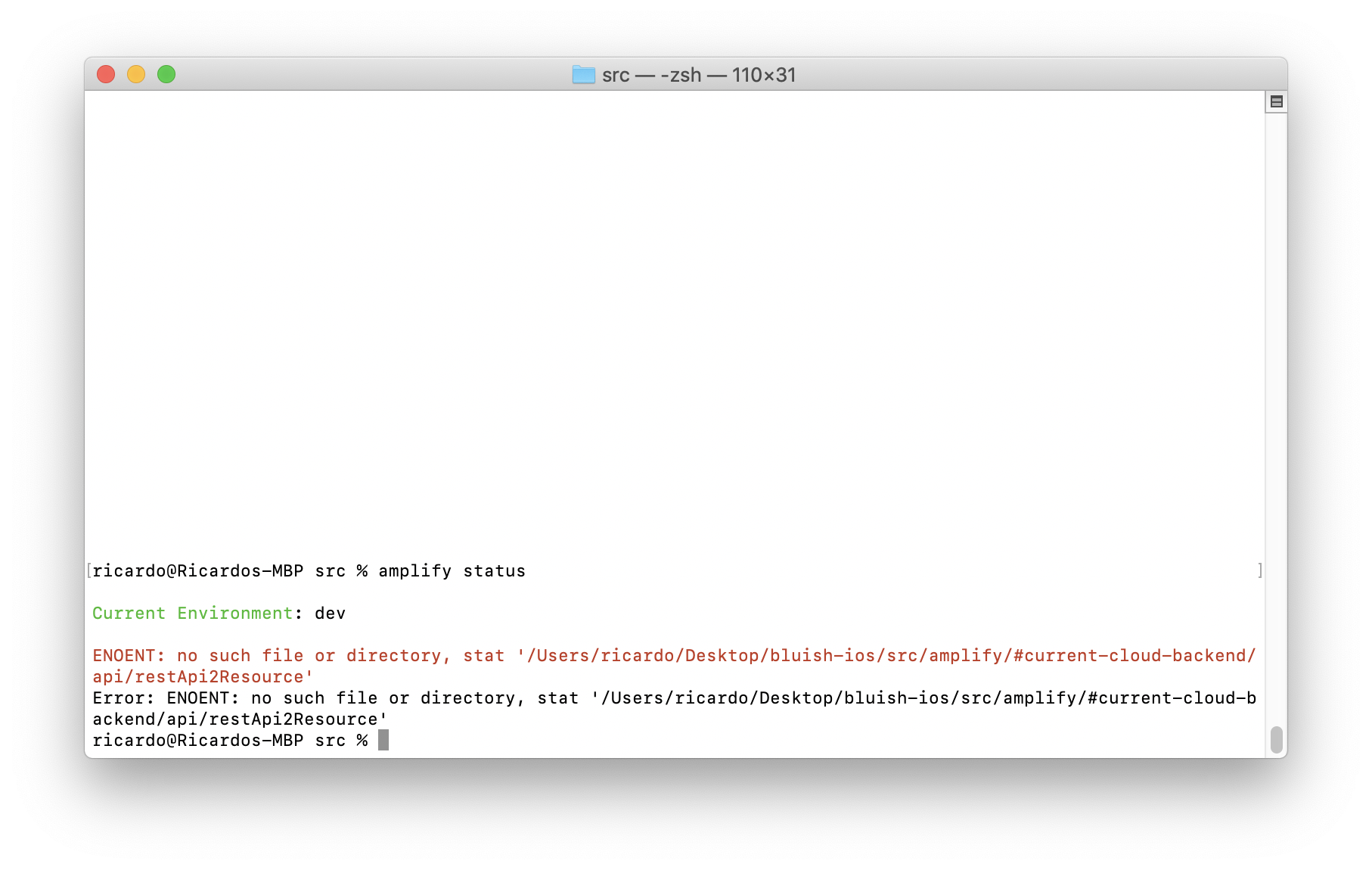
I checked that folder and I only see my appsync api.
Perhaps the issue is that the CLI does not support an AppSync and REST api at the same time, I don't know.
So, at this point I am completely stuck. Amplify does not work anymore.
Please, what do I do? I cannot continue working! And I cannot restore the previous state.
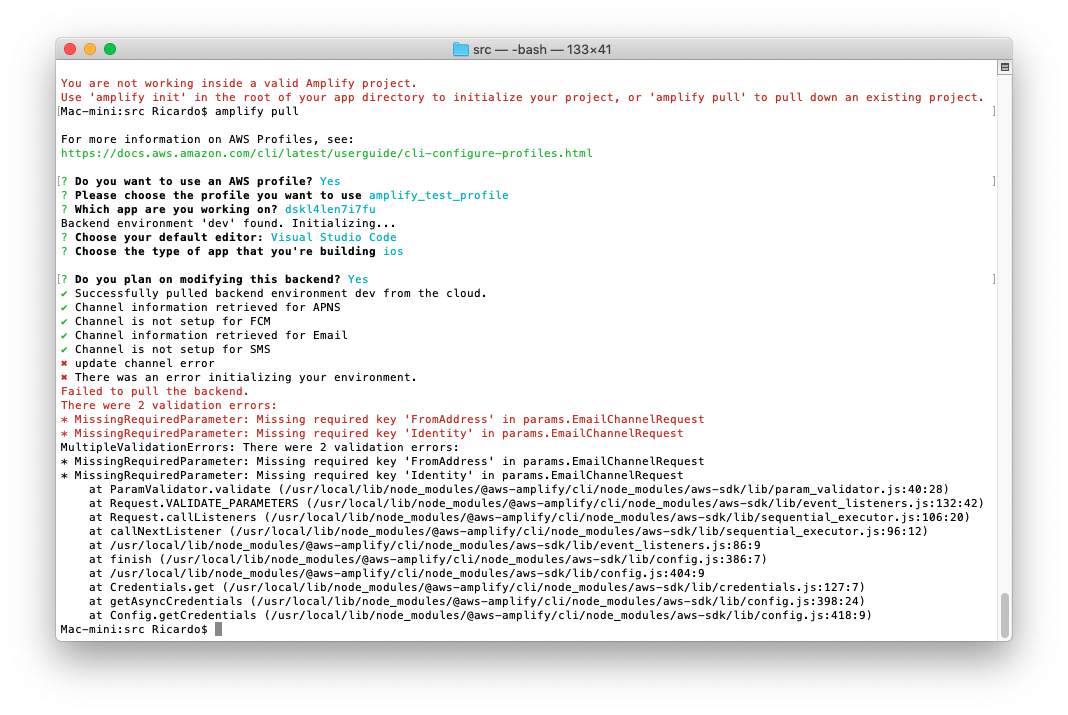
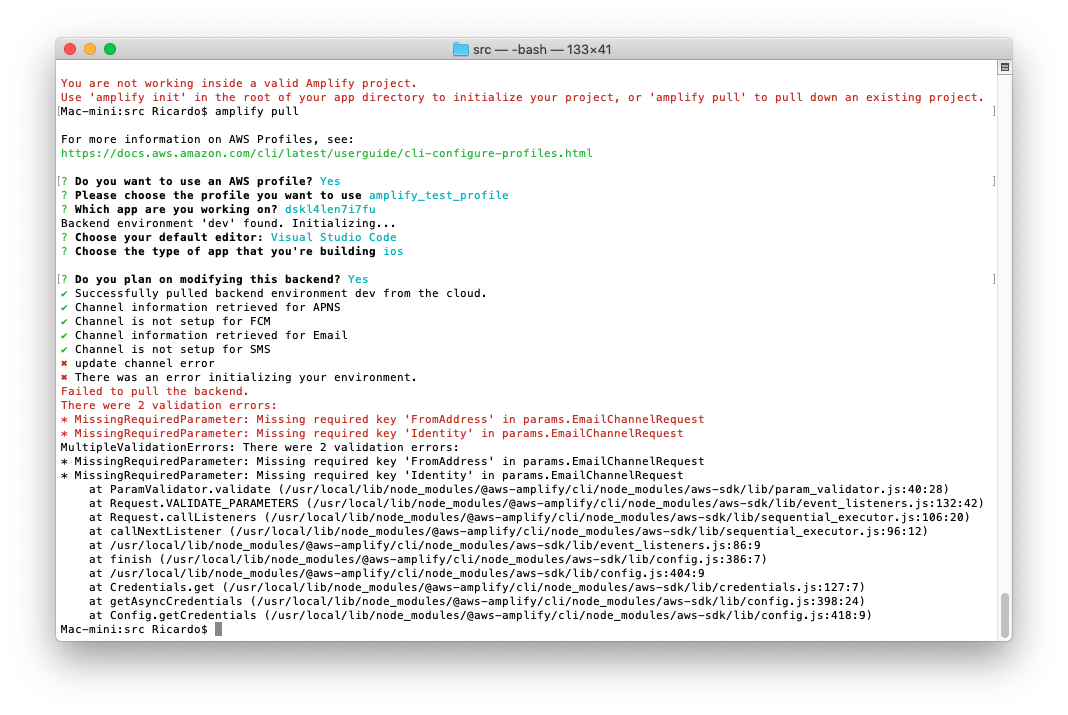
EDIT: I tried calling "amplify pull" in another computer but I receive this error (I don´t know if it is related).
EDIT2:
I tried to reproduce it in 2 empty projects I just created and I see the bug in both of them (so, the issue is not in my project).
I recorded a video so you can follow the same steps.
Here the link:
https://www.dropbox.com/s/aojjorfz9rg1rfe/bug.mov?dl=0
(if you need a higher resolution video, let me know)
Basically, this is what you have in the video:
I setup an amplify project from scratch.
I add an AppSync api, with cognito (email).
I add pinpoint.
I add notifications (APNS with key)
calling “amplify push” works.
I add REST api with one lambda function.
When I call “amplify push”, it appears it works, but after a while, it is completely stuck.
You can see the same step/spinner for 10 minutes in the video.
Then I press COMMAND+C, I modify a lambda function and I try to upload everything again.
You can see the error saying a folder is empty and it is completely impossible to do anything.
Can you check this? My project is completely stuck due to this bug.
If you have any problem reproducing it, let me know.
Thanks a lot.
Amplify CLI Version
4.29.6
To Reproduce
(check the video which is in the EDIT2 section)
In my project happens all the time if I take the same steps:
Add rest api
With a lambda function
no api restrictions
(if I remove the api and the the lambda and try again, then it happens all the time)
I don't know if this happens in other projects.
BTW, my project uses appsync, pinpoint, aurora, lambda, cognito.... I don't know if the CLI is prepared to have 2 apis in the same project (appsync and rest). In any case, all the services are working.
Expected behavior
No stuck
Screenshots
If applicable, add screenshots to help explain your problem.
Desktop (please complete the following information):
- OS: Mac Catalina 10.15.7 (19H2)
- Node Version. v13.2.0
 Ricardo1980
All 11 comments
@Ricardo1980 does this happen only when you have notification added?
 yuth
on 12 Oct 2020
yuth
on 12 Oct 2020
@yuth @jamesonwilliams
I executed all the steps again but not "amplify notifications add" and I see the same problem.
I also tried removing "amplify notifications add" and "amplify analytics add", and again, still same issue.
(after 10 or 15 min with the spinner, I stopped the process using Command+C)
Here you have a video:
https://www.dropbox.com/s/ou4crh16bsf27ir/bug3.mov?dl=0
I did it in an empty project, using latest amplify version.
Is there any way to print more info? Like a verbose option.
I am completely blocked, please, can you check it?
What else can I try?
Thanks.
BTW, I am using eu-west-1 (Ireland)
Ricardo1980
on 12 Oct 2020
@Ricardo1980 I was able to reproduce this issue, it looks like extract-zip package was updated recently and the method but one of the places where it was called was not updated. I am going to have an PR out soon but this is the change diff
diff --git a/packages/amplify-provider-awscloudformation/src/download-api-models.js b/packages/amplify-provider-awscloudformation/src/download-api-models.js
index 1f179a7c2..287a96fdd 100644
--- a/packages/amplify-provider-awscloudformation/src/download-api-models.js
+++ b/packages/amplify-provider-awscloudformation/src/download-api-models.js
@@ -51,15 +51,16 @@ function extractAPIModel(context, resource, framework) {
             if (err) {
               reject(err);
             }
-            extract(`${tempDir}/${apiName}.zip`, { dir: tempDir }, err => {
-              if (err) {
+            extract(`${tempDir}/${apiName}.zip`, { dir: tempDir })
+              .then(() => {
+                // Copy files to src
+                copyFilesToSrc(context, apiName, framework);
+                fs.removeSync(tempDir);
+                resolve();
+              })
+              .catch(err => {
                 reject(err);
-              }
-              // Copy files to src
-              copyFilesToSrc(context, apiName, framework);
-              fs.removeSync(tempDir);
-              resolve();
-            });
+              });
           });
         });
       });
@yuth Great news! Thanks a lot.
2 questions.
Once that is released, what should I do to fix/restore my project? (perhaps, removing manually the rest api from json files?)
When using the aws console, I see that the gateway was uploaded and working.
The last question, what about the issue I have when calling "amplify pull" (Missing required key)?
Perhaps, that is completely unrelated to this issue. What do you think?
Do I open a new bug?
Thanks a lot.
Ricardo1980
on 13 Oct 2020
@Ricardo1980 DO you see this error in the original project or is this happening from the cloned projects? I am not 100% sure how we can fix it, but removing the rest API most likely would fix this. The other workaround (__after backing up the project__) might be to change the project type to JS, which does not require REST resources to work. And then switching back to iOS project
yuth
on 13 Oct 2020
@yuth
In both. Can you see it in the first video.
I will try all those approaches once a new version is released with the fix.
This week maybe?
Thanks.
Ricardo1980
on 13 Oct 2020
We are activley working on the fix and will try to get the release with this fix ASAP.
yuth
on 13 Oct 2020
This has been fixed in Amplify CLI v4.29.7
yuth
on 13 Oct 2020
Awesome! I try it in 3 hours.
Ricardo1980
on 13 Oct 2020
@yuth
Thanks a lot.
After moving some files manually, I was able to recreate the rest api and push it. Now everything is working again. Thanks a lot.
I still have the problem with "amplify pull" (the Missing required key).
I guess I have to open a new bug because it looks like a different issue.
Ricardo1980
on 14 Oct 2020
I still have the problem with "amplify pull" (the Missing required key).
I guess I have to open a new bug because it looks like a different issue.
Yes. Please open another issue so we can track it
yuth
on 14 Oct 2020
Related issues
 gabriel-wilkes
·
3Comments
gabriel-wilkes
·
3Comments
 nicksmithr
·
3Comments
nicksmithr
·
3Comments
 kangks
·
3Comments
kangks
·
3Comments
 kstro21
·
3Comments
kstro21
·
3Comments
 nason
·
3Comments
nason
·
3Comments
Most helpful comment
@Ricardo1980 I was able to reproduce this issue, it looks like extract-zip package was updated recently and the method but one of the places where it was called was not updated. I am going to have an PR out soon but this is the change diff