Amplify-cli: deleted lambda layer version in aws console, not cannot run "amplify push"
Note: If your issue/bug is regarding the AWS Amplify Console service, please log it in the
Amplify Console GitHub Issue Tracker
Describe the bug
A clear and concise description of what the bug is.
I deleted lambda layer version in aws console, and now I cannot run "amplify push", I am stuck trying to do a cloudformation rollback where it is stuck in the "UPDATE_ROLLBACK_FAILED" state, the cloudformation template references a lambda layer that no longer exists. How do I fix this issue? It seems I cannot create a lambda layer with a previously used version
Amplify CLI Version
You can use amplify -v to check the amplify cli version on your system
To Reproduce
Steps to reproduce the behavior or terminal output if applicable
Expected behavior
A clear and concise description of what you expected to happen.
Screenshots
If applicable, add screenshots to help explain your problem.
Desktop (please complete the following information):
- OS: [e.g. Mac/Windows/Ubuntu]
- Node Version. You can use
node -vto check the node version on your system
Additional context
Add any other context about the problem here.
 tomhirschfeld
All 19 comments
using 4.25.0, reproducible by creating a lambda layer, adding it to a project, then deleting a version from the console.
tomhirschfeld
on 24 Jul 2020
is there a way to bypass this by creating another env?
tomhirschfeld
on 24 Jul 2020
when I try to roll back, I get the following error logs
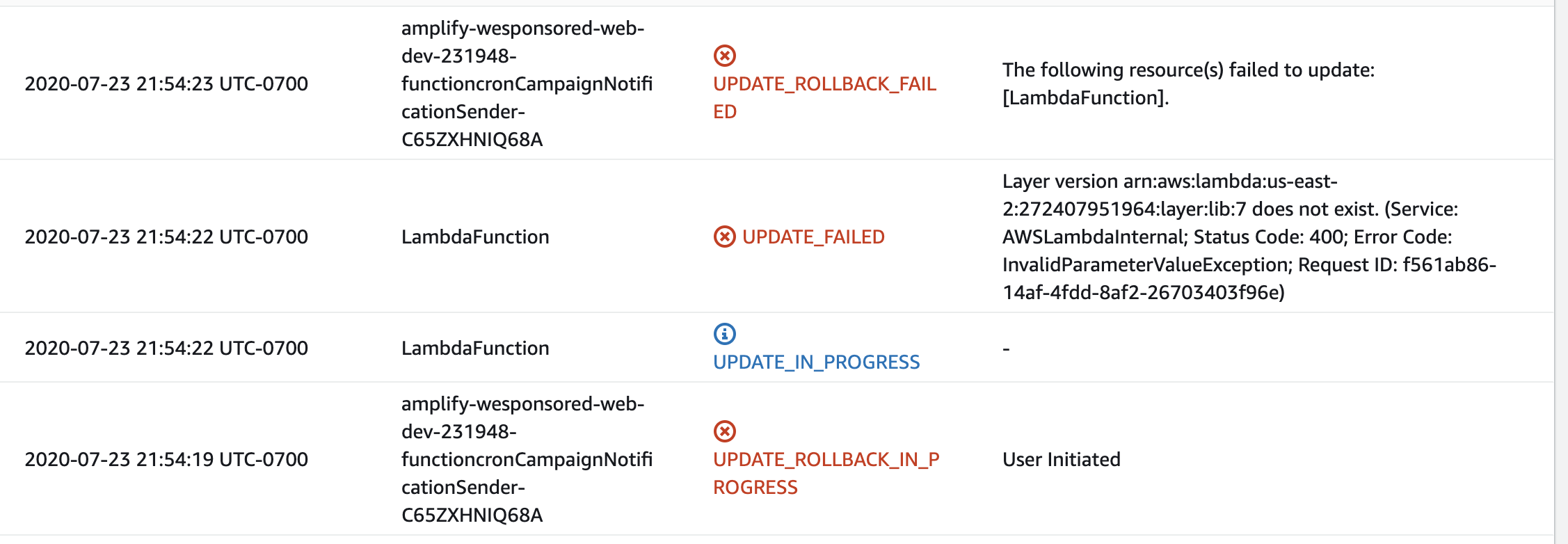
tomhirschfeld
on 24 Jul 2020
root cause is that the layer version at that ID/version combo does not exist, how can I either (1) recreate it to get my stack back in sync or (2) do some kind of override to get past this issue. I'd be happy to delete the function or this part of the stack and recreate later if that would get past this issue, but I don't want to do anything that would put me into an unrecoverable state
tomhirschfeld
on 24 Jul 2020
Hi @tomhirschfeld, the CLI does not check if Lambda layer versions are deleted in the console, so your local state is out of sync with what's in the cloud. I haven't been able to reproduce the full scenario you're facing just yet. I will continue investigating during daytime hours.
 jhockett
on 24 Jul 2020
jhockett
on 24 Jul 2020
@jhockett
I believe the root issue is this (cloud formation template from one of my lambda functions)
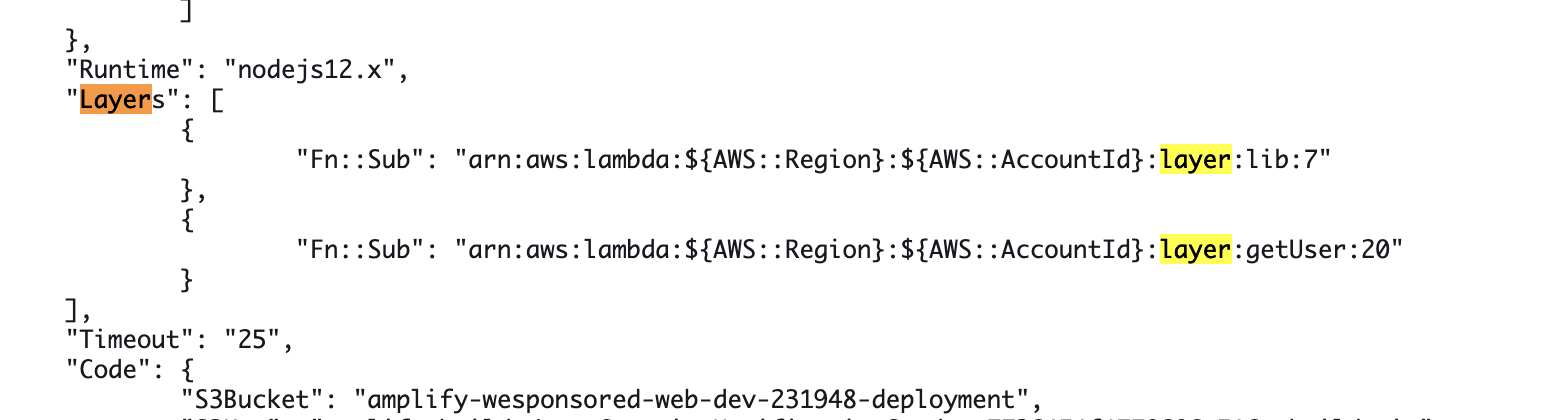
the lib layer 7 does not exist anymore, If it would help, I can issue you guest credentials to my env, happy to chat about this out of github (email: [email protected])
tomhirschfeld
on 24 Jul 2020
Did you run amplify update function to remove the dependency on the Lambda layer version?
To do this, answer "Yes" to "Do you want to configure Lambda layers for this function?" and either deselect the layer or continue with the layer selected, but choose a version that hasn't been deleted.
jhockett
on 24 Jul 2020
@jhockett yes, here is order of operations
I had an issue where the lambda function was dependent on a recent layer version, but older version layer code was executing somehow when I press the "test" button on the console. I verified on the lambda console that lambda was dependent on a recent version without the old code, downloaded the layer version that lambda console declared should be executed, verified that the code that was throwing an error on code that wasn't included in the layer version that was linked, so was confused how old layer code was executing. So from here, the order of operations was:
1) delete old layer versions on console and update dependent lambda to another new version [push succeeds, but old layer code still executes]
2) make all 2 functions that had been dependent on this layer to not be dependent on this layer and then remove lambda (all with cli), this fails and now I'm in this stuck state, and I cannot amplify push at all until cloudformation issue is resolved
tomhirschfeld
on 24 Jul 2020
then remove lambda (all with cli)
Can you elaborate on this point? Please clarify between Lambda functions and Lambda layers.
What does amplify status currently show?
jhockett
on 24 Jul 2020
"then remove lambda (all with CLI)"
step 1)
amplify function update [remove layer dependencies from 2 lambda functions]
amplify function remove [remove lambda layer that was troublesome]
amplify push
amplify status shows
| Category | Resource name | Operation | Provider plugin |
| -------- | -------------------------------- | --------- | ----------------- |
| Function | userCampaignNotificationSender | Update | awscloudformation |
| Function | lib | Update | awscloudformation |
and then a bunch with no change
tomhirschfeld
on 24 Jul 2020
as this is in my dev env, is it possible to just nuke the env and start new ENV without these cloudstack inconsistencies?
tomhirschfeld
on 24 Jul 2020
Hmm, I'm not sure why the cloudformation template for your functions didn't get updated. You should be able to delete the entries in the Layers array in your cloudformation template.
  ...
  "Runtimes": "nodejs12.x",
  "Layers": [],
  ...
so how do I do this and then continue the rollback to unstick cloudformation? I don't see how I can edit the templates when I am in this state
tomhirschfeld
on 24 Jul 2020
@jhockett so how do I do this and then continue the rollback to unstick cloudformation? I don't see how I can edit the templates when I am in this state, is it in my repo in the amplify files, or in the cloudstack console? If its in cloudstack how do I do it when I am in the rollback failed state?
tomhirschfeld
on 25 Jul 2020
Hi @tomhirschfeld, sorry I got confused about the rollback you were referring to. I had the issue transferred mistakenly.
Please try adjusting the CFN template manually as I suggested earlier. Then, backup any important data/files in your Lambda layer and remove the layer with amplify remove function and then perform a push. That should hopefully get you back to a clean state.
jhockett
on 27 Jul 2020
hey @jhockett I was unable to do that, I just ended up nuking my dev env and creating a new one, not ideal but was able to unblock myself.
Still having the issue where the layer versions in CLI are out of sync w layer versions in console
tomhirschfeld
on 15 Aug 2020
@jhockett I'm also having a similar problem. After I created new Lambda Layer and wanted to associated that layer to existing Lambda function, I am not able to update CloudFormation stack anymore, nor I'm able to remove old Lambda Layer for that matter:
⇒  amplify -v
4.31.1
Step: 1 (update _MyLambda_ function to not use the Layer)
⇒  amplify update function
? Select which capability you want to update: Lambda function (serverless function)
? Select the Lambda function you want to update MyLambda
? Do you want to update the Lambda function permissions to access other resources in this project? No
? Do you want to invoke this function on a recurring schedule? No
? Do you want to configure Lambda layers for this function? Yes
? Provide existing layers or select layers in this project to access from this function (pick up to 5): (Press <space> to select, <a> to toggle all, <i> to invert selection)
 ◯ Provide existing Lambda layer ARNs
❯◯ my-deprecated-lambda-layer
Step: 2 (remove Lambda Layer)
```⇒ amplify remove function
? Choose the resource you would want to remove my-deprecated-lambda-layer (layer)
When you delete a layer version, you can no longer configure functions to use it.
However, any function that already uses the layer version continues to have access to it.
? Are you sure you want to delete the resource? This action deletes all files related to this resource from the backend directory. Yes
Resource cannot be removed because it has a dependency on another resource
Dependency: Lambda:MyLambda
Error: Resource cannot be removed because it has a dependency on another resource
at /usr/local/lib/node_modules/@aws-amplify/cli/lib/extensions/amplify-helpers/remove-resource.js:128:31
at Array.forEach (
at /usr/local/lib/node_modules/@aws-amplify/cli/lib/extensions/amplify-helpers/remove-resource.js:124:40
at Array.forEach (
at deleteResourceFiles (/usr/local/lib/node_modules/@aws-amplify/cli/lib/extensions/amplify-helpers/remove-resource.js:122:22)
at processTicksAndRejections (internal/process/task_queues.js:97:5)
at async Object.executeAmplifyCommand (/usr/local/lib/node_modules/@aws-amplify/cli/node_modules/amplify-category-function/lib/index.js:193:5)
at async executePluginModuleCommand (/usr/local/lib/node_modules/@aws-amplify/cli/lib/execution-manager.js:153:5)
at async Object.executeCommand (/usr/local/lib/node_modules/@aws-amplify/cli/lib/execution-manager.js:35:9)
at async Object.run (/usr/local/lib/node_modules/@aws-amplify/cli/lib/index.js:82:9)
An error occurred when removing the function resource
Even tried to manually remove dependency from `backend-config.json`:
"MyLambda": {
"build": true,
"providerPlugin": "awscloudformation",
"service": "Lambda",
"dependsOn": [
{
"category": "function",
"resourceName": "my-deprecated-lambda-layer",
"attributes": [
"Arn"
]
}
]
},
```
However, when I try to push something using amplify cli, I'm getting this error:
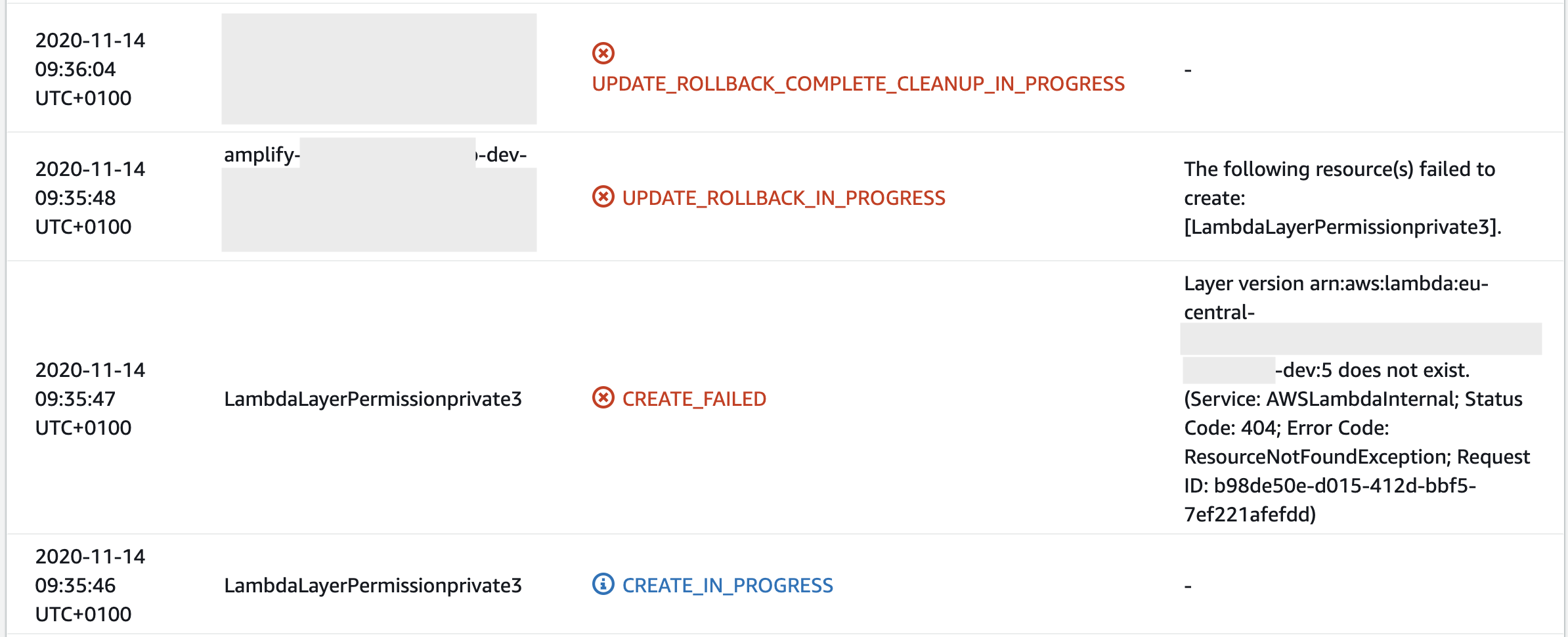
This brakes my entire environment and I don't know what to do next.
 cc-bojan
on 14 Nov 2020
cc-bojan
on 14 Nov 2020
@cc-bojan : I have been struggling with the same issue for a week now and just resolved it. Here is what I did: Search your source code for the field dependsOn[...]. I did this early on but it didn't work because the amplify entries in .gitignore were obscuring a number of the files in my IDE (VS Code). Once I temporarily renamed .gitignore to not.gitignore I was able to see the dangling dependsOn[...] references. Upon removing the problematic layer from those dependsOn[...] sections, I was able to successfully run amplify remove function. Hope you are able to benefit from me pulling my hair out over the past week!
 cellularatomaton
on 14 Nov 2020
cellularatomaton
on 14 Nov 2020
@cellularatomaton This workaround worked. :)
Thanks a lot.
cc-bojan
on 14 Nov 2020
Related issues
 jeanpaulcozzatti
·
3Comments
jeanpaulcozzatti
·
3Comments
 MageMasher
·
3Comments
MageMasher
·
3Comments
 adriatikgashi
·
3Comments
adriatikgashi
·
3Comments
 davo301
·
3Comments
davo301
·
3Comments
 ffxsam
·
3Comments
ffxsam
·
3Comments
Most helpful comment
@cc-bojan : I have been struggling with the same issue for a week now and just resolved it. Here is what I did: Search your source code for the field
dependsOn[...]. I did this early on but it didn't work because the amplify entries in.gitignorewere obscuring a number of the files in my IDE (VS Code). Once I temporarily renamed.gitignoretonot.gitignoreI was able to see the danglingdependsOn[...]references. Upon removing the problematic layer from thosedependsOn[...]sections, I was able to successfully runamplify remove function. Hope you are able to benefit from me pulling my hair out over the past week!