Amplify-cli: Adding Lambda Layer to existing function clears "dependsOn" in backend-config.json
Note: If your issue/bug is regarding the AWS Amplify Console service, please log it in the
Amplify Console GitHub Issue Tracker
Describe the bug
Adding Lambda Layer to existing function clears "dependsOn" in backend-config.json
Amplify CLI Version
4.24.2
To Reproduce
- Create new Amplify project (I followed getting started for JavaScript)
- amplify add api (GraphQL, default settings)
- amplify add function (NodeJS, Hello World Function).
- amplify add function (create new Layer).
At this moment function is not using the layer. This is backend-config.json
        "testclilambda6938ce0a": {
            "build": true,
            "providerPlugin": "awscloudformation",
            "service": "Lambda",
            "dependsOn": [
                {
                    "category": "api",
                    "resourceName": "testclilambda",
                    "attributes": [
                        "GraphQLAPIIdOutput",
                        "GraphQLAPIEndpointOutput"
                    ]
                }
            ]
        },
- amplify update function (add the layer created in step 4 to the function)
backend-config.json is now:
"testclilambda6938ce0a": {
            "build": true,
            "providerPlugin": "awscloudformation",
            "service": "Lambda",
            "dependsOn": [
                {
                    "category": "function",
                    "resourceName": "myLayer",
                    "attributes": [
                        "Arn"
                    ]
                }
            ]
        }
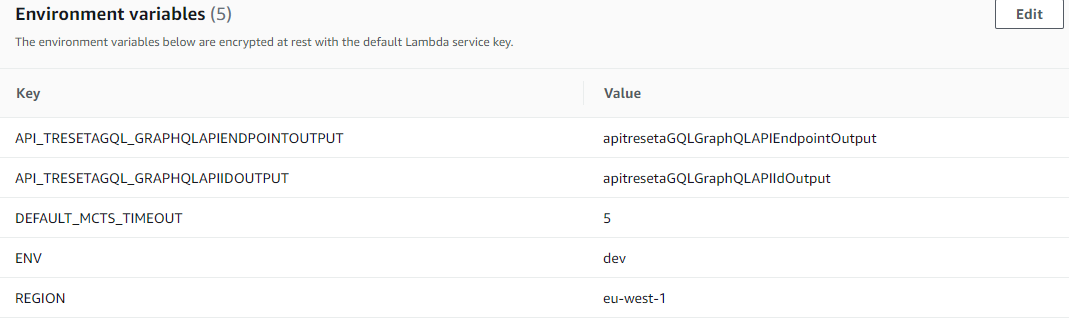
Dependency on API dissapeared. If we push the Lambda now, environment variable will not have GraphQL API endpoint and Id.
Expected behavior
Adding the layer should add to existing dependsOn, not replace them.
Screenshots
This is what ENV variables look like after the deployment:
Desktop (please complete the following information):
- OS: Windows 10
- Node Version. v12.17.0
Additional context
Here's a question: How to rebuild my function - i.e. eve after manually updating backend-config.json - when deployed, the function still does not have environemtent variables set?
 andrija78
All 6 comments
Found an answer to my own question: after manually updating backend-config.json, you should run
amplify env checkout <env-name>
andrija78
on 16 Jul 2020
+1 - unexpectedly having to re-add dependencies to all my functions. Thank you for adding layers though!
 kennandavison
on 19 Jul 2020
kennandavison
on 19 Jul 2020
+1. I'm seeing same issue. In my case my lambda function had a dependsOn auth category.
 hisham
on 21 Jul 2020
hisham
on 21 Jul 2020
This is a bug with amplify update function.
The current workaround to update a function without losing dependsOn data, is to always answer yes to "Do you want to update the Lambda function permissions to access other resources in this project?" and confirm any existing permissions. Then you can add a Lambda layer or schedule invocation without it overwriting data in the dependsOn array.
 jhockett
on 24 Jul 2020
jhockett
on 24 Jul 2020
Somewhat related warning for those also using layers... https://github.com/aws-amplify/amplify-cli/issues/4892. Be very careful and check your dev amplify env first to see if things are resetting.
kennandavison
on 25 Jul 2020
A fix was merged and deployed in Amplify CLI version 4.26.0.
jhockett
on 29 Jul 2020
Related issues
 nason
·
3Comments
nason
·
3Comments
 jkeys-ecg-nmsu
·
3Comments
jkeys-ecg-nmsu
·
3Comments
 kangks
·
3Comments
kangks
·
3Comments
 darrentarrant
·
3Comments
darrentarrant
·
3Comments
 gabriel-wilkes
·
3Comments
gabriel-wilkes
·
3Comments
Most helpful comment
This is a bug with
amplify update function.The current workaround to update a function without losing
dependsOndata, is to always answer yes to "Do you want to update the Lambda function permissions to access other resources in this project?" and confirm any existing permissions. Then you can add a Lambda layer or schedule invocation without it overwriting data in thedependsOnarray.