Amplify-cli: API Endpoint not working when Auth is required
Which Category is your question related to?
Auth, API, Lambda function
Amplify CLI Version
cli version = 4.20.0
amplify version = 3.0.16
Angular Version
version 9.1.9
What AWS Services are you utilizing?
Auth (Cognito user/identity pool), API Gateway, Lambda Functions (triggered by api gateway)
Provide additional details e.g. code snippets
Once require authorization is on a route it no longer works.
I am using Amplify Javascript library (aws-amplify) for an Angular app (version 9.1.9) I do the standard steps for first adding auth (ie. creation of a cognito user & identity pool). I then do the standard commands for adding an api, routes (one with auth and one without), and corresponding lambda functions. See commands below.
Commands in order:
amplify configure
amplify init
amplify add auth
- Default configuration
- Email and Name
amplify add api
- create new lambda function
- add these new routes (code below)
- /noauth (doesn’t require authentication)
- Generate new function right now
- Restrict API access = No
- /helloWorld (required authentication)
- Restrict API access = Yes
- What kind of access do you want for Authenticated users? Create, Read, Update, Delete (picked all)
amplify push
code for lambda function (app.js):
/* Amplify Params - DO NOT EDIT
 AUTH_**HIDDEN**_USERPOOLID
 ENV
 REGION
Amplify Params - DO NOT EDIT */

var express = require('express')
var bodyParser = require('body-parser')
var awsServerlessExpressMiddleware = require('aws-serverless-express/middleware')

// declare a new express app
var app = express()
app.use(bodyParser.json())
app.use(awsServerlessExpressMiddleware.eventContext())

// Enable CORS for all methods
app.use(function(req, res, next) {
 res.header("Access-Control-Allow-Origin", "*")
 res.header("Access-Control-Allow-Headers", "Origin, X-Requested-With, Content-Type, Accept")
 next()
});

app.get('/noauth', function(req, res) {
 res.json({success: 'get call to noauth succeed!', url: req.url});
});

app.get('/helloworld', function(req, res) {
  res.json({success: 'get call succeed!', url: req.url});
});

app.listen(3000, function() {
   console.log("App started")
});
module.exports = app
(end app.js)
The only thing I’m doing differently is that I am not using the pre built @aws-amplify/ui-angular signup form component and instead made my own but call the same functionality according to (https://docs.amplify.aws/lib/auth/emailpassword/q/platform/js#sign-in). I’m doing this because when I attempted to import the @aws-amplify/ui-angular there seems to be an error regarding the angular version 9.1.9 Ivy compiler and the @aws-amplify/ui-angular module.
The following is the code that gets run:
Importing amplify into angular project: (begin main.ts)
import Amplify, { Auth, API } from 'aws-amplify';
import awsconfig from './aws-exports';

awsconfig["Auth"] = {
 identityPoolId: awsconfig["aws_cognito_identity_pool_id"],
 region: awsconfig["aws_cognito_region"],
 userPoolId: awsconfig["aws_user_pools_id"],
 userPoolWebClientId: awsconfig["aws_user_pools_web_client_id"]
};

awsconfig["API"] = {
 endpoints: [
     {
       name: 'apid13c4bbc',
       endpoint: 'https://**hidden**.execute-api.us-west-2.amazonaws.com/dev',
       region: 'us-west-2'
   }
     // Can add more endpoints
 ]
};


Amplify.configure(awsconfig);
(end of main.ts)
sign in: (begin login.ts)
async SignIn() {
   const loginData = this.loginForm.value;
   const email: string = loginData.email;
   const password: string = loginData.password;

   this.spinner.show();

   try {
     // we used the email as the username
     // the function is Auth.signIn(uname,pw)
     const user = await Auth.signIn(email, password);
     this.router.navigate(['/test']);
   } catch (error) {
       console.log('error signing in', error);
       this.errorText = error.message;
   }

   this.spinner.hide();
 }
(end login.ts)
calling new api: (begin test.component.ts)
ngOnInit(): void {
   this.testNewAPI();
 }

 async testNewAPI(){
   let b = await API.get('apid13c4bbc', '/noauth', {});
   console.log(' results from /noauth: ', b);

   let a = await API.get('apid13c4bbc', '/helloWorld', {});
   console.log(' results from /helloWorld: ', a);

 }
(end test.component.ts)
The /noAuth route works fine and I’m able to call it but as soon as I try calling the /hellowWorld route (which has auth enabled) i get the following errors: (our lambda function returns the 'Access-Control-Allow-Origin' header so I know that’s not the issue and that this seems to come up as a generic nondescript error when dealing with apiGateway/lambda)
Access to XMLHttpRequest at 'https://**hidden**.execute-api.us-west-2.amazonaws.com/dev/helloWorld' from origin 'http://localhost:4200' has been blocked by CORS policy: Response to preflight request doesn't pass access control check: No 'Access-Control-Allow-Origin' header is present on the requested resource.

RROR Error: Uncaught (in promise): Error: Network Error
Error: Network Error
    at createError (createError.js:16)
    at XMLHttpRequest.handleError [as __zone_symbol__ON_PROPERTYerror] (xhr.js:81)
    at XMLHttpRequest.wrapFn (zone-evergreen.js:1218)
    at ZoneDelegate.invokeTask (zone-evergreen.js:399)
    at Object.onInvokeTask (core.js:41632)
    at ZoneDelegate.invokeTask (zone-evergreen.js:398)
    at Zone.runTask (zone-evergreen.js:167)
    at ZoneTask.invokeTask [as invoke] (zone-evergreen.js:480)
    at invokeTask (zone-evergreen.js:1621)
    at XMLHttpRequest.globalZoneAwareCallback (zone-evergreen.js:1647)
    at resolvePromise (zone-evergreen.js:798)
    at zone-evergreen.js:705
    at rejected (tslib.es6.js:72)
    at ZoneDelegate.invoke (zone-evergreen.js:364)
    at Object.onInvoke (core.js:41654)
    at ZoneDelegate.invoke (zone-evergreen.js:363)
    at Zone.run (zone-evergreen.js:123)
    at zone-evergreen.js:857
    at ZoneDelegate.invokeTask (zone-evergreen.js:399)
    at Object.onInvokeTask (core.js:41632)

GET https://**hidden**.execute-api.us-west-2.amazonaws.com/dev/helloWorld net::ERR_FAILED
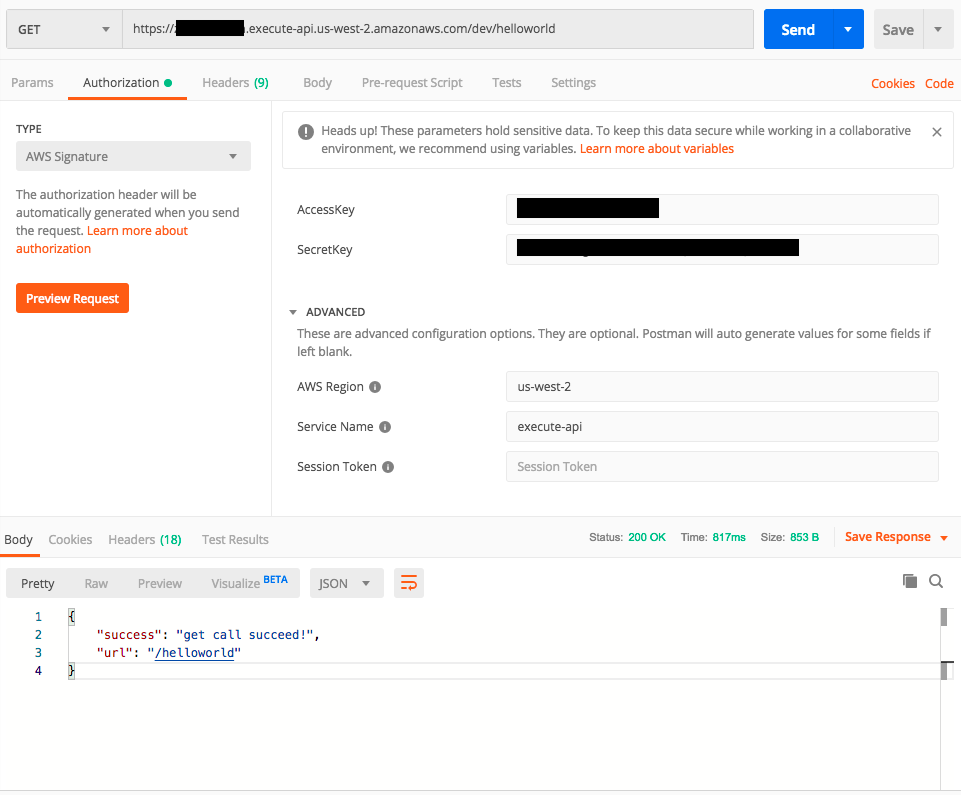
I’ve also tested the /helowWorld (route requiring auth) route from postman and got it to work by doing the following.
Create a new IAM user, attach the following policy to them:
{
    "Version": "2012-10-17",
    "Statement": [
        {
            "Sid": "VisualEditor0",
            "Effect": "Allow",
            "Action": "execute-api:Invoke",
            "Resource": [
                "arn:aws:execute-api:us-west-2:**hidden**:**hidden**/*/*/helloworld"
            ]
        }
    ]
}
Then I take the AccesKey and SecretKey and using Postman make a call to the route.
I've been stuck on this for a while so any help would be greatly appreciated!
 pboutet
All 2 comments
@pboutet thanks for the detailed report! 👍 so to clarify, the endpoint that Amplify CLI deploys working correctly, the execute-api:Invoke permission is generated properly for the Authenticated role in the User pool you create, but not working from your client application?
Your client application is hosted on localhost when you try to call the API, right? because it can be a CORS issue, since the CLI not deploying CORS rules for localhost. If you could check the network request in the browser I think your Lambda is not getting a chance to reply to the OPTIONS request, could you please confirm it?
 attilah
on 19 Jun 2020
attilah
on 19 Jun 2020
Closing this issue due to lack of response
 SwaySway
on 22 Jul 2020
SwaySway
on 22 Jul 2020
Related issues
 jkeys-ecg-nmsu
·
3Comments
jkeys-ecg-nmsu
·
3Comments
 mwarger
·
3Comments
mwarger
·
3Comments
 jeanpaulcozzatti
·
3Comments
jeanpaulcozzatti
·
3Comments
 MageMasher
·
3Comments
MageMasher
·
3Comments
 zjullion
·
3Comments
zjullion
·
3Comments