Amplify-cli: amplify init hungs
Hi,
I'm trying to do the same as described in https://docs.amplify.aws/start/q/integration/js:
[enp@thinkpad amplify-js-app]$ amplify -v
4.21.3
[enp@thinkpad amplify-js-app]$ amplify configure
Follow these steps to set up access to your AWS account:

Sign in to your AWS administrator account:
https://console.aws.amazon.com/
Press Enter to continue

Specify the AWS Region
? region:  eu-west-2
Specify the username of the new IAM user:
? user name:  amplify-fmGX0
Complete the user creation using the AWS console
https://console.aws.amazon.com/iam/home?region=undefined#/users$new?step=final&accessKey&userNames=amplify-fmGX0&permissionType=policies&policies=arn:aws:iam::aws:policy%2FAdministratorAccess
Press Enter to continue

Enter the access key of the newly created user:
? accessKeyId:  ********************
? secretAccessKey:  ****************************************
This would update/create the AWS Profile in your local machine
? Profile Name:  default

Successfully set up the new user.
[enp@thinkpad amplify-js-app]$ amplify init
Note: It is recommended to run this command from the root of your app directory
? Enter a name for the project todo
? Enter a name for the environment dev
? Choose your default editor: Visual Studio Code
? Choose the type of app that you're building javascript
Please tell us about your project
? What javascript framework are you using none
? Source Directory Path:  src
? Distribution Directory Path: dist
? Build Command:  npm run-script build
? Start Command: npm run-script start
Using default provider  awscloudformation


For more information on AWS Profiles, see:
https://docs.aws.amazon.com/cli/latest/userguide/cli-multiple-profiles.html

? Do you want to use an AWS profile? Yes
? Please choose the profile you want to use default
Adding backend environment dev to AWS Amplify Console app: db2k0y1sfqeph
⠦ Initializing project in the cloud...

CREATE_IN_PROGRESS amplify-todo-dev-93655 AWS::CloudFormation::Stack Fri Jun 12 2020 09:37:34 GMT+0300 (Moscow Standard Time) User Initiated
CREATE_IN_PROGRESS DeploymentBucket       AWS::S3::Bucket            Fri Jun 12 2020 09:37:38 GMT+0300 (Moscow Standard Time)
CREATE_IN_PROGRESS AuthRole               AWS::IAM::Role             Fri Jun 12 2020 09:37:38 GMT+0300 (Moscow Standard Time)
CREATE_IN_PROGRESS UnauthRole             AWS::IAM::Role             Fri Jun 12 2020 09:37:38 GMT+0300 (Moscow Standard Time)
CREATE_IN_PROGRESS DeploymentBucket       AWS::S3::Bucket            Fri Jun 12 2020 09:37:39 GMT+0300 (Moscow Standard Time) Resource creation Initiated
⠼ Initializing project in the cloud...

CREATE_COMPLETE DeploymentBucket AWS::S3::Bucket Fri Jun 12 2020 09:38:00 GMT+0300 (Moscow Standard Time)
⠋ Initializing project in the cloud...
I'm doing above in the root of my app directory, app can be started with npm run without any errors, but I see no results after last Initializing project in the cloud..., it just hungs and output is not the same as in https://docs.amplify.aws/start/getting-started/setup/q/integration/js
Is this a bug in docs or in amplify-cli or I'm doing something wrong?
 enp
enp
All 7 comments
Same here, after some time it displays Initializing project in the cloud...(node:5020) TimeoutOverflowWarning: 53603712755.42617 does not fit into a 32-bit signed integer.
 amirelemam
on 12 Jun 2020
amirelemam
on 12 Jun 2020
same as @enp
amplify -v
4.21.3
 rastoelias
on 12 Jun 2020
rastoelias
on 12 Jun 2020
same as @enp
amplify -v
4.21.3
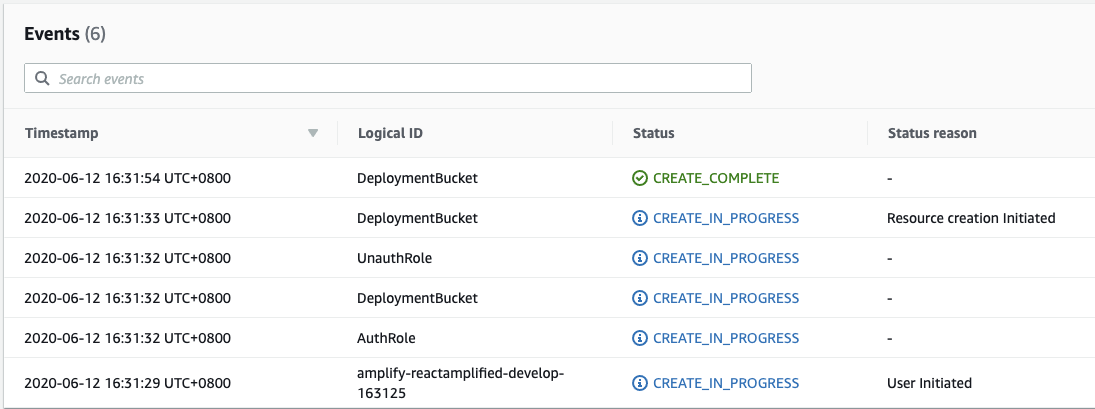
It seems stuck on creating the IAM role for UnauthRole and AuthRole
 ftwang
on 12 Jun 2020
ftwang
on 12 Jun 2020
amplify -v 4.21.3
Stuck with init and add env commands.

 bschulz87
on 12 Jun 2020
bschulz87
on 12 Jun 2020
Guys, I had the same bug.
Moved back to 4.21.2 and no more problem.
Cheers,
Alexandre
 alexandrefilipiak
on 12 Jun 2020
alexandrefilipiak
on 12 Jun 2020
Guys, I had the same bug.
Moved back to 4.21.2 and no more problem.Cheers,
Alexandre
I worked for me too. Thanks
amirelemam
on 12 Jun 2020
The IAM Creation API had some issues as stated in the Service Health Dashboard.
It seems this issue has been resolved now
https://status.aws.amazon.com/
Message below
Between June 11 9:56 PM PDT and June 12 6:40 AM PDT, AWS IAM experienced increased error rates and latencies on the AWS IAM CreateRole and CreateServiceLinkedRoles APIs. The issue has been resolved and the service is operating normally.
Should you have any issues related to this again please comment below.
 SwaySway
on 12 Jun 2020
SwaySway
on 12 Jun 2020
Related issues
 jexh
·
3Comments
jexh
·
3Comments
 zjullion
·
3Comments
zjullion
·
3Comments
 MageMasher
·
3Comments
MageMasher
·
3Comments
 nason
·
3Comments
nason
·
3Comments
 ffxsam
·
3Comments
ffxsam
·
3Comments
Most helpful comment
Guys, I had the same bug.
Moved back to 4.21.2 and no more problem.
Cheers,
Alexandre