Amplify-cli: Including _version in delete requests, unable to filter _deleted items from list response.
Which Category is your question related to?
Using AWS Amplify API to delete items through AWS Appsync
Amplify CLI Version
4.18.1
What AWS Services are you utilizing?
AWS Appsync, DynamoDB
Provide additional details e.g. code snippets
While using API.graphql to delete items from my database I have 2 following issue:
Issue # 1:
Here is my request to delete a photo from the frontend:
API.graphql(graphqlOperation(mutations.deletePhoto, {
      input: {
        id: photoId,
        _version: 1,
      }
    })) as unknown as {
      data: DeletePhotoMutation
    }
Currently, there's no way for me delete an item without including the _version of the item without running into an error:
errorType: "ConflictUnhandled"
message: "Conflict resolver rejects mutation."
Is this intended? Or am I missing something.
Issue # 2 :
When I successfully deleted the item using the API by adding in the _version attributes, I verified that the deleted attributes in DynamoDB is false,
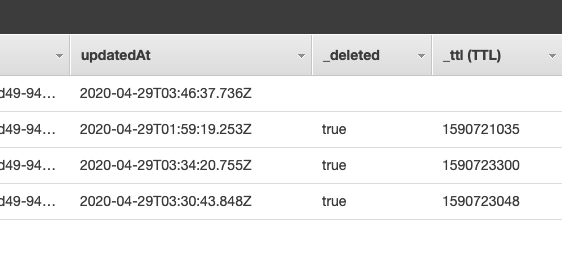
When I list all the items again, I couldn't find a way to filter out deleted items from server side. The generated types for the filter is like so:
export type ModelPhotoFilterInput = {
  id?: ModelIDInput | null,
  albumId?: ModelIDInput | null,
  bucket?: ModelStringInput | null,
  and?: Array< ModelPhotoFilterInput | null > | null,
  or?: Array< ModelPhotoFilterInput | null > | null,
  not?: ModelPhotoFilterInput | null,
};
So now I have to fetch all items from serverside and filter deleted items out on the front end like so
const listPhotosByAlbum = async (input: ListPhotosByAlbumQueryVariables): Promise<any> => {
  const response = await API.graphql(graphqlOperation(queries.listPhotosByAlbum, input)) as unknown as {
    data: ListPhotosByAlbumQuery
  };
  return response.data.listPhotosByAlbum.items.filter(item => item._deleted !== true);
};
which isn't ideal considering the number of deleted items can grow indefinitely and slow down the response.
Appreciate if anyone can share their experience.
 drixta
All 14 comments
Same issue, shouldn't Appsync Resolvers filter out _deleted=true ?
 jesper-bylund
on 30 Apr 2020
jesper-bylund
on 30 Apr 2020
Which Category is your question related to?
Using AWS Amplify API to delete items through AWS AppsyncAmplify CLI Version
4.18.1What AWS Services are you utilizing?
AWS Appsync, DynamoDBProvide additional details e.g. code snippets
While using API.graphql to delete items from my database I have 2 following issue:Issue # 1:
Here is my request to delete a photo from the frontend:
API.graphql(graphqlOperation(mutations.deletePhoto, {
      input: {
        id: photoId,
        _version: 1,
      }
    })) as unknown as {
      data: DeletePhotoMutation
    }
Currently, there's no way for me delete an item without including the
_versionof the item without running into an error:errorType: "ConflictUnhandled" message: "Conflict resolver rejects mutation."Is this intended? Or am I missing something.
Issue # 2 :
When I successfully deleted the item using the API by adding in the
_versionattributes, I verified that thedeletedattributes in DynamoDB isfalse,
When I list all the items again, I couldn't find a way to filter out
deleteditems from server side. The generated types for the filter is like so:export type ModelPhotoFilterInput = { id?: ModelIDInput | null, albumId?: ModelIDInput | null, bucket?: ModelStringInput | null, and?: Array< ModelPhotoFilterInput | null > | null, or?: Array< ModelPhotoFilterInput | null > | null, not?: ModelPhotoFilterInput | null, };So now I have to fetch all items from serverside and filter deleted items out on the front end like so
const listPhotosByAlbum = async (input: ListPhotosByAlbumQueryVariables): Promise<any> => {
  const response = await API.graphql(graphqlOperation(queries.listPhotosByAlbum, input)) as unknown as {
    data: ListPhotosByAlbumQuery
  };
  return response.data.listPhotosByAlbum.items.filter(item => item._deleted !== true);
};
which isn't ideal considering the number of deleted items can grow indefinitely and slow down the response.
Appreciate if anyone can share their experience.
@drixta it looks like you setup a sync enabled endpoint but are calling it using the API category instead of DataStore. Did you intend to do this? That's why the version is required. If you didn't intend to do this I'd recommend just creating an app and using amplify add api through the standard flow.
 undefobj
on 1 May 2020
undefobj
on 1 May 2020
@drixta I am closing this issue, do not hesitate to re-open if you have any further questions.
 ammarkarachi
on 1 May 2020
ammarkarachi
on 1 May 2020
@drixta it looks like you setup a sync enabled endpoint but are calling it using the API category instead of DataStore. Did you intend to do this? That's why the version is required. If you didn't intend to do this I'd recommend just creating an app and using amplify add api through the standard flow.
@ammarkarachi What's the difference between a sync enabled endpoint and a regular endpoint was I'm unaware about this? I did create the endpoint using amplify add api so I'm curious what caused the difference.
Is it the Configure conflict detection portion during the setup? If so what option is for the regular endpoint, which one Is for the sync endpoint
drixta
on 1 May 2020
@drixta it looks like you setup a sync enabled endpoint but are calling it using the API category instead of DataStore. Did you intend to do this? That's why the version is required. If you didn't intend to do this I'd recommend just creating an app and using amplify add api through the standard flow.
@ammarkarachi What's the difference between a sync enabled endpoint and a regular endpoint was I'm unaware about this? I did create the endpoint using
amplify add apiso I'm curious what caused the difference.Is it the
Configure conflict detectionportion during the setup? If so what option is for the regular endpoint, which one Is for the sync endpoint
Yes correct conflict resolution is enabling sync. I'd suggest running amplify update api and turning off.
undefobj
on 2 May 2020
@drixta it looks like you setup a sync enabled endpoint but are calling it using the API category instead of DataStore. Did you intend to do this? That's why the version is required. If you didn't intend to do this I'd recommend just creating an app and using amplify add api through the standard flow.
@ammarkarachi What's the difference between a sync enabled endpoint and a regular endpoint was I'm unaware about this? I did create the endpoint using
amplify add apiso I'm curious what caused the difference.
Is it theConfigure conflict detectionportion during the setup? If so what option is for the regular endpoint, which one Is for the sync endpointYes correct conflict resolution is enabling sync. I'd suggest running
amplify update apiand turning off.
Which Configure conflict detection should be used?
 ivenxu
on 15 Jun 2020
ivenxu
on 15 Jun 2020
@drixta it looks like you setup a sync enabled endpoint but are calling it using the API category instead of DataStore. Did you intend to do this? That's why the version is required. If you didn't intend to do this I'd recommend just creating an app and using amplify add api through the standard flow.
@ammarkarachi What's the difference between a sync enabled endpoint and a regular endpoint was I'm unaware about this? I did create the endpoint using
amplify add apiso I'm curious what caused the difference.
Is it theConfigure conflict detectionportion during the setup? If so what option is for the regular endpoint, which one Is for the sync endpointYes correct conflict resolution is enabling sync. I'd suggest running
amplify update apiand turning off.Which Configure conflict detection should be used?
I have exactly the same question. Which option should we select if we want to disable this.
(Although Ideally I'd much rather be able to filter on _deleted as mentioned in in this issue https://github.com/aws-amplify/amplify-cli/issues/4230#issue-616194162 )
 Mentioum
on 17 Jun 2020
Mentioum
on 17 Jun 2020
I have to agree with Mentioum & drixta, seems like an unnecessary pain to have filter out deleted items on the client side, and not enable a query of non-deleted items from the server. I'm running into this same issue, and it's too bad that I can't filter or do something to query out the _deleted items server side via : listBlogs(filter: {type: {notContains: "_deleted"}}), I guess I will look at creating my own field "trash", move the item to the "trash", delete it, and then filter it out non trash from my main queries, but that seems like lot of extra unnecessary steps.
 LawrenceNorman
on 2 Jul 2020
LawrenceNorman
on 2 Jul 2020
@LawrenceNorman @Mentioum are you using the API Category in your app client code? As mentioned above the reason the items which are marked for deletion are coming through is because you have syncing enabled on your endpoint which is not designed to work with the API category but rather the DataStore category. When you're using DataStore it uses this metadata to remove the items from the local storage medium, so no extra filtering is needed there. The API category from your client code isn't designed for synching which is why you shouldn't enable it if you're trying to interface with your GraphQL endpoint directly.
undefobj
on 2 Jul 2020
@LawrenceNorman @Mentioum are you using the API Category in your app client code? As mentioned above the reason the items which are marked for deletion are coming through is because you have syncing enabled on your endpoint which is not designed to work with the API category but rather the DataStore category. When you're using DataStore it uses this metadata to remove the items from the local storage medium, so no extra filtering is needed there. The API category from your client code isn't designed for synching which is why you shouldn't enable it if you're trying to interface with your GraphQL endpoint directly.
Thanks @undefobj that makes sense as to why it's not working. That being said... I'm using both...
I'm using the datastore from my mobile PWA and the CLI from ReTool for my administration views. What would you recommend in this scenario?
Mentioum
on 2 Jul 2020
If you're using both, then you're going to have to independently track versions in your app state (sending the current version when you perform update mutations with API directly) and handling deletion filtering locally. Using both categories together isn't something we fully support OOTB today. It's on the roadmap, but to be transparent it's a bit away.
undefobj
on 2 Jul 2020
@undefobj ok no problem, that's what I ended up doing anyway ( I actually quite like sending the version with updates, it was only the _deleted field which annoyed me, since I wanted to add it to an index so I could filter it out... ).
Looking forward to seeing how far I and my team can push Amplify, some frustrations so far, with getting up to speed so quickly definitely outweighs the frustrations for now 👍 .
Thank you for answering our issues!
Mentioum
on 2 Jul 2020
@LawrenceNorman @Mentioum are you using the API Category in your app client code? As mentioned above the reason the items which are marked for deletion are coming through is because you have syncing enabled on your endpoint which is not designed to work with the API category but rather the DataStore category. When you're using DataStore it uses this metadata to remove the items from the local storage medium, so no extra filtering is needed there. The API category from your client code isn't designed for synching which is why you shouldn't enable it if you're trying to interface with your GraphQL endpoint directly.
Could you please indicate how to disable the sync if it was enabled accidentally at the beginning?
ivenxu
on 2 Jul 2020
Good to know that having both DataStore and GraphQL API going together might cause issues if you're not careful. @ivenxu I kept running into issues with deletion and after reading https://github.com/aws-amplify/amplify-cli/issues/2384
I figured out I had to resort to:
amplify api remove
followed by
amplify add api
and then I just put my graphql db on an api key and opted to not configure conflict detection, and now my graphql mutations seem to be working well.
LawrenceNorman
on 8 Jul 2020
Related issues
 MageMasher
·
3Comments
MageMasher
·
3Comments
 mwarger
·
3Comments
mwarger
·
3Comments
 kstro21
·
3Comments
kstro21
·
3Comments
 ReidWeb
·
3Comments
ReidWeb
·
3Comments
 onlybakam
·
3Comments
onlybakam
·
3Comments
Most helpful comment
Could you please indicate how to disable the sync if it was enabled accidentally at the beginning?