Amplify-cli: Additional app created after upgrading amplify-cli to 4.x
Describe the bug
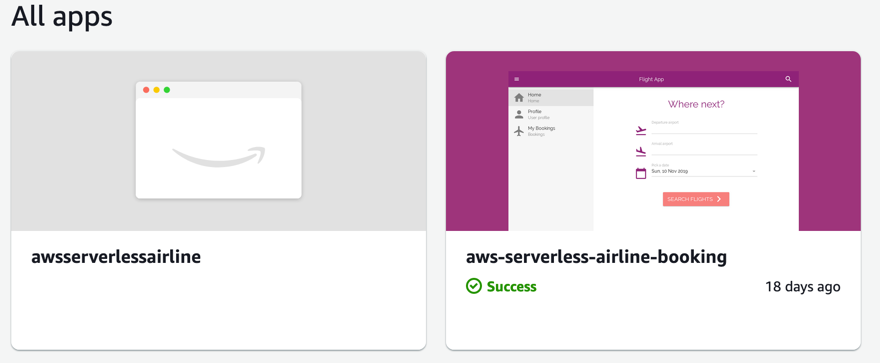
Duplicated App in Amplify Console after upgrading Amplify-CLI to 4.x (4.2 as of now).
To Reproduce
Steps to reproduce the behavior:
- Create a new App within Amplify Console
- Install Amplify-CLI older than 4, upgrade it and push
- You should see a duplicated app
Expected behavior
Single App
Additional context
Add any other context about the problem here.
Sample code
Include additional sample code or a sample repository to help us reproduce the issue. (Be sure to remove any sensitive data)
 heitorlessa
All 16 comments
I just discovered why it ended up creating a duplicate one.
After upgrading to Amplify-CLI and running amplify push it created an Amplify App ID which is different from the Amplify App ID it got auto-generated for my existing App.
My existing App sees the front-end but back-end. My new App sees back-end but front-end.
heitorlessa
on 29 Nov 2019
@heitorlessa for apps that are using both console and CLI, you need to upgrade through the console by clicking redeploy this version. This will give you a backed env in the tab. After doing so, run the amplify pull command from your local terminal to get the correct appid.
 swaminator
on 29 Nov 2019
swaminator
on 29 Nov 2019
@heitorlessa for apps that are using both console and CLI, you need to upgrade through the console by clicking redeploy this version. This will give you a backed env in the tab. After doing so, run the amplify pull command from your local terminal to get the correct appid.
I've tried both redeploying and pushing a new commit - No effect. Either way, I've tried amplify pull with the AppId from Amplify Console, all green but no changes in the Console itself.
heitorlessa
on 29 Nov 2019
I'm having the same issue.
I have various environments:
stagingandprod, which are configured in Amplify Console in an app created a while agochristophe, a dev env which isn't configured in Amplify Console and that I only deploy via the CLI
I recently upgraded to 4.2 and when I push from christophe, it creates a new Amplify app in the console. I tried to redeploy the staging env from the Console, but it doesn't make the backend section appear anywhere.
What am I supposed to do?
 ChristopheBougere
on 4 Dec 2019
ChristopheBougere
on 4 Dec 2019
@ChristopheBougere can you share your appid? Also your build settings would be helpful
swaminator
on 6 Dec 2019
@swaminator thanks for taking a look.
The original amplify app id is d2kr6iz2hgzrdy (eu-west-1). A new app has been generated with this id: d3p8otsv7y21zu.
Here is my amplify.yml:
version: 0.1
backend:
  phases:
    preBuild:
      commands:
        - (cd commons && npm ci)
        - (cd cli && npm link)
        - cd web
    build:
      commands:
        - amplifyPush --simple
        - (cd ../services/cleanup && npx serverless deploy --stage $USER_BRANCH --region $AWS_REGION)
        - (cd ../services/images && npx serverless deploy --stage $USER_BRANCH --region $AWS_REGION)
        - (cd ../services/uploader && npx serverless deploy --stage $USER_BRANCH --region $AWS_REGION)
frontend:
  phases:
    preBuild:
      commands:
        - npm ci
    build:
      commands:
        - npm run build
    postBuild:
      commands:
        - claptime setup-env --yes
  artifacts:
    baseDirectory: web/build
    files:
      - '**/*'
  cache:
    paths:
      - web/node_modules/**/*
@ChristopheBougere can you turn on live updates for the Amplify CLI to latest in the Console (or pin it to version 4.2 if that's what you're using locally): https://docs.aws.amazon.com/amplify/latest/userguide/custom-build-image.html#setup-live-updates
Your staging env should show up. For the env named christophe we are aware of this bug in the CLI and working on it.
swaminator
on 6 Dec 2019
I can confirm it works well for my staging env. Waiting for the CLI fix.
Thanks for your help
ChristopheBougere
on 6 Dec 2019
I hit something similar while upgrading from 3.16 to 4.6.0. I even read this bug report before starting and tried my best to avoid it this from happening.
This is what I did:
- Upgraded amplify cli in npm
- Did a pull, amplify status, and various stuff to try to get the app ID, nothing really happened
- amplify status was reporting changes (which it had from before the upgrade), so I did an amplify push
- The push was successful, and I checked that the new Managed Policies were created, seemed to work
- After the push finished the team-provider-info.json file now had
AmplifyAppIdadded - Went to the Console to update my live version to 4.6.0
- I committed the team-provider-info file and pushed it to force a build in the Console
- At this point I noticed a new app, no frontend, but the push of my backend was connected to the backend of that app
- The build seemed to work fine both for frontend of backend but I still have two apps
- Went to the CLI and did an amplify pull which kinda errored:
> Amplify appId mismatch.
> You are currently working in the amplify project with Id d1gmm0yc7cvihe (id changed slightly for privacy) - At this point it seemed like my only option was to manually update the team-provider-info.json file with the
AmplifyAppIdthe Console was giving me for my existing app (not the duplicate) - Doing a pull after having done that change didn't give any errors.
So now I believe I should be able to push from the CLI without issues and everything seems to be working for now, but my semi loaded duplicate app in the Console persists.
Is it safe to delete that app in the Console without also deleting any Amplify resources?
You guys really need to start documenting upgrades and code your upgrades to handle stuff like this nicer in order to prevent having to experiment with solutions on a PRODUCTION system. I have yet to do a single Amplify CLI upgrade without regressions or nit picks. This time it seems like a nit pick at best, so I guess that's progress?
 houmark
on 12 Dec 2019
houmark
on 12 Dec 2019
@kaustavghosh06 @UnleashedMind
I'd like clarification on two very basic questions (this does not seem to be documented):
1) Can an Amplify Console app be safely deleted in the UI without any Amplify resources being torn down (a new app with only backend attached was automatically created in the update process, and I'd like to get rid of it)?
2) Is the recently introduced AmplifyAppId consistent between environments or will there be a unique ID per environment (in the same project of course)?
I'm halfway in the process of upgrading from 3.x to latest release in my dev environment, but I don't want to continue to production until I have this cleared out.
houmark
on 18 Dec 2019
Fix for this has been merged and released with v4.7.
 kaustavghosh06
on 20 Dec 2019
kaustavghosh06
on 20 Dec 2019
We just recently updated from amplify cli 3.14.0 to 4.12.0 and seem to be experiencing this exact issue after the upgrade.
 amcbb
on 14 Jan 2020
amcbb
on 14 Jan 2020
And AWS devs do not care to respond to my basic questions whether it's 100% safe to remove the extra app created. I would not like to remove it and have resources automatically removed effectively breaking our prod environment.
@kaustavghosh06 @UnleashedMind would you please respond at least to point 1 here: https://github.com/aws-amplify/amplify-cli/issues/2972#issuecomment-566817944.
houmark
on 15 Jan 2020
@amcbb
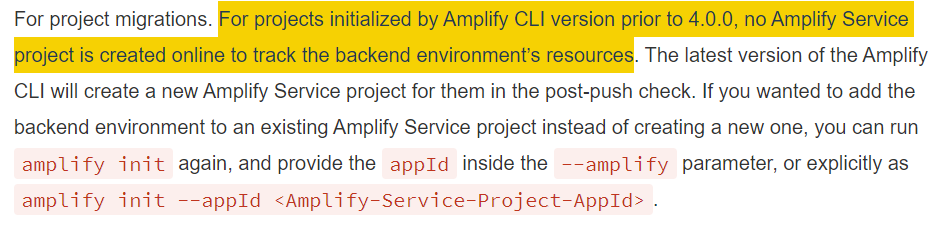
If you want to add your env to an existing Amplify Console project, you should run the migration workflow on a fully setup project (by previous version of the Amplify CLI):
amplify init --appId <amplify-console-project-appId>
 UnleashedMind
on 16 Jan 2020
UnleashedMind
on 16 Jan 2020
@houmark Sorry for the late response. Please find responses in-line for your questions
- Can an Amplify Console app be safely deleted in the UI without any Amplify resources being torn down (a new app with only backend attached was automatically created in the update process, and I'd like to get rid of it)?
Yes, deleting the Amplify Console app in the UI won't delete your resources
- Is the recently introduced AmplifyAppId consistent between environments or will there be a unique ID per environment (in the same project of course)?
The AmplifyAppID is based on your account/region If you're pushing to the same AWS account and region - your AmplifyAppID would be the same. If you have your environments in different regions/accounts, you'll have a different AmplifyAppID.
kaustavghosh06
on 16 Jan 2020
@amcbb
If you want to add your env to an existing Amplify Console project, you should run the migration workflow on a fully setup project (by previous version of the Amplify CLI):
amplify init --appId <amplify-console-project-appId>
Thanks @UnleashedMind. We were previously using amplify v 3.14.0 before the upgrade, and I missed the below text. Is it possible to configure something so no Amplify Console project is created each time a new environment is init'd (and not added to an existing project through --appId) like before? If not, this seems like a strange design change to me since team-workflow often has many backend development environments for developers that have no need to be added to Amplify Console projects (whether new or existing apps).
amcbb
on 16 Jan 2020
Related issues
 jkeys-ecg-nmsu
·
3Comments
jkeys-ecg-nmsu
·
3Comments
 onlybakam
·
3Comments
onlybakam
·
3Comments
 jexh
·
3Comments
jexh
·
3Comments
 nason
·
3Comments
nason
·
3Comments
 rehos
·
3Comments
rehos
·
3Comments