Amplify-cli: amplify init fails to ask for type of app
Describe the bug
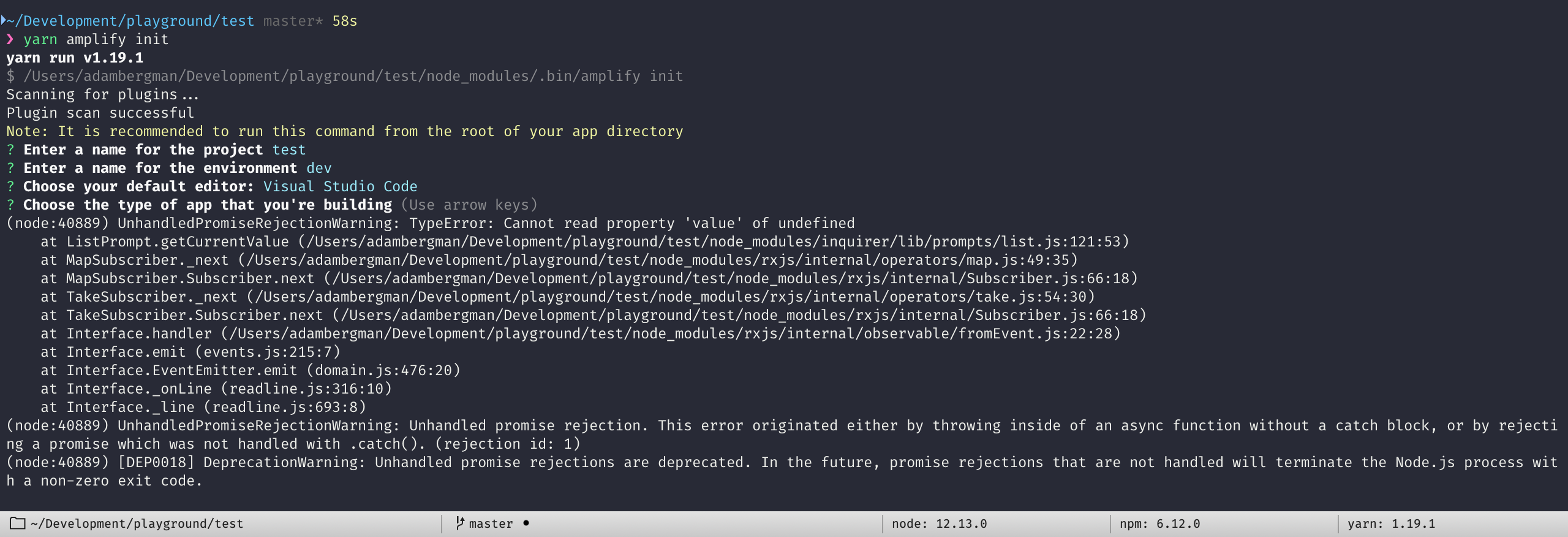
When running amplify init in a fresh Create React App project the cli fails on the Choose the type of app that you're building-question. But only if the cli is installed locally.
Amplify CLI Version
3.17.0 (works locally when using 3.0.0)
To Reproduce
$ npx create-react-app test-app && cd test-app
$ yarn add @aws-amplif/[email protected] --dev
$ yarn amplify init
This will ("hopefully") end on the above mentioned question.
Expected behavior
I expect the cli to show the usual options, ios, android and javascript
Screenshots
Before pressing enter no options are shown:

After pressing enter an error is thrown:
Desktop (please complete the following information):
- OS: macOS Mojave 10.14.6
- Node Version: 12.13.0
- Amplify CLI: 3.17.0
- NPM: 6.12.0
- yarn: 1.19.1
 adambrgmn
All 7 comments
The recommended way to use Amplify CLI is to install it globally and use it. I have marked this as a bug, but in the mean time could you install the CLI globally and use it
 yuth
on 14 Nov 2019
yuth
on 14 Nov 2019
I'm having the same problem running globally or not.
The only env differences are:
- Windows 10 Enterprise.
- Node v10.16.3.
 luantafarel
on 18 Nov 2019
luantafarel
on 18 Nov 2019
The recommended way to use Amplify CLI is to install it globally and use it. I have marked this as a bug, but in the mean time could you install the CLI globally and use it
Same behavior on Ubuntu 18.04 and Windows - with amplify installed globally and called simply via "amplify".
 pedershk
on 20 Nov 2019
pedershk
on 20 Nov 2019
I'm also affected by this: https://streamable.com/2euc0
These are my software versions:
| | version |
| ------- | ------------- |
| OS | Debian buster |
| node | 13.2.0 |
| amplify | 3.17.0 |
I run into this when trying to follow the recipe at:
https://aws-amplify.github.io/docs/js/start?ref=amplify-js-btn&platform=purejs
I can't go beyond Step 2.
This is the error trace at the end of my screencast…
(node:29645) UnhandledPromiseRejectionWarning: TypeError: Cannot read property 'value' of undefined
    at ListPrompt.getCurrentValue (/home/user/amplify-install/node_modules/inquirer/lib/prompts/list.js:121:53)
    at MapSubscriber._next (/home/user/amplify-install/node_modules/rxjs/internal/operators/map.js:49:35)
    at MapSubscriber.Subscriber.next (/home/user/amplify-install/node_modules/rxjs/internal/Subscriber.js:66:18)
    at TakeSubscriber._next (/home/user/amplify-install/node_modules/rxjs/internal/operators/take.js:54:30)
    at TakeSubscriber.Subscriber.next (/home/user/amplify-install/node_modules/rxjs/internal/Subscriber.js:66:18)
    at Interface.handler (/home/user/amplify-install/node_modules/rxjs/internal/observable/fromEvent.js:22:28)
    at Interface.emit (events.js:215:7)
    at Interface.EventEmitter.emit (domain.js:478:20)
    at Interface._onLine (readline.js:315:10)
    at Interface._line (readline.js:692:8)
(node:29645) UnhandledPromiseRejectionWarning: Unhandled promise rejection. This error originated either by throwing inside of an async function without a catch block, or by rejecting a promise which was not handled with .catch(). (rejection id: 1)
(node:29645) [DEP0018] DeprecationWarning: Unhandled promise rejections are deprecated. In the future, promise rejections that are not handled will terminate the Node.js process with a non-zero exit code.
 steve-ballmer-developers
on 23 Nov 2019
steve-ballmer-developers
on 23 Nov 2019
+1.
I've noticed that I'm affected by this if Amplify is either installed locally in the project or if amplify is installed globally with yarn.
If Amplify is installed globally with npm, it seems to work!
Here's a quick screencast that I threw together that shows Amplify being installed globally with yarn and not working as expected: https://asciinema.org/a/qk9sBgPbVxAtzB5rLsWlUAyl5
I'm using Docker here so these results should be reproducible.
And here's the same thing but using npm and working: https://asciinema.org/a/KqKB3TGGRgbc8Gzg0QRSH4mAm
 yanneg
on 9 Dec 2019
yanneg
on 9 Dec 2019
I was not able to reproduce the exact issue.
But I got a similar issue that was resolved by removing the global yarn directory and re-install the Amplify CLI. And I suspect this issue is very likely due to the same reason, it is because of how yarn handles package dependencies, which causes the frontend plugin to become invalid.
If you can afford it, remove the global yarn directory and reinstall the Amplify CLI using yarn.
Otherwise, use npm to install the Amplify CLI.
 UnleashedMind
on 14 Jan 2020
UnleashedMind
on 14 Jan 2020
closing this issue. feel free to open a new issue if you still see this problem.
UnleashedMind
on 16 Jan 2020
Related issues
 rehos
·
3Comments
rehos
·
3Comments
 adriatikgashi
·
3Comments
adriatikgashi
·
3Comments
 davo301
·
3Comments
davo301
·
3Comments
 YikSanChan
·
3Comments
YikSanChan
·
3Comments
 ReidWeb
·
3Comments
ReidWeb
·
3Comments