Amplify-cli: @searchable throws Elasticsearch:User IllegalArgumentException
Describe the bug
I'm using AWS AppSync with @searchable and I did search* query. All of which will throw Elasticsearch:User IllegalArgumentException when the resource was only instantiated for the first time, i.e., I just created and I haven't done any other mutations to it (create), so the tables are currently empty.
sample query
query {
  searchUsers {
    items {
      id
    }
    nexToken
  }
}
To Reproduce
Steps to reproduce the behavior:
- Create a resource with AWS AppSync using GraphQL.
- Use
@searchablewith it. - On AppSync GraphQL UI, try to use
search*query.
Expected behavior
Instead of throwing that error, it should return items: [] which is what it normally does. (After applying the workaround specified at the bottom of this document).
Screenshots
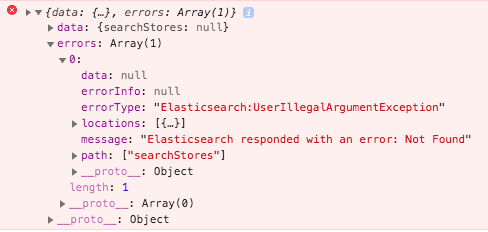
Desktop (please complete the following information):
The error is not specific to any platform. You can use the AWS AppSync GraphQL UI and still be able to replicate the error.
Smartphone (please complete the following information):
The error is not specific to any device. You can use the AWS AppSync GraphQL UI and still be able to replicate the error.
Additional context
As a workaround. You can insert data to the tables first, then you can remove those data. The next time you query that table with search you'll get the desirable response:
data: {
  searchTable: {
    items: [],
    nextToken: null
  }
}
 aprilmintacpineda
All 5 comments
@aprilmintacpineda I was able to reproduce this issue thanks for reporting.
 attilah
on 6 Nov 2019
attilah
on 6 Nov 2019
@aprilmintacpineda could you please retry this, as I was getting back to this issue and works as you expect, perhaps it was fixed in the AppSync Service DataSource side. I asked the team and awaiting an answer.
attilah
on 16 Dec 2019
Will get back to you. Thanks @attilah 🙇
I asked the team and awaiting an answer.
Feel free to close this issue once they have verified. Then, I will simply get back here if I experience this again.
aprilmintacpineda
on 17 Dec 2019
@aprilmintacpineda There was a modification in the behavior of the DataSource so that can be a reason why it does not happen anymore.
attilah
on 24 Jan 2020
Hi @attilah,
Sorry for the delay on feedback. I just had the chance to get back to the project assigned to me that was using this. So here's the scenario:
The project I have that's experiencing this already have an existing UAT environment setup, I just checked it out and it's still experiencing the error. It was previously using @aws-amplify/[email protected] but I have just upgraded it to 4.13.1 and the error still occurs. Is there any prerequisites for me to get the fix? or will it just be applied the next time I create a new environment?
I still have to touch the dynamo db to allow the searchable to create the indices. And I have to do that for each of the model with @searchable flag on it.
aprilmintacpineda
on 4 Feb 2020
Related issues
 darrentarrant
·
3Comments
darrentarrant
·
3Comments
 jexh
·
3Comments
jexh
·
3Comments
 jkeys-ecg-nmsu
·
3Comments
jkeys-ecg-nmsu
·
3Comments
 adriatikgashi
·
3Comments
adriatikgashi
·
3Comments
 gabriel-wilkes
·
3Comments
gabriel-wilkes
·
3Comments
Most helpful comment
@aprilmintacpineda I was able to reproduce this issue thanks for reporting.