Amplify-cli: Amplify Analytics BROKE up my WHOLE project
Here is the nightmare happened to me with amplify analytics which messed up my whole project.
Step 1 : Thought adding amplify analytics was so simple so tried adding "amplify add analytics" then did the push then it did throw an error stating that "nodejs6.10" issues it is caused by amplify itself because when I did "amplify add analytics" it did add the default node as "node6.10" then it went back to rollback mode and all the drama.
finally then if I do anything (publish,remove,push )it's throwing error that "stack delete failed" and all....
so basically now I can't use my project or publish my code.
then I decided to change node myself then changed to nodejs8.10 but as the previous stack is in delete failed it didn't let me do anything else. So I manually went and delete and I promise that's not easy too then I manually forcefully deleted but then the stack deleted my client id's and arn of my cognito pools. So, now I can't even signin to my website and my website was down now.
Then left with no choice I did create new amplify env and did everything from the start .like adding and hosting as my production website gone down due to cognito issue.
Now here is the catch I can't ask all of my hunderd 's of users to signup again. So I thought migrating users would fix all my issues But aws say's "It wont be that easy". I tried migrating using their documentaion and it's worse they don't even show which modules they are importing.(others are also facing this issue)
"https://docs.aws.amazon.com/cognito/latest/developerguide/cognito-user-pools-import-using-lambda.html"
Now left with no choice I fixed it somehow. Now as my clientid's deleted in the cognito . Iadded it manually now what it is saying is that ""errorMessage": "Unable to verify secret hash for client 2vet1o3lnn0lboepkfvtprl8qo", .
Please somebody helpme quickly by either fixing my migration error or getting back my old stack perfectly
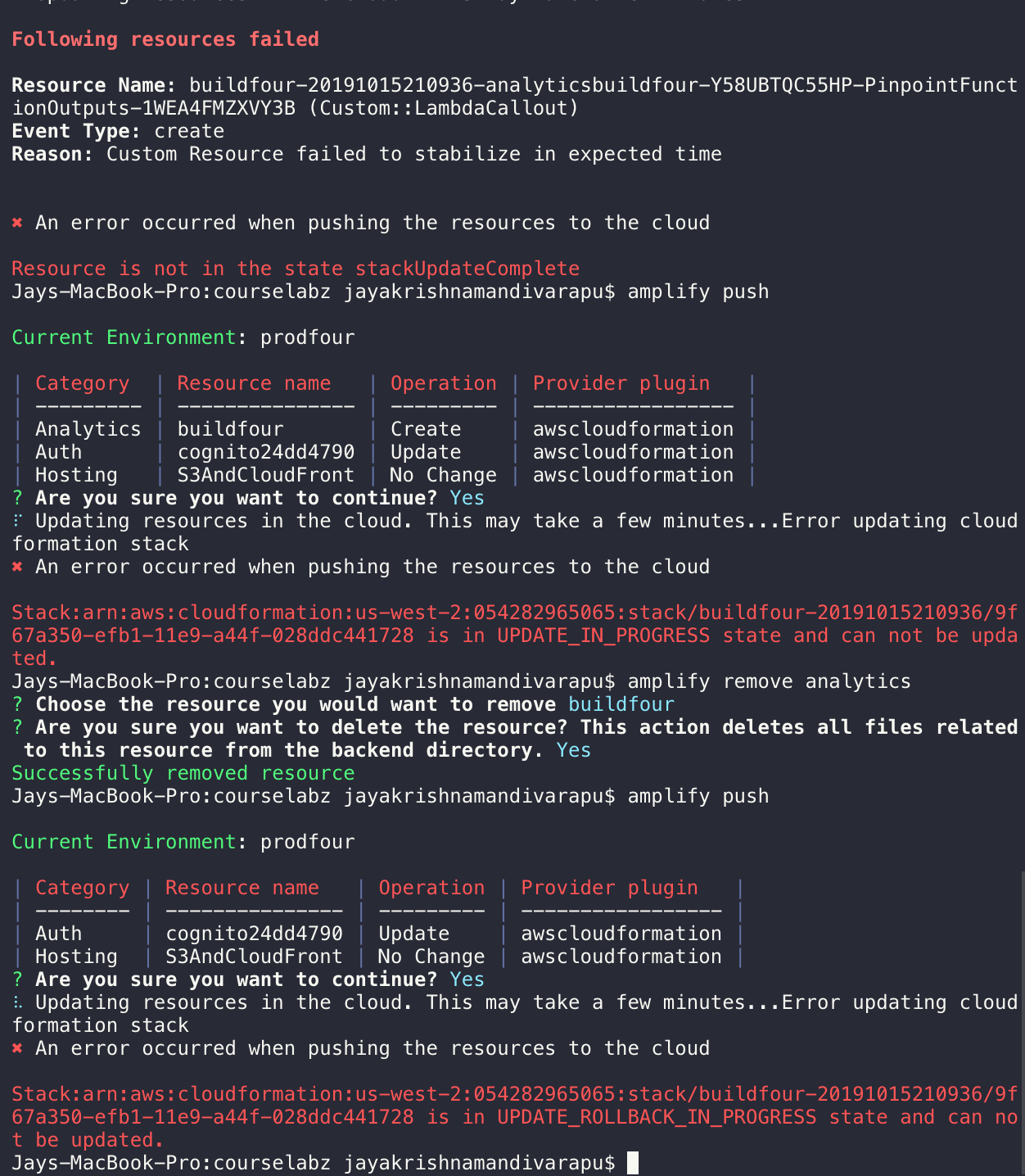
Some of my latest amplify analytics errors:
 jmandivarapu1
All 16 comments
@jmandivarapu1 This doc - https://aws-amplify.github.io/docs/cli/lambda-node-version-update couldn'e helped you out with the Analytics Lambda migration if you'd informed us before about us rather than deleting the Cloudformation stacks from your console. Nevertheless, I beleive Cognito stores a backup of your userpool (for a limited period) and you can contact AWS Support to recover your userpool (for existing users).
 kaustavghosh06
on 16 Oct 2019
kaustavghosh06
on 16 Oct 2019
have you tried amplify env pull --restore then do amplify push ?
 monaye
on 16 Oct 2019
monaye
on 16 Oct 2019
amplify env pull --restore
yeah I did tried it but sadly didn't workedout.
jmandivarapu1
on 16 Oct 2019
@jmandivarapu1 This doc - https://aws-amplify.github.io/docs/cli/lambda-node-version-update couldn'e helped you out with the Analytics Lambda migration if you'd informed us before about us rather than deleting the Cloudformation stacks from your console. Nevertheless, I beleive Cognito stores a backup of your userpool (for a limited period) and you can contact AWS Support to recover your userpool (for existing users).
I do have my userpool and created all my webclient. But all configuration and roles are gone I think. So, it's not letting me login back into website.
jmandivarapu1
on 16 Oct 2019
@jmandivarapu1 This doc - https://aws-amplify.github.io/docs/cli/lambda-node-version-update couldn'e helped you out with the Analytics Lambda migration if you'd informed us before about us rather than deleting the Cloudformation stacks from your console. Nevertheless, I beleive Cognito stores a backup of your userpool (for a limited period) and you can contact AWS Support to recover your userpool (for existing users).
I have my old user pool. S
o, the best thing I thought is that I would migrate the users from old pool to new pool (again hosted my website)using this code. But this documentation is pretty unclear like how to to import lookupUser,authenticateUser ...etc
Notonly me someother people also posted about this.
exports.handler = (event, context, callback) => {

    var user;

    if ( event.triggerSource == "UserMigration_Authentication" ) {

        // authenticate the user with your existing user directory service
        user = authenticateUser(event.userName, event.request.password);
        if ( user ) {
            event.response.userAttributes = {
                "email": user.emailAddress,
                "email_verified": "true"
            };
            event.response.finalUserStatus = "CONFIRMED";
            event.response.messageAction = "SUPPRESS";
            context.succeed(event);
        }
        else {
            // Return error to Amazon Cognito
            callback("Bad password");
        }
    }
    else if ( event.triggerSource == "UserMigration_ForgotPassword" ) {

        // Lookup the user in your existing user directory service
        user = lookupUser(event.userName);
        if ( user ) {
            event.response.userAttributes = {
                "email": user.emailAddress,
                // required to enable password-reset code to be sent to user
                "email_verified": "true"
            };
            event.response.messageAction = "SUPPRESS";
            context.succeed(event);
        }
        else {
            // Return error to Amazon Cognito
            callback("Bad password");
        }
    }
    else {
        // Return error to Amazon Cognito
        callback("Bad triggerSource " + event.triggerSource);
    }
};
@jmandivarapu1 Did you create a new env? If you created a new env, all the corresponding roles, user pool configurations will get cloned along with the app clients.
kaustavghosh06
on 16 Oct 2019
@jmandivarapu1 Did you create a new env? If you created a new env, all the corresponding roles, user pool configurations will get cloned along with the app clients.
I didn't after the stack got deleted my old env also got disappeared.
Now i am following this
Just wanted to migrate the old users to new user pool. then they can login in the normal way
but i don't know what npm package they used for the authenticateUser and lookupUser
can u help with that.?
jmandivarapu1
on 17 Oct 2019
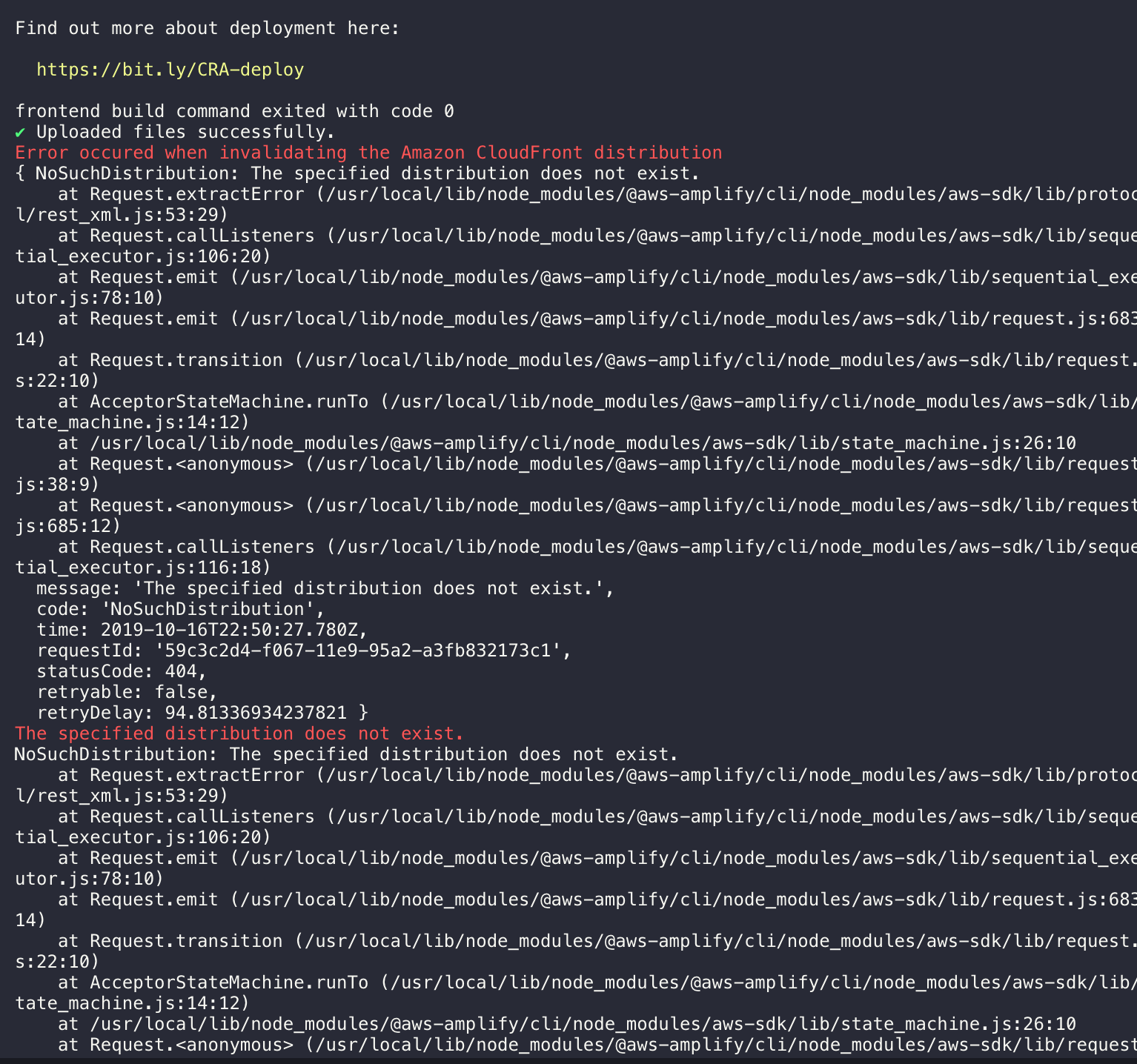
and one solution i tried is that I rolled back to my old environment and tried the amplify push then. But I am getting this error. Is there anyway to fix this. Just asking if any such solution exist?
jmandivarapu1
on 17 Oct 2019
@jmandivarapu1 Did the deletion of your stack delete your Cloudfront distribution as well? Are you able to access your website? You can check your Cloudfront distribution in amplify/backend/amplify-meta.json file.
kaustavghosh06
on 17 Oct 2019
@jmandivarapu1 Did the deletion of your stack delete your Cloudfront distribution as well? Are you able to access your website? You can check your Cloudfront distribution in
amplify/backend/amplify-meta.jsonfile.
Nope I wasn't able to access my website from yesterday "https://d19v75l5red964.cloudfront.net/"
At this point I was okay with any solution. But only goal of me was not to ask all my users signup again
jmandivarapu1
on 17 Oct 2019
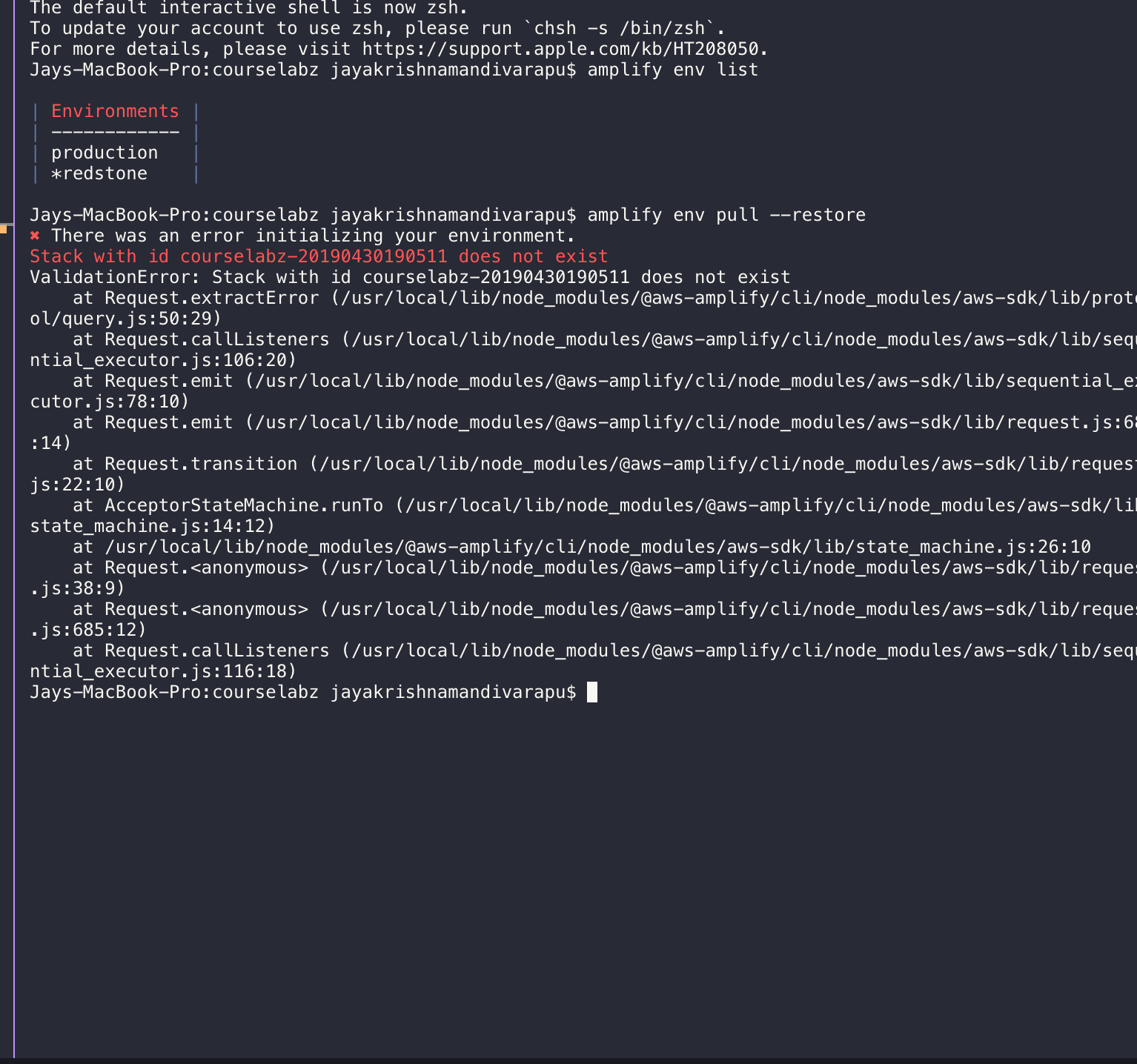
if i try to restore
jmandivarapu1
on 17 Oct 2019
@jmandivarapu1 tl;dr b/c my website is on fire:
The quickest way for you to get back online is to:
- provision a new amplify environment
- add your auth and hosting categories, make sure to keep configs consistent
- create/update the migration trigger and add it to your user pool
- enable USER_PASSWORD_AUTH in your app clients and configure your source code to use USER_PASSWORD_AUTH
- Cutover DNS if needed
Just wanted to migrate the old users to new user pool. then they can login in the normal way
Do you have custom attributes on your users? That's the main snag when writing a migration trigger lambda for user pool -> user pool. And since you are trying to migrate within a single account you don't need to manually invoke sts.assumeRole to call the adminGetUser API. Here's a snippet that might help you, I didn't bother to put in proper error handling, etc so it's up to you to make it robust enough for your application. I would say this code is close to the bare minimum needed to do single-account user pool -> user pool migration.
const AWS = require('aws-sdk');
const cognitoIdentity = new AWS.CognitoIdentityServiceProvider({ region: '<your-region-here>' });

const UserPoolId = process.env.deprecatedUserPoolId;

exports.handler = async (event) => {
    const { userName } = event;

    const getUserParams = {
        Username: userName,
        UserPoolId
    };

    try {
        const user = await cognitoIdentity.adminGetUser(getUserParams).promise();
        //TODO: if you have custom attributes, grab them from the user variable and store them in the response below
        event.response = { finalUserStatus: "CONFIRMED" }
        return event;
    } catch (e) {
        throw e; //no user to migrate, give them an error in the client
    }
};
At this point I was okay with any solution. But only goal of me was not to ask all my users signup again
Hosting category is pretty rock-solid and is pretty plug-n-play, the only thing you'd have to do there besides reprovision the category is to cutover your DNS to the new CloudFront distribution (assuming you're using a URL besides the CF url).
EDIT: oh, and the migration trigger doesn't get called with SRP auth because the actual username and password doesn't go over the wire. So modify your Cognito app clients to allow USER_PASSWORD_AUTH, then update your Auth configuration in your source to force USER_PASSWORD_AUTH flow instead of default SRP flow.
o, the best thing I thought is that I would migrate the users from old pool to new pool (again hosted my website)using this code. But this documentation is pretty unclear like how to to import lookupUser,authenticateUser ...etc
That sample code is for migrating a user from a legacy database, and the authenticateUser, lookupUser functions are just abstractions for your business logic (which AWS can't write for you). For instance if you have to migrate from a legacy database (not a user pool), then you would lookup their user in your table, grab their salt, hash the password passed in to the migration trigger using the same logic you did in your legacy authentication method, compare it against the stored hashed password in your legacy database, etc. (It gets a little simpler if you were storing passwords in plaintext, but let's not consider that.)
User pool -> user pool is a piece of cake comparatively.
 jkeys-ecg-nmsu
on 17 Oct 2019
jkeys-ecg-nmsu
on 17 Oct 2019
@jmandivarapu1 tl;dr b/c my website is on fire:
The quickest way for you to get back online is to:
- provision a new amplify environment
- add your auth and hosting categories, make sure to keep configs consistent
- create/update the migration trigger and add it to your user pool
- enable USER_PASSWORD_AUTH in your app clients and configure your source code to use USER_PASSWORD_AUTH
Just wanted to migrate the old users to new user pool. then they can login in the normal way
Do you have custom attributes on your users? That's the main snag when writing a migration trigger lambda for user pool -> user pool. And since you are trying to migrate within a single account you don't need to manually invoke sts.assumeRole to call the adminGetUser API. Here's a snippet that might help you, I didn't bother to put in proper error handling, etc so it's up to you to make it robust enough for your application. I would say this code is close to the bare minimum needed to do single-account user pool -> user pool migration.
const AWS = require('aws-sdk');
const cognitoIdentity = new AWS.CognitoIdentityServiceProvider({ region: '<your-region-here>' });

const UserPoolId = process.env.deprecatedUserPoolId;

exports.handler = async (event) => {
    const { userName } = event;

    const getUserParams = {
        Username: userName,
        UserPoolId
    };

    try {
        const user = await cognitoIdentity.adminGetUser(getUserParams).promise();
        //TODO: if you have custom attributes, grab them from the user variable and store them in the response below
        event.response = { finalUserStatus: "CONFIRMED" }
        return event;
    } catch (e) {
        throw e; //no user to migrate, give them an error in the client
    }
};
At this point I was okay with any solution. But only goal of me was not to ask all my users signup again
Hosting category is pretty rock-solid and is pretty plug-n-play, the only thing you'd have to do there besides reprovision the category is to cutover your DNS to the new CloudFront distribution (assuming you're using a URL besides the CF url).
EDIT: oh, and the migration trigger doesn't get called with SRP auth because the actual username and password doesn't go over the wire. So modify your Cognito app clients to allow USER_PASSWORD_AUTH, then update your Auth configuration in your source to force USER_PASSWORD_AUTH flow instead of default SRP flow.
o, the best thing I thought is that I would migrate the users from old pool to new pool (again hosted my website)using this code. But this documentation is pretty unclear like how to to import lookupUser,authenticateUser ...etc
That sample code is for migrating a user from a legacy database, and the authenticateUser, lookupUser functions are just abstractions for your business logic (which AWS can't write for you). For instance if you have to migrate from a legacy database (not a user pool), then you would lookup their user in your table, grab their salt, hash the password passed in to the migration trigger using the same logic you did in your legacy authentication method, compare it against the stored hashed password in your legacy database, etc. (It gets a little simpler if you were storing passwords in plaintext, but let's not consider that.)
User pool -> user pool is a piece of cake comparatively.
I did exactly the way you said.
But I am getting the error. I created the lambda logs too and it's finding user and returning all the variables. (I took care of custom attributes also)
"Cannot modify the non-mutable attribute sub"

jmandivarapu1
on 17 Oct 2019
@jmandivarapu1 The code to extract the custom attributes is non-trivial and I excluded it because I didn't want to write your whole program for you, and was in a bit of a hurry. I don't know exactly how you implemented it but clearly you're trying to copy over all attributes instead of just _custom_ attributes. You don't get to define the sub, that's left up to the token issuer (in this case, the Cognito user pool). Just like you don't get to modify iss or any of the other default attributes.
Here's a good entry point for learning more about how tokens work: OpenID default claims
Hint: filter the array to get only the custom attributes, or use a reducer starting with an empty array. Or if you only have a few customs then you could create a const list of names of custom attributes manually with the prefix and map over it to get just those attributes.
Also I assumed you knew this if you were using custom attributes, but just in case, Cognito custom token claims are prefixed with custom:.
jkeys-ecg-nmsu
on 17 Oct 2019
@jmandivarapu1 The code to extract the custom attributes is non-trivial and I excluded it because I didn't want to write your whole program for you, and was in a bit of a hurry. I don't know exactly how you implemented it but clearly you're trying to copy over all attributes instead of just _custom_ attributes. You don't get to define the sub, that's left up to the token issuer (in this case, the Cognito user pool). Just like you don't get to modify
issor any of the other default attributes.Here's a good entry point for learning more about how tokens work: OpenID default claims
Hint: filter the array to get only the custom attributes, or use a reducer starting with an empty array. Or if you only have a few customs then you could create a const list of names of custom attributes manually with the prefix and map over it to get just those attributes.
Also I assumed you knew this if you were using custom attributes, but just in case, Cognito custom token claims are prefixed with
custom:.
Thank you for all the help. Now I was able to migrate users from old pool to new pool.
But I did observed one more thing that is if I am using authenticationFlowType: 'USER_PASSWORD_AUTH' then Auth.currentUserInfo() of the authenticated user is returning NULL. But I used that in my project multiple times. Is there any way to fix that too.
  Auth: {
        userPoolId:  "----------",
        userPoolWebClientId: "------------",
        region: 'us-west-2',
        authenticationFlowType: 'USER_PASSWORD_AUTH'
    }
Thank you for all the help. Now I was able to migrate users from old pool to new pool.
You're welcome. I open a lot of issues in this repo AND I feel your pain in losing a production stack, so I wanted to help if I could.
But I did observed one more thing that is if I am using authenticationFlowType: 'USER_PASSWORD_AUTH' then Auth.currentUserInfo() of the authenticated user is returning NULL. But I used that in my project multiple times. Is there any way to fix that too.
Sounds like a bug, you should open an issue. If you need it fixed ASAP you can trace the program and patch it in your node_modules, it looks to me like it's failing on this line: https://github.com/aws-amplify/amplify-js/blob/master/packages/auth/src/Auth.ts#L1587
jkeys-ecg-nmsu
on 17 Oct 2019
Related issues
 amlcodes
·
3Comments
amlcodes
·
3Comments
 ReidWeb
·
3Comments
ReidWeb
·
3Comments
 jeanpaulcozzatti
·
3Comments
jeanpaulcozzatti
·
3Comments
 rehos
·
3Comments
rehos
·
3Comments
 jexh
·
3Comments
jexh
·
3Comments