Amplify-cli: Cloudformation templates generated for same graphql schema is different between multiple environments
Describe the bug
The templates generated by amplify console for same graphql schema is somehow aggregating resources that does not belong to it between multiple environments.
To Reproduce
Create schema as follows
Create an env with this schema
type GrantApplication @model {
    id: ID!
    cert: [Cert] @connection(name: "GrantApplicationCert")
    equipment: [Equipment] @connection(name: "GrantApplicationEquipment")
}


type Equipment @model {
    id: ID!
    grantapplication: GrantApplication @connection(name: "GrantApplicationEquipment")
}

type Cert @model {
    id: ID!
    grantapplication: GrantApplication @connection(name: "GrantApplicationCert")

}
Build it locally and push it to amplify console
then add this to the schema
type FinancialReimbursement @model {
    id: ID!

    equipment: FimEquipment @connection(name: "EquipmentFinancialReimbursements")
    cert: FimCert @connection(name: "CertFinancialReimbursements")
}


type FimEquipment @model {
    id: ID!
    financialreimbursement: FinancialReimbursement @connection(name: "EquipmentFinancialReimbursements")
}

type FimCert @model {
    id: ID!
     financialreimbursement: FinancialReimbursement @connection(name: "CertFinancialReimbursements")
}
Build it locally and push it to the console. Then make this to change to FinancialReimbursement schema
type FinancialReimbursement @model {
    id: ID!

    equipment: [FimEquipment] @connection(name: "EquipmentFinancialReimbursements")
    cert: [FimCert] @connection(name: "CertFinancialReimbursements")
}
The local amplify push will go successfully, but as soon as the build on amplify console starts, it throws this error
CREATE_FAILED      FimCert                AWS::CloudFormation::Stack Tue Aug 20 2019 19:24:09 GMT+0000 (Coordinated Universal Time) Embedded stack arn:aws:cloudformation:us-east-1:072516061299:stack/lempg-amplify-20190430201722-apilempg-146B5J3YARASD-FimCert-27ORAMDH9JHZ/0f2899a0-c380-11e9-8b3b-0e0c84e5bae6 was not successfully created: Export with name i6ufnuujbve25hbn4ce6x26c3u:GetAtt:FimCertTable:StreamArn is already exported by stack lempg-amplify-20190430201722-apilempg-146B5J3YARASD-Cert-HBKNK9RNYCFS

CREATE_FAILED      FimEquipment           AWS::CloudFormation::Stack Tue Aug 20 2019 19:24:09 GMT+0000 (Coordinated Universal Time) Embedded stack arn:aws:cloudformation:us-east-1:072516061299:stack/lempg-amplify-20190430201722-apilempg-146B5J3YARASD-FimEquipment-1B6D3U3R42NJ2/0f2899a0-c380-11e9-8230-0e23fbf2c85e was not successfully created: Export with name i6ufnuujbve25hbn4ce6x26c3u:GetAtt:FimEquipmentTable:StreamArn is already exported by stack lempg-amplify-20190430201722-apilempg-146B5J3YARASD-Equipment-17BRW8J3XWLEE
Let me give you some back context. We have 4 environments namely, master, devmaster, prodtest and newprod. master env is the one that 2 developers share and thats the one where we do local builds. Rest of the envs are build using amplify console driven by their own branches on github.
Now, if you look at the error closely, you will see, A stack for FimCert model and FimEquipment model is not created because the error says it is exported by Cert and Equipment stacks.
If you also look at the schema, FimCert and FimEquipment, Cert and Equipment are different models with no connections between them.
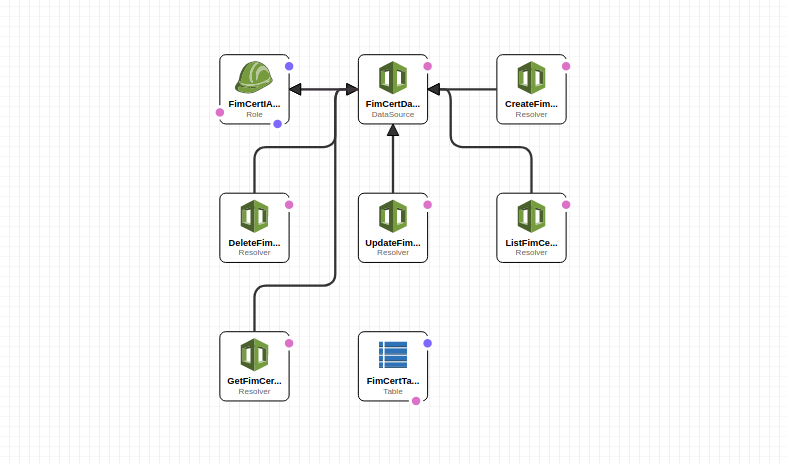
This is what cloudformation's exports section tells me for FimCert for master and devmaster env
devmaster

master

If you are a visual person, then this is what above images are saying
on devmaster env
This is how Cert's model stack looks now
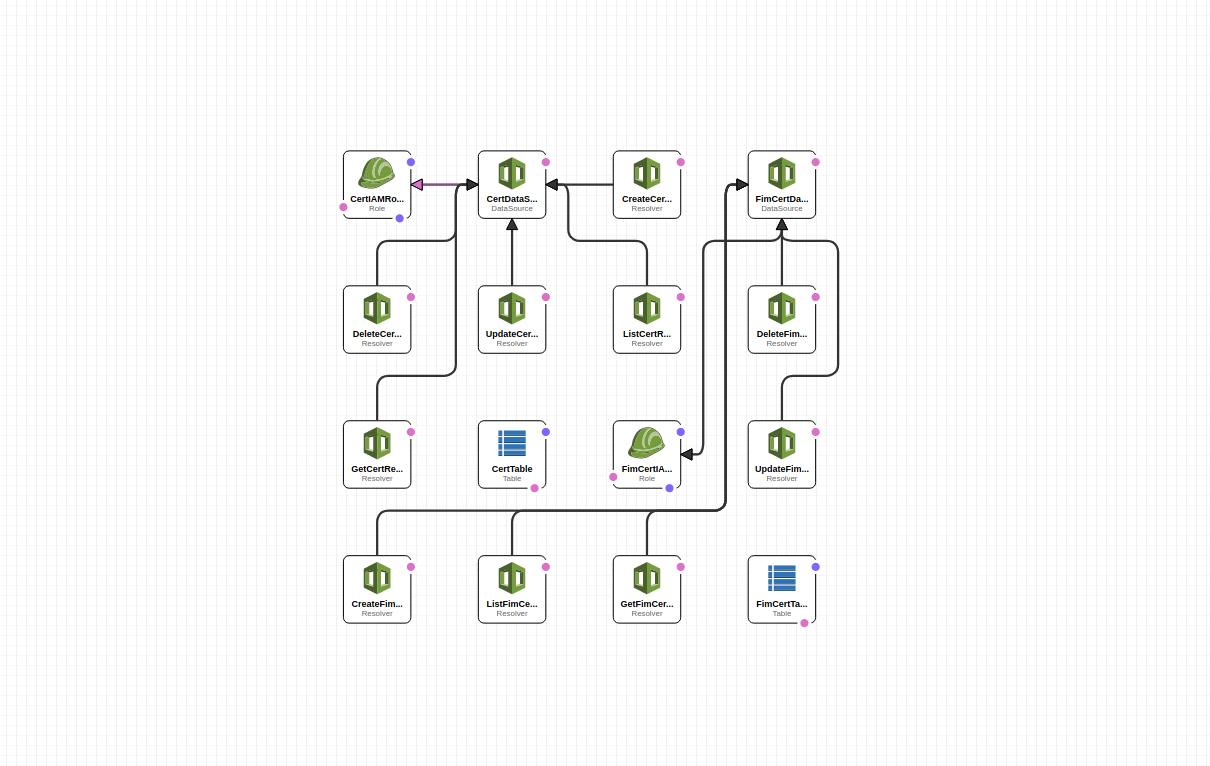
and on master
This is FimCert's image
This is Cert's stack image
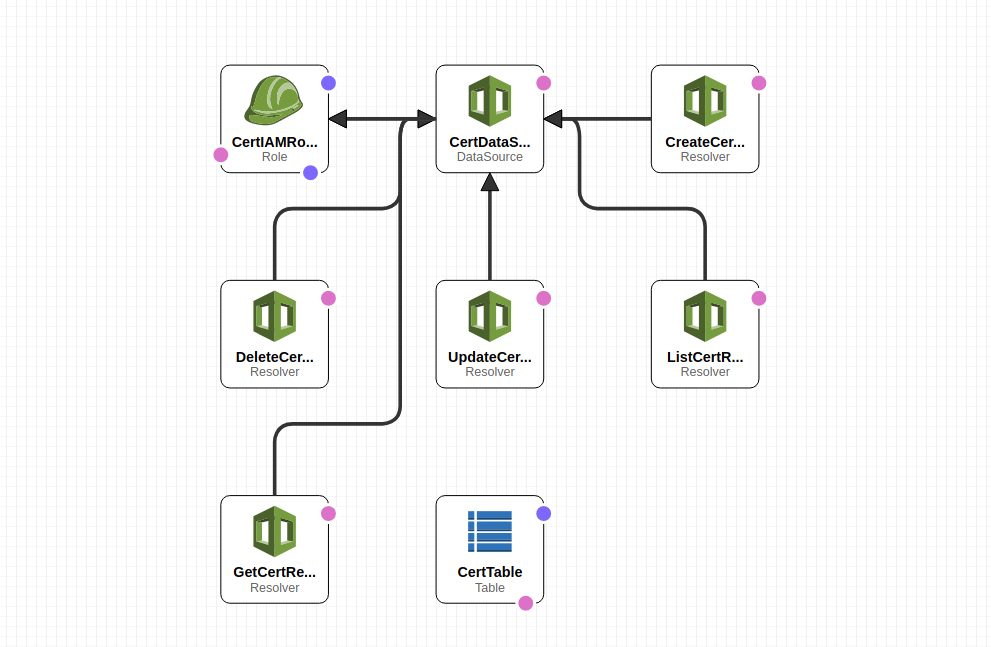
For some unknown reason, the resources generated by amplify console for Cert and FimCert, Equipment and FimEquipment and others (I have not listed them in the schema but they are like Travel, FimTravel and so on) belong to the initial stack that was created on devmaster env BUT not on master env
The only reason I am forced to believe is I am using same field name for named connections in FinancialReimbursement and GrantApplication model. If thats the case then why the local build to master env went fine and one on amplify console for devmaster env failed?
Now it has to come to a point where If I make a change with the build that was passing before I made the second change to FinancialReimbursement schema, fails now.
Expected behavior
Templates generated across env should generically be same.
Desktop (please complete the following information):
- OS: Arch Linux
- Browser Chromium 76
- Amplify Version - 1.12.0
 grudra7714
All 14 comments
@grudra7714 could you please confirm that you've customized the CLI version used by Amplify Console to the same version you're using locally, because Amplify Console is on an older version of the CLI by default.
Take a look at #1581 I think you are being hit by the same problem and I just submitted a PR for this issue.
 attilah
on 22 Aug 2019
attilah
on 22 Aug 2019
@attilah its not. I am on 1.12.0
This is from the build provision log
# Framework Versions
ENV VERSION_NODE_8=8.12.0
ENV VERSION_NODE_10=10.16.0
ENV VERSION_NODE_12=12
ENV VERSION_NODE_DEFAULT=$VERSION_NODE_10
ENV VERSION_RUBY_2_4=2.4.6
ENV VERSION_RUBY_2_6=2.6.3
ENV VERSION_BUNDLER=2.0.1
ENV VERSION_RUBY_DEFAULT=$VERSION_RUBY_2_4
ENV VERSION_HUGO=0.55.6
ENV VERSION_YARN=1.16.0
ENV VERSION_AMPLIFY=1.7.2
@grudra7714 I see ENV VERSION_AMPLIFY=1.7.2 there. not 1.12.0
attilah
on 22 Aug 2019
Sorry misread your message. I have not customized amplify version on the console. Let me try that
grudra7714
on 22 Aug 2019
@attilah I added an override for the Amplify CLI version but I still see 1.7.2 in the build provision log for new builds
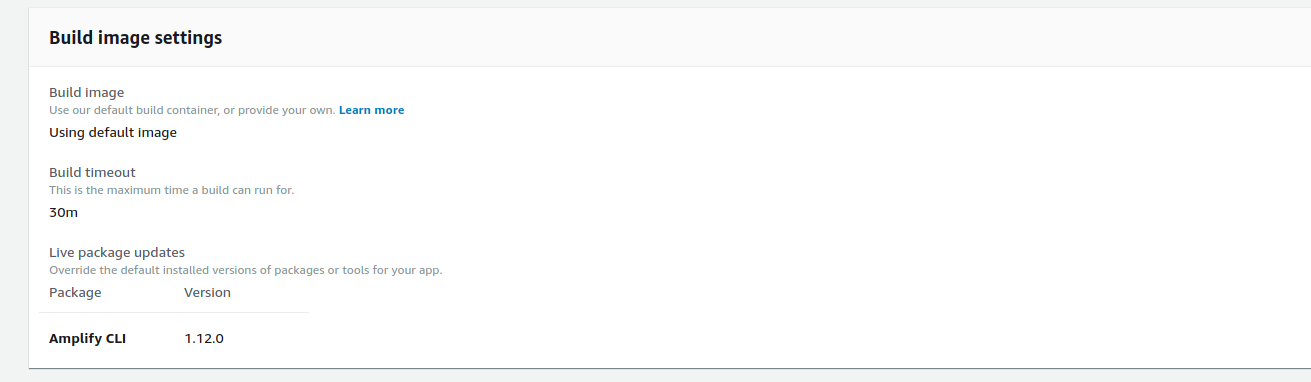
Also tried adding an env variables in the Environment Variables section of the console as well as in the amplify.yml file
version: 0.1
env:
  variables:
      VERSION_AMPLIFY: 1.12.0
backend:
  phases:
    build:
      commands:
        - '# Execute Amplify CLI with the helper script'
        - amplifyPush --simple
@grudra7714 @attilah its a console UI inconsistency. A fix is being rolled out to all regions in the coming days. The build container has 1.12.0 installed.
 swaminator
on 22 Aug 2019
swaminator
on 22 Aug 2019
@grudra7714 please wait for the merge of #2114 and the next release that will contain that fix and retry after that.
attilah
on 22 Aug 2019
@attilah ok. Any timeline on that?
Thanks for your help btw
grudra7714
on 22 Aug 2019
@grudra7714 we've releases mostly every week, so next week is a good candidate to have this included. If you'd like to test it, you can take the PR branch and setup the CLI with yarn setup-dev and after that use amplify-dev command to see if it works. See here on proper setup steps.
attilah
on 22 Aug 2019
Thanks! I'll try that
grudra7714
on 22 Aug 2019
This is a show-stopper for us. Any update?
 zawarski
on 26 Aug 2019
zawarski
on 26 Aug 2019
@zawarski We published a fix for this in 2.0.0 release.
 kaustavghosh06
on 29 Aug 2019
kaustavghosh06
on 29 Aug 2019
@kaustavghosh06 @attilah still no bueno. We tried builds with 2.0.0 and latest amplify-cli version in the aws console and still same result. We have 4 environments running master, demaster, prodtest and newprod. master env is the one that developers share locally and do local builds. Also its the only one that builds without any issue. Other 3 environments which are built from amplify console, fails.
In the provision log, it still says ENV VERSION_AMPLIFY=1.7.2 but I am guessing that's the inconsistency @swaminator is talking about.
grudra7714
on 9 Sep 2019
UPDATE
I was able to fix this problem yesterday by manually going through cloud formation templates and removing the stacks that should be part of the stack in the first place. I ended up updating associated nested stacks (Like for CERT model, I removed all the FimCert references, because FimCert was exported by CERT). After that, I updated the connection stack where I removed all the associated resolvers. I started a build after this and it passed.
grudra7714
on 13 Sep 2019
Related issues
 MageMasher
·
3Comments
MageMasher
·
3Comments
 jeanpaulcozzatti
·
3Comments
jeanpaulcozzatti
·
3Comments
 ReidWeb
·
3Comments
ReidWeb
·
3Comments
 jexh
·
3Comments
jexh
·
3Comments
 davo301
·
3Comments
davo301
·
3Comments
Most helpful comment
@grudra7714 @attilah its a console UI inconsistency. A fix is being rolled out to all regions in the coming days. The build container has 1.12.0 installed.