Amplify-cli: Passing cognito user pool web client id to lambda functions
Note: If your feature-request is regarding the AWS Amplify Console service, please log it in the
official AWS Amplify Console forum
Is your feature request related to a problem? Please describe.
Feature: https://github.com/aws-amplify/amplify-cli/issues/1099 enabled us to pass some parameters (like region, graphqlid and cognito user pool id) to lambda functions (great work BTW), however, for being able to use Amplify inside a lambda function like we do in the frontend we still need the param: aws_user_pools_web_client_id found on the aws-exports file that we pass to Amplify to configure it (Amplify.configure(aws_exports)).
Describe the solution you'd like
pass the aws_user_pools_web_client_id param to lambda functions.
 damianrr
All 9 comments
It would be nice if there was a Secrets category that would simplify the process of creating a new Secret in Secrets Manager and generate the code for the Functions category to decrypt that secret. But otherwise it's pretty simple to create a new secret, decrypt it from lambda, and go without much heartburn. I'll send you some sample code when I'm free of curr obligations.
 jkeys-ecg-nmsu
on 20 Jun 2019
jkeys-ecg-nmsu
on 20 Jun 2019
Thanks for your response @jkeys-ecg-nmsu. As I said in the other thread that you responded, my issue is that when I post a query to the GraphQL endpoint I don't know what would actually be the credentials that I need to pass (nor where to get them from) since in Amplify I just do: Amplify.configure(aws_exports) and that handles any required authentication and everything else.
I have no problems creating a secret and reading it from the lambda function (I'm actually doing that elsewhere easily) but if you have a snippet of how could I make a GraphQL request from lambda to AppSync (with authentication) that would be very helpful!
damianrr
on 21 Jun 2019
I'm currently having this issue too. I have a lambda function using NodeJS. When it runs, it should insert a data into a dynamo db and I'm using aws appsync with graphql, that is protected with user groups, to do that instead of directly connecting to dynamo db.
I have to login with cognito to get access token and use that access token to make graphql queries (using graphql-request).
I logged process.env and it does not contain this variable.
sample code
await identity
    .adminInitiateAuth({
      UserPoolId: process.env.AUTH_WRGDAUTHENTICATION_USERPOOLID,
      ClientId, // should be in process.env
      AuthFlow: 'ADMIN_NO_SRP_AUTH',
      AuthParameters: {
        USERNAME,
        PASSWORD
      }
    })
    .promise();
The problem with it not being in the process.env is the environment. Our system is running on 3 different environments, I'm pretty sure it can't be constant.
As a work around, we can have a .env file on the src of the function, and then use dotenv to read it.
sample code
src/.env
aws_user_pools_web_client_id=
src/index.js (the handler)
require('dotenv').config({
  path: require('path').join(__dirname, './.env')
});
The problem with this is that every time you git checkout to an environment, you will also have to change that (because you don't want to commit that file so you should add that to your gitignore). The solution to this problem is to set up script to do the checkout for you and then modify this, because you don't want to accidentally push config of UAT env to Staging env.
Alternative solutions that could work in my scenario:
- Use layers to store constants -- layers are not yet managed by aws-amplify, so you will have to maintain them yourself by manually uploading them every time you update them.
- Use multi auth and add API KEY authorization to your API -- I was informed that when you use API KEY to authenticate you cannot use
@searchableso allsearch*queries will not work, which you can get around this by using ESQuery. This alternative seems to require quite a lot of effort just to achieve something so simple.
 aprilmintacpineda
on 28 Oct 2019
aprilmintacpineda
on 28 Oct 2019
Another possible workaround is to put it inside team-provider-info.json:
"categories": {
            "auth": {

            },
            "function": {
                "fonctionWithWebId": {
                    "userPoolWebClientId": "Your web client Id hardcoded",
                },
                "function2": {},
            }
        }
You can put it for every environement. You just needs to be careful when doing amplify init because it wipes the values sometimes. It doesn't change it when doing amplify env checkout.
To get it inside the function, you have to put inside amplify/backend/function/fonctionWithWebId/fonctionWithWebId-cloudformation-template.json:
"Parameters": {
        "env": {
            "Type": "String"
        },
        "userPoolWebClientId": {
            "Type": "String",
            "Default": "userPoolWebClientId"
        },
}
...

"Resources": {
        "LambdaFunction": {
            ...
            },
            "Properties": {
                ...
                "Environment": {
                    "Variables": {
                        "ENV": {
                            "Ref": "env"
                        },
                        "AUTH_USERPOOL_WEB_CLIENT_ID": {
                            "Ref": "userPoolWebClientId"
                        }
                    }
                },
....
 SebSchwartz
on 8 Nov 2019
SebSchwartz
on 8 Nov 2019
I am facing a similar issue.
I am surprised that in order to configure Amplify in Lambda we need both the User Pool Id and the Client Id but we only get User Pool Id in process.env.
@SebSchwartz , adding it to the team-provider-info.json might expose it too.
 rehanbabertkxel
on 9 Jan 2020
rehanbabertkxel
on 9 Jan 2020
+1
 amuresia
on 21 Mar 2020
amuresia
on 21 Mar 2020
And I ran into this issue again, this time when setting up the app in a CI/CD environment. The way I do it is by generating a .env file on the src of the function, and then using dotenv package to load it, the process depends on aws-exports.js which is not being committed to the repository, so it has to be generated before amplify push, but generating aws-exports.js on CI/CD is not as easy as generating it on your machine https://github.com/aws-amplify/amplify-cli/issues/3643 it would have been better if this was added into the environment by default just like the others variables.
aprilmintacpineda
on 20 May 2020
There might be an easier way (depending on your usecase):
Use IAM access.
make sure you add IAM access:
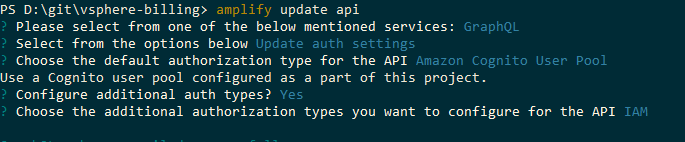
Then in your schema add
type MyModel
    @model
    @aws_iam
    @aws_cognito_user_pools
    @auth(rules: [{ allow: private }, { allow: private, provider: iam }]) {
    etc: String!
}
Then follow the example in the amplify documentation here:
Amplify Documentation
These lines = magic:
  const signer = new AWS.Signers.V4(gqlRequest, 'appsync', true)
  signer.addAuthorization(AWS.config.credentials, AWS.util.date.getDate())
 dan-danciu
on 9 Jun 2020
dan-danciu
on 9 Jun 2020
Is anyone working on this at all? for me I'm using it for a lambda s3 trigger.
aprilmintacpineda
on 15 Jul 2020
Related issues
 jexh
·
3Comments
jexh
·
3Comments
 kstro21
·
3Comments
kstro21
·
3Comments
 zjullion
·
3Comments
zjullion
·
3Comments
 ffxsam
·
3Comments
ffxsam
·
3Comments
 YikSanChan
·
3Comments
YikSanChan
·
3Comments
Most helpful comment
And I ran into this issue again, this time when setting up the app in a CI/CD environment. The way I do it is by generating a
.envfile on thesrcof the function, and then usingdotenvpackage to load it, the process depends onaws-exports.jswhich is not being committed to the repository, so it has to be generated before amplify push, but generatingaws-exports.json CI/CD is not as easy as generating it on your machine https://github.com/aws-amplify/amplify-cli/issues/3643 it would have been better if this was added into the environment by default just like the others variables.