Amplify-cli: Amplify console saying stack with id xxxxxxxx does not exist, when it does.
Describe the bug
My amplify console build is failing with an amplify-cli based project. It is saying that the stack does not exist, when it actually does. I can go into the cloudformation console and find the root stack with exactly the same id. I'm confused about how I can resolve this issue.
I'm happy to provide build logs to someone - I can send to an email.
 mwarger
All 16 comments
Are you using the Amplify console in the same region to which the AWS resources are deployed to using the CLI? You can send over the logs to [email protected]
 kaustavghosh06
on 23 Jan 2019
kaustavghosh06
on 23 Jan 2019
I am using the same region for everything.
Email sent. Thanks for taking a look.
mwarger
on 23 Jan 2019
Hi @mwarger : can you share your app ARN? Found in App Settings > General
 swaminator
on 23 Jan 2019
swaminator
on 23 Jan 2019
@swaminator - Is that information sensitive?
mwarger
on 23 Jan 2019
To clarify - this was working fine yesterday evening with the same project.
mwarger
on 23 Jan 2019
@mwarger We were to able to reproduce the issue and provide a fix for it as a part of the Amplify Console. Please let me know if you're able to re-build your project. Thanks for letting us know about it.
kaustavghosh06
on 23 Jan 2019
That worked! Thank you for your quick help.
mwarger
on 23 Jan 2019
@kaustavghosh06 I am also having the same issue. But i realized my aws resources are hosted in Mumbai zone, while amplify console is in N.Virginia zone.
As amplify is not in mumbai zone, does that mean i have to redeploy everything to N.Virginia zone?
This is kinda painful...
 artista7
on 25 Feb 2019
artista7
on 25 Feb 2019
@kaustavghosh06, can you speak to @artista7's question? I think I stumbled upon the same "error". amplify init did let me choose the eu-central-1 region but now I am discovering that the Amplify console is not available in this region ... :/
 riddla
on 26 Mar 2019
riddla
on 26 Mar 2019
Can I just change the Region within amplify-meta.json to a region that supports the console and amplify push or amplify publish again? How do I get rid of the CloudFormation stuff that was created in the old region then? By hand?
riddla
on 26 Mar 2019
same issue here. Created everything by the console.
As a bug, I couldn't build the project in the console, unless we checked in the src/aws-exports.js file.
The bug is still there, today I created a new project, and got into the same issue again.
 zerdos
on 4 May 2019
zerdos
on 4 May 2019
I have this same issue as well, with a fresh project using Amplify 1.1.29. @mwarger I think it's the exact issue you had originally. Can provide logs if needed.
 jldillman
on 18 Jun 2019
jldillman
on 18 Jun 2019
My mistake, I was using the Amplify Console in the wrong region. Apologies!
jldillman
on 18 Jun 2019
Ah! and for those of you wondering how to change your region in Amplify Console:
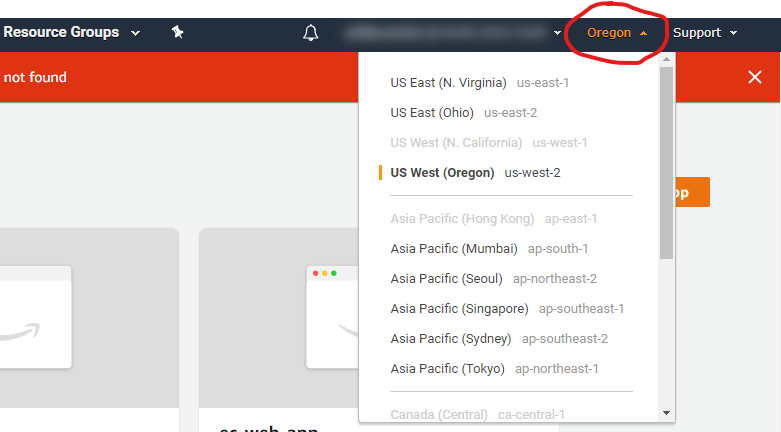
(Make sure to change your Amplify Console region to the same region you set in your initialized project)
 philateatclub
on 16 Mar 2020
philateatclub
on 16 Mar 2020
App with id: ______________ not found is happening when I run "amplify console" from the root of my project. I have triple checked that the region in aws.exports and my console are the same. Any suggestions?
 gmfinear
on 17 Oct 2020
gmfinear
on 17 Oct 2020
I am having the same issue as gmfinear.
`•100% [I] amplify status
Current Environment: dev
| Category | Resource name | Operation | Provider plugin |
| -------- | ----------------------- | --------- | ----------------- |
| Auth | amplifyreactappXXXXXX | Create | awscloudformation |
| Api | songAPI | Create | awscloudformation |
| Storage | songStorage | Create | awscloudformation |
`
The Auth above (that is X'd out for security) does not match the Auth below(Y's) that I am getting the error on.
•100% [I] amplify push
✖ There was an error pulling the backend environment dev.
An error occurred during the push operation: Stack with id amplify-amplifyreactapp-dev-YYYYY does not exist
My region is eu-west-1 on AWS Dynamo and my team-provider-info.json file remains unchanged with
"Region": "eu-west-1",
It is as if there is an amplify init conflict somewhere. I would hate to have to start over as I am 3/4s of the way through this project. Is there a step I can walk back to that isn't from scratch to fix this? THANKS!
 pinkopaque22
on 18 Nov 2020
pinkopaque22
on 18 Nov 2020
Related issues
mwarger
·
3Comments
 zjullion
·
3Comments
zjullion
·
3Comments
 nicksmithr
·
3Comments
nicksmithr
·
3Comments
 rehos
·
3Comments
rehos
·
3Comments
 davo301
·
3Comments
davo301
·
3Comments
Most helpful comment
My mistake, I was using the Amplify Console in the wrong region. Apologies!