Amplify-cli: How to update API key on project.
On setting up my dev project, an aws-exports.js file was generated which included the API key. Since then, the API key has expired and I have been prompted in the AppSync console to update the key.
How do I update the API key on my project now? For working locally I can just update the key in aws-exports.js but obviously as soon as I run amplify-push that gets overwritten with the old API key.
Thanks,
Amy
 amymc
amymc
All 14 comments
@amymc
Amplify.configure({
    ...awsmobile,
    aws_appsync_graphqlEndpoint:
        process.env.REACT_APP_aws_appsync_graphqlEndpoint,
    aws_appsync_region: process.env.REACT_APP_aws_appsync_region,
    aws_appsync_authenticationType:
        process.env.REACT_APP_aws_appsync_authenticationType,
})
You can try something like this.
 rajababu3
on 4 Oct 2018
rajababu3
on 4 Oct 2018
Just to clarify I have tried running amplify update api as per the docs but that command doesn't seem to exist. When I run it I just get a list of suggested commands.
amymc
on 30 Oct 2018
@amymc Which CLI version are you using? amplify api update or amplify update api does exist.
 kaustavghosh06
on 5 Nov 2018
kaustavghosh06
on 5 Nov 2018
Hi @kaustavghosh06,
Running amplify --v returns0.1.18
When I run amplify update api or amplify api update I get the following:
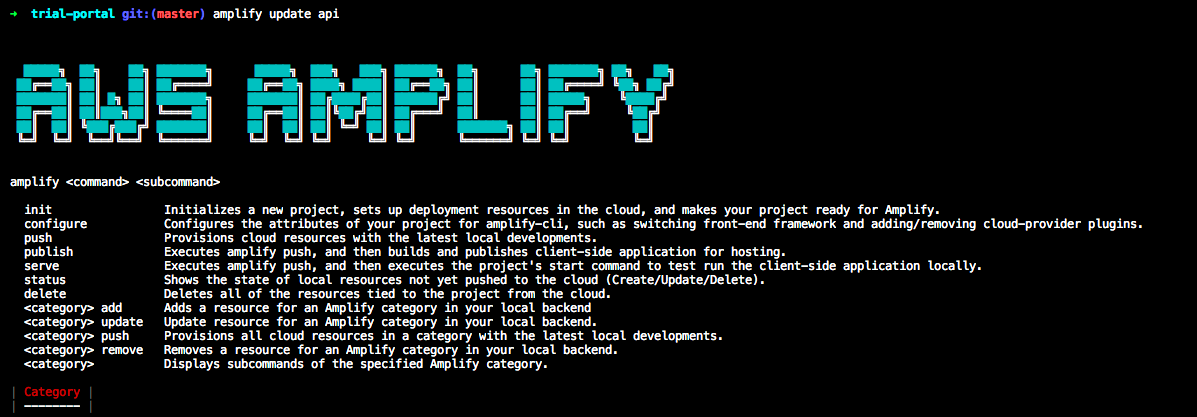
amymc
on 7 Nov 2018
Upgrading my version of amplify-cli with yarn global upgrade @aws-amplify/cli solved my problem.
Thanks!
amymc
on 7 Nov 2018
I'm facing the same issue. I can put the new API key in my local file but when I deploy with the AWS Amplify Console how does it know the new key to use?
 cj-l
on 22 May 2019
cj-l
on 22 May 2019
I have the same issue. I've updated aws-exports yet when I run amplify push it shows that it fails and I see the old key in the stacktrace
 karldanninger
on 5 Jun 2019
karldanninger
on 5 Jun 2019
Changing the APIKeyExpirationEpoch worked for me. See https://github.com/aws-amplify/amplify-cli/issues/808.
 javierjavier
on 18 Jun 2019
javierjavier
on 18 Jun 2019
In Android project, I still have the same issue. I have updated awsconfiguration.json with new api key. amplify status also shows the new api key. but when I do amplify push it fails telling API key not found: <old api key> (Service: AWSAppSync; Status Code: 404; Error Code: NotFoundException; Request ID: 2fe05136-b0e5-11e9-a0fc-59240c6936f3)
 shamal
on 28 Jul 2019
shamal
on 28 Jul 2019
@shamal As mentioned in the above comments, setting the APIKeyExpirationEpoch key in your amplify/backend/api/<api-name>/parameters.json file would renew the API Key. Changing the APIKey just in your awsconfiguration.json, wouldn't make the amplify push succeed. Please take a look at #808 for more details. You can find documentation reference out here - https://aws-amplify.github.io/docs/cli-toolchain/graphql#apikeyexpirationepoch
kaustavghosh06
on 28 Jul 2019
Just had to do this and setting the APIKeyExpirationEpoch worked. Here are the steps I took.
- In
amplify/backend/api/<api-name>/parameters.json,APIKeyExpirationEpochwasn't there so I've addedAPIKeyExpirationEpochand set it to "-1". - Run
amplify push. This removes the API key from the template in the cloud (I think). At this point, my local files still showed the old API key. - In
amplify/backend/api/<api-name>/parameters.json, I've removed theAPIKeyExpirationEpochfield but you could also set an expiration date, defined by seconds. - Run
amplify pushagain. This time, all of the files that lists the API key is now updated. - My API key was manually set in my .env files so I had to manually update that as well.
Hope this helps.
 vientang
on 27 Oct 2019
vientang
on 27 Oct 2019
People coming here via Google search, note that APIKeyExpirationEpoch is apparently now deprecated. When you set it and push you get: APIKeyExpirationEpoch parameter's -1 value is deprecated to disable the API Key creation. In the future CreateAPIKey parameter replaces this behavior.
 berenddeboer
on 16 May 2020
berenddeboer
on 16 May 2020
Is this the latest/greatest guidance?
https://docs.amplify.aws/cli/graphql-transformer/config-params#createapikey
 loganpowell
on 16 Jun 2020
loganpowell
on 16 Jun 2020
Hey @berenddeboer where did you read that? could you link the source? Thanks in advance
karldanninger
on 16 Jul 2020
Related issues
 gabriel-wilkes
·
3Comments
gabriel-wilkes
·
3Comments
 zjullion
·
3Comments
zjullion
·
3Comments
 kstro21
·
3Comments
kstro21
·
3Comments
 adriatikgashi
·
3Comments
adriatikgashi
·
3Comments
 jexh
·
3Comments
jexh
·
3Comments
Most helpful comment
People coming here via Google search, note that APIKeyExpirationEpoch is apparently now deprecated. When you set it and push you get:
APIKeyExpirationEpoch parameter's -1 value is deprecated to disable the API Key creation. In the future CreateAPIKey parameter replaces this behavior.