Amplify-cli: DynamoDB table name is not correct in the lambda function when using amplify add api
Describe the bug
I used: amplify add api
And followed the guided steps including the part of creating the DynamoDB table
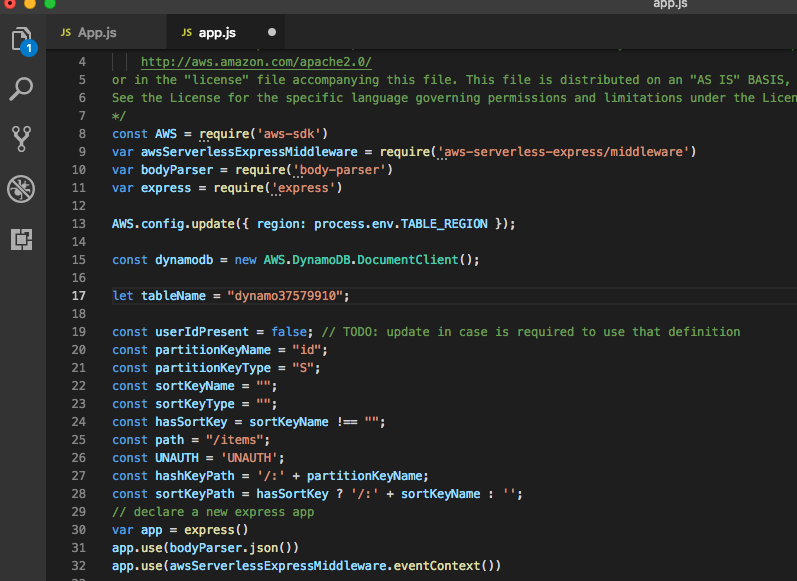
The bug is although I changed the table name from the suggested default “dynamo37579910” to “items”, the dynamo table itself was crated with the updated name but in the generated lambda code the table name was not changed (see screenshot)
After I manually updated the lambda code under .amplify/backend/function/myfunctionName/src/app.js it started to work
To Reproduce
Steps to reproduce the behavior:
- amplify add api
- Select the REST option
- Choose Create a new lambda function
- Choose CRUD function for Amazon DynamoDB table (Integration with Amazon API Gateway and Amazon DynamoDB)
- When prompted for the dynamoDB table name change it from the suggested default to a custom name (e.g. items)
- Continue with the rest of the flow till the end and push the changes
Expected behavior
The dynamoDB table is created with the provided custom name (e.g. items) - OK
The same custom name is updated in the lambda function ./amplify/backend/function/myfunctionName/src/app.js
in the line 17 let tableName = "items"; - Not OK
Screenshots
Desktop:
- OS: MacOS HighSierra
- Browser: chrome
- Version: 69.0.3497.100 (Official Build) (64-bit)
Additional context
 ranef
ranef
All 7 comments
@ranef Unforutnately, i wasn't able to reproduce this.
Here's my CLI flow:

Here's my lambda function generated with the custom dynamo table name:
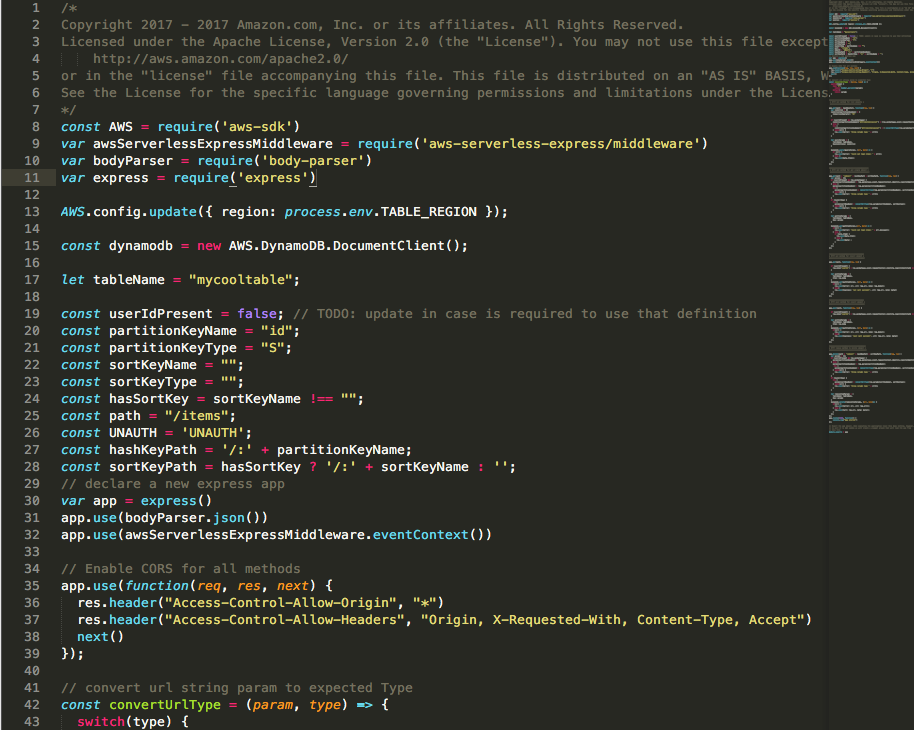
Is there something different that I'm doing in the flow whihc is different from yours?
 kaustavghosh06
on 28 Sep 2018
kaustavghosh06
on 28 Sep 2018
@ranef Not able to reproduce this issue. Please feel free to re-open this if the problem still persists.
kaustavghosh06
on 9 Oct 2018
@kaustavghosh06
I have come across the same issue using amplify version 0.1.45.
The problem only occurs if you use a different friendly name for the DynamoDB category to the name of the table.
The generated function is using the friendly name of the category instead of the name of the table.
Command sequence to reproduce:
amplify api add
? Please select from one of the below mentioned services: REST
? Provide a friendly name for your resource to be used as a label for this category in the project: dbrest
? Provide a path (e.g., /items) /items
? Choose a Lambda source Create a new Lambda function
? Provide a friendly name for your resource to be used as a label for this category in the project: dbrestfunction
? Provide the AWS Lambda function name: dbrestfunction
? Choose the function template that you want to use: CRUD function for Amazon DynamoDB table (Integration with Amazon API Gateway and Amazon DynamoDB)
? Choose a DynamoDB data source option Create a new DynamoDB table

? Please provide a friendly name for your resource that will be used to label this category in the project: categoryname
? Please provide table name: tablename
? What would you like to name this column: id
? Please choose the data type: string
? Would you like to add another column? No
? Please choose partition key for the table: id
? Do you want to add a sort key to your table? No
? Do you want to add global secondary indexes to your table? No
Succesfully added DynamoDb table locally
? Do you want to edit the local lambda function now? No
Succesfully added the Lambda function locally
? Restrict API access No
? Do you want to add another path? No
Successfully added resource dbrest locally
The two lines from above that trigger the bug are:
? Please provide a friendly name for your resource that will be used to label this category in the project: categoryname
? Please provide table name: tablename
The generated function amplify/backend/function/dbrestfunction/src/app.js has the following code:
const dynamodb = new AWS.DynamoDB.DocumentClient();

let tableName = "categoryname";
This should instead be:
let tableName = "tablename";
 craigmalone
on 7 Feb 2019
craigmalone
on 7 Feb 2019
We are on AWS Amplify v1.12.0 and still remains the same error! =(
 wellmmer
on 16 Aug 2019
wellmmer
on 16 Aug 2019
I love AWS Amplify but I am still facing this issue. How is this not a big deal and why is it closed?
Is there any workaround at least?
 iamtekeste
on 20 Aug 2019
iamtekeste
on 20 Aug 2019
@iamtekeste You can always modify your Lambda function located in ‘amplify/backend/function/fn-name/src/app.js’ and change the ‘let tablenname’ parameter to any table you want to reference from the Lambda function.
kaustavghosh06
on 20 Aug 2019
Thank you @kaustavghosh06 for that workaround!
iamtekeste
on 20 Aug 2019
Related issues
 rehos
·
3Comments
rehos
·
3Comments
 nason
·
3Comments
nason
·
3Comments
 adriatikgashi
·
3Comments
adriatikgashi
·
3Comments
 darrentarrant
·
3Comments
darrentarrant
·
3Comments
 ReidWeb
·
3Comments
ReidWeb
·
3Comments