Amplify-cli: Email option not available for "How do you want your end users to sign in?" using amplify add auth.
When configuring auth using this cli, the option for end users to sign in via email is not available as a configuration choice in the setup flow. Why is this the case, and what's the proper way to make email the sign-in method? Should I just use the username sign-in method but enforce that usernames and emails are the same?
 zhzhang
All 31 comments
I am also interested in this option, is an option in awsmobile CLI but not in Amplify CLI.
UPDATE:
I've found that, in the meantime, I can modify the cloudformation template in my local project repository, going to amplify/backend/auth/
Type: AWS::Cognito::UserPool
Properties:
UserPoolName: !Ref userPoolName
You can add:
AliasAttributes:
- 'email'
- 'phone_number'
save it and then issue the command:
amplify push
By no means this is a permanent solution, this is just to get it going using the tool and being able to sign-in with a verified email address or phone number until a final solution is in place.
 gustavo-rios
on 10 Sep 2018
gustavo-rios
on 10 Sep 2018
When implmented, this should include email or phone_number options.
 haverchuck
on 17 Sep 2018
haverchuck
on 17 Sep 2018
Will this end up using the UsernameAttributes?
 aiwilliams
on 18 Sep 2018
aiwilliams
on 18 Sep 2018
I also need this. At the moment I can manually set up the "Users can use email as their "username" to sign up and sign in" option from the AWS console with MobileHub but I would really like to have the option to select it from the Amplify Cli especially since there are already the options to add other user attributes like given_name and family_name. Sign Up with email instead of a username is quite a standard case I think.
 ghost
on 1 Oct 2018
ghost
on 1 Oct 2018
Is there any update on this request? Being able to use the Amplify Cli to set up sign in with an email address instead of username?
ghost
on 14 Oct 2018
I also find this a very strange and frustrating limitation. I even tried to create a new cognito and replace the one in the setup doc, but it just ended up making a NEW cognito with that given name instead (overwriting the ids etc).
 angineering
on 24 Oct 2018
angineering
on 24 Oct 2018
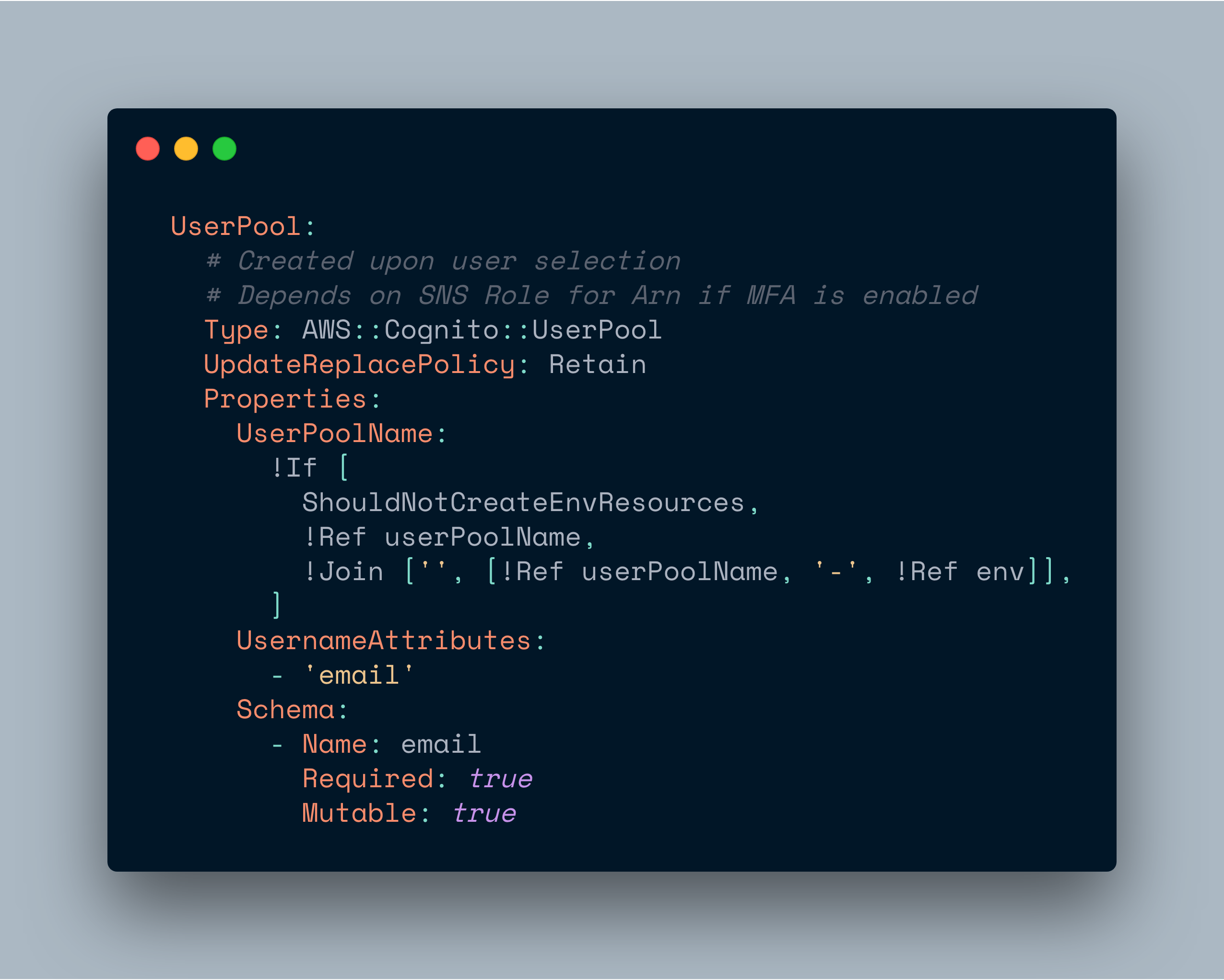
Finally figured this out looking at the template language.
Under Type: AWS::Cognito::UserPool set
UsernameAttributes:
        - 'email'
This will create it with email instead of username setup.
link to documentation https://docs.aws.amazon.com/AWSCloudFormation/latest/UserGuide/aws-resource-cognito-userpool.html
angineering
on 24 Oct 2018
@angineering I am not sure I understand how you solved the problem? If you set up Cognito with the Amplify Cli (using the terminal and going through the custom set up options) it doesn't allow you to select Email as username. It gives you other options such as adding any attributes you want but not "Email as Username". Once Cognito is set up I don't seee how you can change the username setting... If you could explain in more detail how you did this I would be very grateful! Thanks
ghost
on 26 Oct 2018
@tamsynjennifer I did what @gustavo-rios did above. Go through the cli steps, then manually edit the mplify/backend/auth/amplify push
angineering
on 26 Oct 2018
@angineering Thanks! I understand now. It worked for me too! :)
ghost
on 26 Oct 2018
Is not working for me, I'm tried with both solutions
```
UserPool:
# Created upon user selection
# Depends on SNS Role for Arn if MFA is enabled
Type: AWS::Cognito::UserPool
    Properties:
      UserPoolName: !Ref userPoolName
      AliasAttributes:
        - 'email'
        - 'phone_number'
UsernameAttributes:
        - 'email'
Schema:
    -
      Name: family_name
      Required: true
      Mutable: true
```
I tried to use them separately
 rcanessa89
on 18 Dec 2018
rcanessa89
on 18 Dec 2018
@rcanessa89 Did you edit the file before doing amplify push?
ghost
on 18 Dec 2018
Any updates on this?
 Eduardo-Vargas
on 28 Jan 2019
Eduardo-Vargas
on 28 Jan 2019
@rcanessa89 Only one of the aliasAttributes or usernameAttributes can be set in a User pool.
 amirmishani
on 30 Jan 2019
amirmishani
on 30 Jan 2019
Hee is what I did to make this work (after trying many variations:
In the YML file, add the following to the list of variables at the top of the page
UsernameAttributes:
    Type: CommaDelimitedList
Then, in the UserPool: section below, add the following:
UsernameAttributes: !Ref UsernameAttributes
Then, in the parameters.json file, add:
"UsernameAttributes": ["email"],
This worked for me
 fcwheeler
on 27 Feb 2019
fcwheeler
on 27 Feb 2019
Adding the following to the CF template works:
UsernameAttributes:
        - 'email'
However the builtin Amplify signup forms are not compatible... at least not the aws-amplify-vue component I've tried it with.
Even passing in a signUpFields array to try and force it to stop displaying the username field, it just sticks one in there anyway, along with a phone number saying they are both required (The Cognito console does not list them as required)
 comfytoday
on 6 Mar 2019
comfytoday
on 6 Mar 2019
@comfytoday
not 100% sure if vue behaves the same as angular but there you need to set hideAllDefaults
like
signUpConfig = {
    hideAllDefaults: true,
    signUpFields: [
    {
      label: 'Name',
      key: 'name',
      required: true,
      displayOrder: 1,
      type: 'text',
    },
    {
      label: 'Email',
      key: 'username',
      required: true,
      displayOrder: 2,
      type: 'email',
    },
    {
      label: 'Password',
      key: 'password',
      required: true,
      displayOrder: 3,
      type: 'password',
    }
    ]
  };
 h0raz
on 10 Mar 2019
h0raz
on 10 Mar 2019
@h0raz Thank you!
Saved me some explaining....
This is the config I used in Vue. Found reference in another Github issue. It doesn't appear to be documented on the Vue side.
signUpConfig: {
          header: 'Sign Up',
          hideDefaults: true,
          signUpFields: [
            { ...
const signUpConfig = {
  hiddenDefaults: ['username'],
  signUpFields: [
    {
      label: 'Email',
      key: 'username', // !!!
      required: true,
      displayOrder: 1,
      type: 'string',
      custom: false
    },
    {
      label: 'Password',
      key: 'password',
      required: true,
      displayOrder: 2,
      type: 'password',
      custom: false
    },
    {
      label: 'Phone Number',
      key: 'phone_number',
      required: true,
      displayOrder: 3,
      type: 'tel',
      custom: false
    }
  ]
};

export default withAuthenticator(App, { signUpConfig });
And adding:
 janhesters
on 14 Mar 2019
janhesters
on 14 Mar 2019
If anyone is wondering how they can replace Username label on the Login screen, you can "translate it":
I18n.setLanguage('en');
I18n.putVocabularies({
  en: {
    'Username': 'Email'
  }
});
 undsoft
on 29 Mar 2019
undsoft
on 29 Mar 2019
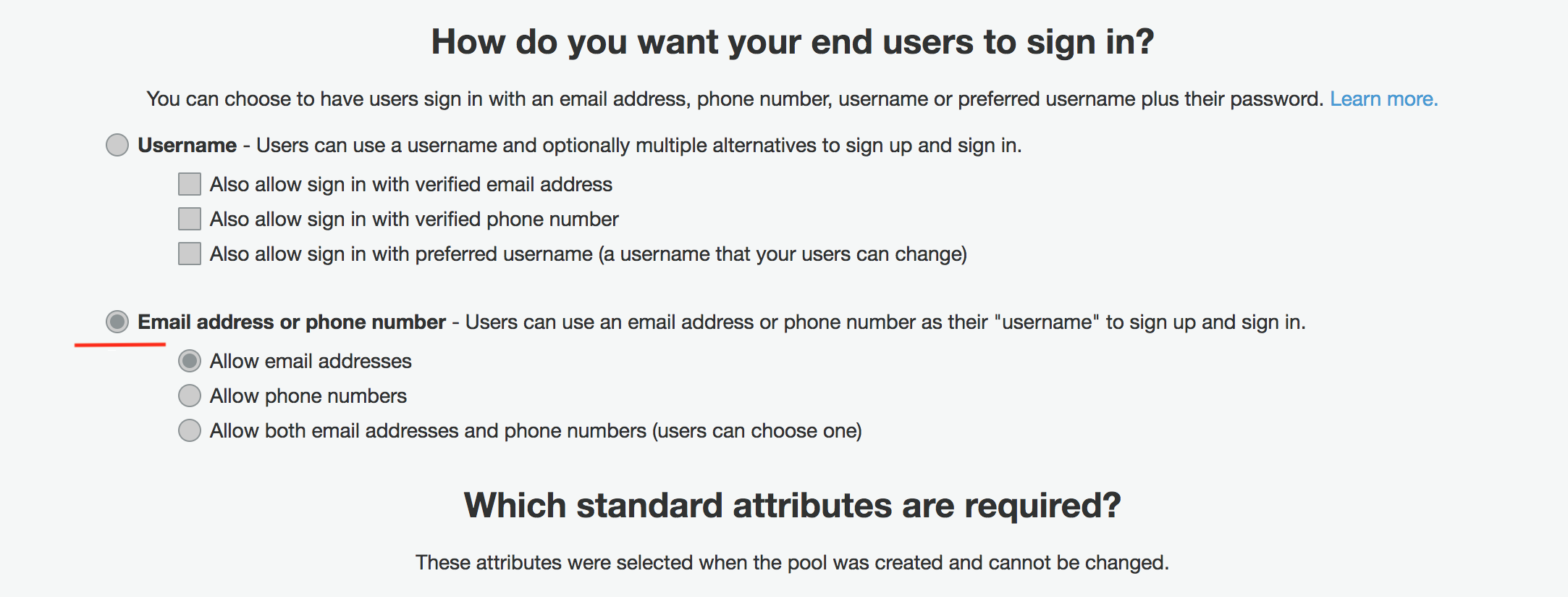
With our new version of the CLI we've introduced the ability for users to select how they want users to sing in upfront as a part of the default flow instead of setting the username attribute as a default in the default flow (which is immutable unfortunately after the creation of the userpool since that is a restriction from the Cognito service). Please feel free to check it out and re-open/comment on this issue if you see a problem with it.
 kaustavghosh06
on 3 Apr 2019
kaustavghosh06
on 3 Apr 2019
Hi @kaustavghosh06 , so now we can use specify email as login option using amplify CLI ? Can you please share more details on it ?
 vjindalaurea
on 3 Apr 2019
vjindalaurea
on 3 Apr 2019

In the above screenshot, I'm using the latest version of the CLI to add an auth resource. We now explicitly ask the user during this setup as to how they want their users to sign in. (This attribute is unfortunately not editable after your initial push due to Cognito service limitation)
kaustavghosh06
on 3 Apr 2019
@kaustavghosh06 Great, thank you for adding this feature!
janhesters
on 3 Apr 2019
I'm glad to see that this is a new feature. However, I created my project before this feature was available, so my Auth stack currently expects "username + email + phone number", which is way too much. I'd like to switch to Email. (technically, I'd like to switch to Email OR Phone Number, but that doesn't seem to be possible)
I know that you can't change this setting on Cognito after you've created the Userpool, however, I'm worried that there is no way within Amplify to create a new Cognito Userpool and go through the initialization process. I don't believe that creating a new Env provides an opportunity to reconfigure Auth so that it uses Email instead of Username.
I'm still in development so I can throw users and data away.
Am I stuck? If I need to create a new project to redo the Auth initialization, is there a guide for porting configuration to a new project?
 ajhool
on 7 Apr 2019
ajhool
on 7 Apr 2019
In my login it have both email and phone number. But I only receives code for my phone number.
I not received anything in my mail. Can anyone elaborate. How can I send the confirmation for both (Mobile and email)
 nihp
on 16 Mar 2020
nihp
on 16 Mar 2020
I know that you can't change this setting on Cognito after you've created the Userpool, however, I'm worried that there is no way within Amplify to create a new Cognito Userpool and go through the initialization process. I don't believe that creating a new Env provides an opportunity to reconfigure Auth so that it uses Email instead of Username.
I'm still in development so I can throw users and data away.
Am I stuck? If I need to create a new project to redo the Auth initialization, is there a guide for porting configuration to a new project?
@ajhool did you find a solution to this?
 edlefebvre
on 18 Mar 2020
edlefebvre
on 18 Mar 2020
In the above screenshot, I'm using the latest version of the CLI to add an auth resource. We now explicitly ask the user during this setup as to how they want their users to sign in. (This attribute is unfortunately not editable after your initial push due to Cognito service limitation)
How does one go about using the Auth module with this configuration? The docs don't mention anything about email-only signup or signin, and the Typescript typings say username is required for both Auth.signUp and Auth.signIn.
 ianmartorell
on 24 Jul 2020
ianmartorell
on 24 Jul 2020
@ianmartorell if you choose email only login, the username property is the email address.
 douglas-mason
on 24 Jul 2020
douglas-mason
on 24 Jul 2020
@douglas-mason Oh I see! I guess that could be made more clear in the documentation but thanks!
ianmartorell
on 24 Jul 2020
@ianmartorell yeah, it took me some trial and error before realizing that as well.
douglas-mason
on 24 Jul 2020
Related issues
 zjullion
·
3Comments
zjullion
·
3Comments
 YikSanChan
·
3Comments
YikSanChan
·
3Comments
 darrentarrant
·
3Comments
darrentarrant
·
3Comments
 gabriel-wilkes
·
3Comments
gabriel-wilkes
·
3Comments
 onlybakam
·
3Comments
onlybakam
·
3Comments
Most helpful comment
Finally figured this out looking at the template language.
Under
Type: AWS::Cognito::UserPoolsetThis will create it with email instead of username setup.
link to documentation https://docs.aws.amazon.com/AWSCloudFormation/latest/UserGuide/aws-resource-cognito-userpool.html