Amplify-android: [Flutter Support] Saving a list of strings is failing in DataStore
While saving a model which has a list of strings as a field such as stringList: [String], the modelSchema generated by flutter is as follows for that field
ModelField{name='stringList', javaClassForValue='class java.lang.String', targetType='String', isRequired=true, isArray=true, isEnum=false, isModel=false}
However when storing a value of ["VALUE_ONE", "VALUE_TWO"], an exception is thrown from here since the value is of type Array. The exception stack trace is below
DataStoreException{message=, cause=null, recoverySuggestion=}
    at com.amplifyframework.datastore.storage.sqlite.SQLiteStorageAdapter.bindValueToStatement(SQLiteStorageAdapter.java:699)
    at com.amplifyframework.datastore.storage.sqlite.SQLiteStorageAdapter.bindStatementToValues(SQLiteStorageAdapter.java:670)
    at com.amplifyframework.datastore.storage.sqlite.SQLiteStorageAdapter.saveModel(SQLiteStorageAdapter.java:724)
    at com.amplifyframework.datastore.storage.sqlite.SQLiteStorageAdapter.lambda$save$3$SQLiteStorageAdapter(SQLiteStorageAdapter.java:303)
    at com.amplifyframework.datastore.storage.sqlite.-$$Lambda$SQLiteStorageAdapter$JhGtXoPGeJ7lbNvRHxROfLs-WmE.run(Unknown Source:12)
Originated from: https://github.com/aws-amplify/amplify-flutter/issues/241
 Amplifiyer
All 22 comments
I'm also seeing this with a list of int (intList: [Int]). It probably happens with other primitives lists also. Although, one interesting thing I found is declaring floatList: [Float] will actually save just fine and sync via AppSync. Still digging but it looks like this is due to a mismatch between the Flutter schema definition which is looking for double whereas Android I think is using java.lang.Float as the underlying type. For reference, ModelField for [Float] when defined in Flutter: ModelField{name='floatList', javaClassForValue='double', targetType='Double', isRequired=true, isArray=false, isEnum=false, isModel=false}
 kjones
on 8 Dec 2020
kjones
on 8 Dec 2020
Are you passing a primitive array? The Java codegen uses a java.util.List as the collection type. It might as simple as changing:
["this", "approach"]
to:
Arrays.asList("this", "approach")
 jamesonwilliams
on 8 Dec 2020
jamesonwilliams
on 8 Dec 2020
We had a similar issue during initial rollout. I'm chasing down the details for it.
 rjuliano
on 8 Dec 2020
rjuliano
on 8 Dec 2020
Just checked again, the value being passed is an instance of an ArrayList

Amplifiyer
on 8 Dec 2020
Lists get stored in SQLite as a String, but for the calls coming from Flutter, that's not happening. I need to do some more digging into this tomorrow.
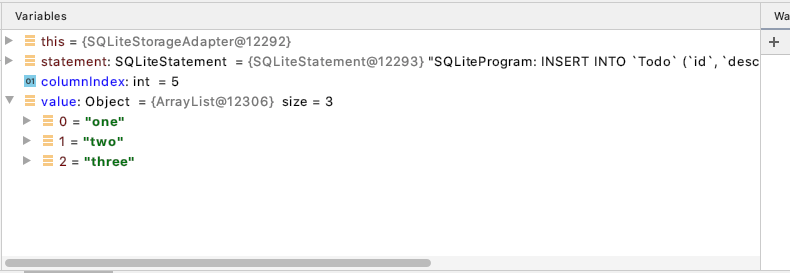
Here's what the values look like when invoked from flutter:
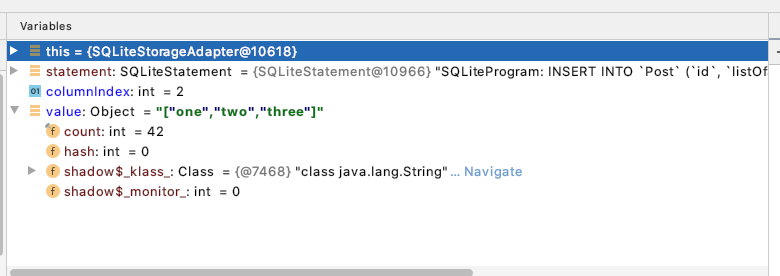
And here's what it looks like when I save a similar model (using SerializedModel) via a java-based unit test.
rjuliano
on 9 Dec 2020
Looks like the Dart model that gets generated is not adding setting the isArray property to true.
    modelSchemaDefinition.addField(ModelFieldDefinition.field(
        key: Todo.LIST_OF_STRINGS,
        isRequired: false,
        isArray: true, // This was not in the generated code
        ofType: ModelFieldType(ModelFieldTypeEnum.string)));
@rjuliano Can you see if this works with Int, Float, and enum lists? I swear I tried this exact thing (manually modifying the generated dart models) but was still getting exceptions in SQLiteStorageAdapter. I could certainly have been missing other corresponding changes that needed to go along with this such as updating the model serialization
kjones
on 9 Dec 2020
Hi @kjones, we have a separate issue tracking floats, specifically: https://github.com/aws-amplify/amplify-android/issues/1031. Is that what you were seeing? Great find @rjuliano on the isArray property. This should cause lists of _anything_ to fail.
jamesonwilliams
on 9 Dec 2020
That is an issue with the codegen models, however I tested with properly passing the isArray property. If you check the ModelField value i pasted in the issue description, it has the isArray set to true
Amplifiyer
on 9 Dec 2020
Hi @kjones, we have a separate issue tracking floats, specifically: #1031. Is that what you were seeing? Great find @rjuliano on the
isArrayproperty. This should cause lists of _anything_ to fail.
My original problem was a list of enum as linked in the problem statement of this issue.
Originated from: aws-amplify/amplify-flutter#241
Problems with [String], [Int], and [Float] were only discovered when I was creating a test app to illustrate the problem. I've since had to revert to my own Flutter DataStore plugin to get any work done as noted here: https://github.com/aws-amplify/amplify-flutter/issues/243#issuecomment-740351288
Once the schema noted in that comment properly works with DataStore I would like to make the switch to the official AWS Flutter SDK.
I would be happy to build and try any Amplify Android/iOS/Flutter/CLI branches or builds if you need additional testing/feedback.
kjones
on 9 Dec 2020
Thanks @kjones! Appreciate your passion and involvement. We'd love to join efforts with you. :-).
jamesonwilliams
on 9 Dec 2020
So the isArray thing alone is not the issue here. It appears to be related to the type stored in the javaClassForValue property of the ModelField. It affects the execution path of this method.
When called from a flutter app, the javaClassForValue has the value String, which causes the converter to return whatever value is stored in the field (i.e. it assumes it's a string).
When called from the unit test I'm using, it has the value List<String>. That throws an exception because you can't create an instance of List<String>. Inside the catch block it gets treated as a custom type, which eventually becomes JSON-ified strings when saved to SQLite, which is why it works.
rjuliano
on 9 Dec 2020
I changed the generated code for the field to:
    modelSchemaDefinition.addField(ModelFieldDefinition.field(
        key: Todo.LIST_OF_STRINGS,
        isRequired: false,
        isArray: true,
        ofType: ModelFieldType(ModelFieldTypeEnum.collection, ofModelName: 'String')));
And that seems to work. Arrived at that conclusion after looking at this code.
Can someone try this to make sure?
rjuliano
on 9 Dec 2020
Can someone try this to make sure?
I'll try this in a couple of hour and report back.
Amplifiyer
on 9 Dec 2020
Can someone try this to make sure?
Is this only for list of string or is there some combination I could try for list of enum?
I know I'll need model updates for the broken enum serialization but I think I can pull that off also.
kjones
on 9 Dec 2020
Is this only for list of string or is there some combination I could try for list of enum?
ModelSchema generated for enums in flutter is actually very similar to the one with String. You can test with the following
modelSchemaDefinition.addField(ModelFieldDefinition.field(
    key: TestEnumModel.ENUMLIST,
    isArray: true,
    isRequired: true,
    ofType: ModelFieldType(ModelFieldTypeEnum.collection,
        ofModelName: describeEnum(ModelFieldTypeEnum.enumeration))));
Can someone try this to make sure?
I'll try this in a couple of hour and report back.
@rjuliano this worked great! Thanks for your help! I'll update the codegen team to reflect these changes.
Amplifiyer
on 9 Dec 2020
Alright. So I updated the generated Flutter models that have enum list fields to the modelSchemaDefinition above. I also had to fix some of the model serialization code for enum lists. This does appear to let me save the model to DataStore and it does appear to sync with the backend.
I am seeing some other odd behavior around the model _version numbers sent to AppSync. In one case I was seeing _version=1 on every update to the model. I think this is messing with a proper delta sync because my enum list just keeps getting bigger on every update.
In another case I was seeing _version=14 sent to AppSync the second time I saved a model. AppSync would reject this mutation since DynamoDB was still at _version=1.
Either of these could be something I'm doing wrong on the client. I'll dig in more tomorrow.
kjones
on 10 Dec 2020
Thanks @kjones, yes there are few issues with list de/serialization that we will be fixing in the next modelgen release. For the version issue, once you get more information, please create another issue to track and we will take a look.
Amplifiyer
on 10 Dec 2020
@Amplifiyer is there anything else that needs looked at on the Android side for this issue? I Assume you're tracking the codegen-related changes in a separate issue. Let me know.
rjuliano
on 10 Dec 2020
@rjuliano yes, I'm tracking codegen-related changes separately. This issue can be closed!
Amplifiyer
on 10 Dec 2020
Update on my last comment about version numbers being whacked.
I was seeing _version=14 sent to AppSync the second time I saved a model. AppSync would reject this mutation since DynamoDB was still at _version=1.
I was using the Cognito user ID as a unique ID when creating singleton DataStore models for a specific user. That gave me an easy way to query for a specific ID and also made it easy to scan the DDB tables in the console for a specific user. This works on iOS but not on Android. On Android the VersionRepository is global for all model types as opposed to being based on a combination of ID and model type. Therefore, the 14 being sent was the version number of another model type with the same ID. I'll stop doing it this way. Was just a convenience for human lookup.
I am seeing some other odd behavior around the model _version numbers sent to AppSync. In one case I was seeing _version=1 on every update to the model. I think this is messing with a proper delta sync because my enum list just keeps getting bigger on every update.
This is a problem with the Android DataStore code. Issue here: #1050
Pull request here: #1051
kjones
on 11 Dec 2020
Related issues
 zubairzahoor
·
8Comments
kjones
·
7Comments
zubairzahoor
·
8Comments
kjones
·
7Comments
 btdo
·
4Comments
btdo
·
4Comments
 upachecog
·
4Comments
upachecog
·
6Comments
upachecog
·
4Comments
upachecog
·
6Comments