Amphtml: Display a description in analytics-notification example
In examples/analytics-notifications.amp.html, let's add a description to let the reader know what is happening behind the scenes and what to expect in the developer console.
 micajuine-ho
All 23 comments
@micajuine-ho Hi, I would like to work on this but I need more details on this. This is also my first contribution I would really appreciate if you can guide me through it.
 ajitsinghkaler
on 27 Oct 2019
ajitsinghkaler
on 27 Oct 2019
@ajitsinghkaler Hi Ajit. Happy to you guide you through this. Have you taken a look at the resources in the contributing folder? This is a good link that describes how to contribute code.
As for the issue, I imagine that adding some text in analytics-notifications.amp.html to describe what is happening would be sufficient. You can learn about what is happening with that page, specifically the amp-user-notification tag, here.
Let me know if you have any other questions.
micajuine-ho
on 28 Oct 2019
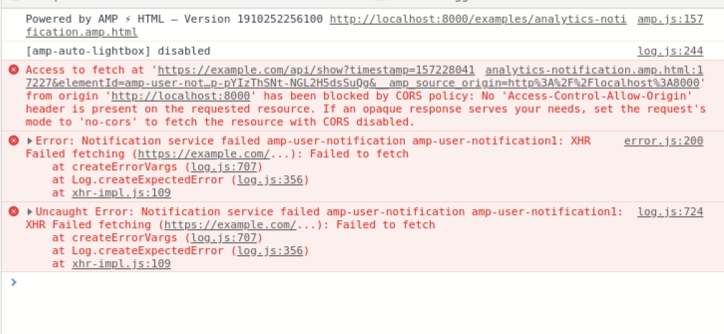
After setup whenever I open analytics-notifications.amp.html I get the following error. Do, I need any additional setup for CORS on that page. I also receive a blank page on chrome. I don't know what is the fault.
ajitsinghkaler
on 28 Oct 2019
What commands are you running?
micajuine-ho
on 28 Oct 2019
I'm running gulp command in the amphtml folder. After installing Gulp-CLI, nvm, yarn
ajitsinghkaler
on 28 Oct 2019
I'm not sure about the CORS error, but the other errors make sense (because they're fake endpoints).
As for why it displays a blank page, take a look at this documentation.
It seems like the webpage is using the amp-user-notification tag in the same way that is shown in Example 1. Try substituting it out for Example 2 :)
micajuine-ho
on 29 Oct 2019
Is this the kind of thing you're looking for?

 noodles
on 12 Nov 2019
noodles
on 12 Nov 2019
@noodles Perfect! Would you like to create a PR for this solution?
micajuine-ho
on 12 Nov 2019
@ajitsinghkaler are you still in interested in this issue?
noodles
on 13 Nov 2019
Yes, I am but I can't figure out the CORS error is it okay if I still create a PR using your content.
ajitsinghkaler
on 13 Nov 2019
@ajitsinghkaler to get rid of the CORS error, I replaced the amp-user-notification in the demo with 'Example 2' from the documentation @micajuine-ho mentioned.
<amp-user-notification
      layout=nodisplay
      id="amp-user-notification6"
      data-persist-dismissal="false">
This notification should ALWAYS show on every page visit.
<a href="#learn-more">Learn more.</a>
<button on="tap:amp-user-notification6.dismiss">Dismiss</button>
</amp-user-notification>
After that, I just edited the text in the notification and added an explanation to the body of the page. Does that help?
noodles
on 13 Nov 2019
So, should I generate the pull request or you are generating it because you solved it first?
ajitsinghkaler
on 13 Nov 2019
@ajitsinghkaler you found the issue first so please go ahead and create your own PR.
noodles
on 13 Nov 2019
Thanks @noodles
ajitsinghkaler
on 13 Nov 2019
@micajuine-ho is there a problem in the first example if there is a problem then should I create a new issue for that.
ajitsinghkaler
on 13 Nov 2019
@ajitsinghkaler I don't think there is a problem with example 1. Example 2 is just more straightforward and easier to understand :)
micajuine-ho
on 13 Nov 2019
@micajuine-ho So should example 2 be the default example. What are your thoughts on it?
ajitsinghkaler
on 13 Nov 2019
@ajitsinghkaler Example 1 will only display if the data-show-if-href gets a positive response from its endpoint. However since the endpoint in the example is fake, it will not show, which could be confusing.
Example 2 will always show, and so is less confusing. We should use example 2 instead of 1 to reduce confusion.
micajuine-ho
on 13 Nov 2019
So should I create an issue for that
ajitsinghkaler
on 13 Nov 2019
No, this is the place for this issue.
micajuine-ho
on 13 Nov 2019
I was asking if we should create a new issue for that
ajitsinghkaler
on 13 Nov 2019
You should not, you can just create a PR and then reference this issue in the PR.
micajuine-ho
on 13 Nov 2019
Okay, thanks for your help
ajitsinghkaler
on 13 Nov 2019
Related issues
 radiovisual
·
3Comments
radiovisual
·
3Comments
 jpettitt
·
3Comments
jpettitt
·
3Comments
 sryze
·
3Comments
sryze
·
3Comments
 cvializ
·
3Comments
cvializ
·
3Comments
 mrjoro
·
3Comments
mrjoro
·
3Comments
Most helpful comment
@ajitsinghkaler you found the issue first so please go ahead and create your own PR.