Amphtml: amp-iframe resize request broken on iOS
What's the issue?
We have an issue where resizable amp-iframe would not resize when the iframe is loaded. The message to resize is sent properly but the resize is not applied until the user clicks or interacts with the amp-iframe.
These are the messages that are been received to post a new messages and change the height of the iframe.
{
   data: { height: 4037 }
   name: "resize"
   scope: "host"
   sender: "dsq-app6849"
}
How do we reproduce the issue?
We are defining an amp-iframe with initial height 300. The iframe content is eventually 4037px high and requests an iframe resize using the embed-size message.
<amp-iframe width="600" height="300" layout="responsive"
            sandbox="allow-scripts allow-same-origin allow-modals allow-popups allow-forms" resizable="" frameborder="0"
            src="${disqusURI}">
    <div overflow="" tabindex="0" role="button" aria-label=""></div>
</amp-iframe>
Content of the iframe:
<div id="disqus_thread"></div>
<script>
window.addEventListener('message', receiveMessage, false);

  function receiveMessage(event) {
    if (event.data) {
      var msg;
      try {
        msg = JSON.parse(event.data);
      } catch (err) {
        // Do nothing
      }
      if (!msg)
        return false;
      if (msg.name === 'resize' || msg.name === 'rendered') {
        window.parent.postMessage({
          sentinel: 'amp',
          type: 'embed-size',
          height: msg.data.height
        }, '*');
      }
    }
  }
</script>
What browsers are affected?
All browsers.
 raquelyustemrf
All 24 comments
Hi @raquelyustemrf
resize is not guaranteed to execute if the resize causes visible content shifting by design. Is your iframe visible above the fold? (that's one common case where resize request won't be honored).
Per documentation, you must have a child overflow element (for example <button overflow>See more</button>) inside your amp-iframe. This element gets displayed when resize is not honored and allows the user to manually click and expand the iframe.
 aghassemi
on 31 May 2019
aghassemi
on 31 May 2019
Closing per comment above. Please feel free to reopen if that does not address your concern.
aghassemi
on 31 May 2019
No, the content is not visible above the fold. And yes, I have already the button overflow and when the user clicks into the iframe the resize is called.
But is there any way to resize without any user interaction?
raquelyustemrf
on 5 Jun 2019
@raquelyustemrf There is no way to guarantee an iframe would resize (otherwise we run into content shifting and bad UX) so AMP tries to see if resize causes bad UX or not based on several heuristics and allows or denies resize.
If the iframe is visible (e.g. you have scrolled to it) but the time size message is received, it will be denied. Otherwise it should go through just. If you have a test page I can check to see what's happening.
aghassemi
on 5 Jun 2019
Yes! For sure. You can check what I'm talking about here:
https://areajugones.sport.es/2019/05/19/por-que-madhouse-no-es-la-respuesta-para-que-one-punch-man-vuelva-a-brillar/amp
If you scroll down you can see this iframe:

raquelyustemrf
on 5 Jun 2019
Hi @raquelyustemrf resizes fine for me when I load the page and scroll naturally to the end (If I load the page at the exact scroll position that puts that iframe in my viewport at load time then our heuristics would deny resize which is by design)
So doesn't look like resize is broken, as mentioned, it is just not guaranteed.
aghassemi
on 5 Jun 2019
@aghassemi We attempted the resizable iframe implementation after running into issues getting scrolling to work on iOS. We are running into the same issue with resizing on iOS as the user who reported this bug. Based on your comment, we made sure to test by scrolling to the top of the page before reloading, and our iframe content is cut off.
Both scrolling and resizing work fine on Android.
 dollup
on 25 Jun 2019
dollup
on 25 Jun 2019
Reopening based on the last comment, looks iOS specific issue with requestResize
aghassemi
on 26 Jun 2019
@dollup What browser and version on iOS?
 choumx
on 26 Jun 2019
choumx
on 26 Jun 2019
@choumx This happened across multiple iOS versions for our users on Safari and Chrome. I tested on iOS 11 and 12 on Chrome and Safari and was able to duplicate both issues - resize not working on a resizable iframe and scroll bars not working when trying to use scrollable iframe versions.
dollup
on 26 Jun 2019
I'm not sure if this is the same issue, but we can easily reproduce this on our own AMP site we're working on, when using Chrome Dev Tools and emulating any mobile device. An easy way to do so is loading an AMP page with Disqus, scrolling down to the Disqus form, then reloading.
For example:
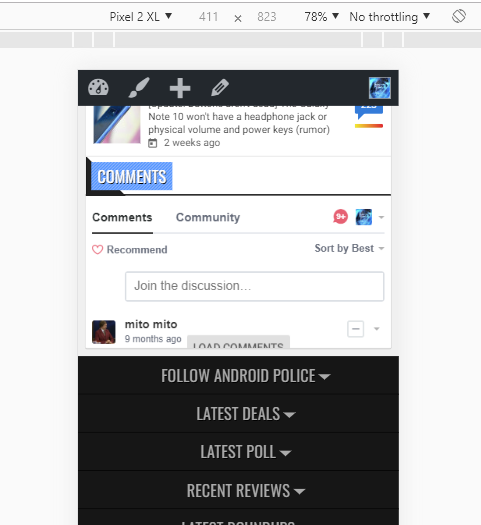
The (semi-visible) Load Comments button is something my developer is playing with to make the comments show (its position is semi-broken right now). We'd love to be able to do away without such a button.
It's unclear to me if this happens on live devices, but it's possible, especially after seeing this issue.
 archon810
on 9 Jul 2019
archon810
on 9 Jul 2019
@raquelyustemrf The linked site appears to be working for me on Safari 12.3.1. I do recommend adding an overflow button in case the resize request happens too late (when the iframe is already in viewport).
choumx
on 18 Jul 2019
@archon810 Resizing is not allowed if the widget is already visible.
choumx
on 18 Jul 2019
Curious why the Disqus widget itself doesn't include a load button for such a case. We had to insert our own that then disappears if the widget does load.
archon810
on 19 Jul 2019
@archon810 Me too. :) Fixing this common issue might be as simple as updating their example code.
Where did everyone find the code for the amp-iframe usage for Disqus? Was it here? https://github.com/disqus/disqus-install-examples/tree/master/google-amp
choumx
on 19 Jul 2019
@choumx I'm not sure now, but I've asked my developer to chime in here. Here's our current source: https://android-police.github.io/disqus-amp/disqus-amp.html.
https://github.com/android-police/disqus-amp
The logic to add the Load Comments button that resizes is done elsewhere in our code though.
archon810
on 19 Jul 2019
@choumx, we used that code but we added an overflow button per AMP specifications and still ran into this issue.
We switched to this implementation (resizable) after not being able to get scroll bars to work on iOS.
dollup
on 19 Jul 2019
@dollup Can you share a link to a page with your current implementation?
choumx
on 19 Jul 2019
@choumx I've included a link below.
dollup
on 19 Jul 2019
@choumx I'm not sure now, but I've asked my developer to chime in here. Here's our current source: https://android-police.github.io/disqus-amp/disqus-amp.html.
https://github.com/android-police/disqus-amp
The logic to add the Load Comments button that resizes is done elsewhere in our code though.
@choumx
You are right, our implementation is based on this https://github.com/disqus/disqus-install-examples/tree/master/google-amp
But for the "Load Comments" button we are using [placeholder] and [overflow] elements in amp-iframe.
If the iframe is in the viewport the resizing is not allowed so the button is vissible,
but once user clicks the button he/she interacted with the iframe so resizing is allowed and amp-iframe component hides the [placeholder] and [overflow] elements.
 maciejmackowiak
on 22 Jul 2019
maciejmackowiak
on 22 Jul 2019
Thanks, we'll try to contribute an update to that code sample that adds an overflow button.
choumx
on 22 Jul 2019
@choumx We are using code like this:
<amp-iframe id="ampdisqus" width="600" height="300"
    layout="responsive"
    sandbox="allow-scripts allow-same-origin allow-modals allow-popups"
    resizable
    frameborder="0"
    src="">
    <div overflow tabindex="0" role="button" aria-label="Load comments"><span class="btn">Load comments</span></div>
    <div placeholder><span class="btn">Load comments</span></div>
</amp-iframe>
and css for it:
#ampdisqus div[overflow],
#ampdisqus div[placeholder] {
  width: 100%;
  height: 100%;
  background-color: #fff;
  position: absolute;
  top: 0;
}
#ampdisqus div[overflow] span,
#ampdisqus div[placeholder] span{
  position: absolute;
  top: 50%;
  left: 50%;
  transform: translateX(-50%) translateY(-50%);
}
Hi everyone, Disqus engineer here. @raquelyustemrf thanks for bringing up this bug.
Like others mentioned in this thread, the resize will sometimes not execute so you're best off adding an overflow child element to the amp-iframe. We updated our installation instructions to include an overflow div. The styling provided is similar to other Disqus components.
Please let us know if you're still having issues.
 Hovspian
on 31 Jul 2019
Hovspian
on 31 Jul 2019
@Hovspian Ah great, thanks. I'll close this issue then.
choumx
on 31 Jul 2019
Related issues
aghassemi
·
3Comments
 edhollinghurst
·
3Comments
choumx
·
3Comments
edhollinghurst
·
3Comments
choumx
·
3Comments
 samanthamorco
·
3Comments
samanthamorco
·
3Comments
 sryze
·
3Comments
sryze
·
3Comments
Most helpful comment
Thanks, we'll try to contribute an update to that code sample that adds an overflow button.