Amphtml: Search Console rendering text
What's the issue?
Google Search Console and testmysite.thinkwithgoogle.com (including some others) does not render a screenshot correctly, shows only text. This causes alerts in search console saying the text is too small (mobile friendliness) and Viewport not set errors.
According to https://github.com/ampproject/amphtml/issues/17516#issuecomment-413355280 this should have been fixed in August already?
How do we reproduce the issue?
Really not sure. The site is AMP compliant according to the testing tools, looking for advice on how to fix
What browsers are affected?
Which AMP version is affected?
Current
 AcidRaZor
All 14 comments
Triaging to @aghassemi , feel free to reassign 😄
 torch2424
on 7 Feb 2019
torch2424
on 7 Feb 2019
Hi @AcidRaZor I am investigating, will report back.
(This usually means something in AMP is using a new JS/Web API that older Chrome that indexing renders use don't understand.)
 aghassemi
on 7 Feb 2019
aghassemi
on 7 Feb 2019
@AcidRaZor Are you using install-service-worker by any chance?
aghassemi
on 7 Feb 2019
@AcidRaZor nevermine, I don't think it is service-wroker. current suspect is fix headers. Do you have fixed headers in your page? (or even better, can you share a Url with us please?)
aghassemi
on 7 Feb 2019
This so far ( at least for amp-by-example and ampproject.org ) has turned out to be related to fixed-layer and pretty much same issue as what @jridgewell talks about here: https://github.com/ampproject/amphtml/issues/14178 unfortunately the workaround done for Safari does not work for Chrome 41 and transition: none never goes away messing up everything.
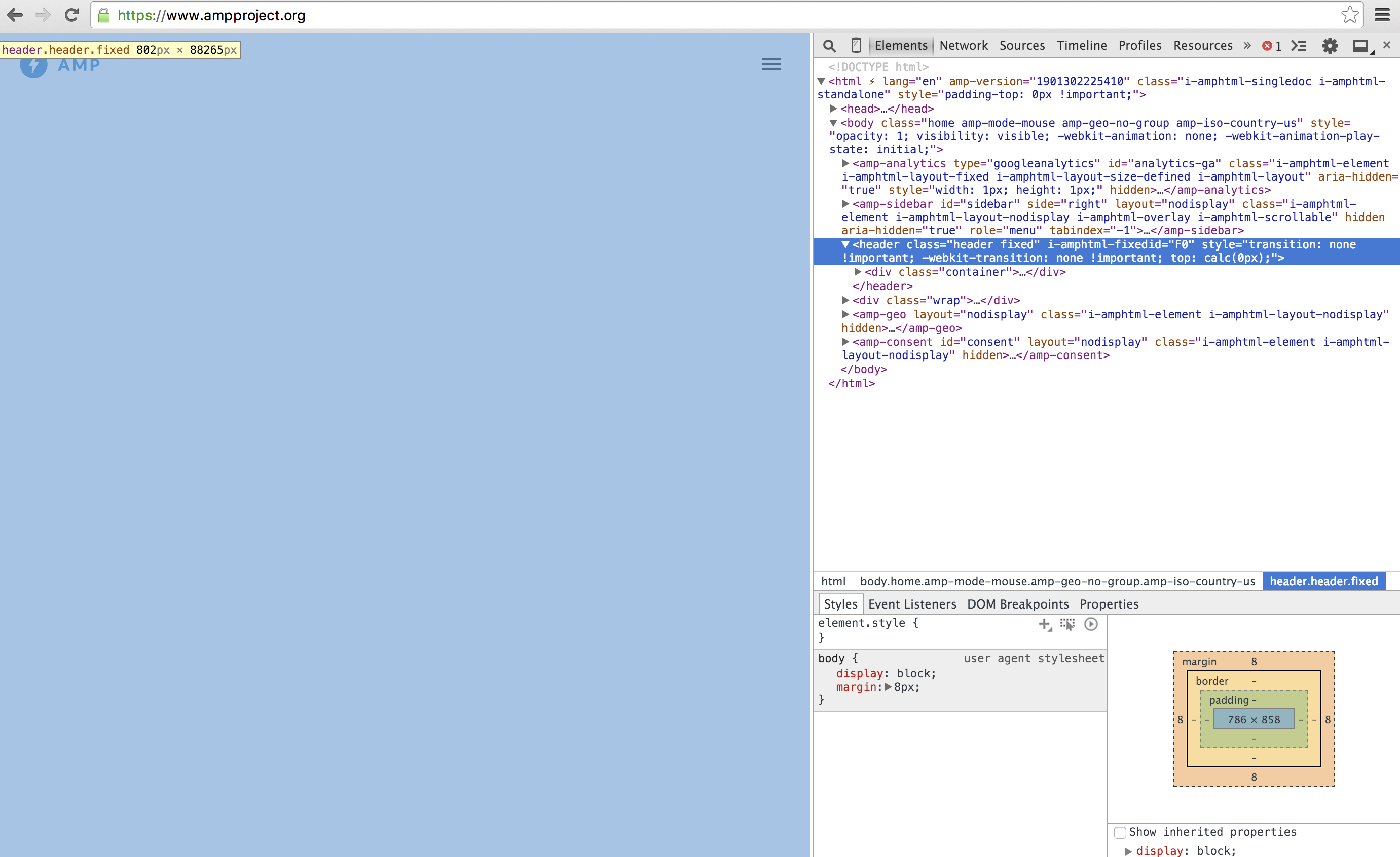
@AcidRaZor Your case would be caused by something completely different, so please be sure to send us a Url.
aghassemi
on 8 Feb 2019
@jridgewell Do we really need to apply all the fixed-layer stuff (aside from reparenting) on the non-viewer case? This being broken on Chrome 41 in viewer is fine, but not on origin since that's how crawlers render pages.
aghassemi
on 8 Feb 2019
lowering priority to P2, it is not a wide spread issue and has certain conditions need to be true to repro.
aghassemi
on 8 Feb 2019
I dont use service workers/fixed layers and what not.
AcidRaZor
on 8 Feb 2019
Ok I asked the one Director if I can share publically...
https://amp.heycarter.com/Cars/Renault/Clio/66kW-turbo-Authentique/
Note most of it is static html. Similar cars works with amp-list and pulls dynamically from our API
AcidRaZor
on 8 Feb 2019
Thanks @AcidRaZor. Always feel free to share Urls privately, either on Slack or emailing me ( aghassemi at google.com). Nice website by the way!
Alright, based on my debugging, the server renders the whole page as pure text (e.g. it renders the actual HTML source). Issue is with content-type your server is sending. It is sending content-type: text/html,charset=utf-8 in response headers which is invalid, it needs to be content-type: text/html; charset=utf-8.
Looks like the engine used for rendering is not as forgiving as browsers with malformed content-type values and falls back to text. (Also not AMP specific, any other HTML page would have behaved this way)
Hope that helps. Please let me know if still an issue after fixing your server.
aghassemi
on 8 Feb 2019
Closing per comment above.
aghassemi
on 8 Feb 2019
Thanks for the compliment. I generally don't like my own work :)
Having said that, I never set the header to act like that. Could be IIS messing around with me, will have to check. Thank you for helping on this. We did do a whole SEO project, so wondering if there is something set by someone that could act this way.
AcidRaZor
on 8 Feb 2019
Yep, looks like we added charset=utf-8 and IIS automatically comma separates and appends it to text/html output
AcidRaZor
on 8 Feb 2019
To anyone that finds this, don't add content-type "charset=utf-8" to the http response headers in IIS, this will add it on comma-separated. You would want to edit the MIME type of the html document to add the utf-8.
Thanks again aghassemi!
AcidRaZor
on 8 Feb 2019
Related issues
 sryze
·
3Comments
sryze
·
3Comments
 choumx
·
3Comments
choumx
·
3Comments
 jpettitt
·
3Comments
torch2424
·
3Comments
jpettitt
·
3Comments
torch2424
·
3Comments
 samanthamorco
·
3Comments
samanthamorco
·
3Comments