Amphtml: AMP Cache triggers reCaptcha Challenge Page
What's the issue?
When the AMP cache tries to fetch our AMP page, it is receiving the reCaptcha challenge page instead of our AMP page.
@torch2424 Suggested that this might be a cache issue
How do we reproduce the issue?
Visit https://www.google.com/amp/s/www.redfin.com/UT/Park-City/6434-Silver-Lake-Dr-84060/home/71407701/amp (Or search "6434 Silver Lake Dr Redfin")
An error page will come up
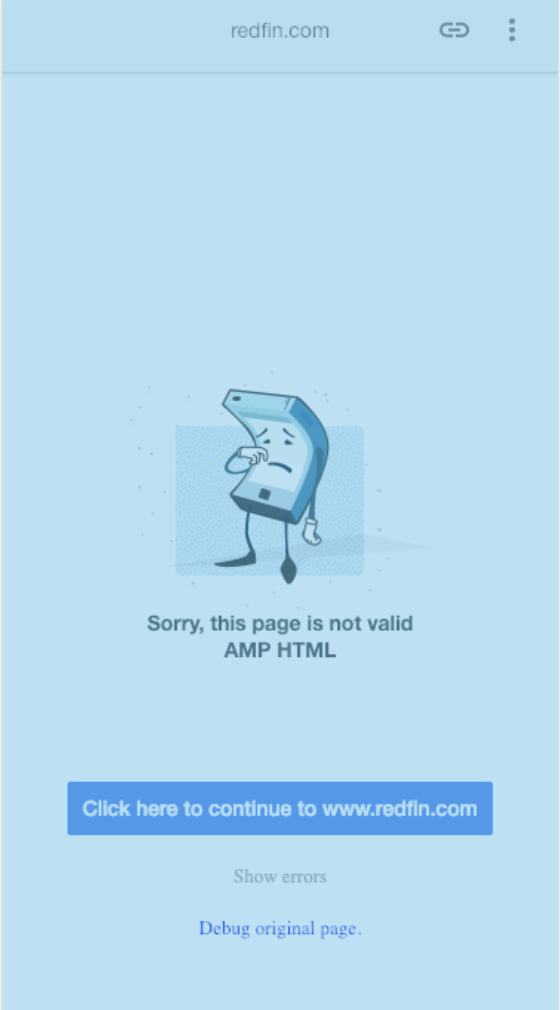
Click "Debug original page."
(Might need to throttle to slow 3g to click it in time)The mark up in the AMP validator is for the recaptcha challenge page (and thus not valid amp)
What browsers are affected?
All browsers
Which AMP version is affected?
Version 1812181822170
 eveyiyuan
All 36 comments
cc @Gregable @honeybadgerdontcare Just wanted to check in and was wondering if this is a cache issue?
Though after playing with this myself, the way the Cache works is that we go ahead and crawl AMP pages to be served. Thus, if the page gets crawled by a bot, then you are probably serving the recaptcha to the bot crawling the page. This explains it much better than I do.
And @sebastianbenz actually has a good article on how to allow the AMP crawler to access your pages: https://medium.com/google-developers/how-to-avoid-common-mistakes-when-publishing-accelerated-mobile-pages-9ea61abf530f
Check that out and let me know how it goes. Thanks! 😄
 torch2424
on 22 Dec 2018
torch2424
on 22 Dec 2018
It also looks like the amp page is being redirected to the non-amp page.
https://www.redfin.com/UT/Park-City/6434-Silver-Lake-Dr-84060/home/71407701/amp
redirects to
https://www.redfin.com/UT/Park-City/6434-Silver-Lake-Dr-84060/home/71407701
 honeybadgerdontcare
on 22 Dec 2018
honeybadgerdontcare
on 22 Dec 2018
@honeybadgerdontcare We do that when we don't want the users to see an amp page temporarily and see the canonical instead but the google search still has the AMP page indexed. Is it something that is not recommended? According to this (https://developers.google.com/search/docs/guides/remove-amp#remove-only-amp) it seems like it is ok to return a 302.
 acsant
on 22 Dec 2018
acsant
on 22 Dec 2018
@torch2424 So if I understand it correctly, are you saying that the googlebot that crawled the site saw a recaptcha challenge page and that's why the AMP cache is serving that?
acsant
on 22 Dec 2018
@acsant The comment you made to @honeybadgerdontcare we discussed briefly online that the cache would consider a redirection to a non-AMP page, a non-AMP Page. Though, they understand this better than I do, so I may be incorrect.
And the comment to me, yes, that is what it seems like it happening here 😄 Your webserver for serving the AMP page, may realize it's a bot/crawler, and is serving a recaptcha challenge to the AMP crawler, instead of the AMP document.
torch2424
on 22 Dec 2018
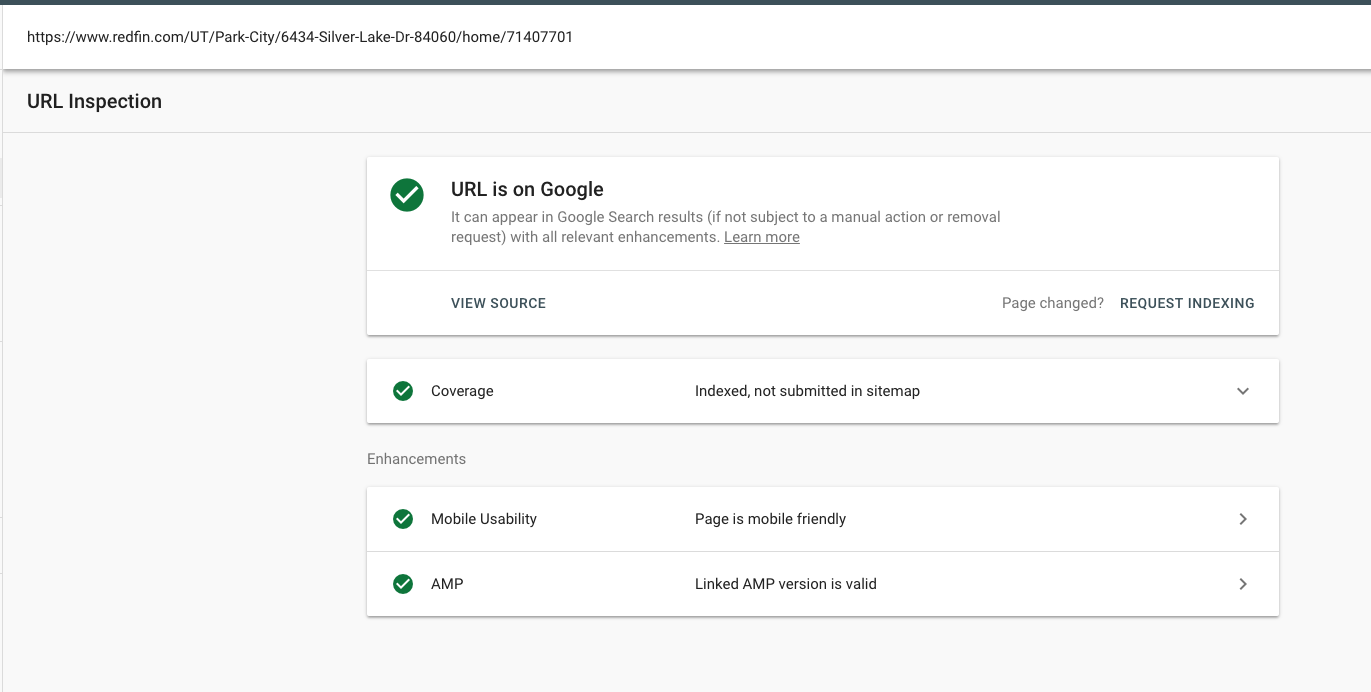
@torch2424 I ran the URL inspection tool from our search console on the canonical's last indexed version and the result came out saying that it has valid AMP html. If the crawler is seeing a recaptcha for the AMP html, then the inspection tools would be reporting it as an invalid AMP html if I understand it correctly?
acsant
on 22 Dec 2018
@acsant Huh that is quite strange, I'll let @honeybadgerdontcare answer that one.
But after investigating, your page does appear to be valid AMP, but it seems like it is just an amp page, that opens an iframe (with the src: https://amp.redfin.com/amp-iframe/redirect/UT/Park-City/6434-Silver-Lake-Dr-84060/home/71407701), that redirects to a non-AMP page. Is that your intended behavior? Or is it because I am on a desktop device? As mentioned before, the crawler will follow that redirection (I think?) and then whatever page it gets after that, it will consider it to be the final page (which is a non-AMP page).
torch2424
on 22 Dec 2018
Also, could explain to me your user journey for accessing the site through AMP? And how you expect the journey to be for a bot accessing the AMP site?
torch2424
on 22 Dec 2018
@torch2424 We came up with this behavior because we were having issues removing AMP pages from the cache after we unlinked the AMP page from the canonical page. We are running AMP as an experiment right now, so we wanted some kind of "kill-switch" behavior to stop serving AMP pages when we turned off the experiment. The AMP crawler seemed to have been ignoring the 302 we were sending originally when we tried unlinking our AMP page. So, we decided to serve a simple AMP page that redirects a user to the canonical as our kill switch. Ideally, in this case, we would just not show an AMP page at all, but we've run into issues where the crawler fetches the canonical page and thinks it's supposed to be an AMP page.
eveyiyuan
on 22 Dec 2018
@torch2424 Yes, that is the currently intended behavior. We want to be able to control when a user sees the AMP page vs. the canonical. So often times we will have AMP pages enabled for testing and then we'd decide to disable it temporarily at some point. When we disable it, we would want the users to see the canonical right away. But that wouldn't really happen unless Google re-crawls the page and reindexes the canonical right? So instead we temporarily (until Google re-crawls the page) serve an IFrame that will redirect the users to canonical.
We also have different states for a page and we have AMP implemented for the first state initially so when a page changes state, we would want to disable AMP such that the user's don't see the stale data and are routed to canonical instead.
The other alternative that we were thinking of was that we return a 404 and force the AMP cache to update using the update-cache api. But we didn't want the 404s to hurt the SEO and we weren't sure how it'd impact crawling frequency if we wanted to enable the AMP pages for those cases once again.
acsant
on 22 Dec 2018
lol @eveyiyuan beat me to it
acsant
on 22 Dec 2018
Awesome! Thanks for the thorough responses!
I'm not sure if this is an intended high level use case for AMP? Cc @cramforce
torch2424
on 22 Dec 2018
CC @sebastianbenz for some insights.
While I understand such kill switches make sense for rollouts, the Search index will always have some latency for some pages.
I'd recommend to run experiments on a subset of pages to minimize risk, and at least avoid needing to do quick back and forth by design (outside of emergencies).
 cramforce
on 22 Dec 2018
cramforce
on 22 Dec 2018
Also, in the meantime while we wait for a response from @sebastianbenz
Here is a good resource for removing AMP pages: https://developers.google.com/search/docs/guides/remove-amp
cc @eveyiyuan @acsant
torch2424
on 3 Jan 2019
@torch2424 We tried having a redirect with 301 or 302 to the canonical (which is what's mentioned in that document above). The only downside of doing that is that since the canonical is an invalid AMP HTML, Google will show that blue phone error screen if the AMP page is still indexed
acsant
on 3 Jan 2019
For single-URL-intent-clicks (click not going to a carousel), the error
isn't shown to users. Instead they are redirected to the origin server.
On Wed, Jan 2, 2019 at 5:37 PM Akash Sant notifications@github.com wrote:
@torch2424 https://github.com/torch2424 We tried having a redirect with
301 or 302 to the canonical. The only downside of doing that is that since
the canonical is an invalid AMP HTML, Google will show that blue phone
error screen if the AMP page is still indexed—
You are receiving this because you were mentioned.
Reply to this email directly, view it on GitHub
https://github.com/ampproject/amphtml/issues/20064#issuecomment-451036733,
or mute the thread
https://github.com/notifications/unsubscribe-auth/AAFeTwvk70vW3Avl_ltEBocQG4Fum1mAks5u_V7ZgaJpZM4ZfPeL
.
cramforce
on 7 Jan 2019
@cramforce I'm not sure what you mean by "click not going to a carousel" here. Could you please explain this in a bit more detail and how we could ensure that we follow the correct steps as to not see the error screen? :) Thanks
acsant
on 8 Jan 2019
If you click a normal search result (not part of a carousel), there should
never be such an error message (in Google, not sure about Bing, Twitter,
etc).
On Mon, Jan 7, 2019 at 5:01 PM Akash Sant notifications@github.com wrote:
@cramforce https://github.com/cramforce I'm not sure what you mean by
"click not going to a carousel" here. Could you please explain this in a
bit more detail and how we could ensure that we follow the correct steps as
to not see the error screen? :) Thanks—
You are receiving this because you were mentioned.
Reply to this email directly, view it on GitHub
https://github.com/ampproject/amphtml/issues/20064#issuecomment-452137406,
or mute the thread
https://github.com/notifications/unsubscribe-auth/AAFeT2ZlZP60uKS0YBFmyJs2DZfI13Unks5vA-3rgaJpZM4ZfPeL
.
cramforce
on 8 Jan 2019
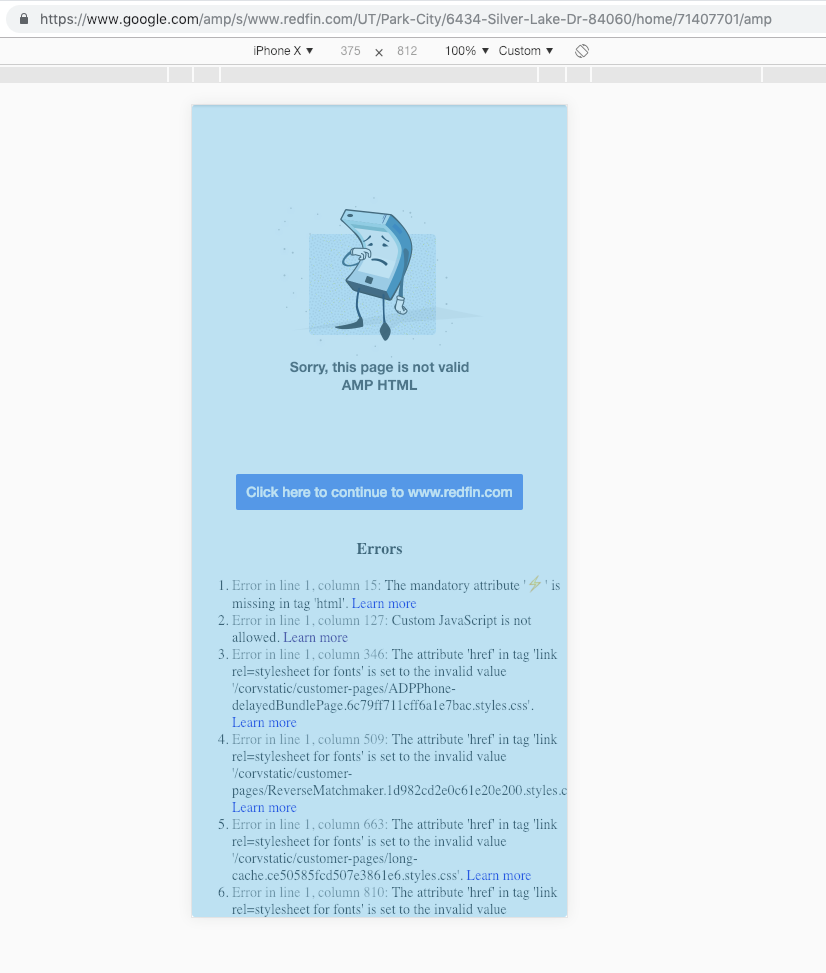
@cramforce I don't think there is a carousel for real estate is there? Here's a screenshot of what we were seeing when we clicked on a normal search result for our AMP page that was redirecting to the canonical. The error says "missing attribute with the amp lightning symbol" when we redirected to the canonical instead of returning a valid AMP page.
acsant
on 8 Jan 2019
@ericfs Is it expected that this is shown to users?
Having said that: The redirect is a fallback not design to be regularly used, of course.
cramforce
on 8 Jan 2019
No, that error page should not be shown. There should be a redirect when there is an invalid AMP document.
https://www.google.com/amp/s/www.redfin.com/UT/Park-City/6434-Silver-Lake-Dr-84060/home/71407701/amp
currently displays correctly for me.
If we're seeing that error page and not redirecting to redfin.com, then that's a bug.
 ericfs
on 8 Jan 2019
ericfs
on 8 Jan 2019
@ericfs That listing currently is AMP'd. However when the page's status changes, we remove the AMP'd page and redirect the users to canonical instead so the above example isn't a valid one anymore. As a hacky fix for that error page, we had to serve our own valid AMP page that redirects the users to canonical when the AMP page is not valid anymore
acsant
on 8 Jan 2019
This one for instance: https://www.google.com/amp/s/www.redfin.com/UT/Millcreek/1161-E-4085-S-84124/home/91760398/amp
acsant
on 8 Jan 2019
Thanks. I think @cramforce's point is that when Google's AMP Viewer tries to open an invalid AMP document, it is supposed to redirect instead of showing the error pages that are in the screenshot.
Both
https://www.google.com/amp/s/www.redfin.com/UT/Park-City/6434-Silver-Lake-Dr-84060/home/71407701/amp
and
https://www.google.com/amp/s/www.redfin.com/UT/Millcreek/1161-E-4085-S-84124/home/91760398/amp
are valid AMP.
The screenshot you have in step 2) of your original report should not be shown for more than an instant.
I'm trying to reproduce with other invalid pages and so far have not been able to reproduce.
I filed an internal issue: b/122539181
ericfs
on 8 Jan 2019
@ericfs oh yes, I can confirm that it is only shown for an instant. I had to throttle the network speed down to slow 3G in order to capture that error screenshot lol. But still, we just thought that it was confusing from an end user perspective to be seeing that error screen
acsant
on 8 Jan 2019
Got it, thanks. That is working as intended, then.
ericfs
on 8 Jan 2019
Out of curiosity, why is that error page shown even for an instant? When I first saw it, it wasn't long enough for me to understand why I was seeing it (it was too fast). Wouldn't it be a smoother experience to just not show it and follow the redirect instead of both? That's just my opinion though
acsant
on 8 Jan 2019
It seems like it may just be legacy reasons. We don't want to slow down the display in the case that the document is not an error, but it should still be possible to avoid showing the error. The internal b/122539181 will track this.
ericfs
on 9 Jan 2019
Is there a way for us to get updates on it or watch that internal issue? Specially because if there was a way to not see that error screen, it'd speed up a lot of things on our side
acsant
on 9 Jan 2019
The tracker isn't public, but we can update here.
ericfs
on 9 Jan 2019
This issue doesn't have a category which makes it harder for us to keep track of it. @Gregable Please add an appropriate category.
 ampprojectbot
on 9 Jan 2019
ampprojectbot
on 9 Jan 2019
Since this is an internal product issue, closing here on github.
 Gregable
on 9 Jan 2019
Gregable
on 9 Jan 2019
Hello! Any updates on this? Just trying to figure out how this is going to play into our timeline.
acsant
on 11 Jan 2019
Nothing to report. If you're looking for an immediate fix, I'm afraid it's going to be a little while.
ericfs
on 14 Jan 2019
The new modified triage process is to leave these open, so reopening.
Gregable
on 14 Jan 2019
This issue has been automatically marked as stale because it has not had recent activity. It will be closed in 7 days if no further activity occurs. Thank you for your contributions.
![stale[bot] picture](https://avatars.githubusercontent.com/in/1724?v=4&s=40) stale[bot]
on 17 Jul 2020
stale[bot]
on 17 Jul 2020
Related issues
 radiovisual
·
3Comments
radiovisual
·
3Comments
 edhollinghurst
·
3Comments
edhollinghurst
·
3Comments
 gmajoulet
·
3Comments
gmajoulet
·
3Comments
 choumx
·
3Comments
choumx
·
3Comments
 sryze
·
3Comments
sryze
·
3Comments