Amphtml: AMP forms incompatible with IE 11
What's the issue?
form submission is failing on IE11 with the following error:
Response must contain the AMP-Access-Control-Allow-Source-Origin header
Form submission failed: Error: Response must contain the AMP-Access-Control-Allow-Source-Origin header _reported_
the following headers ARE present in the response
Request Method:POST
Status Code:200

access-control-allow-credentials:true
access-control-allow-origin:[our domain]
access-control-expose-headers:AMP-Redirect-To
access-control-expose-headers:AMP-Access-Control-Allow-Source-Origin
amp-access-control-allow-source-origin:[our domain]
amp-redirect-to:[page on our domain]
this is happening even on the non-cached version of the page
How do we reproduce the issue?
try the following page in IE vs Chrome
https://joenimble.github.io/amp-form-example/
Setup a post amp-form, with an end point on the same domain,
respond with similar headers as above,
try it on Internet Explorer,
check the console for errors
What browsers are affected?
IE 11.1593.14393.0
Which AMP version is affected?
v0 (Version 1504040004635)
 brozef
All 10 comments
Do you have a link?
 jridgewell
on 31 Aug 2017
jridgewell
on 31 Aug 2017
I noticed that your headers are all lower-case. Does this error still occur when you use the correct capitalization for the header names and values?
 cvializ
on 1 Sep 2017
cvializ
on 1 Sep 2017
@cvializ headers are using correct capitalization, it just shows lower-cased in the inspector.
@jridgewell sorry for the delay, I've just made a simple example that repros the issue: https://joenimble.github.io/amp-form-example/
brozef
on 6 Sep 2017
I can't reproduce. In IE11 on Windows 10 and Windows 8.1 it submits and navigates as expected without adding an error to the console. Are there any other details you can provide to help me reproduce the issue?

cvializ
on 6 Sep 2017
@cvializ weird, I've reproduced this locally on win 10 and 8 and on browserstack Windows 10, 8, 7 with all versions of IE11 available. What version of IE are you running? I always get:

brozef
on 6 Sep 2017
Huh that's strange! I'm using SauceLabs to test the behavior in IE. It looks like their version is 11.103.10586.0
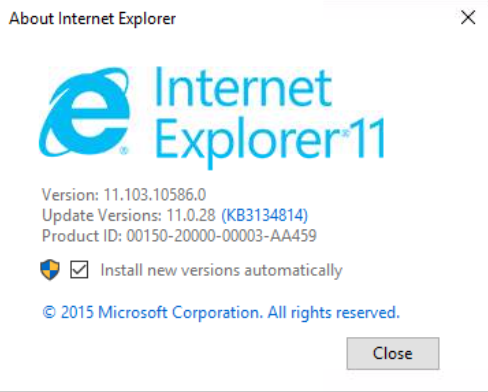
Maybe there's a caching issue? Did you try clearing the browser cache and trying again?
cvializ
on 6 Sep 2017
Can confirm it's not a caching problem. Are you able to try on BrowserStack or locally? For what ever strange reason, the problem does not exist on SauceLabs. I haven't been able to download the EXACT versions of IE that SauceLabs uses for Win 8.1/10 but I did manage to get versions close to - both older and newer - which get the errors.
brozef
on 7 Sep 2017
I used our physical windows machine and I am able to reproduce at your URL. It looks like the actual native XMLHttpRequest.prototype.getAllResponseHeaders isn't even returning the AMP-Access-Control-Allow-Source-Origin header, but it appears in the network tab
cvializ
on 7 Sep 2017
You've specified two Access-Control-Expose-Headers headers, and IE11 is only using the first. Concatenate the two with a comma:
Access-Control-Expose-Headers=AMP-Redirect-To,Amp-Access-Control-Allow-Origin
@jridgewell @cvializ, my bad. Thanks for the help
brozef
on 8 Sep 2017
Related issues
 sryze
·
3Comments
sryze
·
3Comments
 akshaylive
·
3Comments
akshaylive
·
3Comments
 aghassemi
·
3Comments
aghassemi
·
3Comments
 gmajoulet
·
3Comments
gmajoulet
·
3Comments
 torch2424
·
3Comments
torch2424
·
3Comments
Most helpful comment
You've specified two
Access-Control-Expose-Headersheaders, and IE11 is only using the first. Concatenate the two with a comma: