Amp-wp: Image sizer SVG image corruptible by caching/optimization plugins
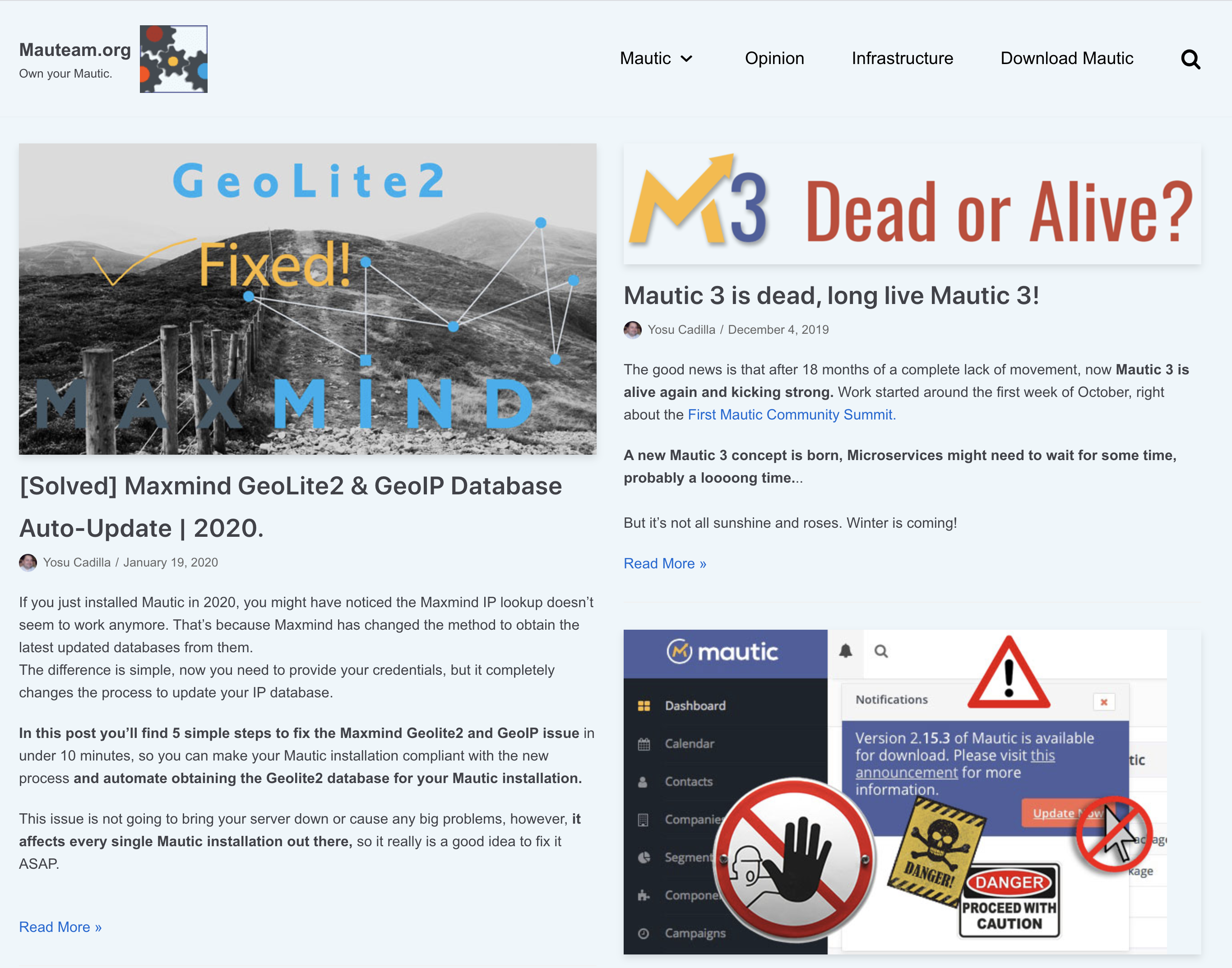
All the images are gone including the logo.
If I deactivate the AMP plugin images return immediately.
If I activate it again images are gone again.
WP Version 5.3.2
Theme: Neve Version: 2.6.4
 YosuCadilla
All 27 comments
Hi @YosuCadilla,
Can you post your Site Health information here as well.
And if possible, a link to the website you're having trouble with.
 pierlon
on 31 Mar 2020
pierlon
on 31 Mar 2020
@YosuCadilla What will be most helpful for us is seeing the problem on your site with Transitional mode active, so we can compare AMP and non-AMP. Please share the URL for your site.
 westonruter
on 31 Mar 2020
westonruter
on 31 Mar 2020
Here you go @pierlon
`
wp-core
version: 5.3.2
site_language: en_US
user_language: en_US
timezone: Europe/Andorra
permalink: /%category%/%postname%/
https_status: true
user_registration: 0
default_comment_status: closed
multisite: false
user_count: 1
dotorg_communication: true
wp-paths-sizes
wordpress_path: /var/www/html/wordpress
wordpress_size: 43.44 MB (45546440 bytes)
uploads_path: /var/www/html/wordpress/wp-content/uploads
uploads_size: 11.66 MB (12222211 bytes)
themes_path: /var/www/html/wordpress/wp-content/themes
themes_size: 5.99 MB (6278353 bytes)
plugins_path: /var/www/html/wordpress/wp-content/plugins
plugins_size: 44.31 MB (46459889 bytes)
database_size: 17.56 MB (18415616 bytes)
total_size: 122.95 MB (128922509 bytes)
wp-dropins (3)
advanced-cache.php: true
db.php: true
object-cache.php: true
wp-active-theme
name: Neve (neve)
version: 2.6.4
author: ThemeIsle
author_website: https://themeisle.com
parent_theme: none
theme_features: hfg_support, title-tag, post-thumbnails, automatic-feed-links, custom-logo, html5, customize-selective-refresh-widgets, custom-background, themeisle-demo-import, align-wide, editor-color-palette, fl-theme-builder-headers, fl-theme-builder-footers, header-footer-elementor, lifterlms-sidebars, lifterlms, service_worker, amp, menus, widgets
theme_path: /var/www/html/wordpress/wp-content/themes/neve
wp-plugins-active (9)
AMP: version: 1.5.1, author: AMP Project Contributors
Amp Stories for Wordpress: version: 1.3.2, author: Elías Margolis
Contextual Related Posts: version: 2.8.0, author: WebberZone
No Category Base (WPML): version: 1.3, author: Marios Alexandrou
Post Types Order: version: 1.9.4.2, author: Nsp Code
Redirection: version: 4.7.1, author: John Godley
Simple Author Box: version: 2.3.16, author: GreenTreeLabs
The SEO Framework: version: 4.0.5, author: The SEO Framework Team
W3 Total Cache: version: 0.13.1, author: BoldGrid
wp-plugins-inactive (9)
Cloudflare: version: 3.4.1, author: John Wineman, Furkan Yilmaz, Junade Ali (Cloudflare Team)
Cloudflare Page Cache: version: 1.4, author: Patrick Meenan
Custom Twitter Feeds Pro Developer: version: 1.5.6, author: Smash Balloon
Disqus for WordPress: version: 3.0.17, author: Disqus
Edge Cache HTML via Cloudflare Workers: version: 1.0.5, author: Silviu Stroe
Gutenberg Blocks and Template Library by Otter: version: 1.5.2, author: ThemeIsle
Multi Twitter Stream: version: 1.5.0, author: Clayton McIlrath, Roger Hamilton
WordPress Popular Posts: version: 5.1.0, author: Hector Cabrera
WP Mautic: version: 2.3.2, author: Mautic community
wp-media
image_editor: WP_Image_Editor_Imagick
imagick_module_version: 1687
imagemagick_version: ImageMagick 6.9.7-4 Q16 x86_64 20170114 http://www.imagemagick.org
imagick_limits:
imagick::RESOURCETYPE_AREA: 122 MB
imagick::RESOURCETYPE_DISK: 1073741824
imagick::RESOURCETYPE_FILE: 786432
imagick::RESOURCETYPE_MAP: 512 MB
imagick::RESOURCETYPE_MEMORY: 256 MB
imagick::RESOURCETYPE_THREAD: 2
gd_version: 2.2.5
ghostscript_version: 9.26
wp-server
server_architecture: Linux 4.15.0-91-generic x86_64
httpd_software: Apache/2.4.41 (Ubuntu)
php_version: 7.2.24-0ubuntu0.18.04.3 64bit
php_sapi: fpm-fcgi
max_input_variables: 1000
time_limit: 120
memory_limit: 256M
max_input_time: 60
upload_max_size: 32M
php_post_max_size: 32M
curl_version: 7.58.0 OpenSSL/1.1.1c
suhosin: false
imagick_availability: true
htaccess_extra_rules: true
wp-database
extension: mysqli
server_version: 10.1.44-MariaDB-0ubuntu0.18.04.1
client_version: mysqlnd 5.0.12-dev - 20150407 - $Id: 3591daad22de08524295e1bd073aceeff11e6579 $
wp-constants
WP_HOME: https://mauteam.org
WP_SITEURL: https://mauteam.org
WP_CONTENT_DIR: /var/www/html/wordpress/wp-content
WP_PLUGIN_DIR: /var/www/html/wordpress/wp-content/plugins
WP_MAX_MEMORY_LIMIT: 256M
WP_DEBUG: false
WP_DEBUG_DISPLAY: true
WP_DEBUG_LOG: false
SCRIPT_DEBUG: false
WP_CACHE: true
CONCATENATE_SCRIPTS: undefined
COMPRESS_SCRIPTS: undefined
COMPRESS_CSS: undefined
WP_LOCAL_DEV: undefined
DB_CHARSET: utf8mb4
DB_COLLATE: undefined
wp-filesystem
wordpress: writable
wp-content: writable
uploads: writable
plugins: writable
themes: writable
mu-plugins: writable
amp_wp
amp_mode_enabled: transitional
amp_templates_enabled: post, page, attachment, is_singular, is_home, is_archive, is_author, is_date, is_search, is_404, is_category, is_tag
amp_serve_all_templates: true
amp_css_transient_caching_disabled: n/a
amp_css_transient_caching_threshold: 50 transients per day
amp_css_transient_caching_sampling_range: 14 days
amp_css_transient_caching_transient_count: 66
`
YosuCadilla
on 31 Mar 2020
@westonruter I normally use the Default mode (AMP only) for this site.
I have just switched to Transitional mode per your request.
Site is: https://mauteam.org/
YosuCadilla
on 1 Apr 2020
Thank you. I've captured the AMP and non-AMP versions of the homepage and put them in this Gist: https://gist.github.com/westonruter/d15f30c488bcf92cd87e087431a0059a
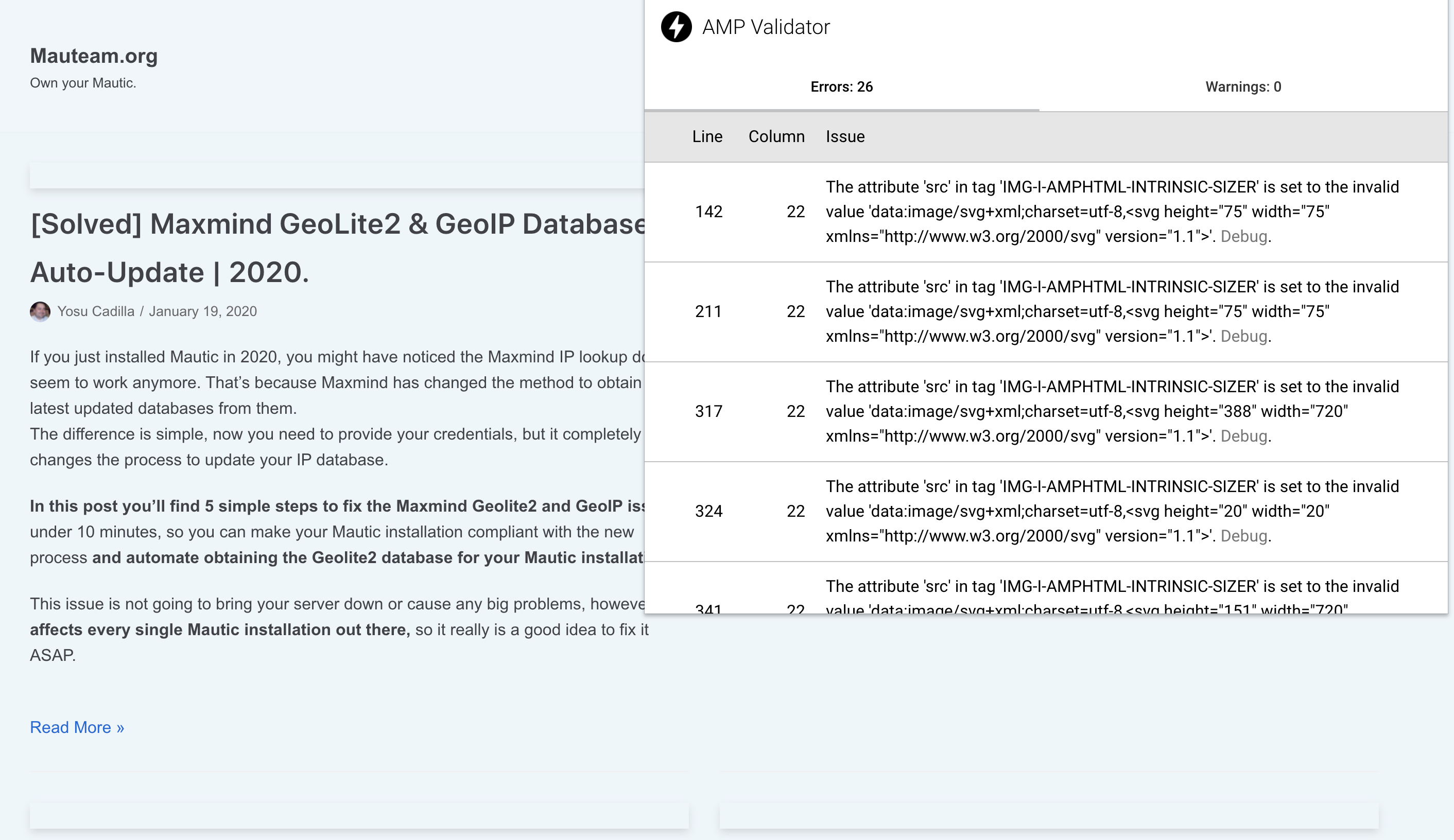
I'm seeing this AMP validation error on the frontend caused by an issue with the Optimizer:
The attribute 'src' in tag 'IMG-I-AMPHTML-INTRINSIC-SIZER' is set to the invalid value 'data:image/svg+xml;charset=utf-8,<svg height="75" width="75" xmlns="http://www.w3.org/2000/svg" version="1.1">'
Also reported at https://wordpress.org/support/topic/error-images-4/
Non-AMP
AMP
westonruter
on 1 Apr 2020
@YosuCadilla For a short term fix, you can disable the Optimizer from running on your site by using this plugin: https://gist.github.com/westonruter/8d52c0b807e6dfbbdf2219622d0f4a7e
westonruter
on 1 Apr 2020
I'm not able to reproduce the issue locally.
Bad
<amp-img src=https://mauteam.org/wp-content/uploads/2019/08/mauteam-logo-75-V.png alt width=75 height=75 class="amp-wp-enforced-sizes i-amphtml-layout-intrinsic i-amphtml-layout-size-defined" layout=intrinsic i-amphtml-layout=intrinsic>
<i-amphtml-sizer class=i-amphtml-sizer>
<img alt aria-hidden=true class=i-amphtml-intrinsic-sizer role=presentation src="data:image/svg+xml;charset=utf-8,<svg height="75" width="75" xmlns="http://www.w3.org/2000/svg" version="1.1">">
</i-amphtml-sizer>
<noscript><img src=https://mauteam.org/wp-content/uploads/2019/08/mauteam-logo-75-V.png alt width=75 height=75 class></noscript>
</amp-img>
Good
<amp-img src="https://mauteam.org/wp-content/uploads/2019/08/mauteam-logo-75-V.png" alt="" width="75" height="75" class="amp-wp-enforced-sizes i-amphtml-layout-intrinsic i-amphtml-layout-size-defined" layout="intrinsic" i-amphtml-layout="intrinsic">
<i-amphtml-sizer class="i-amphtml-sizer">
<img alt="" aria-hidden="true" class="i-amphtml-intrinsic-sizer" role="presentation" src="data:image/svg+xml;charset=utf-8,<svg height="75" width="75" xmlns="http://www.w3.org/2000/svg" version="1.1"/>">
</i-amphtml-sizer>
<noscript><img src="https://mauteam.org/wp-content/uploads/2019/08/mauteam-logo-75-V.png" alt width="75" height="75" class=""></noscript>
</amp-img>
Diff
The key difference is in the the sizer img:
- version="1.1">">
+ version="1.1"/>">
The AMP validator is requiring the trailing slash on the svg in the data URL.
@YosuCadilla I bet W3 Total Cache is causing this problem. Can you try turning off the HTML minification?
Ultimately this is something that the AMP validator needs to allow in the validator spec pattern:
  attrs: {
    name: "src"
    value_regex: "data:image\\/svg\\+xml;charset=utf-8,<svg height=\"\\d+\" width=\"\\d+\" xmlns=\"http:\\/\\/www\\.w3\\.org\\/2000\\/svg\" version=\"1\\.1\"\\/>|data:image\\/svg\\+xml;charset=utf-8,<svg height='100' width='300' xmlns='http:\\/\\/www\\.w3\\.org\\/2000\\/svg' version='1\\.1'\\/>"
    mandatory: true
  }
Thank you very much @westonruter.
You rock!
It worked fine with AMP in the Default mode plus the "AMP disabled Optimizer" plugin enabled.
And it is now working fine with the W3 cache disabled and "AMP disabled Optimizer" disabled,
YosuCadilla
on 1 Apr 2020
@YosuCadilla It seems actually that this is a bug with W3 Total Cache. It is corrupting the SVG image, causing it to be invalid XML. Consider these two examples:
<img style="border:solid 3px red" src="data:image/svg+xml;charset=utf-8,<svg height="75" width="75" xmlns="http://www.w3.org/2000/svg" version="1.1">">
<img style="border:solid 3px lime" src="data:image/svg+xml;charset=utf-8,<svg height="75" width="75" xmlns="http://www.w3.org/2000/svg" version="1.1"/>">

The trailing / in the svg data URL is required. Otherwise, the browser is failing render it due to an XML parse error.
westonruter
on 1 Apr 2020
A way for AMP to make this more resilient would perhaps be to allow Base64-encoded data URLs here. Consider:
<img src="data:image/svg+xml;base64,PHN2ZyBoZWlnaHQ9Ijc1IiB3aWR0aD0iNzUiIHhtbG5zPSJodHRwOi8vd3d3LnczLm9yZy8yMDAwL3N2ZyIgdmVyc2lvbj0iMS4xIi8+">
This image behaves the same as the non-encoded image.
@sebastianbenz What do you think?
westonruter
on 1 Apr 2020
Curiously PageSpeed Insights seems to be slightly happier now that W3 is disabled.
YosuCadilla
on 1 Apr 2020
It turns out that the Base64-encoded image is actually _smaller_ than the non-encoded image due to there not being a need to escape HTML entities:
data:image/svg+xml;base64,PHN2ZyBoZWlnaHQ9Ijc1IiB3aWR0aD0iNzUiIHhtbG5zPSJodHRwOi8vd3d3LnczLm9yZy8yMDAwL3N2ZyIgdmVyc2lvbj0iMS4xIi8+
data:image/svg+xml;charset=utf-8,<svg height="75" width="75" xmlns="http://www.w3.org/2000/svg" version="1.1"/>
There does not seem to be a need for charset since the default is ASCII, I believe.
westonruter
on 1 Apr 2020
And base64-encoded images are normal on the web, whereas SVG data: URLs seem more novel.
westonruter
on 1 Apr 2020
Thanks for investigating @westonruter! I've created a PR for the AMP validator.
 sebastianbenz
on 1 Apr 2020
sebastianbenz
on 1 Apr 2020
I've filed a bug report with W3 Total Cache to fix the underlying problem with that plugin: https://github.com/W3EDGE/w3-total-cache/issues/162
westonruter
on 1 Apr 2020
Hey ... trying to figure out the same but with WP Rocket instead and there's no minification active at all.
 vz01d
on 3 Apr 2020
vz01d
on 3 Apr 2020
@sebot Please share the URL to an AMP page that has the problem. If WP Rocket is disabled, does that fix the issue?
westonruter
on 3 Apr 2020
@westonruter sure thing, it's this page: https://www.the-impish-ink.de/gossip/romantische-zitate-liebesfilmen/amp/
disabling WP Rocket has not helped, however I am not entirely sure about the server cache has been purged properly. The plugin you brought up fixed the thing for now. Thanks
vz01d
on 4 Apr 2020
@sebot You're actually experiencing #4493. Please update to v1.5.2 and the issue should be fixed for you.
westonruter
on 4 Apr 2020
You can also then deactivate the amp-disable-optimizer plugin.
westonruter
on 4 Apr 2020
Ah gotcha, alright will do so and get back to you if any other issues arise. ;-)
vz01d
on 4 Apr 2020
Note: I've changed the amp-disable-optimizer plugin into amp-disable-ssr. I realized that the Optimizer as a whole did not need to be disabled. Only the SSR needed to be disabled to prevent this issue with the SVG sizer image. Please use this replacement plugin instead.
westonruter
on 8 Apr 2020
Pull request for validator has been merged: https://github.com/ampproject/amphtml/pull/27518
So we can move forward with using a base64-encoded SVG image sizer.
westonruter
on 8 Jun 2020
While the urgency for this seems to have lessened given the bug being fixed in W3 Total Cache, it still seems worthwhile to do for validation hardening.
westonruter
on 16 Jun 2020
What is the change that I can help with here?
 jwold
on 16 Jun 2020
jwold
on 16 Jun 2020
It's to do QA, but it's more appropriate for me to do this one.
westonruter
on 16 Jun 2020
Verified that base64-encoded image is used as sizer and no validation error is present:
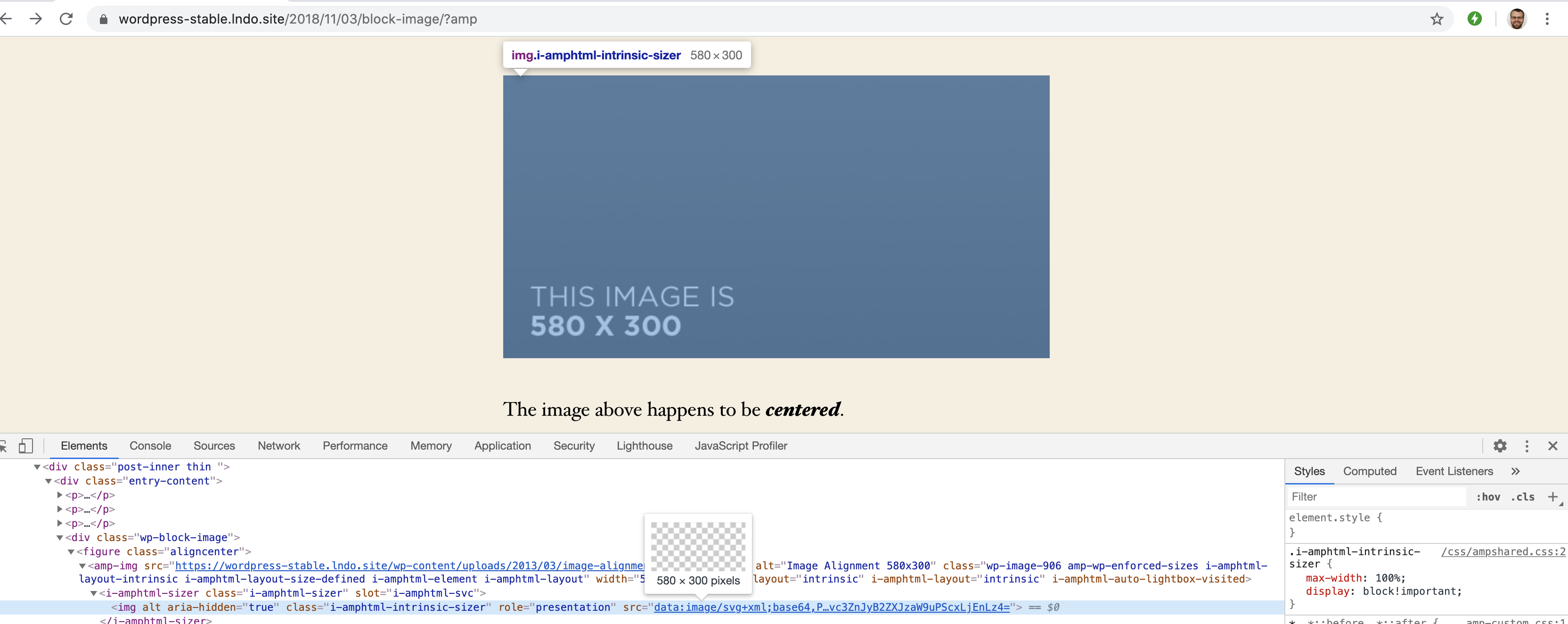
Given this sizer image:
data:image/svg+xml;base64,PHN2ZyBoZWlnaHQ9JzMwMCcgd2lkdGg9JzU4MCcgeG1sbnM9J2h0dHA6Ly93d3cudzMub3JnLzIwMDAvc3ZnJyB2ZXJzaW9uPScxLjEnLz4=
The base64-encoded data decodes as:
<svg height='300' width='580' xmlns='http://www.w3.org/2000/svg' version='1.1'/>
Related issues
 alexhaller
·
5Comments
alexhaller
·
5Comments
 swissspidy
·
4Comments
swissspidy
·
4Comments
 maciejmackowiak
·
5Comments
westonruter
·
3Comments
maciejmackowiak
·
5Comments
westonruter
·
3Comments
 luizeof
·
4Comments
luizeof
·
4Comments
Most helpful comment
Verified that base64-encoded image is used as sizer and no validation error is present:
Given this sizer image:
The base64-encoded data decodes as: