Amp-wp: Explore existing options for how to provide users the ability to auto-snap size, position to another elements
This item is to do an exploration around existing options that could be leveraged to provide users the ability to auto-snap to size, position of an item to other elements. Intention is not to write this from scratch, but leverage an existing solution.
 MackenzieHartung
All 10 comments
There's a Gutenberg PR that adds a grid for elements to snap to: https://github.com/WordPress/gutenberg/pull/16748
Turns out that is a native feature of the re-resizable package that Gutenberg uses.
 swissspidy
on 31 Jul 2019
swissspidy
on 31 Jul 2019
Here's an example scenario:
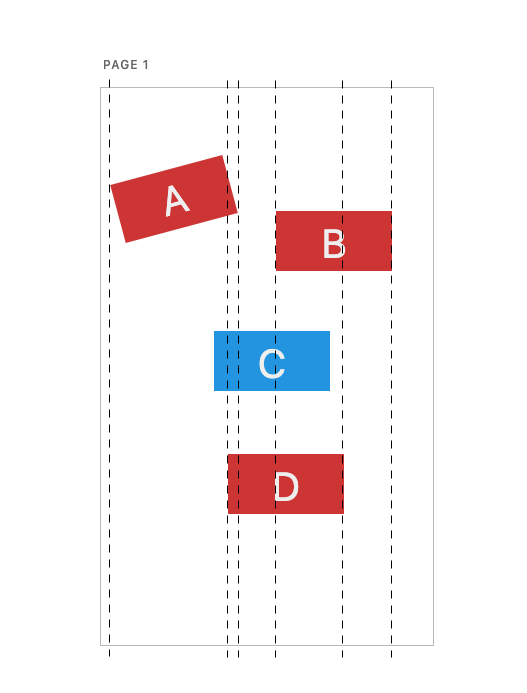
When we want to move element C, it should snap to one of the dashed lines in the screenshot. For this we only need to know the X position on the page of all its siblings, as well as their width and rotation angle to calculate the actual width from line to line. getBlockPositioning can be extended for that. The logic with the snapping here could fit into BlockMover.
Here, visual snapping indicators (if we want to show any) would basically be like these dashed lines in the screenshot.
When we want to resize element C, the snapping would take into account the distance between a sibling's dashed lines, e.g. lines 1 and 3 for element A. This logic fits into ResizableBox.
Here, visual snapping indicators would be shown next to block A and C, indicating that they are now of equal size.
In both scenarios, the best place to display these is probably in the page block's edit component.
That means on a higher-level there needs to be some knowledge about a snapping being in progress, so that the indicators can be rendered accordingly. So probably in our Redux store, just like that Gutenberg PR does it.
As for using pre-existing solutions, I don't think we can get around writing something that integrates well with Gutenberg. However, it would not be too difficult to implement this.
ResizableBox uses re-resizable, which already supports snapping to a grid. Snapping to one in our custom BlockMover should be doable as well. For rotation it was rather easy, see #2967.
And then it's just about extending the Redux store for showing a grid, where it might take some time to get the positioning of the indicators right.
swissspidy
on 5 Aug 2019
^ @miina @westonruter @kienstra Let me know your thoughts on this.
swissspidy
on 5 Aug 2019
Thanks for looking into this, sounds like a good approach to try.
We might also want to consider the center lines of the Page, e.g. for moving the block exactly to the center of the Page, I guess it might work for this as well?
 miina
on 6 Aug 2019
miina
on 6 Aug 2019
Indeed. Horizontal + vertical center of the page, as well as the page borders could be additional lines that help with better alignment.
swissspidy
on 6 Aug 2019
There is no issue for actually implementing this right now, right? Couldn't find one now.
Looks to me like we have an approach to try, we can probably create a new issue for the actual implementation and then move this to Ready for Merge.
miina
on 6 Aug 2019
No, not yet. Creating that depends on what we come up with _here_. For example, we could split this up into multiple issues, one for moving, one for resizing, one for displaying the grid, one for e2e tests, etc.
swissspidy
on 6 Aug 2019
For some reason, I was convinced that we already discussed splitting the ticket and even wrote it down but nope, looks like I imagined it.
On e2e tests: I'd vote for trying to include the related e2e tests within each ticket already to ensure having tests done when merging.
For other issues, definitely should separate moving the blocks and resizing the blocks. Depending on the complexity, we could also separate moving the blocks and resizing the blocks in relation to other blocks vs the Page center points + the moved block's center.
This would mean:
- Moving the block + grid in relation to other blocks.
- Resizing the block + grid in relation to other blocks.
- Moving the block + grid in relation to Page (e.g. if moving around the center, snapping should enable positioning exactly to the center of the Page)
- Resizing the block + grid in relation to Page (e.g. if the block is 200px from the left side then resizing the right size should allow snapping to 200px from the right side as well).
Probably just displaying the grid as one separate ticket might be quite large (considering all the different cases). Although we could implement separately the grid in relation to other blocks for example, this would be useful without snapping as well and could be a good base for the other cases too.
Thoughts?
miina
on 6 Aug 2019
Not sure if we want to display a grid regardless of snapping. That's not what I meant. I think - for now at least - we should only display these help indicators when moving or resizing, nothing else.
This would mean: [...]
Splitting up into these four tasks sounds good. I would probably start with the ones related to the page, as it's easier since we only need to compare the current block with the page. The ones in relation to other blocks will be more complex.
swissspidy
on 6 Aug 2019
Created four new issues as a result of this:
- #2992
- #2993
- #2994
- #2995
swissspidy
on 8 Aug 2019
Related issues
 westonruter
·
27Comments
westonruter
·
27Comments
 spacedmonkey
·
30Comments
MackenzieHartung
·
24Comments
spacedmonkey
·
30Comments
MackenzieHartung
·
24Comments
 Ipstenu
·
32Comments
westonruter
·
32Comments
Ipstenu
·
32Comments
westonruter
·
32Comments
Most helpful comment
Here's an example scenario:
When we want to move element C, it should snap to one of the dashed lines in the screenshot. For this we only need to know the X position on the page of all its siblings, as well as their width and rotation angle to calculate the actual width from line to line.
getBlockPositioningcan be extended for that. The logic with the snapping here could fit intoBlockMover.Here, visual snapping indicators (if we want to show any) would basically be like these dashed lines in the screenshot.
When we want to resize element C, the snapping would take into account the distance between a sibling's dashed lines, e.g. lines 1 and 3 for element A. This logic fits into
ResizableBox.Here, visual snapping indicators would be shown next to block A and C, indicating that they are now of equal size.
In both scenarios, the best place to display these is probably in the page block's
editcomponent.That means on a higher-level there needs to be some knowledge about a snapping being in progress, so that the indicators can be rendered accordingly. So probably in our Redux store, just like that Gutenberg PR does it.
As for using pre-existing solutions, I don't think we can get around writing something that integrates well with Gutenberg. However, it would not be too difficult to implement this.
ResizableBoxusesre-resizable, which already supports snapping to a grid. Snapping to one in our customBlockMovershould be doable as well. For rotation it was rather easy, see #2967.And then it's just about extending the Redux store for showing a grid, where it might take some time to get the positioning of the indicators right.