Amp-wp: Extend classic/reader templates with commonly-requested features
Now that we plan to rebrand the Classic mode and maintain it as a “Reader” mode (#2034) we should address common requests by users for the classic post templates.
The most common request I believe is to add a nav menu (#1772, #792, #615, #220, #435). Note that if this involves adding a nav menu location, this could be re-used for navigation in AMP Stories. As with AMP Stories, the nav menu should be presented in an amp-sidebar.
What are the other most-commonly requested template features that make sense for us to incorporate into the plugin? One request is a search bar.
 westonruter
All 19 comments
Some users also requested filtering all internal links so that they stay in reader mode while navigating.
 swissspidy
on 2 Apr 2019
swissspidy
on 2 Apr 2019
For that, there is also https://github.com/ampproject/amp-wp/issues/1389
westonruter
on 2 Apr 2019
Here is a basic plugin which can be used to add a nav menu sidebar on Reader mode templates: https://gist.github.com/westonruter/b22cfae13f0862d5b9716c776c60f882
westonruter
on 15 Jul 2019
Is a good idea make two location menu?
- location for AMP page;
- location for AMP stories.
So in AMP stories, the menu will be active or not.
 mrjuri
on 16 Jul 2019
mrjuri
on 16 Jul 2019
@mrjuri Those would be separate things either way eventually, see #2639.
swissspidy
on 16 Jul 2019
Hi Weston,
I heard similar feedbacks of publishers requesting sidebar & search bar.
Beside that, common asks I've heard:
- Feature to upload publisher logo on top of the page. (upon click - redirect to home)
- Flexibility of changing the colour of the top bar (currently only available in blue)
Pubs also ask for share to social media, but I usually recommend them to check supported plugins in amp-wp.org/ecosystem
Hope this helps!
Sincerely,
Jeanny
 jeannyhaliman
on 19 Jul 2019
jeannyhaliman
on 19 Jul 2019
@jeannyhaliman
Feature to upload publisher logo on top of the page. (upon click - redirect to home)
Currently the site icon is shown in the upper-right corner of the header.

But instead of this they want to have a bigger logo appear instead of the site title in the top-left (here “WordPress Develop”)? Should the site icon then be hidden when that is done?
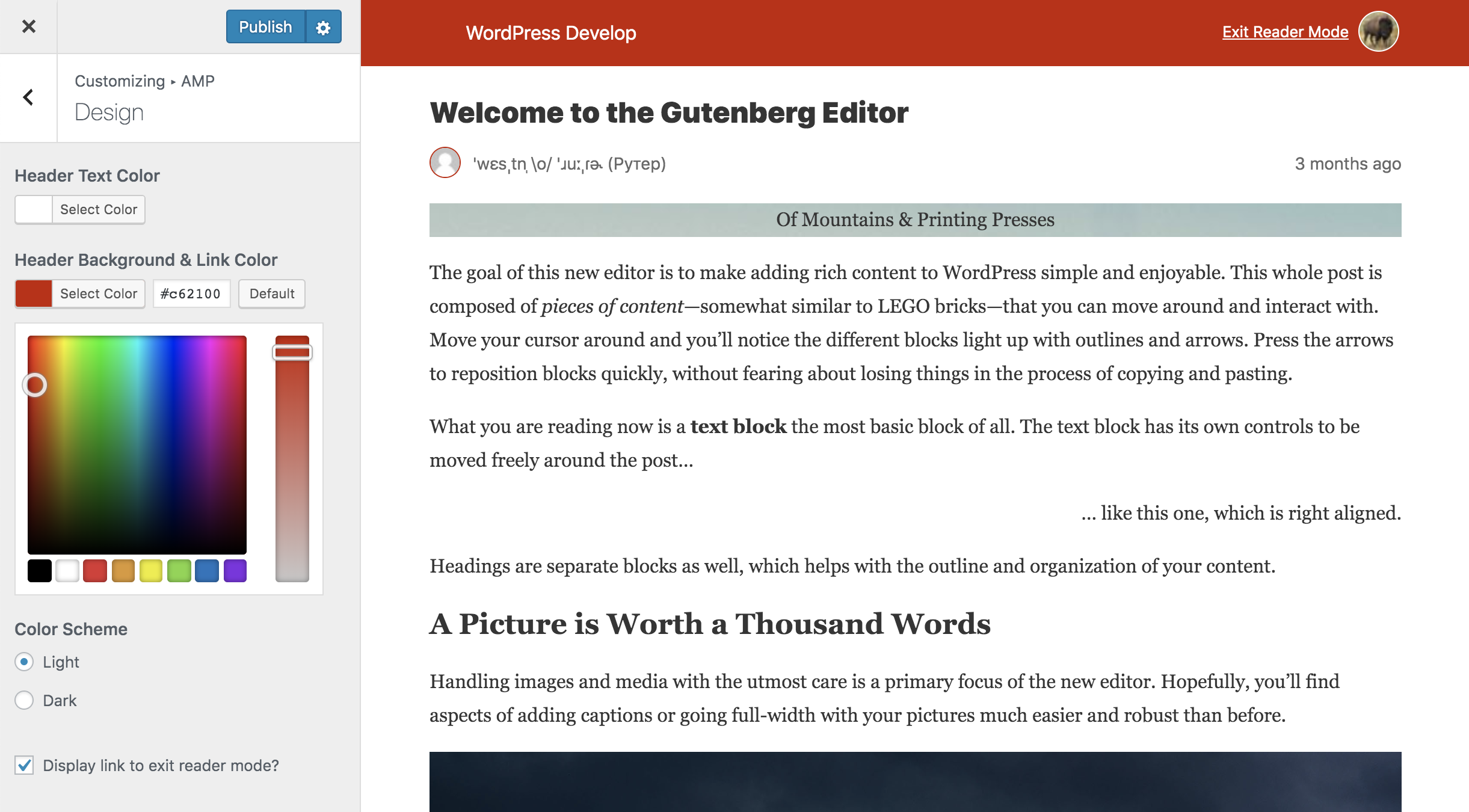
Flexibility of changing the colour of the top bar (currently only available in blue)
Actually, you can change the color of the header currently:
westonruter
on 24 Jul 2019
In https://wordpress.org/support/topic/dark-theme-support/ it was suggested to use a prefers-color-scheme media query to automatically switch to dark mode.
swissspidy
on 20 Sep 2019
A couple more things:
- Implement support for automatically serving mobile visitors to the AMP version, or else redirect them to the AMP version. There would still have to be a way for the user to exit the AMP version. For prototype, see Mobile Redirection plugin.
- Implement support for non-singular templates, such as the blog index page, category template, author template, and other such archive templates.
In short, these two points are summarized by porting Jetpack's mobile theme into the AMP plugin. This is actually great timing to do this because Jetpack's mobile theme is deprecated and will be removed in March 2020.
Since the mobile theme—Mineleven—to be AMP-compatibile and then bundle it with the AMP plugin. This work is greatly simplified after resolving #2202.
It may also be possible for us to architect it in a way where we allow the theme to be installed as a regular theme and then dynamically switch to it. (A problem here is with bootstrapping and needing to wait for wp action to know if we will be serving an AMP page or not; this difficulty also extends to exposing theme-specific customization options.) This would perhaps allow a user to install alternative AMP-compatibile mobile themes to switch between, as an easier alternative to writing AMP templates and placing them in the active theme's amp directory.
westonruter
on 16 Jan 2020
Related: #4204 (adding block stylesheets to Reader mode template)
westonruter
on 30 Jan 2020
I chatted with @gravityrail about Jetpack's Mineleven module (which is deprecated and getting removed). I asked about whether there been headaches about dynamically serving this theme for mobile users. I've suspected the dynamic user-agent detection is somewhat brittle given caching plugins. He confirmed:
We have seen issues with minileven showing the mobile theme under some server and client configurations. Caching plugins, CDNs, caching reverse proxies, varnish and client user-agent spoofing all cause problems.
It's probably possible to solve this with concentrated and long-term effort, so perhaps the WordPress community could come up with a standard function for identifying mobile devices that can live in Core so that we can avoid reinventing the wheel. I'm sure there would be lots of good uses for it. You could use
jetpack_is_mobile()as a starting point.
To support serving the AMP templates to mobile visitors we'd have to incorporate the jetpack_is_mobile() logic into the AMP plugin, but this appears to be problematic to get right. We may need to rely on client-side detection of mobile visitors and redirect them via script early in the head, though I am unsure if this is reliable/performant either.
See also Mineleven issues.
westonruter
on 31 Jan 2020
There is a Core function already ( https://developer.wordpress.org/reference/functions/wp_is_mobile/ ) that we can look at ensuring is up to date for a PHP-based method, but I do agree that if we need a client-side method, we should push for a Core direction to avoid duplication and support headaches with the various differences that a bunch of methods would result in.
 kraftbj
on 31 Jan 2020
kraftbj
on 31 Jan 2020
@kraftbj Yeah. My concern about wp_is_mobile() is that it is quite limited in its detection. The logic in jetpack_is_mobile() seems much more robust. In any case, neither of these is of any help when a caching layer is preventing it from being called in the first place. To use it reliably, caching plugins would need to be told of the user agent variants to vary the caches by.
westonruter
on 31 Jan 2020
I've put together a proposed approach for how to handle JS-based redirection, which redirects mobile visitors of the desktop site over to the AMP version when it is available. Here's the plugin code: https://gist.github.com/westonruter/5f4f27ed3bdd676e3f08524b9bab8bb4
JS-based redirection is not ideal because of the additional latency, but it seems much more robust (since we don't have to worry about caching plugins or reverse proxy caches). In the approach I took, any resources that start to get loaded on the desktop page get aborted via window.stop():
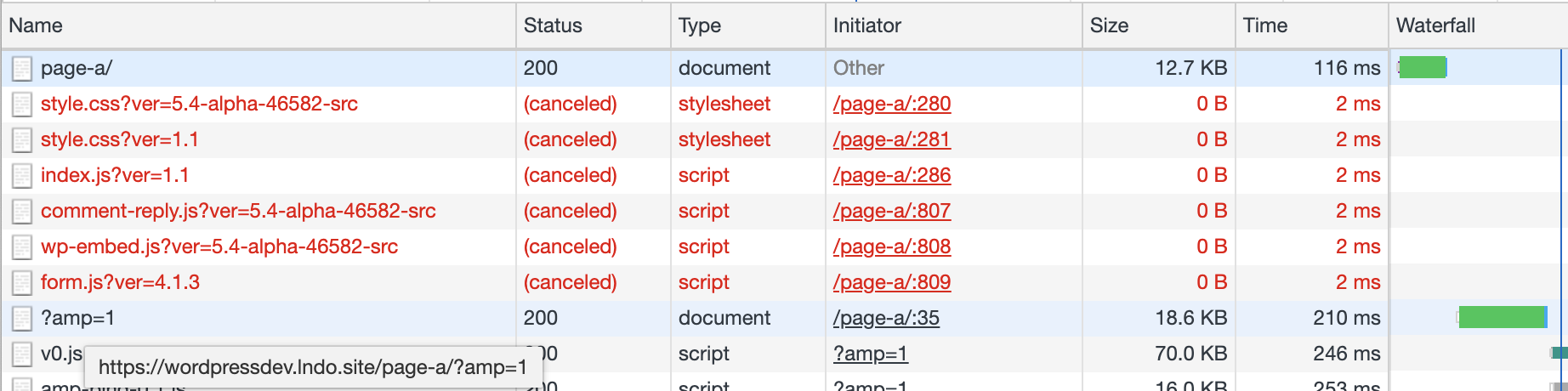
When on the AMP version, any URLs automatically have the have the ?amp query parameter appended to them thank to AMP-to-AMP linking (#1389). A link is added to the footer which links the user to the corresponding non-AMP URL which also causes the redirection to be disabled for the current session.
This works best with a current 1.5-alpha build of the AMP plugin: amp.zip (1.5.0-alpha-20200131T195804Z-caa0c8c61)
Thoughts appreciated!
westonruter
on 31 Jan 2020
This seems like a good approach. Slight latency hit for mobile users
arriving to non-AMP page, but a lot of sites link to the AMP version
directly when it's available, and of course subsequent clicks all go direct
to the AMP version. I like it.
On Fri, 31 Jan 2020 at 12:08, Weston Ruter notifications@github.com wrote:
I've put together a proposed approach for how to handle JS-based
redirection, which redirects mobile visitors of the desktop site over to
the AMP version when it is available. Here's the plugin code:
https://gist.github.com/westonruter/5f4f27ed3bdd676e3f08524b9bab8bb4JS-based redirection is not ideal because of the additional latency, but
it seems much more robust. In the approach I took, any resources that start
to get loaded on the desktop page get aborted via window.stop():[image: image]
https://user-images.githubusercontent.com/134745/73570808-f13ae600-4421-11ea-8b22-2d05bd8b9a4f.pngWhen on the AMP version, any URLs automatically have the have the ?amp
query parameter appended to them thank to AMP-to-AMP linking (#1389
https://github.com/ampproject/amp-wp/issues/1389). A link is added to
the footer which links the user to the corresponding non-AMP URL which also
causes the redirection to be disabled for the current session.This works best with a current 1.5-alpha build of the AMP plugin: amp.zip
https://github.com/ampproject/amp-wp/files/4141204/amp.zip
(1.5.0-alpha-20200131T195804Z-caa0c8c61)Thoughts appreciated!
—
You are receiving this because you were mentioned.
Reply to this email directly, view it on GitHub
https://github.com/ampproject/amp-wp/issues/2044?email_source=notifications&email_token=AAAMVOBSSWNCYANNUH4J5E3RASAL5A5CNFSM4HC3NILKYY3PNVWWK3TUL52HS4DFVREXG43VMVBW63LNMVXHJKTDN5WW2ZLOORPWSZGOEKP3G6Y#issuecomment-580891515,
or unsubscribe
https://github.com/notifications/unsubscribe-auth/AAAMVOC5BABWNUTPAB4RFBDRASAL5ANCNFSM4HC3NILA
.
 gravityrail
on 31 Jan 2020
gravityrail
on 31 Jan 2020
As part of the effort there, we need to look at bringing validation error reporting to Reader mode. At present, any validation errors are silently suppressed so users have no idea when something is being removed for being invalid. Note that validation error messages used to be present in Reader mode, but they were removed in #1132 because users were complaining about seeing undesired warnings.
The new Reader mode theme will need to trigger the standard theme hooks including wp_head and wp_footer so that scripts and stylesheets that a plugin may be trying to the page will be included and then reported as validation errors. This would have illuminated the reason for breakages such as https://github.com/ampproject/amphtml/issues/26622.
Of course, there is still going to be the need to suppress validation errors from certain user roles or on certain site configurations (e.g. WordPress.com). This is needed for Standard/Transitional mode already. It would also need to be available in Reader mode. See #2673.
westonruter
on 6 Feb 2020
FYI: Here's a demonstration of how easily the comments list and comments form can be added to the existing Reader mode template as of AMP plugin v1.5: https://gist.github.com/westonruter/b14c95d5e8531dbc1167ebfc80c74562
cf. support topic thread: https://wordpress.org/support/topic/comment-on-amp-page/#post-12626086
westonruter
on 4 Apr 2020
- Implement support for non-singular templates, such as the blog index page, category template, author template, and other such archive templates.
Prototype for adding the ability to use AMP-compatible themes for serving Reader mode templates: https://github.com/ampproject/amp-wp/pull/4644. This allows for any URL of a site to be served as AMP, not just singular queries.
westonruter
on 7 May 2020
Note this has been implemented in #4984 not by adding features to the legacy post templates but rather to use entire AMP-compatible themes in Reader mode.
westonruter
on 8 Jul 2020
Related issues
westonruter
·
35Comments
 jauyong
·
61Comments
jauyong
·
29Comments
jauyong
·
61Comments
jauyong
·
29Comments
 postphotos
·
25Comments
postphotos
·
25Comments
 Mte90
·
24Comments
Mte90
·
24Comments