Amp-wp: Add ability to acknowledge and suppress/ignore specific validation errors
With #971 there is now reporting on the validation errors that the sanitizer scrubs from the output to ensure valid AMP. For example (and these screens need better UX/design):
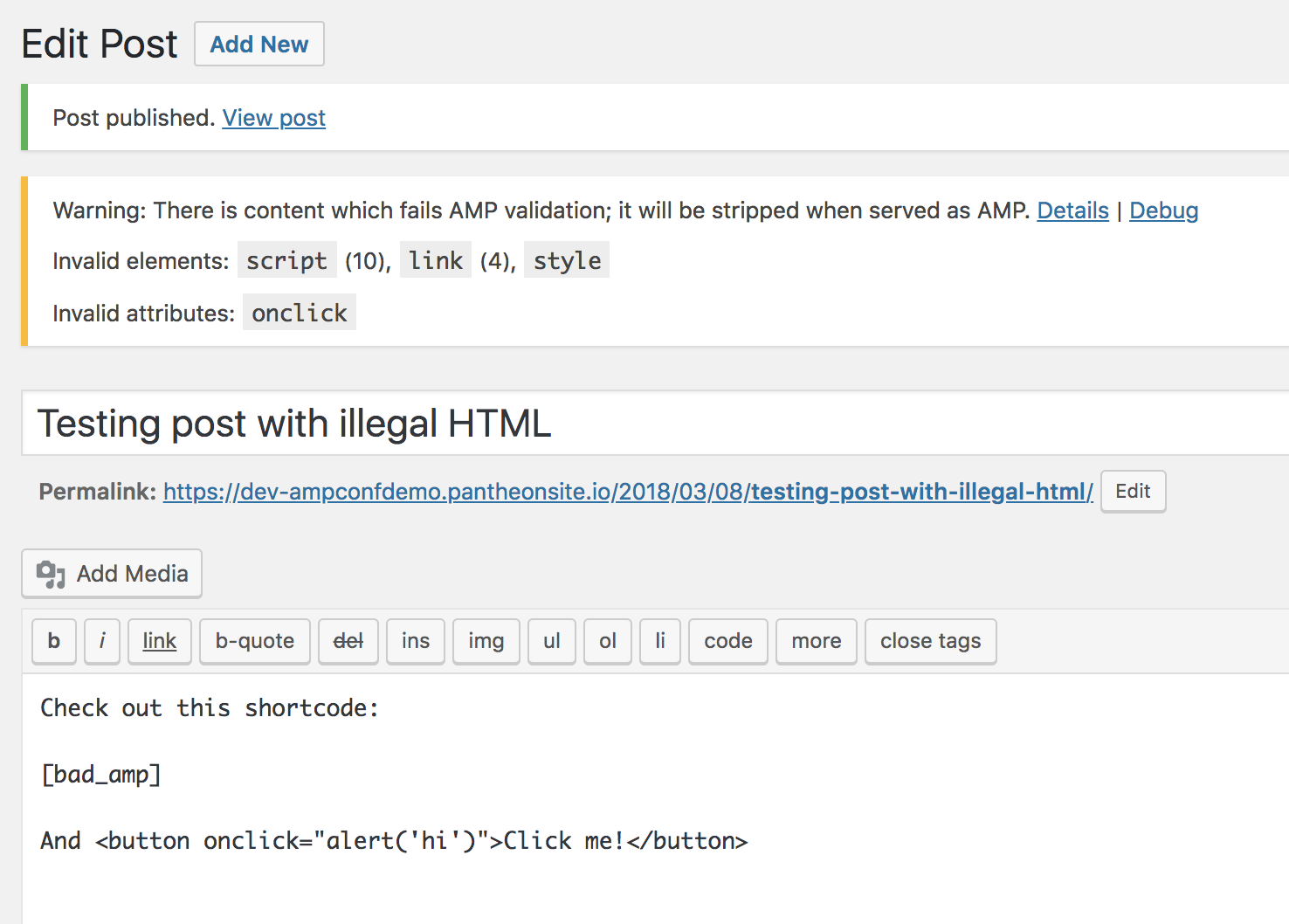


I think it is clear that there should be a way to dismiss certain validation errors from being reported. When something is dismissed, it would then not show up again.
For example, if a theme uses an illegal overflow CSS property, then this is going to get reported on every URL. But if it doesn't cause a big problem for the AMP rendering the page, then this is something the user probably would like to ignore. If you have a plugin that does one thing you know is bad, and the removal doesn't cause any problems in AMP, then the user should be able to just _acknowledge_ it was removed and cease getting notified about it.
 westonruter
All 9 comments
If you had 100 posts and each had a different script tag, you want to understand what's unique. There should be a count of unique instances of the post so you can know what is unique so you can prioritize what should be fixed. There should be the ability to suppress errors for not valid AMP so you don't get reported ("deal with it later") - sanitizer will take care of it anyway to ensure validity.
westonruter
on 5 Apr 2018
Hi @westonruter, I plan to write a formal user story and ACs, but dropping this in for now:
Validation errors exist now for a given URL and issues will be grouped together in the same post.
- if you had 100 posts and each had a different script tag, you want to understand what's unique.
- have a count of unique instances of the post so you can know what is unique so you can priortize what should be fixed.
- Ability to suppress errors for not valid AMP so you don't get reported ("deal with it later") - santizer can take care of it anyway.
Let me know if there's any details here I'm missing.
Related #1006, which should inform/be informed by progress in both places.
 postphotos
on 5 Apr 2018
postphotos
on 5 Apr 2018
Yeah, I think this needs some UX insights to figure out what would be the most beneficial for users. It's closely related to my https://github.com/Automattic/amp-wp/issues/1060#issuecomment-378991968 and the story of activating AMP on a site. It could go so far as a “wizard”-like setup flow. But beyond the initial setup, there is then the ongoing monitoring of validity, as new content is added and plugins are added/removed.
westonruter
on 5 Apr 2018
I think a nice flow for end-users to enable AMP theme support without doing coding:
- I activate the AMP plugin.
- The plugin sees that I don't have AMP theme support.
- The plugin asks if you would like to try AMP theme support on your theme.
- It runs validation report and lets you browse the site with AMP active just for yourself.
- Then at the end you decide whether you want to enable AMP for the theme, or re-use the legacy post templates, or whether you want to use paired mode to selectively opt-in to certain templates being available in AMP.
- AMP theme support is enabled by the plugin as desired.
westonruter
on 9 Apr 2018
In addition to a user being able to acknowledge a validation error to ignore/suppress it, the user should also be able to acknowledge a validation error as being critical. Critical and unacknowledged validation errors should prevent a response from being served as AMP at all, whereas if only ignored/suppressed errors are present then AMP can be served. Acknowledging a validation error marks it as read so that the user is not notified about it. Essentially a validation error needs to have a status introduced.
westonruter
on 20 Apr 2018
Hey @westonruter, thank you for all of your suggestions and definitions here.
One item I wanted to call out of note again:
I think a nice flow for end-users to enable AMP theme support without doing coding.
Related to a lot of the documentation work that @kienstra has done, I think it's something we should consider continue doing to help non-developer admins be able to get a seamless AMP experience.
This is a big part of the narrative we're trying to create: We've made (and are continue to make) AMP as easy as possible to use, and are extending features.
Perhaps we can extend the work here and make a "Getting started for non-coding admins" guide? Let me know your thoughts.
postphotos
on 2 May 2018
@postphotos Yes, I think there would need to be a guide that explains what things might need to be re-worked when enabling AMP. But I should think that most of that information would ideally be presented contextually as the user is taken throw some flow for enabling AMP for a given theme.
westonruter
on 3 May 2018
Steps To Test
Hi @csossi,
Could you please test this?
- Go to this staging site
- Create a new post
- Add this to the post content (using the "Text" tab, not the "Visual" one):
<script>myFunction();</script>
<button onclick="doThis();">Click Me</button>
- Publish the post
- You'll see a notice: "There is content which fails AMP validation. Non-accepted validation errors prevent AMP from being served. Review issues"
- Click "Review issues
- At the top of both errors, you should see a
<select>element with "New," "Accepted" and "Rejected" - Expected: When you choose a different option in the
<select>and click "Update" on the right, that value also appears when the page refreshes - Expected: If you select "Accepted" for all of the errors, this appears: "This URL can be served as AMP because all validation errors have been accepted as not being blockers."
 kienstra
on 5 Jun 2018
kienstra
on 5 Jun 2018
verified in QA
 csossi
on 7 Jun 2018
csossi
on 7 Jun 2018
Related issues
 Mte90
·
24Comments
westonruter
·
31Comments
westonruter
·
32Comments
Mte90
·
24Comments
westonruter
·
31Comments
westonruter
·
32Comments
 jauyong
·
61Comments
jauyong
·
61Comments
 chvillanuevap
·
26Comments
chvillanuevap
·
26Comments
Most helpful comment
I think a nice flow for end-users to enable AMP theme support without doing coding: