Amazon-ecs-agent: ecs-agent fails to connect when requiring SecureTransport
Summary
ecs-agent will fail to connect when you have a service control policy requiring the use of tls.
Description
Deploy the following service control policy (terraform syntax):
statement {
  sid       = "RequireSecureTransport"
  effect    = "Deny"
  actions   = ["*"]
  resources = ["*"]
  condition {
    test     = "Bool"
    variable = "aws:SecureTransport"
    values   = ["false"]
  }
}
You'll see the following behavior:
- the AWS Console ecs dashboard will show the agent as not connected
- no tasks will get scheduled on the host
- you will see the following connection errors in ecs-agent.log:

 arkadiyt
All 15 comments
service control policy requiring the use of tls
I'll need some more context. Is this service control policy account wide? I see s3-bucket-ssl-requests-only as an AWS account level option, and one that requires the use of aws:SecureTransport in the bucket policy itself:
      "Condition": {
        "Bool": {
          "aws:SecureTransport": "false"
        }
      }
https://aws.amazon.com/premiumsupport/knowledge-center/s3-bucket-policy-for-config-rule/
Deploy the following service control policy (terraform syntax)
I'm not familiar with terraform. Can you give more detail on how this policy is translated into AWS resources, ie IAM policy, account level policy, etc? Is your attached statement above part of an aws_organizations_policy for example, or is it an aws_iam_policy_document and if so which role is the policy attached to (ie the ecs-instance-role for example)?
also just for reference I see some good articles on tls with ecs:
https://aws.amazon.com/blogs/compute/maintaining-transport-layer-security-all-the-way-to-your-container-using-the-network-load-balancer-with-amazon-ecs/
https://aws.amazon.com/blogs/compute/maintaining-transport-layer-security-all-the-way-to-your-container-part-2-using-aws-certificate-manager-private-certificate-authority/
 fierlion
on 26 Dec 2019
fierlion
on 26 Dec 2019
I'll need some more context. Is this service control policy account wide?
Yes, Service Control Policies are applied to your entire AWS Organization and/or account:
https://docs.aws.amazon.com/organizations/latest/userguide/orgs_manage_policies_scp.html
I'm not familiar with terraform. Can you give more detail on how this policy is translated into AWS resources
It's translated into the following Service Control Policy:
{
  "Version": "2012-10-17",
  "Statement": [
    {
      "Sid": "RequireSecureTransport",
      "Effect": "Deny",
      "Action": "*",
      "Resource": "*",
      "Condition": {
        "Bool": {
          "aws:SecureTransport": "false"
        }
      }
    }
  ]
}
also just for reference I see some good articles on tls with ecs:
These articles are about how to configure TLS for your application containers - I'm saying that ecs-agent is failing to make some TLS connection (as per the agent logs)
arkadiyt
on 26 Dec 2019
I attached the following policy
{
    "Version": "2012-10-17",
    "Statement": [
        {
            "Sid": "RequireSecureTransport",
            "Effect": "Deny",
            "Action": "*",
            "Resource": "*",
            "Condition": {
                "Bool": {
                    "aws:SecureTransport": "false"
                }
            }
        }
    ]
}
to my organization's root account following the steps here:
https://docs.aws.amazon.com/organizations/latest/userguide/attach-scps.html
I can confirm that the policy is inherited by my testing account.
My pre-existing ECS cluster (EC2 launch type) within this testing account is still in active state. I am able to schedule and run tasks from the ECS console on this pre-existing ECS cluster. The instances are AL2 ECS-optimized AMIs.
I'll create a new ECS cluster using the latest ECS-optimized AMI, post policy-attachment and walk through running a task.
I'll create my new cluster in us-east-1 as I see this is the region your logs above come from.
I would appreciate any more details on your steps to repro this to aid me in confirming this issue.
I am particularly interested in your ECS launch type and EC2 instance setup (ie are you using the ECS-optimized AMI and if so which version?). Also if you can confirm the order of steps taken -- when did you create your cluster? when did you run your task?
fierlion
on 27 Dec 2019
I'm using an EC2 launch type with the AL2 ami amzn2-ami-ecs-hvm-2.0.20191212-x86_64-ebs (ami-00afc256a955c31b5)
I first created the cluster, then applied the SCP, then noticed the ecs dashboard showed my instance having "Agent Connected: false" and new tasks were not being scheduled.
Testing again now it seems like after applying the SCP the agent does remain connected (if it already was) and is able to schedule tasks. However if I restart the agent (by running a docker kill on it) then it fails to connect or schedule tasks
arkadiyt
on 27 Dec 2019
I did the following:
1) removed the SCP from the root in my AWS organization
2) created a new cluster and a new ecs instance in us-east-1 with ami-00afc256a955c31b5
3) re-added the SCP to the root of my AWS organization and confirmed it is active via the console.
4) started up a simple task using the ecs console on the new cluster
5) killed the agent using docker kill <agent-id>
6) restarted agent using sudo systemctl start ecs
I see no errors in the logs:
2019-12-28T00:18:20Z [INFO] Beginning Polling for updates
2019-12-28T00:18:20Z [INFO] Initializing stats engine
2019-12-28T00:18:20Z [INFO] Event stream DeregisterContainerInstance start listening...
2019-12-28T00:18:20Z [INFO] Establishing a Websocket connection to https://ecs-a-12.us-east-1.amazonaws.com...
2019-12-28T00:18:20Z [INFO] Connected to TCS endpoint
2019-12-28T00:18:20Z [INFO] Connected to ACS endpoint
2019-12-28T00:18:30Z [INFO] Saving state! module="statemanager"
7) I ran the same task again after the docker kill command and still am unable to generate the errors you're seeing. The task runs as expected and I see no errors in the agent log.
...        busybox:latest                   "sh -c 'sleep 300'"   6 seconds ago       Up 5 seconds (healthy)                       ecs-health
...        amazon/amazon-ecs-agent:latest   "/agent"              9 minutes ago       Up 9 minutes (healthy)                       ecs-agent
Is there anything in this sequence which differs from what you've done?
fierlion
on 28 Dec 2019
I followed the same steps, I really don't know why I get this error and you don't :\
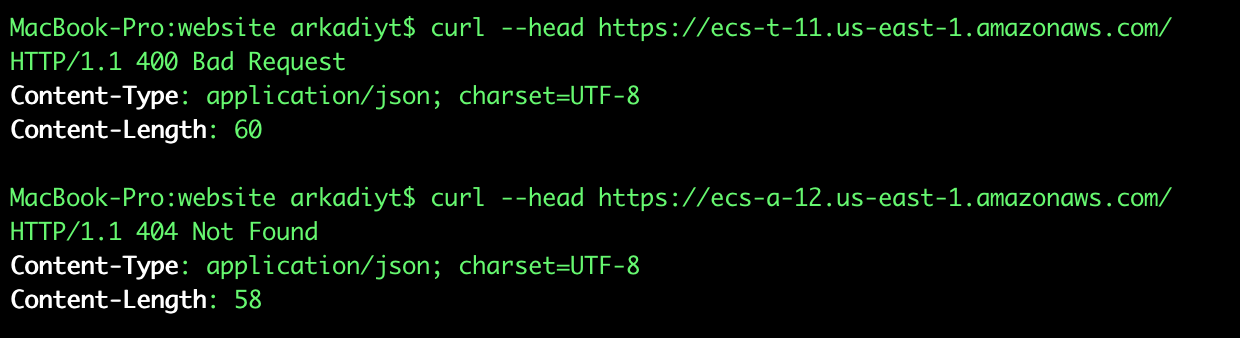
Just spitballing here but it seems like the TCS endpoint is the same across the lifetime of a given ECS cluster - maybe there are some differences between your ecs-a-12.us-east-1.amazonaws.com and my ecs-t-11.us-east-1.amazonaws.com?
Just running a curl, one of them returns a 404 and the other a 400, so they don't seem completely homogenous:
arkadiyt
on 29 Dec 2019
To be sure that my agent's api calls are using the policy, I tested further by creating a new customer managed IAM policy with the same JSON as above. I attached this policy directly to the ecsInstanceRole which I use for my ECS EC2 instances and ran my test task.
https://docs.aws.amazon.com/AmazonECS/latest/developerguide/instance_IAM_role.html
I still see clean ecs-agent logs with the updated policy in place.
I'll get a third person on this to run these same steps to see if they can repro your error scenario.
UPDATE: I was too hasty. After waiting ~15-30 seconds, I see connection errors in my agent daemon logs (ie docker logs <agent container id>)
Error connecting to TCS: websocket client: unable to dial ecs-t-1.us-west-2.amazonaws.com response: {\"AccessDeniedException\":\"Forbidden\"}: websocket: bad handshake
Error connecting to ACS: AccessDeniedException: Forbidden
Hi @arkadiyt , I'm trying to follow these steps but had a few more questions -
- what network mode are you using?
- how are you running tasks? can you send a sample task def to ecs-agent-external at amazon.com ?
- can you check if are there any additional IAM policies in use that may be related to how you run your tasks?
 jy19
on 3 Jan 2020
jy19
on 3 Jan 2020
- The network mode of every task definition in my cluster is
bridge, and ecs-agent runs inhostas you know. - Here's one of my task definitions (though I don't think this issue has anything to do with my specific tasks):
task-definition.txt - I removed all other SCPs except the SecureTransport one. When it's present ecs-agent fails to connect, when it's absent ecs-agent connects successfully. The instance profile of the ec2 host has the following permissions:
{
    "Version": "2012-10-17",
    "Statement": [
        {
            "Sid": "",
            "Effect": "Allow",
            "Action": [
                "logs:PutLogEvents",
                "logs:CreateLogStream",
                "ecs:UpdateContainerInstancesState",
                "ecs:Submit*",
                "ecs:StartTelemetrySession",
                "ecs:RegisterContainerInstance",
                "ecs:Poll",
                "ecs:DiscoverPollEndpoint",
                "ecs:DeregisterContainerInstance",
                "ecr:GetDownloadUrlForLayer",
                "ecr:GetAuthorizationToken",
                "ecr:BatchGetImage",
                "ecr:BatchCheckLayerAvailability",
                "ec2:DescribeTags"
            ],
            "Resource": "*"
        },
        {
            "Sid": "",
            "Effect": "Allow",
            "Action": "ec2:ModifyInstanceMetadataOptions",
            "Resource": "*"
        }
    ]
}
<h2>
Here's a minimal reproduction case I made that runs locally, completely outside of ecs-agent:
package main

import (
    "fmt"
    "io/ioutil"
    "net/http"
    "net/url"
    "os"
    "time"

    "github.com/aws/aws-sdk-go/aws/credentials"
    "github.com/aws/aws-sdk-go/aws/signer/v4"
    "github.com/gorilla/websocket"
)

const (
    Url    = "https://ecs-a-11.us-east-1.amazonaws.com/ws?clusterArn=arn%3Aaws%3Aecs%3Aus-east-1%3A229179926283%3Acluster%2Fmain&containerInstanceArn=arn%3Aaws%3Aecs%3Aus-east-1%3A229179926283%3Acontainer-instance%2F1bd94cd7-283a-4a9e-9edf-fb157cd8eac6"
    Region = "us-east-1"
)

func signHTTPRequest(req *http.Request, region, service string, creds *credentials.Credentials) error {
    signer := v4.NewSigner(creds)
    _, err := signer.Sign(req, nil, service, region, time.Now())
    if err != nil {
        return err
    }
    return nil
}

func connect() error {
    parsedURL, err := url.Parse(Url)
    if err != nil {
        return err
    }

    parsedURL.Scheme = "wss"
    request, _ := http.NewRequest("GET", parsedURL.String(), nil)

    err = signHTTPRequest(request, Region, "ecs", credentials.NewEnvCredentials())
    if err != nil {
        return err
    }

    dialer := websocket.Dialer{}
    _, httpResponse, _ := dialer.Dial(parsedURL.String(), request.Header)
    if httpResponse != nil {
        defer httpResponse.Body.Close()

        resp, err := ioutil.ReadAll(httpResponse.Body)
        if err != nil {
            return err
        }

        fmt.Printf("status: %s\n", httpResponse.Status)
        fmt.Printf("response body: %s\n", string(resp))
    }

    return nil
}

func main() {
    err := connect()
    if err != nil {
        fmt.Printf("got err %+v\n", err)
        os.Exit(1)
    }
}
To run it just make sure you have aws credentials in your environment variables and go run main.go. When I have no SCP it prints:
$ go run main.go
status: 101 Switching Protocols
response body:
When I have the SCP it prints:
$ go run main.go
status: 403 Forbidden
response body: {"AccessDeniedException":"Forbidden"}
I was not able to see any issues when I attached the policy to my organization. However, @fierlion suggested that we attach the TLS policy directly to the instance role and I am now seeing the AccessDeniedExceptions being thrown by the agent, so the issue exists. I will investigate further.
jy19
on 8 Jan 2020
See my update above. With the policy directly attached to the IAM ecsInstanceRole I am able to reproduce the issue. I am still unable to reproduce the errors from the AWS Organization wide policy however.
fierlion
on 8 Jan 2020
Are you running your ECS cluster inside the organization master? Service Control Policies do not apply to the master account, only to the child accounts.
arkadiyt
on 8 Jan 2020
I found some permission denied errors relating to certain operations in the backend, will dig deeper into this.
Also thanks for the clarification, I was able to reproduce the exact issue you're seeing once I've created a child account in the organization and attach the SCP and run ECS commands using the child account.
jy19
on 9 Jan 2020
Hi sorry for the lack of updates - we've identified an issue in ECS backend and have implemented a fix. I will update this thread again once it is released.
jy19
on 17 Jan 2020
I tested this was able to verify that a child account with aws:SecureTransport attached is able to connect. I will close this now. Feel free to re-open if there are issues.
jy19
on 14 Feb 2020
Related issues
 flowirtz
·
5Comments
flowirtz
·
5Comments
 sparrc
·
4Comments
sparrc
·
4Comments
 melo
·
5Comments
melo
·
5Comments
 GeyseR
·
3Comments
GeyseR
·
3Comments
 leonblueconic
·
3Comments
leonblueconic
·
3Comments
Most helpful comment
Hi sorry for the lack of updates - we've identified an issue in ECS backend and have implemented a fix. I will update this thread again once it is released.