Amazon-ecs-agent: Stopped Reason field not populated on "Failed to Start"
Summary
I am trying to run a basic Docker container on ECS, and I keep getting the error "STOPPED(Task failed to start)
Description
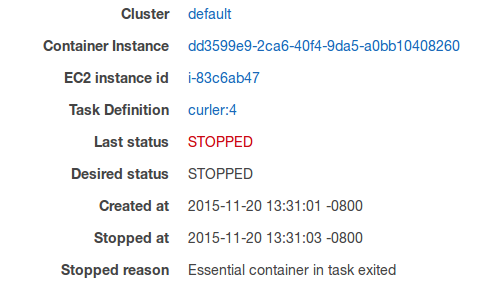
In the documentation (https://docs.aws.amazon.com/AmazonECS/latest/developerguide/stopped-task-errors.html) it says to, "In the Details section, inspect the Stopped reason field to see the reason that the task was stopped".
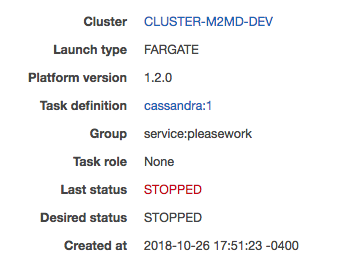
There is no "Stopped reason" field.
Here is what my Details section looks like:
Here is what the documentation says that I should see:
Supporting Log Snippets
Also, no Logs are generated. My services just keep getting started and fail every ~30s.


 Ryanauger95
All 13 comments
I am trying to run a basic Docker container on ECS, and I keep getting the error "STOPPED(Task failed to start)
just to clarify- is this a fargate task?
and you're seeing STOPPED(Task failed to start) in the Last status column of the console?
 adnxn
on 27 Oct 2018
adnxn
on 27 Oct 2018
just to clarify- is this a fargate task?
Yes, but I experienced the same issue using EC2.
and you're seeing STOPPED(Task failed to start) in the Last status column of the console?
Yes, should see it in the images above unless you're referring to a different console
Ryanauger95
on 29 Oct 2018
Furthermore, the logs are empty. From reading other issues here, it seems like the Logs should not be empty even in the case of a failure.

Ryanauger95
on 29 Oct 2018
I have exactly the same issue. What is interesting, that I can launch the same task manually without a service. This problem only occurs, when a service tries to run a task.
 tsmirnov
on 8 Nov 2018
tsmirnov
on 8 Nov 2018
I've figured out what my problem was. Most probably you have the same issue.
I managed to see the reason of failure under the "containers" section, not under "logs"

This was the same issue as #1128
The solution was simple to set AssignPublicIp: 'ENABLED'.
tsmirnov
on 8 Nov 2018
Hi there - I am very new to Fargate deployment(had experience on ECS with EC2).
Deployed a service using Fargate, but the task remains in PENDING status and unable to come into running status.
Task details shows
Stopped reason: Task failed to start
Container Details shows:
Status reason: DockerTimeoutError: Could not transition to started; timed out after waiting 3m0s
fyi...I did define, AssignPublicIp: 'ENABLED'
Could someone please advise on, what could be the possible reason for this error and how to find the root cause for the above error.
Also, please advise, how do we look for errors in container as we see the container logs in EC2 method of deployments.
Really appreciate your help and time here!!
Regards,
Ravi
 Aarushi2016
on 3 Jan 2019
Aarushi2016
on 3 Jan 2019
Hi there - I am very new to Fargate deployment(had experience on ECS with EC2).
Deployed a service using Fargate, but the task remains in PENDING status and unable to come into running status.
Task details shows
Stopped reason: Task failed to startContainer Details shows:
Status reason: DockerTimeoutError: Could not transition to started; timed out after waiting 3m0sfyi...I did define, AssignPublicIp: 'ENABLED'
Could someone please advise on, what could be the possible reason for this error and how to find the root cause for the above error.
Also, please advise, how do we look for errors in container as we see the container logs in EC2 method of deployments.Really appreciate your help and time here!!
Regards,
Ravi
Ravi,
I suspect u might have the same issue as I do. I'm also just start using the fargate, and run into the exact same error "DockerTimeoutError: Could not transition to started; timed out after waiting 3m0s".
After digging a while, I found it's the wrong cloudwatch log preventing my docker image from starting. So I change the container log setting from cloudwatch to default (means no log at all) and then the contain can be started by fargate services.
calvin
 calvinzhuca
on 3 Jun 2019
calvinzhuca
on 3 Jun 2019
Had the same issue running Fargate in a private subnet without a NAT Gateway. Besides adding ECR, S3 and ECS endpoints as very well explained in this article, adding an endpoint for AWS logs did the trick.
 erikpb
on 3 Feb 2020
erikpb
on 3 Feb 2020
Had the same issue running Fargate in a private subnet without a NAT Gateway. Besides adding ECR, S3 and ECS endpoints as very well explained in this article, adding an endpoint for AWS logs did the trick.
How did you add an endpoint for AWS logs?
 ncipollina
on 20 Feb 2020
ncipollina
on 20 Feb 2020
click on VPC --> endpoint,
https://docs.aws.amazon.com/AmazonCloudWatch/latest/logs/cloudwatch-logs-and-interface-VPC.html
calvinzhuca
on 21 Feb 2020
Thanks @calvinzhuca for pre-empting my response ;-)
erikpb
on 21 Feb 2020
Had the same issue running Fargate in a private subnet without a NAT Gateway. Besides adding ECR, S3 and ECS endpoints as very well explained in this article, adding an endpoint for AWS logs did the trick.
Yes. If using Fargate launch type, you need these three endpoints : dkr.ecr, s3 and logs endpoint. Logs endpoint only needed if you are using awslogs driver which is there by default in container definition. ECS endpoint is not needed.
 Tarvinder91
on 16 Apr 2020
Tarvinder91
on 16 Apr 2020
Hi Guys,
I am using AWS ECS EC2 service and we are using Jenkins for CI/CD, when I update the latest task on the service, via Jenkins it showing me as a success but it's not running with the latest task it's failed to run with that. So here I need to notify this Via Jwwnkins Job, anyone can me on this please?
 venu-ibex-9
on 17 Oct 2020
venu-ibex-9
on 17 Oct 2020
Related issues
 cjbottaro
·
4Comments
cjbottaro
·
4Comments
 hayajo
·
3Comments
hayajo
·
3Comments
 acmcelwee
·
4Comments
acmcelwee
·
4Comments
 MartinMitro
·
3Comments
MartinMitro
·
3Comments
 YurgenUA
·
3Comments
YurgenUA
·
3Comments
Most helpful comment
I've figured out what my problem was. Most probably you have the same issue.
I managed to see the reason of failure under the "containers" section, not under "logs"

This was the same issue as #1128
The solution was simple to set AssignPublicIp: 'ENABLED'.