Amazon-ecs-agent: Agent Refuse to start containers with None logging driver
Hi!
Followed up also here:
https://forums.aws.amazon.com/thread.jspa?threadID=267098&tstart=0
We're trying to make a deployment by running old task definition, with logging driver of None. The agents refuses to place them due to ".. is missing an attribute required by your task". When we change the log driver to syslog, it works fine.
Please fix.
 Alonreznik
All 8 comments
Hi @Alonreznik. Thanks for this report. I'm looking into it.
 nmeyerhans
on 8 Nov 2017
nmeyerhans
on 8 Nov 2017
I am affected by this since today. Every time i try to change the network mode to bridge and save, then it is automatically reset to "None".
 lanoxx
on 8 Nov 2017
lanoxx
on 8 Nov 2017
Hi @lanoxx. In order to keep track of things, please create a new issue. This one is for tracking an apparent regression regarding logging drivers. If there's a problem with network modes, I'd very much like to keep track of that separately.
Actually, @lanoxx, your issue looks like it's probably already captured in #1057. That issue should be resolved at this time for newly launched tasks.
nmeyerhans
on 8 Nov 2017
@Alonreznik, I'm a little confused about the actual symptoms, and I want to make sure I'm actually looking at the right things. You mention in the opening of this issue that you've got issues with the 'none' logging driver. However, forums thread that you linked to is related to network modes.
The network mode issue has been resolved within the ECS service, and I've noted as much on the forum. Are you still having logging-driver issues? If so, can you please share some more details of how you're configuring and running agent, as well as how your configuring the logging drivers in your task definition?
nmeyerhans
on 9 Nov 2017
@lanoxx I have faced this error on AWS, after a Hard Reload (CTRL + F5 / Cmd + R) i was able to select Bridge mode and save it.
But I saw that some required attr. was added on the TD making it unable to be started on the cluster service:
com.amazonaws.ecs.capability.logging-driver.none
com.amazonaws.ecs.capability.docker-remote-api.1.18
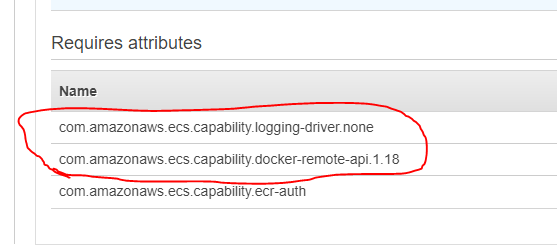
^ this at the bottom of the TD detail page
Before this issue, I didn't had those attr. on my TD revisions.
 furlanrapha
on 10 Nov 2017
furlanrapha
on 10 Nov 2017
@nmeyerhans assuming I faced the same issue, this is what happened to me:
- We had
task definitionsthat were set 1-2+ weeks ago. These had the following requirements:
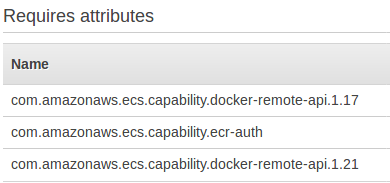
- When clicking
create new revisionto update those task definitions, I reachededit containerand saw this:

note: I'm not sure what was set here before and if this section existed at all. I know that we didn't set it. - After creating the new revision, the requirements section changed to this:
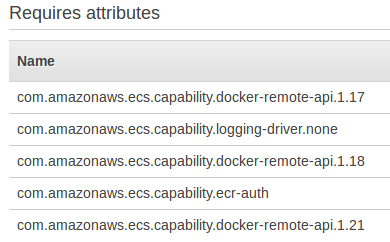
note the addedlogging-driverattribute
==> Result is that I got this ... is missing an attribute required by your task error .
Workaround: I set logging-drive to syslog
 ofirnk
on 13 Nov 2017
ofirnk
on 13 Nov 2017
Hey @ofiliz, our workaround over here was to set the Logging config. on the JSON as null at the moment we are creating a new revision.
Like this:
    ...
    "logConfiguration": null,
    ...
We've identified a problem with the ECS service, outside the agent itself, that lead to this situation. The issue has been resolved and "none" should work as a log driver again. You don't need to modify your agent in order to receive the fix.
nmeyerhans
on 14 Nov 2017
Related issues
 AbelGuti
·
5Comments
AbelGuti
·
5Comments
 dcosson
·
3Comments
dcosson
·
3Comments
 hayajo
·
3Comments
hayajo
·
3Comments
 leonblueconic
·
3Comments
leonblueconic
·
3Comments
 cjbottaro
·
4Comments
cjbottaro
·
4Comments
Most helpful comment
Hey @ofiliz, our workaround over here was to set the Logging config. on the JSON as null at the moment we are creating a new revision.
Like this: