Amazon-ecs-agent: ECS agent fails to launch with latest AMI/Docker
After rebasing our AMI off the latest ECS optimized AMI to get version 1.11.1 of docker I'm seeing the ECS agent fail to start with this message:
docker: Error response from daemon: rpc error: code = 2 desc = "oci runtime error: rootfs (\"/var/lib/docker/devicemapper/mnt/14f9d36675aabe5b45170f0e2ee9206ed61421959c497a7c468091ad0df7d425/rootfs\") does not exist".
The beginning of my docker log file looks like this:
Mon Jun  6 01:10:48 UTC 2016\n
time="2016-06-06T01:10:48.591674132Z" level=info msg="New containerd process, pid: 2720\n"
time="2016-06-06T01:10:49Z" level=warning msg="containerd: low RLIMIT_NOFILE changing to max" current=1024 max=4096
time="2016-06-06T01:10:49.712144800Z" level=info msg="devmapper: Creating filesystem ext4 on device docker-202:1-263764-base"
\nMon Jun  6 01:11:04 UTC 2016\n
time="2016-06-06T01:11:04.943144528Z" level=info msg="previous instance of containerd still alive (2720)"
time="2016-06-06T01:11:08.987919664Z" level=fatal msg="Error starting daemon: error initializing graphdriver: Device is Busy"
\nMon Jun  6 01:11:15 UTC 2016\n
time="2016-06-06T01:11:16.000378921Z" level=info msg="previous instance of containerd still alive (2720)"
time="2016-06-06T01:11:16.032042379Z" level=info msg="devmapper: Creating filesystem ext4 on device docker-202:1-263764-base"
time="2016-06-06T01:11:18.418423073Z" level=info msg="devmapper: Successfully created filesystem ext4 on device docker-202:1-263764-base"
time="2016-06-06T01:11:18.486581118Z" level=info msg="Graph migration to content-addressability took 0.00 seconds"
time="2016-06-06T01:11:19.323088453Z" level=info msg="Default bridge (docker0) is assigned with an IP address 172.17.0.0/16. Daemon option --bip can be used to set a preferred IP address"
time="2016-06-06T01:11:19.361038386Z" level=warning msg="Your kernel does not support cgroup blkio weight"
time="2016-06-06T01:11:19.361066723Z" level=warning msg="Your kernel does not support cgroup blkio weight_device"
time="2016-06-06T01:11:19.361172724Z" level=warning msg="mountpoint for pids not found"
time="2016-06-06T01:11:19.361957135Z" level=info msg="Loading containers: start."

time="2016-06-06T01:11:19.362075330Z" level=info msg="Loading containers: done."
time="2016-06-06T01:11:19.362092940Z" level=info msg="Daemon has completed initialization"
time="2016-06-06T01:11:19.362129999Z" level=info msg="Docker daemon" commit="5604cbe/1.11.1" graphdriver=devicemapper version=1.11.1
time="2016-06-06T01:11:19.375313966Z" level=info msg="API listen on /var/run/docker.sock"
time="2016-06-06T01:11:50Z" level=error msg="containerd: start container" error="oci runtime error: rootfs (\"/var/lib/docker/devicemapper/mnt/bc3d9e8c25aff497e5c69c0951607a7527399a80e289ba477aa1ba9248520914/rootfs\") does not exist" id=ca65f0918a43843fc84a130381efc347da2602fa9a0273402e5de2edf78efd4a
No doubt some of my scripting to do with docker startup is no longer playing nicely with the way ECS docker expects the storage to be configured, any suggestions what it might be?
 alexmac
All 20 comments
It does look like something went weird with the storage. Since you're using a custom AMI based on the ECS-optimized AMI, can you explain what customizations you've done (especially around Docker daemon configuration)? It'd also help to provide the following information:
- Output of
docker info - Contents of
/etc/sysconfig/docker - Contents of
/etc/sysconfig/docker-storage - Any errors you might see in
/var/log/cloud-init-output.log(they'd probably be toward the end, might be something likeERROR: Device /dev/xvdcz is already partitioned and cannot be added to volume group docker)
 samuelkarp
on 6 Jun 2016
samuelkarp
on 6 Jun 2016
I'm seeing a similar issue with amzn-ami-2016.03.a-amazon-ecs-optimized
On EC2 creation, Docker and the ECS Agent fail to start
ecs-init.log
2016-06-06T06:43:06Z [ERROR] dial unix /var/run/docker.sock: connect: connection refused
Docker log
Mon Jun  6 06:41:56 UTC 2016
time="2016-06-06T06:41:56.659171593Z" level=info msg="API listen on /var/run/docker.sock"
Mon Jun  6 06:42:30 UTC 2016
time="2016-06-06T06:42:31.024103765Z" level=info msg="New containerd process, pid: 2776\n"
time="2016-06-06T06:42:31.159177462Z" level=fatal msg="Error starting daemon: error initializing graphdriver: Device is Busy"
If I reboot the EC2 instance the Agent starts correctly.
However, if I attempt to start Docker and the Agent manually I get something quite similar to alexmac
Docker log
time="2016-06-06T06:53:00.435326678Z" level=info msg="previous instance of containerd still alive (2776)"
time="2016-06-06T06:53:00.644868039Z" level=info msg="devmapper: Creating filesystem ext4 on device docker-202:1-263195-base"
time="2016-06-06T06:53:09.549766609Z" level=info msg="devmapper: Successfully created filesystem ext4 on device docker-202:1-263195-base"
time="2016-06-06T06:53:09.590398520Z" level=info msg="Graph migration to content-addressability took 0.00 seconds"
time="2016-06-06T06:53:09.683609560Z" level=info msg="Default bridge (docker0) is assigned with an IP address 172.17.0.0/16. Daemon option --bip can be used to set a preferred IP address"
time="2016-06-06T06:53:09.864382858Z" level=warning msg="Your kernel does not support cgroup blkio weight"
time="2016-06-06T06:53:09.864415171Z" level=warning msg="Your kernel does not support cgroup blkio weight_device"
time="2016-06-06T06:53:09.864508669Z" level=warning msg="mountpoint for pids not found"
time="2016-06-06T06:53:09.865747644Z" level=info msg="Loading containers: start."

time="2016-06-06T06:53:09.865795510Z" level=info msg="Loading containers: done."
time="2016-06-06T06:53:09.865806956Z" level=info msg="Daemon has completed initialization"
time="2016-06-06T06:53:09.865817356Z" level=info msg="Docker daemon" commit="5604cbe/1.11.1" graphdriver=devicemapper version=1.11.1
time="2016-06-06T06:53:09.885724022Z" level=info msg="API listen on /var/run/docker.sock"
time="2016-06-06T06:54:03Z" level=error msg="containerd: start container" error="oci runtime error: rootfs (\"/var/lib/docker/devicemapper/mnt/6edf2c5e3991c8843e539044ddde258bebb52848e2bd362f2c3e8f0f21826283/rootfs\") does not exist" id=a68ff5a1888c200ba4364204d8463d6e87d6e0a50a073250079dfeedf741eb0b
time="2016-06-06T06:54:03.201459526Z" level=error msg="Handler for POST /v1.15/containers/a68ff5a1888c200ba4364204d8463d6e87d6e0a50a073250079dfeedf741eb0b/start returned error: rpc error: code = 2 desc = \"oci runtime error: rootfs (\\\"/var/lib/docker/devicemapper/mnt/6edf2c5e3991c8843e539044ddde258bebb52848e2bd362f2c3e8f0f21826283/rootfs\\\") does not exist\""
ecs-init.log
2016-06-06T06:53:56Z [INFO] pre-start
2016-06-06T06:53:56Z [INFO] Downloading Amazon EC2 Container Service Agent
2016-06-06T06:53:56Z [DEBUG] Downloading published md5sum from https://s3.amazonaws.com/amazon-ecs-agent/ecs-agent-v1.10.0.tar.md5
2016-06-06T06:53:57Z [DEBUG] Downloading Amazon EC2 Container Service Agent from https://s3.amazonaws.com/amazon-ecs-agent/ecs-agent-v1.10.0.tar
2016-06-06T06:53:58Z [DEBUG] Temp file /tmp/ecs-agent.tar775474621
2016-06-06T06:54:01Z [DEBUG] Expected 33b1f9252f395034e3e62b25a08b002a
2016-06-06T06:54:01Z [DEBUG] Calculated 33b1f9252f395034e3e62b25a08b002a
2016-06-06T06:54:01Z [DEBUG] Attempting to rename /tmp/ecs-agent.tar775474621 to /var/cache/ecs/ecs-agent.tar
2016-06-06T06:54:01Z [INFO] Loading Amazon EC2 Container Service Agent into Docker
2016-06-06T06:54:02Z [INFO] start
2016-06-06T06:54:02Z [INFO] No existing agent container to remove.
2016-06-06T06:54:02Z [INFO] Starting Amazon EC2 Container Service Agent
2016-06-06T06:54:03Z [ERROR] could not start Agent: API error (500): rpc error: code = 2 desc = "oci runtime error: rootfs (\"/var/lib/docker/devicemapper/mnt/6edf2c5e3991c8843e539044ddde258bebb52848e2bd362f2c3e8f0f21826283/rootfs\") does not exist"
I've made no customizations to the AMI. It's strange because my launch configuration has been stable and unchanged for a few weeks. I've only noticed over the last few days that new EC2 instances have not been registering with my ECS cluster.
docker info
Containers: 1
 Running: 0
 Paused: 0
 Stopped: 1
Images: 6
Server Version: 1.11.1
Storage Driver: devicemapper
 Pool Name: docker-docker--pool
 Pool Blocksize: 524.3 kB
 Base Device Size: 10.74 GB
 Backing Filesystem: ext4
 Data file:
 Metadata file:
 Data Space Used: 340.8 MB
 Data Space Total: 23.35 GB
 Data Space Available: 23.01 GB
 Metadata Space Used: 204.8 kB
 Metadata Space Total: 25.17 MB
 Metadata Space Available: 24.96 MB
 Udev Sync Supported: true
 Deferred Removal Enabled: true
 Deferred Deletion Enabled: true
 Deferred Deleted Device Count: 0
 Library Version: 1.02.93-RHEL7 (2015-01-28)
Logging Driver: json-file
Cgroup Driver: cgroupfs
Plugins:
 Volume: local
 Network: null host bridge
Kernel Version: 4.4.5-15.26.amzn1.x86_64
Operating System: Amazon Linux AMI 2016.03
OSType: linux
Architecture: x86_64
CPUs: 1
Total Memory: 995.5 MiB
Name: ip-10-1-30-118
ID: ATD4:EDPO:M7AG:SHVB:75UN:QVFK:53M4:NOP2:RIQS:TXMI:ZHWB:MTPJ
Docker Root Dir: /var/lib/docker
Debug mode (client): false
Debug mode (server): false
Registry: https://index.docker.io/v1/
/etc/sysconfig/docker
# The max number of open files for the daemon itself, and all
# running containers.  The default value of 1048576 mirrors the value
# used by the systemd service unit.
DAEMON_MAXFILES=1048576

# Additional startup options for the Docker daemon, for example:
# OPTIONS="--ip-forward=true --iptables=true"
# By default we limit the number of open files per container
OPTIONS="--default-ulimit nofile=1024:4096"
/etc/sysconfig/docker-storage
DOCKER_STORAGE_OPTIONS="--storage-driver devicemapper --storage-opt dm.thinpooldev=/dev/mapper/docker-docker--pool --storage-opt dm.use_deferred_removal=true --storage-opt dm.use_deferred_deletion=true --storage-opt dm.fs=ext4"
I can see something in /var/log/cloud-init-output.log that may or may not be useful to you
INFO: Volume group backing root filesystem could not be determined
File descriptor 6 (/var/log/cloud-init.log) leaked on vgs invocation. Parent PID 2187: /bin/bash
Checking that no-one is using this disk right now ...
OK
sfdisk:  /dev/xvdcz: unrecognized partition table type

sfdisk: No partitions found
 crispkiwi
on 6 Jun 2016
crispkiwi
on 6 Jun 2016
@crispkiwi amzn-ami-2016.03.a-amazon-ecs-optimized comes with Docker 1.9.1. Are you running a yum update in user-data or by some other mechanism perhaps?
samuelkarp
on 10 Jun 2016
@samuelkarp, I am running a yum update in my user-data. Apologies, I should have mentioned this. I have updated to amzn-ami-2016.03.c-amazon-ecs-optimized to solve the issue. If amzn-ami-2016.03.a-amazon-ecs-optimized does not support docker 1.11.1 then my issue is a non issue. Thanks.
crispkiwi
on 10 Jun 2016
@crispkiwi It does, but it's possible that you upgraded while Docker 1.9 was still initializing and it left the Docker storage metadata in a broken state. See https://github.com/aws/amazon-ecs-agent/issues/389#issuecomment-220183496 for what I think may have happened and a workaround.
samuelkarp
on 10 Jun 2016
@alexmac Are you still running into problems here? If so, can you answer my questions?
samuelkarp
on 13 Jun 2016
@samuelkarp sorry - I've not had a chance to look into this yet, I'm holding back on switching to the new AMI.
I'm using packer to build an AMI based of the ECS one with various packages installed and configured for our system - but during the packer build process docker starts up and creates a small docker LVM volume on the xvdc(zy?) volume that the base AMI includes - I want to control the final size of this volume but that doesn't seem doable with packer directly without having a script run at startup that stops docker, reformats the volume, and recreates the LVM volume so it fills the underlying attached EBS volume.
I suspect there is some issue (as mentioned in #389) where perhaps I'm not blocking correctly for docker to shutdown before doing this.
Is there a supported way of stopping docker and invoking the docker-storage library in such a way that it destroys the whole LVM setup and recreates it?
alexmac
on 13 Jun 2016
@alexmac My apologies for the delay in response; I got pretty busy last week and this week with DockerCon.
So, a bit of background on what is happening and how:
When we build the AMI, we include a BlockDeviceMapping for an empty EBS volume. At boot, upstart on the instance starts running various software, including cloud-init. Among other things like setting up SSH using the public key you specified when launching the instance, cloud-init is used to configure the instance on boot. The ECS-optimized AMI specifies some cloud-config configuration in a file
located at /etc/cloud/cloud.cfg.d/90_ecs.cfg and tells cloud-init to invoke docker-storage-setup through the cloud-init-per helper as a bootcmd. The cloud-config configuration is read very early in the boot process, prior to Docker being started, and bootcmds in particular are executed early in the boot process (this is different from normal user-data scripts, which are executed toward the end). We picked a bootcmd as it was a good way for us to ensure that docker-storage-setup ran before Docker was started the very first time.
I haven't used Packer before, but there are a few different general techniques you might be able to apply. For example:
- Option A:
- Inject your own
cloud-configconfiguration when the source instance is launched that overrides thebootcmd - Run whatever scripts you need to prepare the instance normally
- Clean up Docker (stop Docker, remove
/var/lib/docker, and remove/etc/sysconfig/docker-storage) - Shut down the instance and snapshot the root volume
- Register an AMI with the root volume snapshot and a
BlockDeviceMappingfor the second volume (as/dev/xvdcz) without a snapshot - This should give you roughly the same experience as launching an ECS-optimized AMI in that
docker-storage-setupshould run and set up the second volume as the LVM thin pool
- Inject your own
- Option B:
- Launch an instance of the normal Amazon Linux AMI
- Create a volume from the public snapshot of the root volume of the ECS-optimized AMI and attach it to your instance
- Perform whatever modifications you want on that volume, then detach and snapshot
- Register an AMI with the that snapshot and a
BlockDeviceMappingfor the second volume (as/dev/xvdcz) without a snapshot - Again, this should give you roughly the same experience
- Option C: Use your existing process, but specify the size of
/dev/xvdczexplicitly at launch through theBlockDeviceMappingparameter ofRunInstancesand usedocker psto wait for initialization to finish prior to stopping Docker.
I haven't tested each of these, but hopefully this helps give you some general
ideas of how you can approach it.
samuelkarp
on 24 Jun 2016
@alexmac We haven't heard back from you in a while, so I'm going to close this issue for now. Let us know if my suggestions were helpful or if you continue to run into problems.
samuelkarp
on 1 Jul 2016
This issue is causing us plenty of problems with the latest AMI. It doesn't seem to be related to yum because the only thing we are installing is nfs-utils. Worst of all, it's sporadic.
 akvadrako
on 26 Jul 2016
akvadrako
on 26 Jul 2016
@akvadrako could you please let us know if the remediations suggested by @samuelkarp work for you? If not, could you please provide us more information about the errors that you're seeing in the ECS Agent? We'd really appreciate if you could provide the following information:
- Output of docker info
- Output of
curl localhost:51678/v1/metadata(Agent version) - Agent logs from
/var/log/ecs - Docker logs from
/var/log/docker
Additional information as previously mentioned in this issue:
- Contents of /etc/sysconfig/docker
- Contents of /etc/sysconfig/docker-storage
- Any errors you might see in /var/log/cloud-init-output.log (they'd probably be toward the end, might be something like ERROR: Device /dev/xvdcz is already partitioned and cannot be added to volume group docker)
 aaithal
on 26 Jul 2016
aaithal
on 26 Jul 2016
@aaithal, we use the stock AMI and don't build our own, but looking at his third option, maybe it's because we are restarting docker in our user_data script that's causing the issue. However, that seems to be required to use NFS mounts. I don't understand how one can use docker ps to their advantage here - but maybe instructions would help.
We only see this issue on first boot and it's sporadic, so it's hard to debug. Restarting docker later always fixes it. Next time it happens I'll collect those logs you mention.
akvadrako
on 26 Jul 2016
We've also been encountering this issue, thankfully in a non-production environment. I got the docker daemon running again by manually restarting the instance, and that aloud our cluster to connect & run the needed container.
The instance is spun up by an AutoScalingGroup. Here's the following output as requested, and below is the user-data for the launch configuration.
amazon-ecs-docker-log-errors.txt
user-data:
!/bin/bash
echo ECS_CLUSTER=[cluster_name] > /etc/ecs/ecs.config
yum install -y docker
service docker start
usermod -a -G docker ec2-user
Hope this helps!
 morrobkg
on 26 Jul 2016
morrobkg
on 26 Jul 2016
@aaithal Here, I have collected all the requested logs:
https://gist.github.com/akvadrako/2617a080b267e854feffd5f9d79b9ba1
akvadrako
on 27 Jul 2016
I cannot tell, is this an issue with the agent or the AMI? And if it's with the AMI, who supports that? Would this be something AWS support would deal with or is it best to create a new issue here?
akvadrako
on 28 Jul 2016
@morrobkg @akvadrako It's likely that NFS volume is being mounted to the host after the Docker daemon has started. On Amazon Linux (and any other Linux distribution that uses devicemapper to back Docker's layer storage), the mount namespace that the Docker daemon sees is isolated from the host; changes to mounts after the Docker daemon has started are not visible to Docker (and thus not visible to containers).
If that's the case, you could mount NFS prior to starting Docker the first time. On Amazon Linux, Docker starts very early in the boot process (before standard user-data is executed), so a #cloud-boothook is likely an easier way to get NFS mounted prior to Docker starting. You can combine standard user-data and boothooks (or other cloud-init types) using MIME/Muli-Part. You could also try restarting docker, but that could lead to other issues.
We have a blog post on Using Amazon EFS to Persist Data from Amazon ECS Containers, which you can refer for this. There's also a sample application with a CloudFormation template in github.
I cannot tell, is this an issue with the agent or the AMI? And if it's with the AMI, who supports that? Would this be something AWS support would deal with or is it best to create a new issue here?
Since the problem that you're facing differs from the issue posted originally here, you can open a new github issue for this. You can also create a AWS Support Case if you have a support plan. It shouldn't matter if its an issue with ECS Optimized AMI or ECS Agent as far as support is concerned.
aaithal
on 28 Jul 2016
@aaithal - thanks for the information. I will create a new issue for the error message and try using the boothook. If that doesn't fix it, I'll raise a support case (we do have a contract).
akvadrako
on 29 Jul 2016
For a vanilla Docker install (yum install docker) on Amazon Linux AMI you will need to add your user to the 'docker' group or these errors will plague you. This was suggested by @morrobkg above. I am just leaving this note here for future generations. Good luck!
 ethompsy
on 29 Aug 2016
ethompsy
on 29 Aug 2016
@samuelkarp
Could you help me to find my error? How to fix it?
detail :
Docker log:
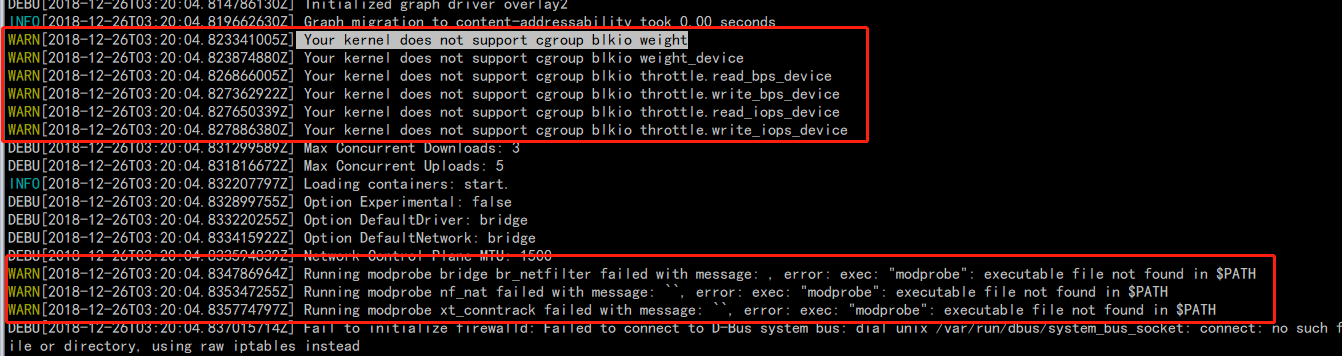


docker run hello-world log:

Output of docker info:
Containers: 0
 Running: 0
 Paused: 0
 Stopped: 0
Images: 0
Server Version: 18.09.0
Storage Driver: overlay2
 Backing Filesystem: tmpfs
 Supports d_type: true
 Native Overlay Diff: true
Logging Driver: json-file
Cgroup Driver: cgroupfs
Plugins:
 Volume: local
 Network: bridge host macvlan null overlay
 Log: awslogs fluentd gcplogs gelf journald json-file local logentries splunk syslog
Swarm: active
 NodeID: fghm6xfjg12heup6o3bb54pek
 Is Manager: true
 ClusterID: sdgetvi1k7053zdtxpjmynje5
 Managers: 1
 Nodes: 1
 Default Address Pool: 10.0.0.0/8
 SubnetSize: 24
 Orchestration:
  Task History Retention Limit: 5
 Raft:
  Snapshot Interval: 10000
  Number of Old Snapshots to Retain: 0
  Heartbeat Tick: 1
  Election Tick: 10
 Dispatcher:
  Heartbeat Period: 5 seconds
 CA Configuration:
  Expiry Duration: 3 months
  Force Rotate: 0
 Autolock Managers: false
 Root Rotation In Progress: false
 Node Address: 10.5.16.187
 Manager Addresses:
  10.5.16.187:2377
Runtimes: runc
Default Runtime: runc
Init Binary: docker-init
containerd version: 468a545b9edcd5932818eb9de8e72413e616e86e
runc version: 69663f0bd4b60df09991c08812a60108003fa340
init version: fec3683
Security Options:
 seccomp
  Profile: default
Kernel Version: 4.9.28
OSType: linux
Architecture: armv7l
CPUs: 1
Total Memory: 1002MiB
Name: EdgeGateway
ID: BTK7:74KT:C2AD:EPMW:U2OU:3OWW:FH2Z:FOVR:GQK2:MNHS:I75N:TEBD
Docker Root Dir: /var/lib/docker
Debug Mode (client): false
Debug Mode (server): true
 File Descriptors: 44
 Goroutines: 161
 System Time: 2018-12-26T05:03:02.109111992Z
 EventsListeners: 0
Registry: https://index.docker.io/v1/
Labels:
Experimental: false
Insecure Registries:
 127.0.0.0/8
Live Restore Enabled: false
Product License: Community Engine

WARNING: No cpuset support
WARNING: bridge-nf-call-iptables is disabled
WARNING: bridge-nf-call-ip6tables is disabled
system info :

any help will be thanks a lot.
Do I need to do something bout my linux kernel?
 jia-zhengwei
on 26 Dec 2018
jia-zhengwei
on 26 Dec 2018
@JesseJ12345 That does not look like an ECS-optimized AMI (we do not provide an image for armv7l), so I would recommend asking for help from your operating system distribution instead.
This issue is very old and any problems that you might be running into now are not related to this issue. I am locking this issue. For anyone who is using the ECS-optimized AMI and experiencing issues with Docker or the ECS agent, please open a new issue.
samuelkarp
on 26 Dec 2018
Related issues
 AbelGuti
·
5Comments
AbelGuti
·
5Comments
 YurgenUA
·
3Comments
YurgenUA
·
3Comments
 cjbottaro
·
4Comments
cjbottaro
·
4Comments
 GeyseR
·
3Comments
GeyseR
·
3Comments
 leonblueconic
·
3Comments
leonblueconic
·
3Comments
Most helpful comment
We've also been encountering this issue, thankfully in a non-production environment. I got the docker daemon running again by manually restarting the instance, and that aloud our cluster to connect & run the needed container.
The instance is spun up by an AutoScalingGroup. Here's the following output as requested, and below is the user-data for the launch configuration.
amazon-ecs-docker-log-errors.txt
user-data:
echo ECS_CLUSTER=[cluster_name] > /etc/ecs/ecs.config
yum install -y docker
service docker start
usermod -a -G docker ec2-user
Hope this helps!