Altair: It just doesn't work after update (v2.4.2)
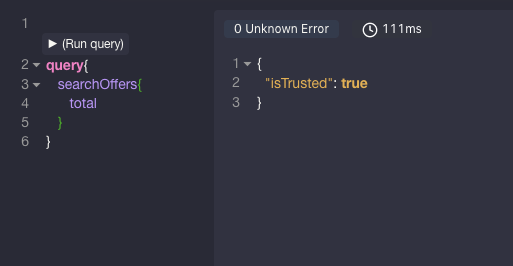
After extension was updates, I get nothing more then { "isTrusted": true} as a response to all queries and mutations. I used this extension a lot, so I know how it works. Now it's broken.
 UlyanaKiklevich
All 14 comments
👋🏾Thanks for opening your first issue here! Be sure to follow the issue template! ✌🏾
![welcome[bot] picture](https://avatars0.githubusercontent.com/in/4141?v=4&s=40) welcome[bot]
on 27 Dec 2019
welcome[bot]
on 27 Dec 2019
@UlyanaKiklevich Sorry this isn't sufficient information. Can you use the issue template? What platform are you using? What version of the app? Any screenshots?
 imolorhe
on 27 Dec 2019
imolorhe
on 27 Dec 2019
I have the same problem. Always getting { "isTrusted": true}
App Version: 2.4.2 used as chrome extension
Google Chrome Version 79.0.3945.88 (Official Build) (64-bit)
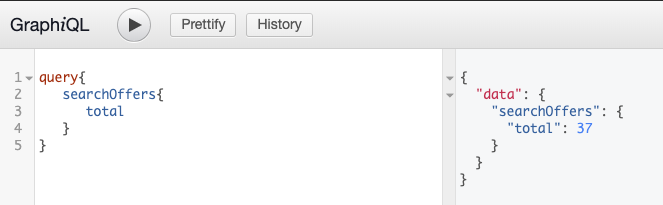
On graphiql same request works but on altair doesn't.
 ValentinGitHuber
on 30 Dec 2019
ValentinGitHuber
on 30 Dec 2019
Is the GraphiQL hosted in your domain? What error do you see in the developer console in Altair? Is it CORS related?
imolorhe
on 30 Dec 2019
I too experienced this issue after previously using it without issues. I am using the Firefox add-on.
Initially, the issue appeared to be CORS (which previously was not a problem, despite not changing anything on my end). Upon changing my CORS configuration, the problem is now that the Altair client is not sending the cookies necessary for my authentication setup. Again, previously this all worked perfectly.
 glinskyc
on 3 Jan 2020
glinskyc
on 3 Jan 2020
Same issue on latest Chrome build and Altair extension as well.
glinskyc
on 3 Jan 2020
https://www.chromium.org/Home/chromium-security/extension-content-script-fetches
Home of the Chromium Open Source Project
 imolorhe
on 3 Jan 2020
imolorhe
on 3 Jan 2020
TLDR - The chromium team are making changes to the way extensions work with cross origin requests. I'll need to update the extension to work with this new standard.
imolorhe
on 3 Jan 2020
TLDR - The chromium team are making changes to the way extensions work with cross origin requests. I'll need to update the extension to work with this new standard.
However, that doesn't explain why Firefox is also having the same issue.
glinskyc
on 3 Jan 2020
I removed some open ended permissions from the browser extensions, in an attempt to better conform to the policies the browser agents are incorporating (like the one in the link I shared). The permission about access to all sites is what allowed the extension to work without CORS for any site before the update.
I would add the permission back for now, but unfortunately the direction the browser agents are going for extensions would require having these web limitations in the browser extensions as well.
I have written about the limitations of the web app previously (https://sirmuel.design/altair-graphql-web-app-limitations-b671a0a460b8) and it might happen that the extensions would have these limitations within the year, so the recommendation of using the desktop apps if possible still stands.
Medium
TL;DR — It is recommended to use Altair desktop apps. If not, prefer browser extensions. Only use web app as a last resort.
 imolorhe
on 3 Jan 2020
imolorhe
on 3 Jan 2020
Correct me if I'm wrong, but this means there is no longer a method of using Altair with cookies, right? Therefore, if your authentication technique relies on cookies, not just headers, there is no way to use Altair.
glinskyc
on 5 Jan 2020
You could always specify cookies in the desktop apps. The limitations of the browsers don't affect the desktop apps in the same way.
imolorhe
on 5 Jan 2020
In the meantime (at v2.4.3), you would still be able to use the cookie based authentications in the browser extensions as before, until anything changes from the chromium team.
imolorhe
on 5 Jan 2020
v2.4.3 fixes the issue. Thank you!
glinskyc
on 6 Jan 2020
Related issues
 XAKEPEHOK
·
8Comments
XAKEPEHOK
·
8Comments
 trafficfox
·
8Comments
trafficfox
·
8Comments
 MCSH
·
7Comments
MCSH
·
7Comments
 levrik
·
4Comments
levrik
·
4Comments
 sneko
·
10Comments
sneko
·
10Comments
Most helpful comment
I have the same problem. Always getting
{ "isTrusted": true}App Version: 2.4.2 used as chrome extension
Google Chrome Version 79.0.3945.88 (Official Build) (64-bit)
On graphiql same request works but on altair doesn't.