Is your feature request related to a problem? Please describe.
We'd like to stand-up our own instance of Altair to serve as an editing playground for our various GraphQL environments (prd/stg/dev). They each require their own headers (tokens) and endpoints. We also need the ability to "deep-link" copy & pastable URLs so that we can share full queries amongst developers to ease debugging.
We've implemented this with GraphQL Playground (which we'd like to switch to Altair due to the staleness of the GraphQL Playground project) like so:

It's conceptually similar to "Copy CURL" but the "Copy to Share" copies a "deep-link" URL that includes the following:
type ShareableObj = {
  q: string; // query
  v: string; // variables
  e: string; // endpoint
};
We opted not to include the headers since those include secret tokens and we leave it up to the developers to communicate which "environment" the query should be run against. In most cases, it's the default of production.
Proposed Solution
There are some considerations involved with "deep-linking". For example, would we require a backend persistence layer so that we can shorten the URLs? Or is it enough to "base64-encode" the full query (and other necessary settings) as part of the URL (would result in very large URLs, but that may be ok!).
The URL itself
At least for the initial implementation, we're fine with large URLs. We currently use lz-string (LZString.compressToEncodedURIComponent(string);) to compress the URL as much as possible -- it still results in very long URLs, but at least it's stateless and doesn't require a backing service. We're open to other approaches though, but would like to start off with something simple.
What information/settings to include?
When a user clicks to "Copy to Share" at the very least, we need the query and variables, but would also like to have the environment and endpoint. In order to protect potential secrets, the "environment" doesn't actually need to be the full set of environment variables, but rather the id or name of the environment that can be auto-selected when navigating to the deep-link (if it's not there, then leaving it on whatever environment the user has is fine).
What happens when the user navigates to the deep-link? The second time?
When a user navigates to a shared deep-link, a new "tab" is created with the query and variables from the URL. The environment is auto-selected if the user has an environment with that same name available (if not, whatever environment the user has selected is fine). The endpoint is also entered if included as part of the deep-link. (As an aside: We actually plan to tie the endpoint to the environment so the endpoint will always be {{endpoint}} and the various environments defined will provide the endpoint URL.)
We can clear the URL deep-link after instantiation so that when the user refreshes it doesn't re-create the new tab. If the user actually navigates to the full deep-link a second time, then a new tab would be created.
What about the API
The way we were able to pull this off in GraphQL Playground is by relying on the fact that they expose their redux action creators, selectors and reducers. So, we literally do something like this:
import {
  store,
  getQuery,
  getVariables,
  getEndpoint,
  newSession,
  editQuery,
  editVariables,
} from "graphql-playground-react";

/**
 * Creates a deep-linkable URI with the "current window" settings
*/
export const compressUri = (): string => {
  const state = store.getState();

  const sessionUri: ShareableObj = {
    q: getQuery(state),
    v: getVariables(state),
    e: getEndpoint(state),
  };

  return lz.compressToEncodedURIComponent(JSON.stringify(sessionUri));
};

/**
 * Creates a new Tab with the given (e)ndpoint, (q)uery, (v)ariables
 */
export const newTab = ({ e, q, v }: ShareableObj): void => {
  store.dispatch(newSession(e, true));
  store.dispatch(editQuery(q));
  store.dispatch(editVariables(v));
};
We could take the same approach in Altair if you'd rather not change much of the internal API (would just require exposing the redux store etc on window so that it can be accessed and actions dispatched).
However, if you're open to having this be a fist-class feature in Altair I'm happy to explore ideas around how to build this directly into the app.
Describe alternatives you've considered
One alternative is to modify localStorage before the app loads and injecting the necessary state. This would obviously be brittle and prone to bugs especially as/if the shape of the localStorage changes.
 tizmagik
All 36 comments
@tizmagik Thanks for creating the issue and your proposed solution. We can consider implementing the solution you have proposed. However, some things to note are the fact that Altair is an angular application, and not react-based. As such, providing the API as you have suggested might not be a feasible option (I assume the API you are proposing is only useful if Altair can be embedded programmatically within another application). However, this could be a perfect feature to implement using the plugin system in Altair.
Some things to note about the plugin system:
- it is a runtime plugin system (the plugins are only retrieved once the app has been initialized)
- it is based on web components (the plugins are components that are embedded within Altair, and have access to an API which they can use to interact with Altair)
- there would be one plugin component per window (only the window-level plugin system has been implemented as of now. Depending on the implementation requirements, this could be a potential plugin to implement on an app-level)
The plugin system is still in beta (initially implemented in #759 but still ironing out the kinks), and I need more use cases to figure out aspects of the system I haven't thought of yet.
You can checkout the plugin implementation by enabling experimental features in the settings, adding altair-graphql-plugin-graphql-explorer to the plugin list, and restarting Altair.
Let me know what you think.
 imolorhe
on 7 Dec 2019
imolorhe
on 7 Dec 2019
Hi @imolorhe I think doing this via a plugin system is certainly the cleaner route and makes a lot of sense. I do however think it will need to be an app-level plugin since it will need to interact with Environments.
As for the API for interacting with Altair -- is that documented somewhere? I'm having trouble following the example plugin to understand what APIs are exposed to plugins and if the current API supports the feature-set needed for a potential "deep-link" plugin.
Also, how/where can plugins render within the UI? We'll need to render some sort of "Copy to Share" button somewhere on the UI that invokes this plugin. What are your thoughts?
tizmagik
on 9 Dec 2019
Awesome! I think that's a good idea. The API for the plugins isn't documented yet since it's still in beta (plus I'm trying to figure out the best way to document the API without needing to keep the docs in sync with changes to the API. If there's a way to autogenerate "useful" API docs directly from the code, especially considering its typescript which has all the interfaces and type definitions 😞🤔).
The current API definitely doesn't support the features we need yet (I only implemented the API that was required as of now, with the intention of implementing others as the need arises), but that's a good thing. The current cases helps shape the API based on needs 🙂.
So like I mentioned, the plugin system works with web components as the fundamental implementation of the plugins. The plugins would be rendered in "slots" created for plugins within the application (the current implementation for window-level plugins renders the plugins as a sidebar in each window). For the app-level plugins, they can render along the top section of the app (just beneath the tabs) in a similar fashion, or alternatively they could render in modal dialogs, similar to the environments.
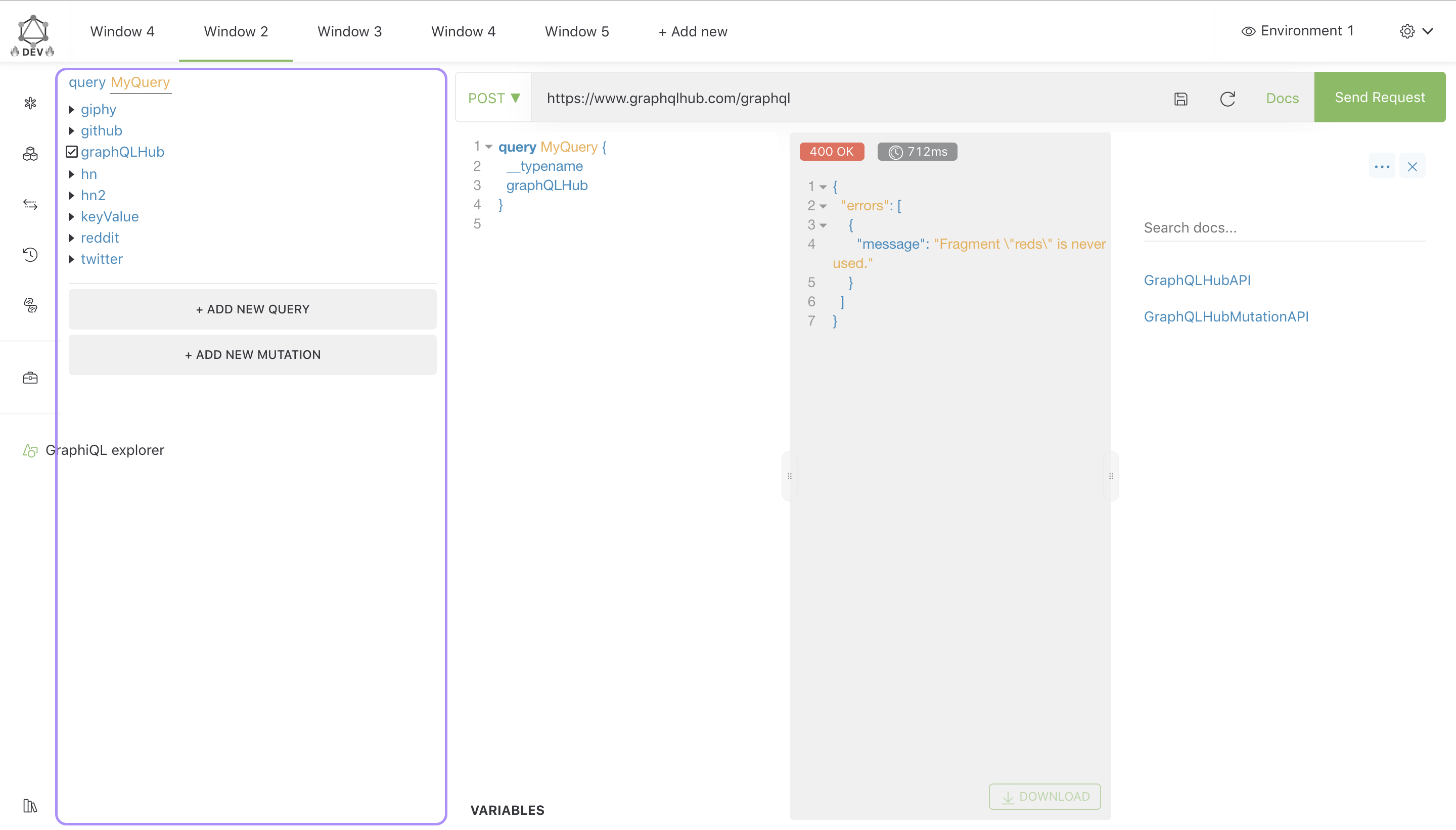
What do you think?
imolorhe
on 10 Dec 2019
That sounds great @imolorhe !
The current API definitely doesn't support the features we need yet
What do you think is the minimum needed to support this functionality? Ideally the APIs added are generic enough where it's useful for other things beyond just deep-link sharing. E.g. exposing a similar altair.data and altair.helpers object like the one available to pre-request scripts. Actually I think for the most part the API exposed there is sufficient, but it will require adding additional "setters" (e.g. altair.helpers.setQuery kind of thing). What do you think?
As for the UI, I'm not sure the best place to put it, but I'd be concerned that putting it under the Tabs will waste too much vertical real estate. Maybe better to the right of the tabs? What about something like this?
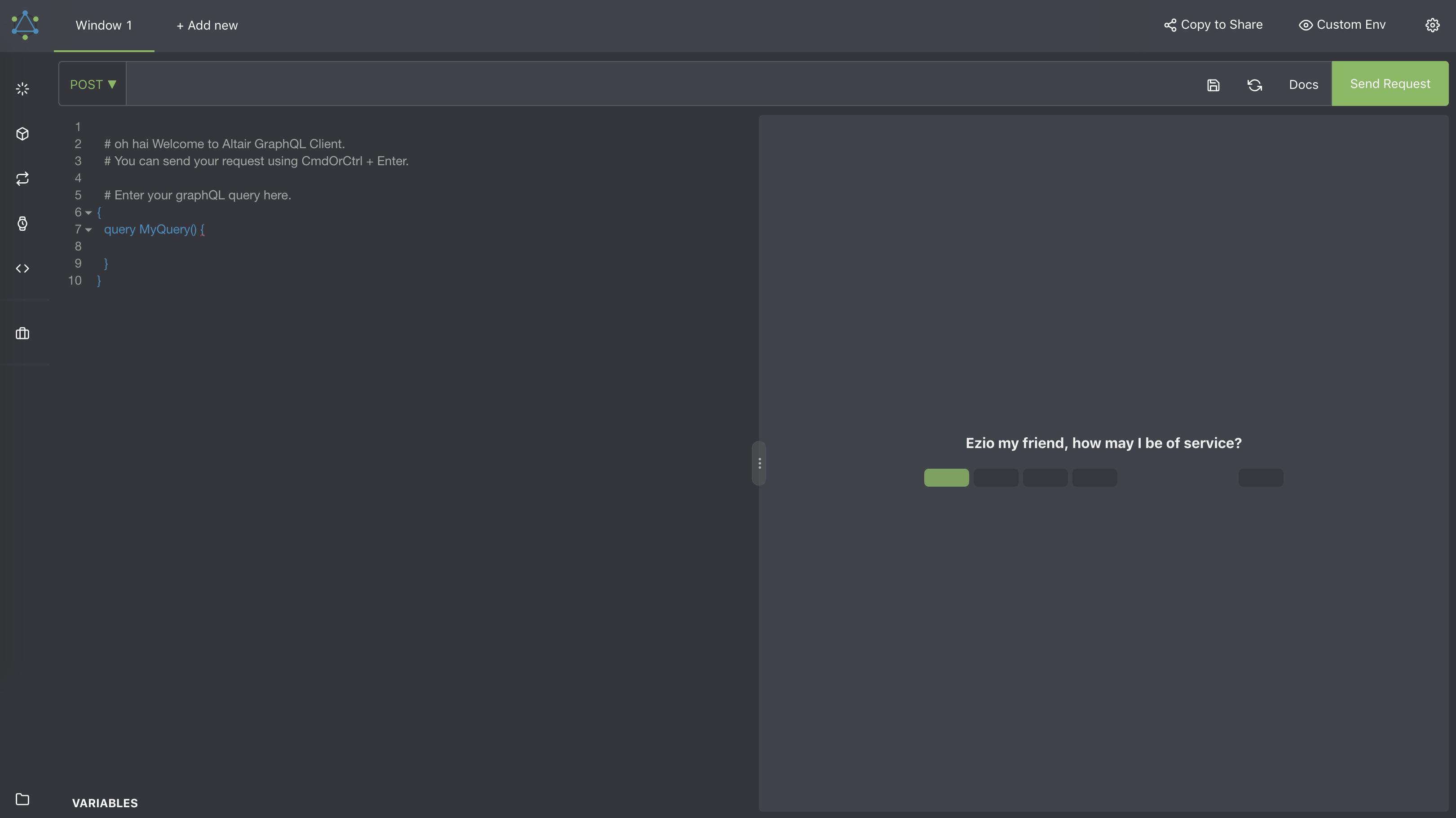
Or, to reduce the amount of horizontal space it takes up, to the left of the settings icon as just a share icon.
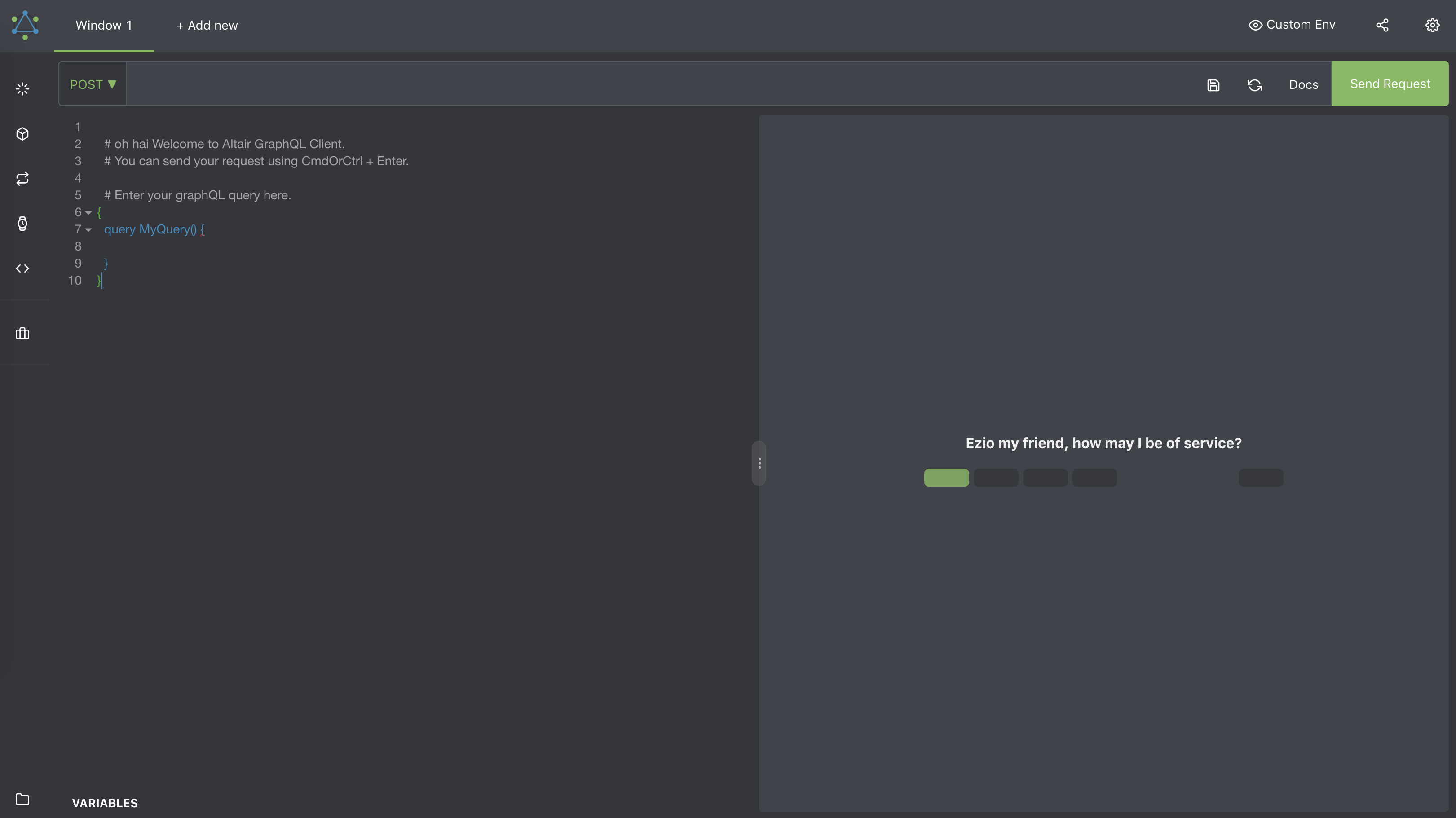
Thoughts?
tizmagik
on 18 Dec 2019
If we define the functionality as a series of steps, then we can see the API that it would need. Currently there is already the setQuery API available to plugins. 🙂
imolorhe
on 18 Dec 2019
@Shreyas51283 what do you think?
imolorhe
on 18 Dec 2019
If we define the functionality as a series of steps, then we can see the API that it would need.
Here's the steps as I can see them:
For navigating directly to a shared deep-link URL
- On-load (after Altair instantiates and is ready to process plugin requests), instantiate the Plugin (maybe this is where rendering the button on the UI happens)
- Read the current
window.location(or if we want to encapsulate this behind analtairobject the plugin reads from) - If the location includes a deep-link, defined as:
http://localhost:4200/?#N4gjiB...iAA7g
- That
N4g...is an lz-string compressed URI which decodes to:
type ShareableObj = {
  q: string; // query
  v: string; // variables
  e: string; // endpoint
};
- At which point, if a valid URI is decoded, the plugin will then:
- Insert a new Tab
- Select the appropriate Environment (if there is a match in the current session -- this should work as long as an initial set of Environments are uniformly defined, see #1086 )
- Set the Query
- Set the Variables
For clicking the "Share" button
- Grab the current state of things (similar to the Share object above):
{ q, v, e } - Use lz-string to compress to a seralizable URI (producing a
N4g...type of string as above) - Append that value to the current
window.location.originto get a URL like:
http://localhost:4200/?#N4gjiB...iAA7g
- Copy that value to the clipboard (using something like copy-to-clipboard)
tizmagik
on 18 Dec 2019
This looks simple enough. From the steps you defined, these are the things I believe need to be exposed to the plugin:
- Altair lifecycle methods (
onAppReadyin this case, to know when it can read window.location and other things like that) - I'm not sure I should bother about adding window.location into some altair object. Seems very specific to the browser usage. The question I would have is, how should this behave in electron?
- Extra setters (
setVariables,setEndpoint) which would passwindowIdalong with the value, for app-level plugins. I'm not sure about the environment setter. I'm still a bit skeptical. Also is that what you mean byendpoint? My understanding ofendpointis the URL for the new tab. - Plugin context should contain
query,variables,endpointfor plugin to be able to generate the share link.
imolorhe
on 18 Dec 2019
Altair lifecycle methods (onAppReady in this case, to know when it can read window.location and other things like that)
Makes sense 👍
I'm not sure I should bother about adding window.location into some altair object. Seems very specific to the browser usage. The question I would have is, how should this behave in electron?
Agreed. Maybe this plugin can be Browser-only for now? A future iteration could support Electron via Protocols API possibly.
Extra setters (setVariables, setEndpoint) which would pass windowId along with the value, for app-level plugins. I'm not sure about the environment setter. I'm still a bit skeptical. Also is that what you mean by endpoint? My understanding of endpoint is the URL for the new tab.
Yes, endpoint really means URL here, but it would be nice to have a way to also configure the currently selected Environment. So maybe the ShareableObj could look something like this instead?
type ShareableObj = {
  q: string; // query
  v: string; // variables
  u: string; // url (for the new tab)
  e: string; // environment name or ID (if not found, environment selection doesn't change)
};
The reason why I'd like it to auto-select an Environment is that we can't share our environment tokens as part of the serialized URL since they contain secret tokens and it would be too insecure to share. Any ideas on how better to handle this?
Plugin context should contain query, variables, endpoint for plugin to be able to generate the share link.
Makes sense. Is that currently available or something that needs to be added?
Sounds like we've outlined a decent plan here. What's the best way to proceed @imolorhe ? Do you want to create separate issues for each piece of work that would need to happen?
tizmagik
on 18 Dec 2019
@tizmagik I've created the issues for the different tasks.
imolorhe
on 18 Dec 2019
All the related issues have been closed, and would be available in v2.4.0. You can create the plugin then. You should note that the header plugins would appear in modal dialogs.
imolorhe
on 19 Dec 2019
That's great! Looking forward to trying that out. Thanks so much for your time with all this @imolorhe !
tizmagik
on 19 Dec 2019
By the way, I'm trying to create a plugin, following the example of your GraphQL Explorer plugin, altair-graphql-plugin-share-button but I'm confused about how to make it available to Altair? Where/how does it look up the plugin code? It seems like it looks it up on jsdelivr -- so does that mean the plugin must be published? Is there currently any way to point it to a local copy or a privately hosted copy?
tizmagik
on 19 Dec 2019
If you're working locally, there's a way to point to a local copy. I'll share a better boilerplate for creating plugins.
imolorhe
on 19 Dec 2019
Also, now that I think about it, for our own hosted version of Altair it would be great to be able to specify an initialPlugins and preset the enableExperimental to true. I can write up a separate issue for that if that makes sense...
tizmagik
on 19 Dec 2019
This is a much cleaner boilerplate you can work with. It uses Vue.js instead. From my experience, building the web components using Vue is much cleaner than React since Vue comes with its own @vue/web-component-wrapper.
https://github.com/imolorhe/altair-graphql-plugin-birdseye
I assume the boilerplate would be mostly self explanatory, but the BirdsEye component is what would be built as the plugin component used in Altair (built by running yarn build:element. Take note of the syntax of the build:element script in the package.json file). After building, you can create a simple http server (yarn web-server) to host the plugin (similar to how jsdeliver would host it when published).
To be able to use this local copy of the plugin, you would need to have the altair repo locally and running. Then modify this section in the app component, specifying your plugin name and URL (version would be ignored for local plugins). https://github.com/imolorhe/altair/blob/staging/src/app/containers/app/app.component.ts#L126-L130
This would load your plugin along with the other plugins.
A few important things to take note:
- You need the
manifest.jsonfile, which is what altair would read, and what would define your plugin structure. - The
manifest.jsonfile should conform to this interface: https://github.com/imolorhe/altair/blob/staging/src/app/services/plugin/plugin.ts#L42-L57 - Ensure the plugin name begins with
altair-graphql-plugin- - The plugin component should expect a prop called
props(yes I know. This can be confusing, but this is because I'm trying to support components built with react. For some reason this is how they do it). You can see how it is used inBirdsEyecomponent (added some comments to help there). - For customizing your plugin component styles, you should use Altair CSS variables. To make this process easier, the CSS file used in altair is loaded in the index.html file in the boilderplate, so when you serve the app (using
yarn serve), you should be able to see how the component would look like in Altair. Basically for customization, you should be using these CSS variables mostly: https://github.com/imolorhe/altair/blob/staging/src/scss/_variables.scss#L47-L52
This should be enough to get started on creating the plugin. Let me know if you have any other questions!
Also, if you could help with documenting the plugin creation process, as well as the plugin API in the docs, that would be awesome! https://github.com/imolorhe/altair/tree/staging/docs/docs
GitHub
GraphQL BirdsEye plugin for Altair GraphQL. Contribute to imolorhe/altair-graphql-plugin-birdseye development by creating an account on GitHub.

✨⚡️ A beautiful feature-rich GraphQL Client for all platforms. - imolorhe/altair
✨⚡️ A beautiful feature-rich GraphQL Client for all platforms. - imolorhe/altair
✨⚡️ A beautiful feature-rich GraphQL Client for all platforms. - imolorhe/altair
✨⚡️ A beautiful feature-rich GraphQL Client for all platforms. - imolorhe/altair
imolorhe
on 19 Dec 2019
Also, now that I think about it, for our own hosted version of Altair it would be great to be able to specify an
initialPluginsand preset theenableExperimentalto true. I can write up a separate issue for that if that makes sense
I don't think the plugins are ready for this yet. It does make sense that we would have a way to specify preset plugins, but the reason why the plugins are behind the enableExperimental flag is because it's still "experimental" 🙂so wouldn't want to add that until the flag is removed. i.e. when the plugins are stable enough and documented.
imolorhe
on 19 Dec 2019
This issue has been automatically marked as stale because it has not had recent activity. It will be closed if no further activity occurs. Thank you for your contributions.
![stale[bot] picture](https://avatars3.githubusercontent.com/in/1724?v=4&s=40) stale[bot]
on 17 Feb 2020
stale[bot]
on 17 Feb 2020
Any progress on this?
 CreatCodeBuild
on 18 Feb 2020
CreatCodeBuild
on 18 Feb 2020
@tizmagik? 🙂
imolorhe
on 19 Feb 2020
Yes I started on this but the local DX was a bit cumbersome and I needed to move on to some other work. I’ll try and get back to this as soon as I can and post back!
tizmagik
on 19 Feb 2020
Okay. Feedback along the way would be appreciated.
imolorhe
on 19 Feb 2020
One thing that I think would help is the ability to instead of (or, in addition to) specifying the plugin-name "altair-graphql-plugin" if you could specify a fully qualified URL to the plugin "http://localhost:3000/my-plugin" that it uses instead of the hard-coded jsdelivr etc URLs it uses internally currently. This would also be helpful in the case of self-hosted plugins so that they don't need to be published anywhere publicly.
tizmagik
on 19 Feb 2020
Sounds like a potential feature would be giving the ability to specify a registry to use for the plugins, if you want to have privately hosted plugins.
For pointing to the plugins locally for development, you can just uncomment this bit of code, customizing it based on your plugin (that's part of why the comment is in the code 🙂): https://github.com/imolorhe/altair/blob/staging/packages/altair-app/src/app/containers/app/app.component.ts#L126-L130
This would fetch your plugin appropriately. Using the little project structure I mentioned earlier in the comments, you should be able to do this easily. I have detailed the steps required to make the process easier here: https://github.com/imolorhe/altair/issues/1089#issuecomment-567695042
In the next version, I could try to make the process easier by allowing you specify the URL for the plugin with the production release of Altair, but that's not the case at the moment.
✨⚡️ A beautiful feature-rich GraphQL Client for all platforms. - imolorhe/altair
imolorhe
on 19 Feb 2020
Yes, for local development the changes needed is clear but I was thinking ahead for when the plugin is ready. We may not necessarily be able to publish it somewhere publicly (although hopefully we will!), so it would be nice if Altair accepted a fully qualified URL to load from.
tizmagik
on 19 Feb 2020
Hmmm.. I was hoping the plugin you were working on would be a publicly re-usable plugin though 🙂
But yeah, I believe having the ability to customize the registry should be sufficient for privately hosting plugins.
imolorhe
on 19 Feb 2020
Yes it most likely will be shareable, but either way, for security concerns we would prefer to mirror with a private registry
tizmagik
on 20 Feb 2020
Written some documentation about writing a plugin: https://altair.sirmuel.design/docs/plugins/writing-plugin.html
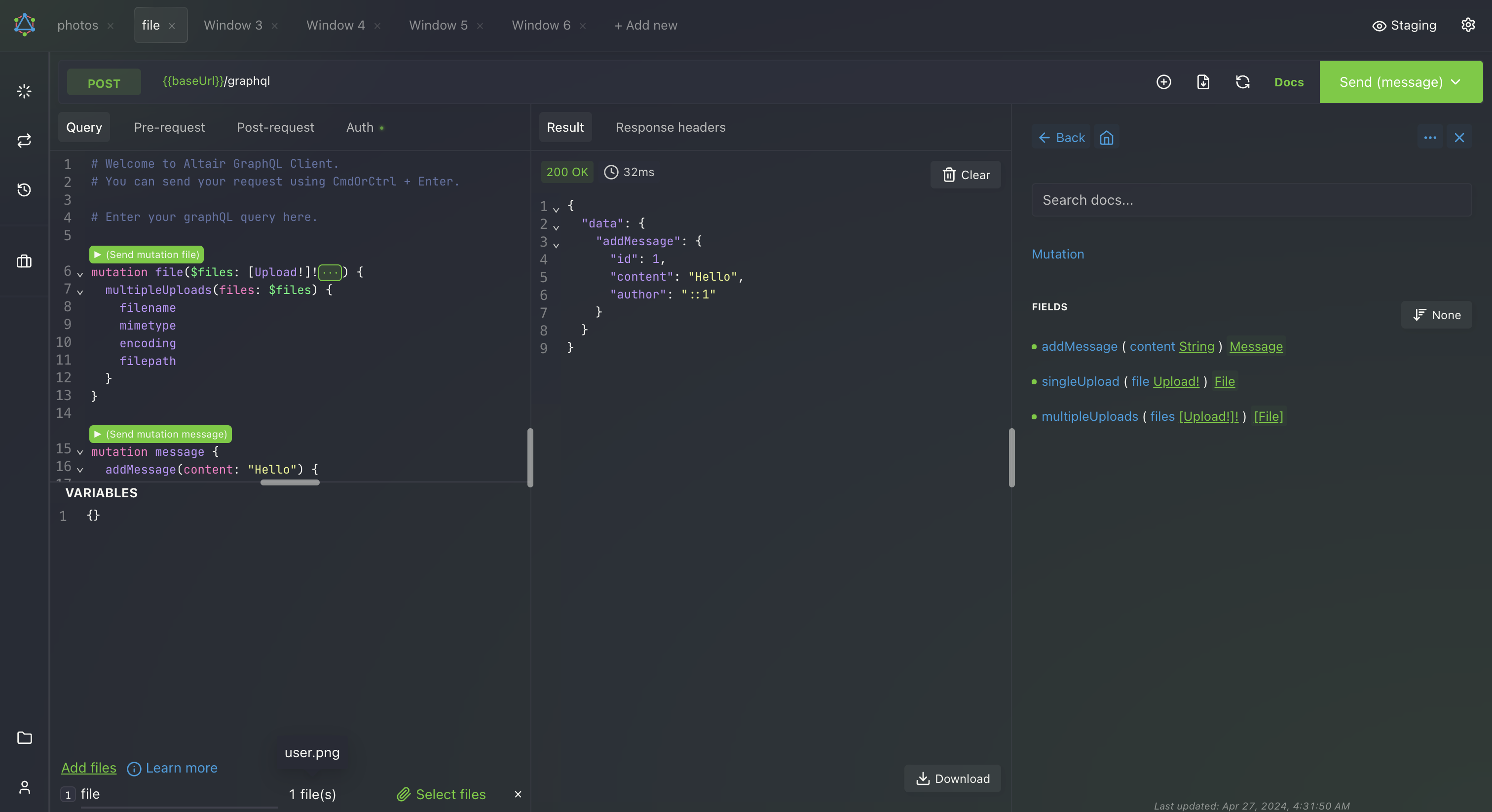
A beautiful feature-rich GraphQL Client IDE for all platforms. Available for MacOS, Windows, Linux, Chrome, Firefox. Enables you interact with any GraphQL server you are authorized to access from any platform you are on. Much like Postman for GraphQL, you can easily test and optimize your GraphQL implementations. You also have several features to make your GraphQL development process much easier including subscriptions, query scaffolding, formatting, multiple languages, themes, and many more.
 imolorhe
on 31 Mar 2020
imolorhe
on 31 Mar 2020
This issue has been automatically marked as stale because it has not had recent activity. It will be closed if no further activity occurs. Thank you for your contributions.
stale[bot]
on 30 May 2020
I still plan on getting to this!
tizmagik
on 30 May 2020
This issue has been automatically marked as stale because it has not had recent activity. It will be closed if no further activity occurs. Thank you for your contributions.
stale[bot]
on 30 Jul 2020
Bumping. Still on my radar.
tizmagik
on 30 Jul 2020
This issue has been automatically marked as stale because it has not had recent activity. It will be closed if no further activity occurs. Thank you for your contributions.
stale[bot]
on 4 Oct 2020
Bump
tizmagik
on 4 Oct 2020
This issue has been automatically marked as stale because it has not had recent activity. It will be closed if no further activity occurs. Thank you for your contributions.
stale[bot]
on 19 Dec 2020
Still on my radar
tizmagik
on 19 Dec 2020
Related issues
 razvan-jiganie-bizcuit
·
4Comments
razvan-jiganie-bizcuit
·
4Comments
 mike-sosa-sofarocean
·
8Comments
mike-sosa-sofarocean
·
8Comments
 MCSH
·
7Comments
MCSH
·
7Comments
 XAKEPEHOK
·
8Comments
XAKEPEHOK
·
8Comments
 sneko
·
10Comments
sneko
·
10Comments