Altair: JS error when trying to send a request
Describe the bug
I'm using Altair to send a simple GQL request to my local server and getting a JS error. DevTools doesn't show any HTTP requests when I click "Send request"
To Reproduce
I send POST request to http://localhost:3011/graphql, I have a custom header `Authorization: Bearer ...jwt token...", the query is
query {
  users {
    id
    name
  }
}
I have more types/queries available, all of them have documentation in the Altair, but I can't get any of them from the server.
Expected behavior
To get a response back.
Desktop (please complete the following information):
- OS: macOS
- Browser: chrome
- Version 67.0.3396.79
Additional context
The trace that I'm getting:
ERROR TypeError: Cannot read property 'trim' of null
    at main.a34c97150364002f3b7f.bundle.js:1
    at Array.filter (<anonymous>)
    at e.sendRequest (main.a34c97150364002f3b7f.bundle.js:1)
    at Object.handleEvent (main.a34c97150364002f3b7f.bundle.js:1)
    at Object.handleEvent (main.a34c97150364002f3b7f.bundle.js:1)
    at Object.handleEvent (main.a34c97150364002f3b7f.bundle.js:1)
    at Kr (main.a34c97150364002f3b7f.bundle.js:1)
    at main.a34c97150364002f3b7f.bundle.js:1
    at t.object.i [as _next] (main.a34c97150364002f3b7f.bundle.js:1)
    at t.__tryOrUnsub (main.a34c97150364002f3b7f.bundle.js:1)
I understand that it points to lines in the minified bundle, please, let me know if you need more info.
 iliabylich
All 45 comments
Hmmm.. strange. There are only two calls to trim() in the code. Are you sure you have a URL set?
 imolorhe
on 15 Jun 2018
imolorhe
on 15 Jun 2018
If I could get more context, maybe I could figure out the issue. At what point does the error appear?
imolorhe
on 15 Jun 2018
Are you sure you have a URL set?
I've just realized that when I open a new tab and copy URL/query everything works fine. So it's not about a localhost, it's about a stale tab, I've opened it like a month ago. Is there any cache using local storage or something like that? That's basically a breaking change that forces me (and maybe someone else) to re-configure opened tabs.
If I could get more context, maybe I could figure out the issue. At what point does the error appear?
When I click "Send request" button on a stale tab.
iliabylich
on 15 Jun 2018
@iliabylich Oh right! So it's a regression bug. I'm not sure I would want to fix it, considering I've handled most of the recent upgrade regression issues already. Sounds like this is from a really old version. I'd still add checks for the query value before calling the trim() method, but wouldn't really be doing anything more than that.
imolorhe
on 15 Jun 2018
I think it's fine as it is. Thanks a lot for Altair!
iliabylich
on 15 Jun 2018
Hey ,
I seem to have the same issue . Restarted chrome completly but no luck..
Chrome : v67.0.3396.87 x64
I beleive Altair is also the latest . I got stuck on this .
tx,
gabor
 faludigabor
on 21 Jun 2018
faludigabor
on 21 Jun 2018
@faludigabor Can you try your query here and let me know if you are still getting the error: https://altair-gql.sirmuel.design/
imolorhe
on 21 Jun 2018
I saw the same error too, then I clear the local storage, everything back to normal
 januszhou
on 21 Jun 2018
januszhou
on 21 Jun 2018
@faludigabor @januszhou Are you getting the exact same error? Or is it something else?
imolorhe
on 22 Jun 2018
I think it's the exact same error, but I can't reproduce it after clear local storage.
januszhou
on 22 Jun 2018
I'm having the same problem. It's fine again after clearing local storage but the problem seems to come back after a few minutes and/or requests.
Chrome v74.0.3729.131
Altair v2.1.7
 nilsd
on 10 May 2019
nilsd
on 10 May 2019
@nilsd Do you see any errors in the console that can help me find the issue?
imolorhe
on 10 May 2019
@imolorhe This is the error i get when clicking Send Request:
main.24b63ef02289e949e08e.js:1 ERROR TypeError: Cannot read property 'trim' of null
    at main.24b63ef02289e949e08e.js:1
    at Array.filter (<anonymous>)
    at t.project (main.24b63ef02289e949e08e.js:1)
    at t._next (main.24b63ef02289e949e08e.js:1)
    at t.next (main.24b63ef02289e949e08e.js:1)
    at t._tryProject (main.24b63ef02289e949e08e.js:1)
    at t._next (main.24b63ef02289e949e08e.js:1)
    at t.next (main.24b63ef02289e949e08e.js:1)
    at t._next (main.24b63ef02289e949e08e.js:1)
    at t.next (main.24b63ef02289e949e08e.js:1)
@imolorhe Also, the request is never sent so this is pre-network stuff. Thanks!
nilsd
on 10 May 2019
@nilsd Yeah there's an unchecked string.trim() being used somewhere. Just need to pin point it. Thanks.
imolorhe
on 10 May 2019
@imolorhe Wonderful, thanks!
nilsd
on 10 May 2019
Looks like this is the culprit: https://github.com/imolorhe/altair/blob/8f7de63fed3a906cec031eabf06ea0cf35a80d92/src/app/effects/query.ts#L45
imolorhe
on 10 May 2019
Nice! Is there any chance a fix could be released today? Thanks!
nilsd
on 10 May 2019
@nilsd Unfortunately not. A release could be done over the weekend. Do you perform any action before sending the request that might cause the query to be undefined? 🤔
Just wondering because ideally there shouldn't be a case where the query is not a string.
imolorhe
on 10 May 2019
Also try setting the __DEBUG_MODE__ to true in your console and try sending the request again. Then send me the logs you see in the console. That might help as well.
imolorhe
on 10 May 2019
@imolorhe Ok no problem!
No I simply reload the page and click Send Request.
nilsd
on 10 May 2019
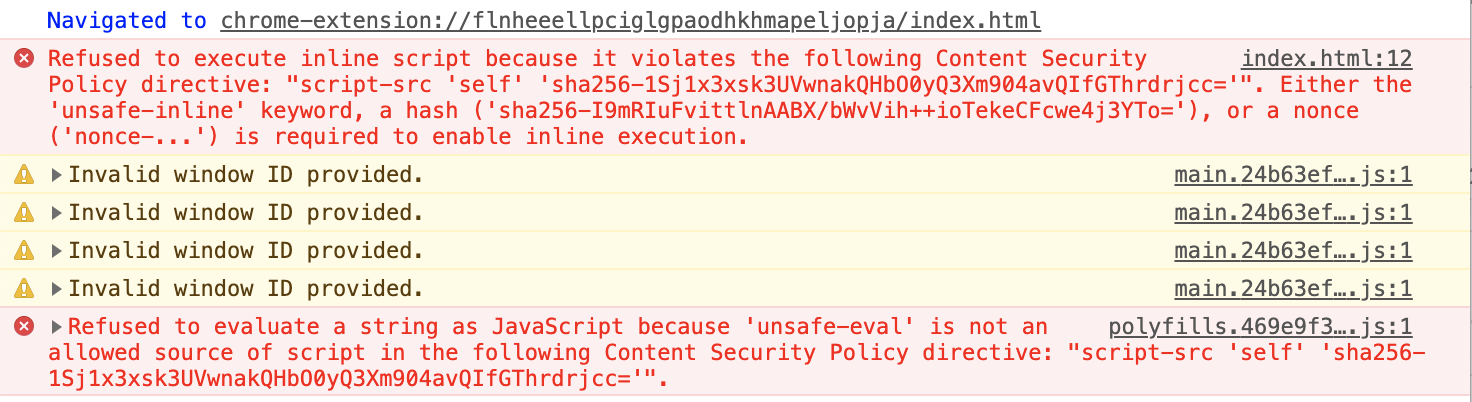
I don't know if this helps but this is what I see in the console when reloading the page:
nilsd
on 10 May 2019
@nilsd Those should be non-breaking errors. These are known.
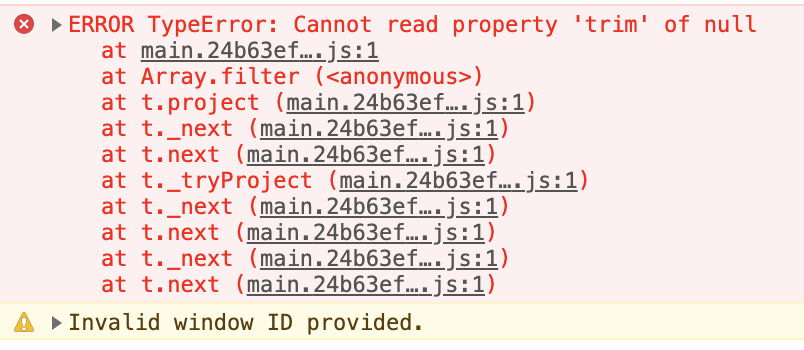
After reloading the page, set __DEBUG_MODE__ = true in your console, then try sending the request again. Then send the screenshot of the logs.
imolorhe
on 10 May 2019
With __DEBUG_MODE__ = true:
nilsd
on 10 May 2019
Oh, it's the same thing. No other logs?
imolorhe
on 10 May 2019
No other logs. It seems that the problem only occurs when loading the extension with pre-filled queries. When adding a new window and typing a query it seems to work ok, but when reloading the extension the new query produces the error.
nilsd
on 10 May 2019
So there may be something weird going on when the queries are loaded from local storage?
nilsd
on 10 May 2019
How many windows do you have open? You should be able to check data.query.query in the logged object after setting the debug mode, and see if the value is a string or undefined.
PS: To enable debug mode, you should use __ENABLE_DEBUG_MODE__ = true. My bad 😅
Yes it might have something to do with the local storage but need to confirm since I can't reproduce it myself.
imolorhe
on 10 May 2019
Oh sorry =) I have 1 window. Here is the debug log:
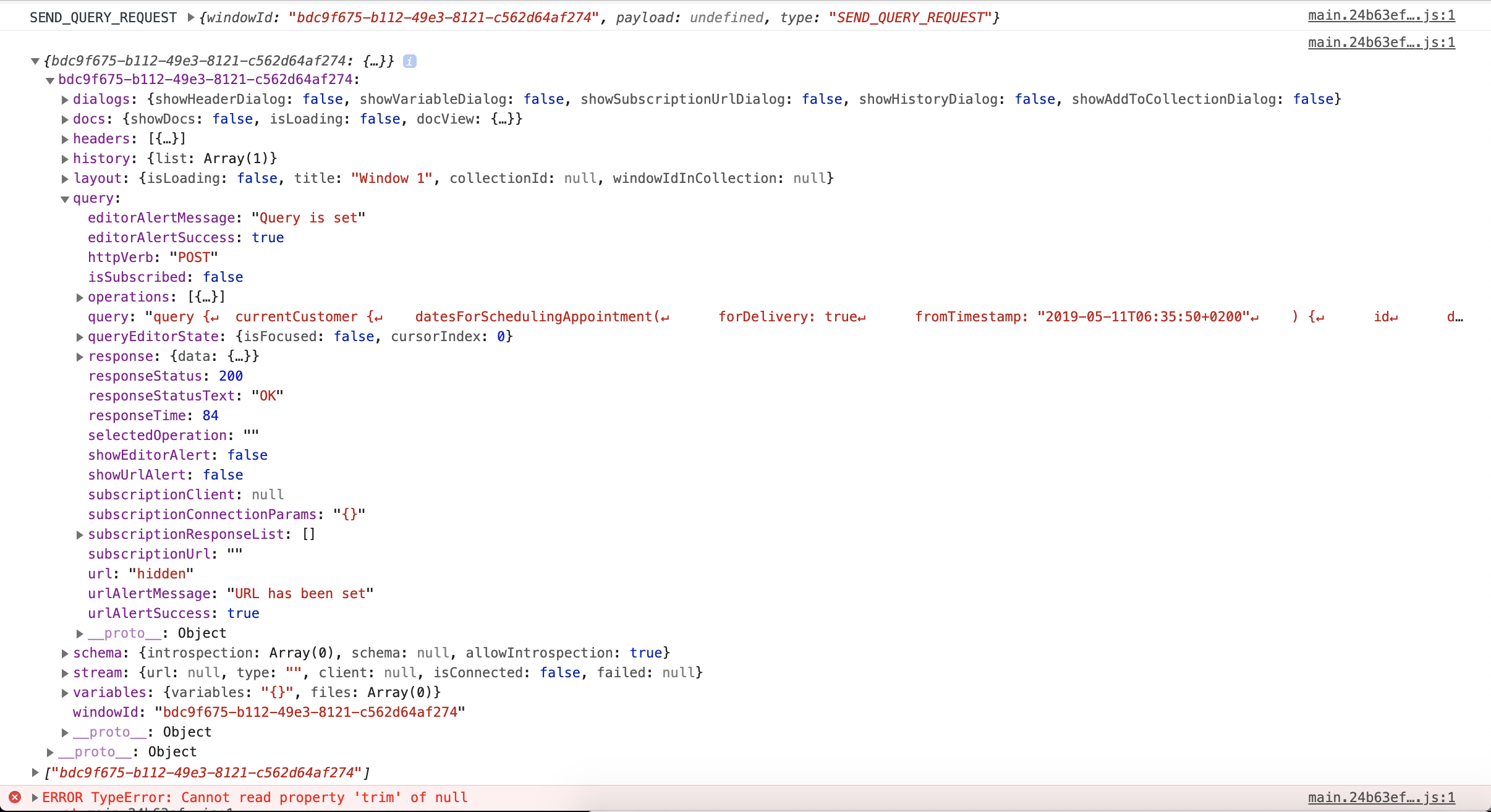
query.query seems ok right?
nilsd
on 10 May 2019
Yeah it does seem okay. Needs further debugging then. Thanks.
imolorhe
on 10 May 2019
@imolorhe NP!
nilsd
on 10 May 2019
Can you also check data.history.list?
imolorhe
on 10 May 2019

nilsd
on 10 May 2019
Aha! 😄
imolorhe
on 10 May 2019
imolorhe
on 10 May 2019
@nilsd Would you like to be a contributor to Altair? This is your chance! 😄 Easy PR.
imolorhe
on 10 May 2019
@imolorhe Haha, that depends! Should the null query be filtered out or should it not be null in the first place?
nilsd
on 10 May 2019
@imolorhe I'll get back to you with a PR in a few hours
nilsd
on 10 May 2019
Should not be null in the first place. So the problem seems to come from where the history item is set in the first place.
imolorhe
on 10 May 2019
It's weird becase query can never be null when reaching that line
nilsd
on 10 May 2019
Yeah I noticed that too. I guess it wouldn't be an easy PR afterall.
imolorhe
on 10 May 2019
Challenge accepted
nilsd
on 10 May 2019
@nilsd Any progress on this? I would be making a new release soon and want to have this bug fixed in the new release.
imolorhe
on 12 May 2019
@imolorhe I'm afraid not, haven't had much time this weekend. I guess you have a better chance of figuring it out anyway :P Sorry for not getting back to you
nilsd
on 12 May 2019
Sure no problem.
imolorhe
on 12 May 2019
Related issues
 Vinlock
·
8Comments
imolorhe
·
4Comments
Vinlock
·
8Comments
imolorhe
·
4Comments
 XAKEPEHOK
·
8Comments
XAKEPEHOK
·
8Comments
 balthild
·
5Comments
balthild
·
5Comments
 benhutton
·
10Comments
benhutton
·
10Comments