740 added theme support along with a few basic themes (default, none, opaque)
It would be useful to add a dark theme: i.e. one with white axes and labels, that would play well with black backgrounds.
 jakevdp
All 10 comments
These themes seem useful (esp. if someone makes a dark theme) -- so I wonder if it's worth putting these in Vega instead so all users of the Vega ecosystem can benefit from these options.
cc: @jheer @arvind @domoritz
 kanitw
on 10 Apr 2018
kanitw
on 10 Apr 2018
I like the idea of having a few predefined themes in Vega embed that people could choose from.
 domoritz
on 11 Apr 2018
domoritz
on 11 Apr 2018
@jakevdp
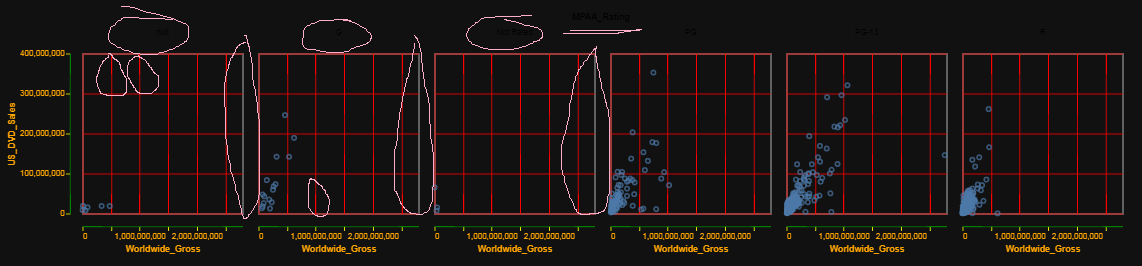
Note - this looks ugly - I know that, just playing with colors and identifying parts of the chart.
I have been trying to put this through its paces to see if I can reach all the attributes.
When I do a faceted chart I can't seem to reach the:
- titles of the facets
- the right most grid line in the facets.
I looked through the vega-lite documentation and I have not yet come across an attribute to address it. I thought I would most likely find it here https://vega.github.io/vega-lite/docs/facet.html, I am also looking through the other pages for color attributes.
I also can't seem to reach the title's color, I tried putting it both at the top level config, then tried to do it following the hierarchy noted here: https://vega.github.io/vega-lite/docs/title.html#config
Finally, there is some crazy aliasing going on with the grids. I had noticed this before, but it really stands out on a dark theme. You can see it in the red vertical grid lines.
See here where I have highlighted some of these:
import altair as alt
import pandas as pd
alt.theme.register('dark_enhanced',
                   {'config':
                    {'title': {'color': 'orange'}, #NOT WORKING
                    'axis': {'titleColor': 'orange', #axis titles
                             'domainColor': 'green', #domain color colors the bar on axis labels
                             'gridColor': 'red', #grid color is most of the grid except the right hand side
                             'labelColor': 'orange', #text labels of the axes
                             'tickColor': 'yellow'} #tick marks
                   }}
                  )
alt.theme.enable('dark_enhanced')

from vega_datasets import data

source = data.movies.url

chart = alt.Chart(source).mark_point().encode(
    x='Worldwide_Gross:Q',
    y='US_DVD_Sales:Q',
    column='MPAA_Rating:N'
)
chart
 afonit
on 11 Apr 2018
afonit
on 11 Apr 2018
Thanks for looking into this... Maybe one of the Vega-Lite folks can weigh-in.
jakevdp
on 11 Apr 2018
Note that alt.theme has been renamed to alt.themes.
jakevdp
on 13 Apr 2018
We have created a vega-themes repo with some themes for Vega and Vega-Lite and I think it would be nice to use the same themes in Altair. We can extend the themes offered in vega-themes. Check it out at https://github.com/vega/vega-themes.
I just sent a PR with some updates and a dark theme: https://github.com/vega/vega-themes/pull/2.
domoritz
on 14 Apr 2018
Here is a start of a dark theme: https://github.com/vega/vega-themes/pull/2#issuecomment-381329700. If someone could improve the default data colors, that would be awesome. Feel free to send a PR for my branch.
domoritz
on 14 Apr 2018
Vega Themes now includes a dark theme. I think it would be best to support all themes from Vega Themes. Ideally, Altair would only set the theme on the embed config and Vega-Embed takes care of applying the right theme (https://github.com/vega/vega-embed/issues/69).
domoritz
on 23 Apr 2018
I think in Altair we can support two kinds of themes: named themes that match those in Vega Themes, or custom themes defined within Python.
jakevdp
on 23 Apr 2018
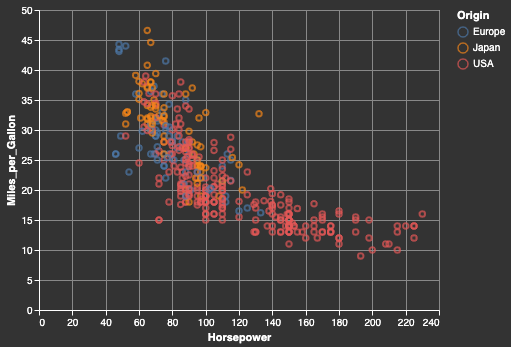
We can now use the dark theme from vega-themes:
import altair as alt
from vega_datasets import data
cars = data.cars()

alt.renderers.set_embed_options(theme='dark')

alt.Chart(cars).mark_point().encode(
  x='Horsepower',
  y='Miles_per_Gallon',
  color='Origin'
).interactive()
jakevdp
on 27 May 2019
Related issues
 SuperShinyEyes
·
3Comments
SuperShinyEyes
·
3Comments
 pabloinsente
·
3Comments
pabloinsente
·
3Comments
 Juan-132
·
3Comments
Juan-132
·
3Comments
 LukeMathWalker
·
3Comments
LukeMathWalker
·
3Comments
 bmcfee
·
3Comments
bmcfee
·
3Comments
Most helpful comment
I think in Altair we can support two kinds of themes: named themes that match those in Vega Themes, or custom themes defined within Python.