Alt-tab-macos: Ability to drag windows around to re-order them?
Honestly, I don't know I'd do this too much, but as the Rolls-Royce of alt-tabs, it just seems like it should include this feature.
It might also be the beginnings of a 'window order management' mindset for the user, including the idea of toggling 'previous' window in one's mental order of windows using alt-shift-tab.
(Which would mean the current window is not moved to the top / the one at the top, but actually in the middle, if it happened to be there.)
Because AltTab is so smooth and performant (crashes and growing pains we can forgive), and due to its ability to close, minimise, hide, quit (etc.) windows all within the interface with either keyboard or mouse - which I'm an instant fan and user of - this is already making me see AltTab as a whole world of window management.
Indeed, is there any real need for the current window to move to the top? Why not just remember where it is in the alt-tab 'order'?
I apologise for this train of thought. Should I put my 'ordering' window management design idea into another Issue?
I'm sure you can see how I've thought of this whole idea just from the initial intuitive instinct to drag the windows around. This is blowing my mind and redefining how I could do window management and therefore improve my productivity. All in this nifty little open-source program.
Organise one's entire workspace via AltTab! Zip around, re-arrange, and navigate, using keyboard or mouse or both.
 overseeing
All 12 comments
Hey @mindfulsource, thank you for the suggestion!
You proposing that the user is able to drag the windows thumbnails to reorder them within AltTab. Here are some thoughts I have:
Technical implementation
Having drag-and-drop of the thumbnails be smooth, that is you move it and see it move in real-time, and as you drag it, other thumbnails move and reorganize to show you what the state would be if you dropped; that would require a huge amount of work. Honestly I don't think I could even do it. AppKit layout system is the worse I've ever worked on, and getting a smooth animation, while following the current layout rules (which are incredibly complex, due to the crazy amounts of customization the user can do, and screen sizes, screen ratio, vertical screens, etc).
Value-proposition
I don't get it to be honest. Why would one reorder the previews? You pop AltTab to access a window. If you open it and see the window is not close to the current selection, just go there, no?
The only use-case I can imagine is thinking "Ok now I will use these 2 apps together in back and forth, for example to do some copy-pasting from one to the other" and at this point in time the user pops up AltTab, and the 2 apps are at the bottom. Ok now it may be useful to drag them at the top so further switches are instant. However you can already do this scenario by actually switching to one app, then the other. At this point they are up in the order.
In summary, I don't see the value-proposition, and the work required would be enormous.
 lwouis
on 8 Aug 2020
lwouis
on 8 Aug 2020
Why would one reorder the previews?
Well, the idea and potential I've realised is that AltTab could not only be a pop-up program to find and go to another window, but actually to gain a whole sense of control and organisation over exactly what's open and how I'm working with all my windows.
Right now among my 27 windows I have 3 Firefox ones scattered across three different rows in my AltTab. Would be nice to organise things it might save some time and 'get organised'.
Or maybe I have two projects at once (both running for months) and I want one to be down the bottom, the other up the top.
(I just checked Mission Control for the first time since c. 2011 - it's crap, your interface is already 100x better than it at glancing at one's workspace, and imagine what more you could do with that interface!)
However, I realised there's a problem. Alt-tabbing is commonly for spontaneous jumping between two windows (whether from separate apps or the same app), back and forth, repeatedly. This new UX idea is separate from that idea. Alt-tabbing by default should be based on 'last used' order, and not this 'visual' order.
To solve that conflict, the interface could allow drag-and-drop re-ordering to visually organise one's workspace in AltTab, but the actual alt-tab key pressing action draws from natural, historical ordering.
For the GUI, user could tick an option to allow for visual manual sorting (in which case hitting tab repeatedly might jump all over the place), or unticked, in which case it just orders in the the natural (but chaotic) 'last used' sorting like it is currently. Even could have a hotkey to toggle between 'organised' and 'historical' ordering, because the program would be working in the background to be doing both things at the same time.
Indeed ,there's the question of how simple it is to code all that! I guess I'm not surprised! I'm sorry to hear it's a bad toolkit. Given how polished it already looks, you've made it seem easy! I'm not really a dev, just thinking of the idea. I can appreciate that every new feature like this is a big feat in and of itself - has to work with every other feature and diverse user scenario!!
You could just park this and see if others come to you with the same intuitive desire to re-arrange windows in AltTab like I quickly did? And/or see if the idea grows on you.
overseeing
on 8 Aug 2020
I have two projects at once (both running for months) and I want one to be down the bottom, the other up the top.
So if I follow you correctly, you're imagining a manually set, and fixed layout of the windows. You would set some windows as being at the beginning, and some at the end of the list. Then upon focusing these, they would stay there right, otherwise it would get back to chronological order.
I this idea of manually organizing windows is a bit far away from what AltTab does currently. For a fixed arrangement, I don't think it makes sense to have AltTab be a list of windows, and start with the first one highlighted when you press the shortcut. Something like direct mapping like in #210, or having groups, or basically a whole new approach would be a better match.
Such a workflow would also need to think about "what happens when windows I manually ordered are closed/re-opened, should we remember their arrangement? How? Based on the title? Titles can be duplicated. A window identifier is a whole topic in-and-of-itself. Also would the UI still show these windows when they are closed, to really keep the UI fixed so everything is organized and doesn't change everytime one window is closed?
You may want to consider using yabai. With yabai you would be able to script all this, and have all your apps launched, their windows organized visually, and then assign shortcuts to each of them, all automatically.
I think this proposal is outside of AltTab current scope and problem space
lwouis
on 11 Aug 2020
So if I follow you correctly, you're imagining a manually set, and fixed layout of the windows.
Yes.
Then upon focusing these, they would stay there right, otherwise it would get back to chronological order.
Yes. It can be an optional 'mode' to enable - 'organised' mode or whatever name for it. Or even simpler in conception and naming (not big and scary): it's just a temporary ability to 'remember' where a user drags a window in the current list to help make sense of their mess of open windows. (And doesn't affect the 'historical' order of a window / normal alt-tab toggling.)
-> Not a 'mode'. Organise 'feature'.
I this idea of manually organizing windows is a bit far away from what AltTab does currently.
It is indeed, it's a new idea! I acknowledge that. I also wouldn't use another app just for this idea. Only 'alt tab' is where this makes sense to live for me. It's where I quickly access my windows - and when I do, holding down alt / cmd, I could use the mouse to re-arrange them just like I can use the mouse to close/minimise/maximise them with three colored buttons. I'm a quick, zippy user, this needs to be simple and quick and sleek. No wonder I've never used Mission Control.
Something like direct ... having groups ... would be a better match.
I thought about grouping windows by app as a consolation, but then I realised I'll often have a Chrome window or text file belonging to one project, and another to a different one. AltTab is all about bringing back per-window switching! So if an ability to 'organise' items were introduced, the same per-window philosophy would carry over. (But grouping per app as an option for users is of course a nice idea.)
Such a workflow would also need to think about "what happens when windows I manually ordered are closed/re-opened, should we remember their arrangement? How? Based on the title? Titles can be duplicated. A window identifier is a whole topic in-and-of-itself. Also would the UI still show these windows when they are closed, to really keep the UI fixed so everything is organized and doesn't change everytime one window is closed?
Yeah I wondered about that too - e.g. what about when you restart macOS, and choose to remember opened windows? Should AltTab remember this set of window organisation across reboots? My answer is no no no, and that's far more complicated than what I think is a cool feature idea here. How often do I reboot anyway? :)
I think it should only have to remember window organisation as long as they're open. Once closed, any re-opened window just appears at the default top of list and user is used to having to re-drag it to wherever they prefer, which makes sense anyway - organising is a 'hands on', interactive thing, and is the instinct my mouse hand has when in AltTab.
I realise this all means a lot of logic and programming and appreciate that you're even exploring the possibility of it with me!
overseeing
on 11 Aug 2020
This is what I meant by grouping:
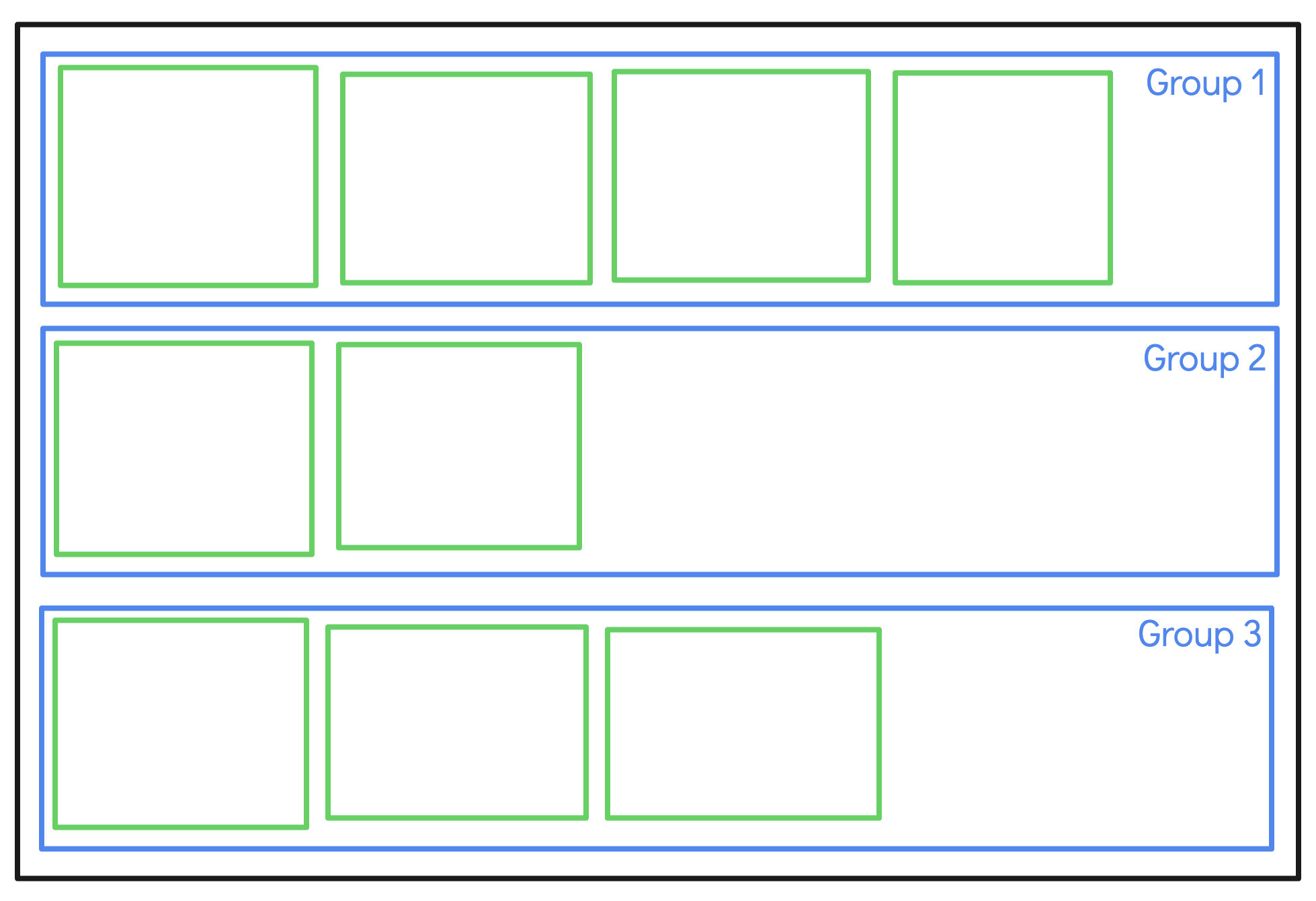
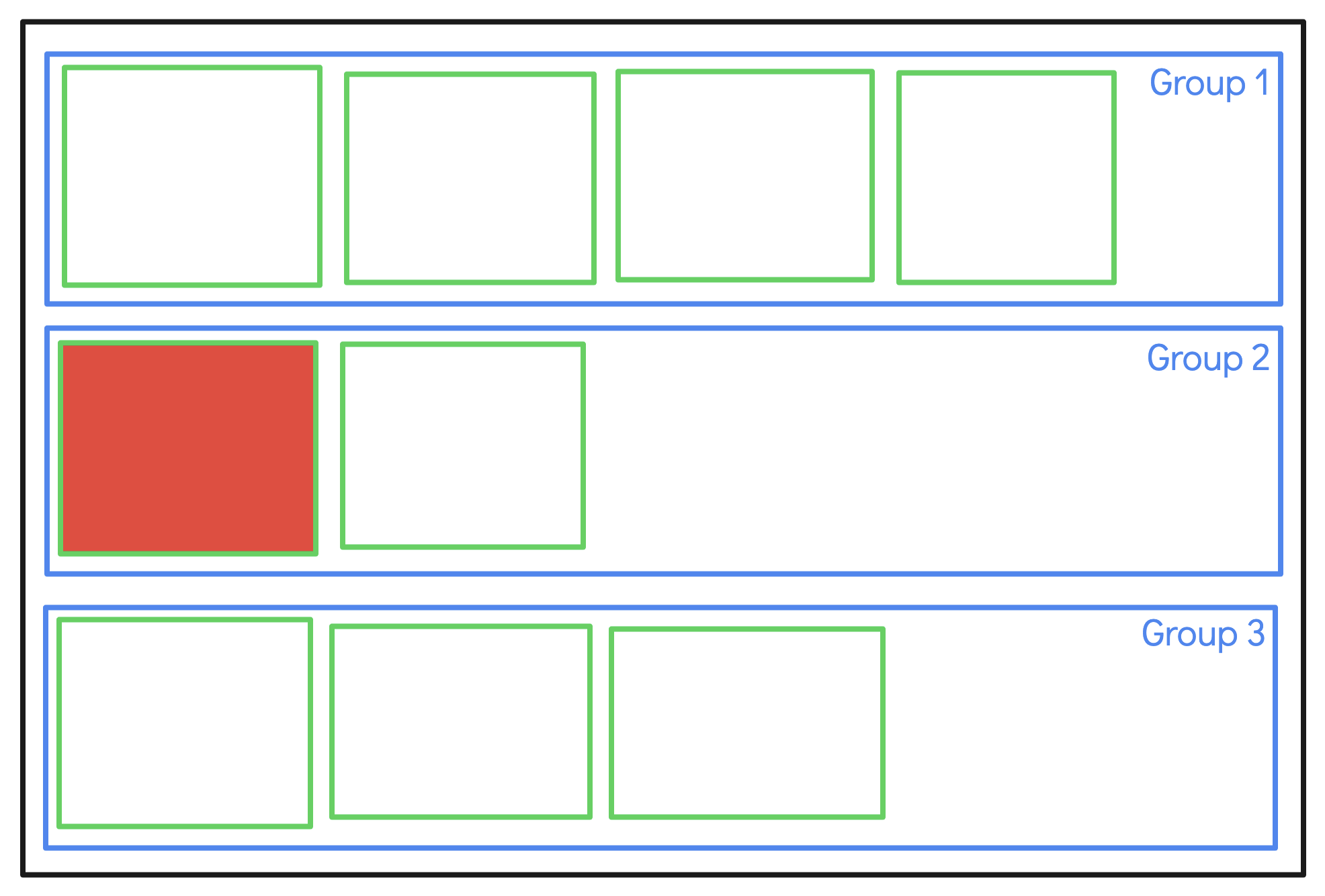
To me, you're suggesting implementing Spaces in AltTab. The user would separate windows into project as you call them, which are similar to Spaces in intent (i.e. focus on an activity). If AltTab were to have such a UI, we would need to rethink the interactions completely. You would most likely want at least a way to select windows within a specific workspace directly. For example alt-2 would bring AltTab with this window pre-selected:
Overall, I think your desire to organize is already served by native macOS Spaces. You can already establish a few Spaces for your different project, and then assign a shortcut in AltTab which only shows windows in the current Space. That way you have organized navigation, window-by-window, within each project.
This flexibility to use AltTab on a subset of window is the reason its preferences are organized in this specific way:
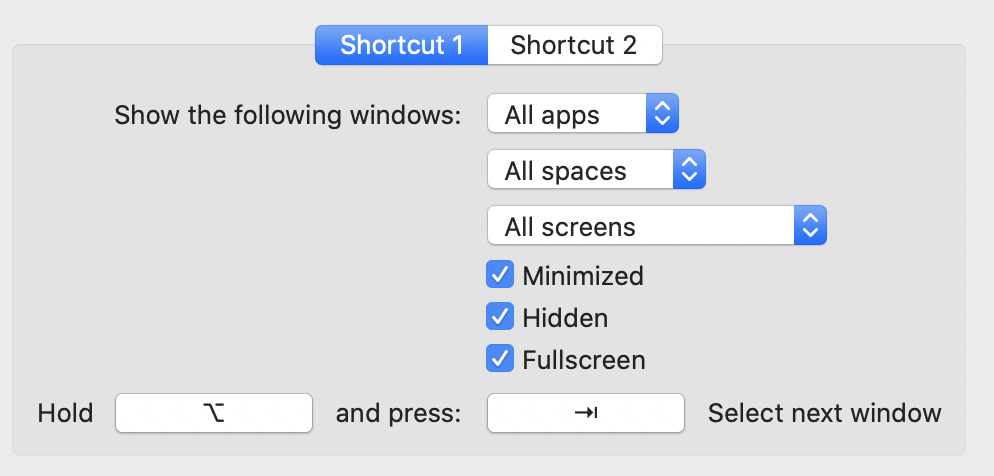
You can use Spaces, but there are other tools. You can use physical monitors to organize, you can minimize or hide some apps, etc.
- Some people have 30 Chrome windows: they can show only the active app windows
- Some people have multiple dedicated Spaces: they can show only the active space
- Some people have multiple monitor: they can show only the active screen, or the screen with the mouse
That is for this fixed organization your evoked.
Now regarding the other more organic manual ordering while still keeping chronological ordering, I don't get the value for this one. As I said, you can already reorder a few window by simply focusing them. That's something I do once in a while if I know i will back-and-forth a lot: I focus one window, then the other, then I know that an alt-tab will swap. Could you share at least one realistic use-case not covered, that you think would benefit from letting the user manually re-order?
lwouis
on 11 Aug 2020
Thanks for bringing all that up (and showing what you meant by 'grouping').
That existing Spaces thing sounds cool, but as you've acknowledged, it's different to the simple feature I think would be great.
(I just checked out Mission Control and what appears to be 'Spaces' - where you add other 'Desktops' and can put some windows into there - and that's all too slow and bloaty / clunky for what I'm meaning. Mission Control doesn't allow me to re-arrange them within the one workspace either.)
If I have to go to a second screen just to re-arrange my apps into groups, then you've already lost me. Too much time spent managing windows in the first place, and thus not worth the time bothering. Simple drag and drop for simple window management is the request here.
Thanks for sharing the other scenarios people are in. Indeed, if you have 75 windows open, you may need more heavy-duty window management or habits such as alt-tilde just for your 30 Chrome windows. I already hit the limit early on and it had a scrollbar. I adjusted row numbers etc and now I'm usually fine for all one overview Alt-Tab for all open apps everywhere.
I think most users would have few enough windows to fit one screen, and in that scenario, cool I think to re-arrange items for some basic window organisation / management.
Really nothing complicated. Simple, simple drag and drop in any current AltTab overview. (I suppose it could apply to the 'Active app' list too...if AltTab remembers historical order for Chrome windows already, why not remember manual dragged order too.)
Here's a great new example for what I mean:
I have two windows open that I don't want to forget about. They belong to my little project called 'chase up that eBay seller who sold me a faulty product and force a refund via eBay support'. (LOL. True story.) One window is Reminders.app where I've stored reference info about the task, another is a specific RTF file in TextEdit with other info related to that little task.
I don't want to close the windows off, or I might forget to monitor it / because technically it's an unfinished project. I just want them in my total window list (which tends to be about 30 at once).
I want this Reminder.app and specific RTF TextEdit file to be at the bottom of the entire list, just sitting there, while I work on my five other projects more pertinently, up the top. If I check in on the RTF file, I then want it out of the way, back to the bottom, but still open. Back to my main project, concentrate on that again. I want to immediately drag it back 'out of the way' to the bottom.
This doesn't warrant total Spaces-like organising, nor would a default per-app grouping setting satisfy it.
Simple Alt-Tab overview window organising.
It's possible you could make it slightly more deluxe by introducing that 'grouping' UI stuff, and I might even use that if it were introduced, but my only request (at first) is basic drag-and-dropping anywhere in the AltTab overview.
I totally understand it could be a lot to code up, but still think it's cool to offer and would really make it the premium 'Alt-Tab' (though it already is).
overseeing
on 14 Aug 2020
I made a video reply: https://www.loom.com/share/dab93b43cbc044c281c562c8b508e356
lwouis
on 14 Aug 2020
Thanks for the video! I will try to reply in next 7 days. (I do need to explain further - the use case isn't about grouping at its core, it's about sorting within the one group or space.) I'll try to make screenshots, and possibly even a video. In meantime, enjoy your holiday :).
overseeing
on 17 Aug 2020
Video reply just for you:
https://www.loom.com/share/1525190bdc1f4770a4924efedf72d54c
Text coming in a second comment below.
overseeing
on 24 Aug 2020
To summarise video:
You got distracted by the 'grouping' idea. The idea is mostly about sorting.
Great analogy: browser tabs. (The Ctrl-tab in-app equivalent.) You can drag and drop and sort tabs to retain a mental order, as well as do the ctrl-tabbing.
Great example: Example shown in video where you tend to create windows for a current project in a chronological / mental order. Productivity gained by keeping control of that order in your AltTab.
Examples:
- Building and learning how to do a new complicated AppleScript.
- Troubleshooting a really annoying and epic bug. (Sprawling out into multiple windows etc.)
How alt-tab toggling between two 'adjacent' apps can work in AltTab interface:
Explained in video... You start by manually tabbing across or use mouse to select a second window, then default alt-tab toggle can remember that as the 'last used' one / historically 'adjacent' second window. But then after that, further tabbing will honour the VISUAL / managed / organised order that you are manually controlling under this different mode.
E.g. Current window might be no. 13 in the list (and it never becomes window 1 - it stays as no. 13 - that's the whole point.) Then you might select window 7. Now, alt-tabbing back and forth jumps (visually and literally) between 13 and 7.
New windows appearing when in 'organised' view probably should be added at the end of the list (or an option to choose to add at the top if user prefers.)
Don't know the best name for this:
- 'Managed order' mode
- 'Organised view'
- 'Manual ordering'
- 'Visual ordering' [and grouping...if you want]
Response to random things you said in vid:
One idea you showed in vid - of hold down key, drag to group adjacent items together, then ability to drag grouped items around in the order - it's cool, but unnecessarily complicated. I might use it though.
I like your grouping and alt-1, alt-2 etc idea... that fits within the desire for access to all windows to be QUICK.
Yes, all windows may get pushed forward or back, but at least it's controllable by me and their visual order not disturbed. It's still 'in order', with what I've manually dragged around.
It's a very different mindset. Once you learn the window order can be 1. controlled and 2. stays in the order, it feels stable. You no longer waste time opening a whole window just to bring it next to another one in your AltTab. You just drag it. It's no longer window shuffling. It's window management. Organised.
Spaces: I found a definitive video about everything it offers - https://www.youtube.com/watch?v=H3hUk0zsxc4 - it's an ugly, disorganised way to manage windows. Steve Jobs would have fixed it by now! Zero features of control or ordering within your current space. Also not easy to control - make any app full screen (like a video playback window), and it puts it in its own space...dealbreaker.
Yes, I hardly turn off my computer. (Probably a 'legacy' habit from Windows where it's way less convenient to resume a session across reboots.)
I already said, the moment I open an 'old' rarely touched window, currently it stays near the top, polluting my window order of my current project, and I don't want to have to cycle through all my 20 other tabs just to laboriously get the reminder app out of the way.
Benefit of keeping things in one space / AltTab window: quicker to not forget projects and muliti-window 'tasks' that way.
I know this is quite a proposal of a feature. I've never seen this feature in any other alt-tab software in my life. But it shouldn't be more complicated than it has to be. both for both devt and user.
I think you've been saying: the usefulness of this isn't worth the effort to get it working. I get that. How do you feel after this further / video explanation?
I think it's a killer feature people would love if it was added. I'm reminded of Steve Jobs: people didn't know they needed his products until they TRIED it. Dragging and dropping in AltTab will lock hook people in forever. :P I KNOW it.
overseeing
on 24 Aug 2020
Thank you for clarifying your ideas. I think it's clearer now. From your explanations, I got a few points, mostly independent of each other. It's important to note that they are orthogonal I think, otherwise everything becomes a blur.
Windows order
Instead of sorting by last focus time, you would like to have the windows sorted by creation time. The way tabs are in a browser, or the ways apps are in the Dock or the Windows bottom-bar. You like the chronology of things being started, as opposed to when you last accessed them.
This is interesting, and wouldn't be too hard to implement. You may be interested in solutions like uBar by the way.
Grouping
I thought that was your main goal, but I think it wasn't. You are interested in having the listing be from window creation time, not so much having conceptual groups of windows. The idea of color coding and visually showing group is still something I would like to keep in mind for #337.
Let's skip this topic in this ticket.
Manual re-ordering
You can indeed re-arrange tabs or items in the Dock. I don't know if it's used by a significant portion of users though. Furthermore, organizing by having things left or right is quite primitive. I think dedicated Spaces or monitors do a better job at organizing things.
This piece here, as I discussed earlier, would be a big chunk of work, so maybe we could add first windows order by creation date, then revisit the idea of manual re-ordering later, and put it face-to-face with other solutions that aim at clustering/organizing, to see which strategy comes on top, if any.
Navigation among windows
Whether the order is focus time or creation time, we can have navigation (i.e. pressing AltTab's shortcuts) move with the visual order, or another order. We could have the windows listed by creation time, yet navigate by focus time. I do think it is confusing though, and probably the navigation order should be the same as the visual order.
Implementation notes for sorting windows by creation date
When AltTab is launched and there are already apps and windows open, there is no way to know exactly what the correct creation time is, as far as I know. We may be able to get launch time for apps, but I don't think there is any way to know at the windows level. Thus the initial order may be incorrect.
It's the same situation we have today with sorting by focus time: we use windows stacking order as an approximation of focus order.
lwouis
on 24 Aug 2020
Great, focusing more in!
Windows order
Instead of sorting by last focus time, you would like to have the windows sorted by _creation time_. The way tabs are in a browser, or the ways apps are in the Dock or the Windows bottom-bar. You like the chronology of things being started, as opposed to when you last accessed them.
It's inspired by the idea of window opening order, sure, and it's probably close enough some of the time, but critically you need ability to re-arrange window order and make a new window go to (e.g.) no. 4 in the list, otherwise one is frustratingly trapped in 'first created' order.
You may be interested in solutions like uBar by the way.
OK. Just tried it. I think this screenshot says it all:

To manage ~30 windows at a time, need the bulk of the screen to manage, not just a strip at the bottom.
(I know you'll say 'just use Spaces', but not everyone uses or wants to use multiple Desktops... some would rather use nothing than spend extra time managing apps in different spaces, and just close off some windows if too many are open.)
Manual re-ordering
You can indeed re-arrange tabs or items in the Dock.
But not by window.
(Which reminds us of why many of us use AltTab - to make things per-window, not per-app.)
I don't know if it's used by a significant portion of users though.
Yes, I think most of us use Dock ordering to pin apps regardless of if they're open. Not for current window / app ordering.
(Also dock re-ordering animation is slow, but maybe a command can rid that.)
Furthermore, organizing by having things left or right is quite primitive. I think dedicated Spaces or monitors do a better job at organizing things.
No, desire to put things in order is common, simple, basic, intuitive. Think 'classic', not 'primitive'.
Simplicity is a desirable thing. Sometimes people don't want something more complicated. Choice is king.
And for what it's worth, I used to love Tab Mix Plus.
This piece here, as I discussed earlier, would be a big chunk of work, so maybe we could add first windows order by creation date, then revisit the idea of manual re-ordering later, and put it face-to-face with other solutions that aim at clustering/organizing, to see which strategy comes on top, if any.
That would be great. Creation date order might be a sizeable improvement towards this goal on its own. Not complete, but a start.
The full thing - manual re-ordering - fortunately doesn't conflict (UX-wise) with any other feature. It's just an extra ability / feature that could be added. (Yes lots of work behind the scenes.)
Navigation among windows
probably the navigation order should be the same as the visual order.
Agreed, but IMO by default it should keep the first selection to be the 'last opened' window (wherever it shows visually in the list), no matter what the visual order is set to. Otherwise, we've lost alt-tab's most classic feature - back and forth temporary window comparing.
Implementation notes for sorting windows by creation date
When AltTab is launched and there are already apps and windows open, there is no way to know exactly what the correct creation time is, as far as I know. We may be able to get launch time for apps, but I don't think there is any way to know at the windows level. Thus the initial order may be incorrect.
It's the same situation we have today with sorting by focus time: we use windows stacking order as an approximation of focus order.
Right. Hence why this whole feature request is about ability to sort the windows. (if that is a desired feature.) And to that point: again, people often don't know what they want until they're aware it's even possible to do.
Right now, I have nine RTF files open. They've been open for weeks and were conceived / opened in a certain order in a very large project I'm doing right now. I really wish I could have had them sortable by order, so I remember how to backtrack in my mental order of things. They're all jumbled up and with similar file names. I've lost track of where I was.
overseeing
on 24 Aug 2020
Related issues
 max-sixty
·
4Comments
lwouis
·
3Comments
max-sixty
·
4Comments
lwouis
·
3Comments
 mrc247-DE
·
3Comments
mrc247-DE
·
3Comments
 valentinocossar
·
3Comments
valentinocossar
·
3Comments
 net
·
3Comments
net
·
3Comments